
2 layers
Layouts
esp-cpp/esp-box-emu
Star Wars: Dark Forces, Doom, NES, Gameboy/Color, Sega Master System / GameGear, Sega Genesis / MegaDrive, and MSX I/II Emulators running on ESP BOX and ESP BOX-3 with a custom gamepad
12 parts148MIT

 esp-cpp/esp-box-emu148
Star Wars: Dark Forces, Doom, NES, Gameboy/Color, Sega Master System / GameGear, Sega Genesis / MegaDrive, and MSX I/II Emulators running on ESP BOX and ESP BOX-3 with a custom gamepad
Box emu is an open-source printed circuit board by esp-cpp, from the esp-cpp/esp-box-emu repository on GitHub, published under the MIT licence. It is a 2-layer board of 72.5 × 76.4 mm with 84 parts on 55 nets, routed with 543 tracks and 182 vias.
Its parts include 30 resistors, 14 capacitors, 12 switches, 6 ICs and 5 connectors. It belongs with the retro computing and games boards and the ESP32 boards of this library.
 |  |


A pocket-sized, Game Boy-style retro emulation handheld built around the ESP32-S3-BOX. Drop in a micro-SD card of ROMs and play NES, Game Boy / Color, Sega, MSX, and Genesis games — plus a full-speed port of Doom — on hardware you can 3D print and build yourself.
https://github.com/user-attachments/assets/2d3da6ea-2e80-42c3-bbd6-5a2c59601201
Table of Contents
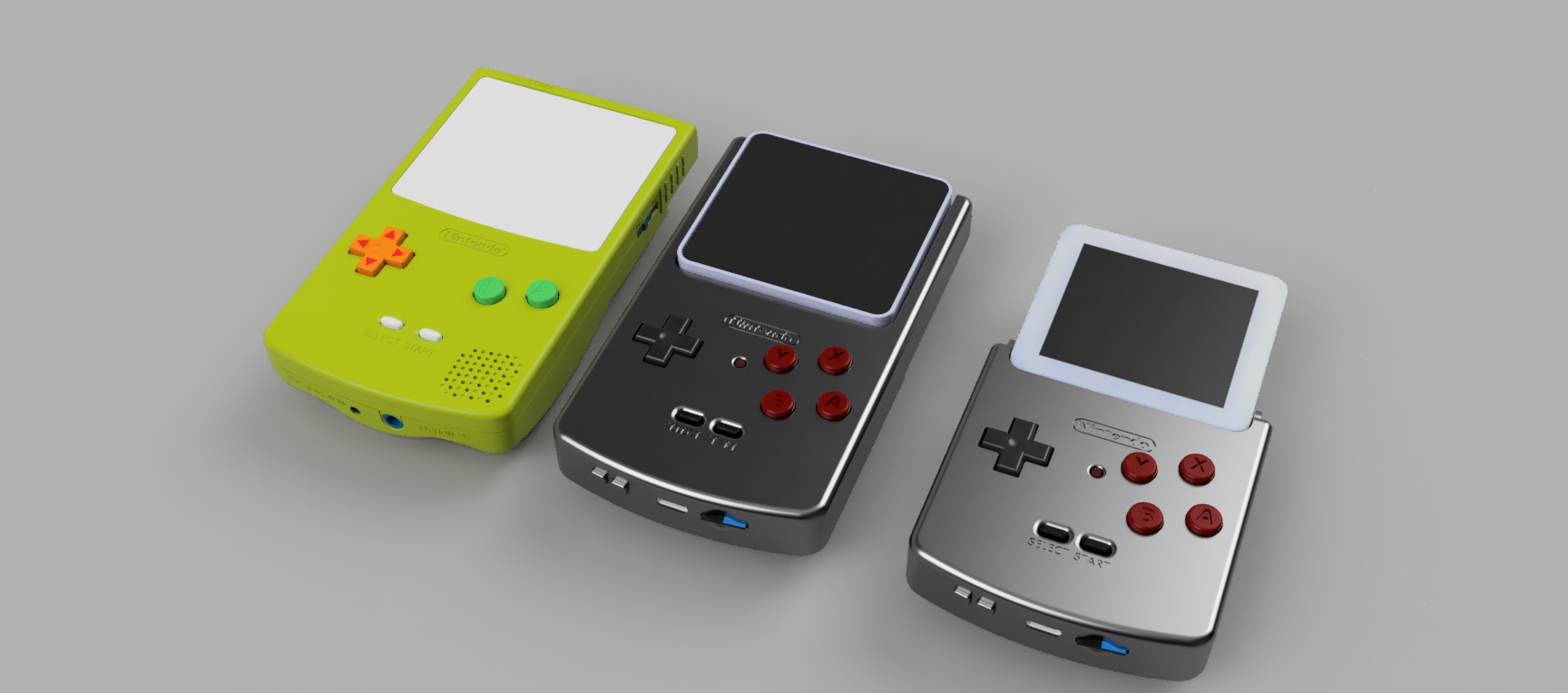
The ESP-BOX-EMU turns an ESP32-S3-BOX or ESP32-S3-BOX-3 into a handheld retro game console. A custom add-on board and 3D-printed shell wrap the BOX in a Game Boy Color form factor — real d-pad and buttons, battery, haptics, and a micro-SD slot — and the firmware runs a stack of emulators behind a polished LVGL interface with boxart, save states, and settings.
Highlights
The right emulator is chosen automatically from each ROM's file extension, and games load on demand straight from the menu — no reboot required. Pick a title, play, then drop back to the menu and launch a different game (or a completely different system) without ever restarting the device. Every core runs with audio, and several offer an Unlocked mode (toggle with the X button) that removes the frame-rate cap for maximum speed.
| System | Core | Unlocked mode | Notes |
|---|---|---|---|
| NES | nofrendo | ✅ | D-Pad / A / B / Start / Select |
| Game Boy / Color | gnuboy | ✅ | D-Pad / A / B / Start / Select |
| Sega Master System / Game Gear | smsplus | ✅ | D-Pad / A / B / Start / Select |
| Sega Genesis / Mega Drive | gwenesis | — | Full speed with sound; 6-button pad (A→B, B→A, C→Y) |
| MSX 1 / 2 | fmsx | — | D-Pad / A / B / Start / Select |
| Doom | prboom | — | Full speed with audio and haptic feedback |
| Dark Forces | The Force Engine (via BSzili's Amiga port) | — | Software renderer, iMuse sound effects and OPL3 music; see Dark Forces setup |
| PICO-8 | femto8 | — | .p8 and .p8.png carts; D-Pad, A/Y = O, B/X = X, START = PICO-8 pause menu; save states; cartdata saves to pico8/cdata/; see PICO-8 setup |
🧬 Full-speed Genesis on the S3. The Genesis core ships with a custom dual-core modification of gwenesis that spreads the workload across both of the ESP32-S3's CPU cores: core 0 runs the 68000 CPU and VDP (video), while core 1 runs the sound unit (Z80 + YM2612 FM synth + PSG). Sound-chip writes are queued and applied in order on core 1, which lets Genesis / Mega Drive games run at full speed with audio — something a single core can't keep up with.
Controls: A fire / enter · B strafe / backspace · X use · Y weapon toggle · START escape · SELECT map.
Haptic feedback is triggered when you fire a weapon (varies by weapon), take damage (scaled to the health/armor lost), interact with something (e.g. a door), or pick up a weapon, ammo, health, armor, a power-up, or a key / card.
In a mission: D-pad move / turn · A fire · B jump · X use · Y next weapon · START escape menu. Hold SELECT as a modifier: SELECT + Left/Right strafe · SELECT + Down crouch · SELECT + Up automap · SELECT + A secondary fire · SELECT + B headlamp · SELECT + X gas mask · SELECT + Y previous weapon · SELECT + START night vision. Running is always on.
Menus, briefings and cutscenes: the D-pad moves a virtual mouse cursor, A clicks, START is Enter, B is Escape (skips cutscenes) and Y is Space. Quitting from the game's escape menu returns to the emulator menu.
Typing an agent name: hold SELECT: Right adds a letter, Up/Down change the last letter, Left deletes it; release SELECT and press START to confirm.
The emulator's own pause menu (touch button or START+SELECT) still works for video scaling and save slots; save slots only work while in a mission.
https://github.com/esp-cpp/esp-box-emu/assets/213467/3b77f6bd-4c42-417a-9eb7-a648f31b4008
https://github.com/esp-cpp/esp-box-emu/assets/213467/a3d18d03-c6a1-4911-89d1-e18119e8cc03
Already have the add-on hardware (or an ESP32-S3-BOX you want to flash)? You don't need to build anything from source — a prebuilt one-time programmer is published with every release.
Download the programmer for your OS (windows, macos, or linux) from
the latest releases page.
Unzip it.
Run it: double-click the .exe on Windows, or run it from a terminal on
macOS / Linux, e.g.:
./esp-box-emu_programmer_v1.0.0_macos.bin(The version in the filename matches the release you downloaded.)
Then set up a micro-SD card with your ROMs and you're ready to play.
The add-on is designed to match the Game Boy Color form factor and reuse GBC button plastics and silicone membranes for an authentic feel. The shell is meant to be 3D printed (PLA or PETG on a Prusa i3 mk3+) and assembled with M3 screws.
Case / mechanical — printable files are in ./mcad or on Printables. CAD is on Fusion 360 (free viewer):
Electronics — schematic and layout files are in ./ecad, provided as both Fusion/Eagle files and atopile + KiCad sources. You can also order the board directly:

GBC replacement buttons / membranes used for a good play feel:
This repo uses submodules, so clone it recursively:
git clone --recurse-submodules git@github.com:esp-cpp/esp-box-emuIf you already cloned it non-recursively (or forgot the flag), pull the submodules with:
git submodule update --init --recursiveThen build, flash, and open the serial monitor with ESP-IDF:
idf.py -p PORT flash monitorReplace PORT with your board's serial port. To exit the monitor, type
Ctrl-].
The firmware prints greppable one-line reports on the serial console so a captured play session doubles as a profile:
[mem] phase=boot|menu|launch|quit ... — internal RAM / PSRAM free and
largest free block at each phase, with [mem] delta ... lines at launch and
quit relative to the menu (a non-zero delta after quitting is a leak or
fragmentation).[mem] block|region|task phase=... — at boot and launch, every internal-RAM
block above a threshold (labelled with the task whose stack it is), each
registered heap region's used/free/largest, and every task's stack high-water
mark (stack_free_min, repeated at quit after a full play session).[genesis mem] NAME: N bytes -> INTERNAL|PSRAM — where each big emulator
buffer landed (the Genesis gets noticeably slower when its hot buffers fall
back to PSRAM).[genesis perf] fps=.. frame=..us 68k=..us vdp=..us convert=..us barrier=..us ... —
per-frame time breakdown averaged over the last 300 frames (~5 s): 68000,
VDP render, RGB565 conversion, time core 0 spends waiting for the core-1
sound unit, present/audio, pacing sleep, late=/skipped=/dropped=
frame counts (skipped = emulated without rendering because the panel could
not show the frame), blit= (video task time per displayed frame), the
core-1 sound unit's own frame time, and Z80 counters (irq= V-ints taken,
busreq=, halted= scanline slices lost to a held bus, wto= handshake
timeouts, ymw= Z80→YM2612 writes). Compile with GENESIS_PERF=0 to
remove it.[display] lcd spi clock: N Hz — the clock the LCD SPI device actually got
(the ESP32-S3 can only divide 80 MHz by integers, so a 60 MHz request runs
at 40 MHz: 320×240×16bpp is ~31 ms per frame, the panel's ~31 fps ceiling).Capture and summarise a session (performance PRs should include a before/after from the same game and the same ~1 minute of play):
python tools/serial_capture.py PORT --out before.log --until "delta phase=quit"
# ... flash the change, play the same section again ...
python tools/serial_capture.py PORT --out after.log --until "delta phase=quit"
python tools/perf_report.py before.log after.log
perf_report.py prints each run's launch/quit memory, buffer placement, and
the perf-line averages side by side with deltas.
Format a micro-SD card as FAT and add your ROMs (.nes, .gb, .gbc, …),
boxart images (.jpg), and a metadata.csv file (see the example
metadata.csv).
Boxart displays best at 100 px wide. The
./boxart/source/resize.bash script resizes every
.jpg in boxart/source to 100 px wide (preserving aspect ratio) and writes the
results to the boxart folder. Copy those onto the SD card and reference them
from your metadata file.
Dark Forces is played with the original (purchased) game data; the engine does
not include it. Copy the DOS install files onto the SD card into a single
folder, for example darkforces/:
darkforces/DARK.GOB
darkforces/SOUNDS.GOB
darkforces/SPRITES.GOB
darkforces/TEXTURES.GOB
darkforces/LFD/*.LFD       (menus, briefings and cutscenes)
Then reference DARK.GOB from metadata.csv:
darkforces/DARK.GOB, boxart/darkforces.jpg, Star Wars: Dark ForcesSettings (settings.ini) and agent / save files are written to the same folder.
PICO-8 carts are plain .p8 text files or .p8.png cartridge images. Put them
in a folder on the card (for example pico8/) and reference them from
metadata.csv:
pico8/celeste.p8, boxart/celeste.jpg, Celeste ClassicCarts that use cartdata() save to pico8/cdata/. The 128x128 screen shows
1:1 in the "original" video mode and scaled to 240x240 in "fit". Multi-cart
games that load("#id") their other carts work when those carts sit in the
same folder as id.p8.png / id.p8.
What to expect: the Lua interpreter runs at roughly 1.3M instructions per
second on the S3 (its heap lives in PSRAM), enough for carts of Celeste's
weight at full speed, but CPU-heavy carts close to PICO-8's limit run at a
few frames per second. Save states work (the cart's Lua heap and PICO-8
RAM are snapshotted between frames); carts' own cartdata() saves are kept
separately; there is no mouse or keyboard.
Each line maps a ROM to its boxart and display name:
<rom filename>, <rom boxart filename>, <rom display name>Example:
mario.nes, boxart/mario.jpg, Mario Bros.
super_mario_1.nes, boxart/super_mario_bros_1.jpg, Super Mario Bros.
super_mario_3.nes, boxart/super_mario_bros_3.jpg, Super Mario Bros. 3
zelda.nes, boxart/zelda1.jpg, The Legend of Zelda
zelda_2.nes, boxart/zelda2.jpg, The Legend of Zelda 2: the Adventure of Link
mega_man.nes, boxart/megaman1.jpg, MegaMan
metroid.nes, boxart/metroid1.jpg, Metroid
pokemon_blue.gb, boxart/pokemon_blue.jpg, Pokemon Blue
pokemon_red.gb, boxart/pokemon_red.jpg, Pokemon Red
pokemon_yellow.gbc, boxart/pokemon_yellow.jpg, Pokemon Yellow
links_awakening.gb, boxart/tloz_links_awakening.jpg, The Legend of Zelda: Link's Awakening
links_awakening.gbc, boxart/tloz_links_awakening_dx.jpg, The Legend of Zelda: Link's Awakening DXA checklist of what's implemented and what's still in progress.
Emulation
User interface
Video and audio
Storage and input
Hardware
Other NES emulators
Other Genesis emulators
Useful background / information
This project is licensed under the terms in LICENSE.
| Qty | Value | Footprint | References |
|---|---|---|---|
| 22 | 10kΩ ±5% | UNI_ROYAL_0402WGF1002TCE:R0402 | R3, R10, R11, R12, R13, R14, R15, R16, R18, R19, R20, R25, R26, R27, R30, R31 +6 |
| 6 | TESTPOINT:TESTPOINT | TP1, TP2, TP3, TP4, TP5, TP6 | |
| 5 | 100nF ±10% | Samsung_Electro_Mechanics_CL05B104KO5NNNC:C0402 | C1, C3, C4, C5, C13 |
| 4 | GBC_A_B_BUTTON:GBC_A_B_BUTTON | SW1, SW2, SW3, SW4 | |
| 4 | GBC_DPAD_BUTTON:GBC_DPAD_BUTTON | SW5, SW6, SW7, SW8 | |
| 3 | 22µF ±20% | Samsung_Electro_Mechanics_CL21A226MAQNNNE:C0805 | C10, C11, C14 |
| 3 | 5.1kΩ ±5% | UNI_ROYAL_0402WGF5101TCE:R0402 | R17, R23, R24 |
| 2 | GBC_START_SELECT_BUTTON:GBC_START_SELECT_BUTTON | SW9, SW10 | |
| 2 | SHOU_HAN_TS24CA:SW-SMD_2P-TS24CA | SW11, SW12 | |
| 2 | PMOD_2X06_EDGE:2X06_EDGE_REVERSED | J2, J3 | |
| 2 | GBC_A_B_MEMBRANE:GAMEBOY_COLOR_A_B_BUTTON_MEMBRANE | MECH1, MECH2 | |
| 2 | 10µF ±20% | Samsung_Electro_Mechanics_CL21A106KAYNNNE:C0805 | C8, C9 |
| 2 | 1MΩ ±1% | UNI_ROYAL_0402WGF1004TCE:R0402 | R1, R2 |
| 2 | 4.7µF ±10% | Samsung_Electro_Mechanics_CL05A475KP5NRNC:C0402 | C6, C7 |
| 1 | Ckmtw_B_2100S02P_A110:HDR-TH_2P-P2.54-V-M-1 | H1 | |
| 1 | Guangdong_Hottech_1N5819WS:SOD-323_L1.8-W1.3-LS2.5-RD | D1 | |
| 1 | GBC_DPAD_MEMBRANE:GAMEBOY_COLOR_DPAD_MEMBRANE | U$1 | |
| 1 | Yuandi_TYPE_611_T3_W:USB-C-SMD_TYPE-611-T3-W | USB1 | |
| 1 | Microchip_Tech_MCP73831T_2ACI_OT:SOT-23-5_L3.0-W1.7-P0.95-LS2.8-BL | U4 | |
| 1 | BOX_EMU_OUTLINE:BOX_EMU | MECH4 | |
| 1 | HOAUC_HYCW118_TF09_200B:SIM-SMD_C9900007362 | U6 | |
| 1 | Texas_Instruments_TPS63020DSJR:VSON-14_L4.0-W3.0-P0.50-BL-EP_TI_DSJ | U5 | |
| 1 | Texas_Instruments_DRV2605LDGSR:VSSOP-10_L3.0-W3.0-P0.50-LS4.9-BL | U1 | |
| 1 | Yongyu_Photoelectric_SZYY0805R:LED0805-R-RD | LED1 | |
| 1 | AWINIC_AW9523BTQR:VFQFPN-24_L4.0-W4.0-P0.50-BL-EP2.8 | U2 | |
| 1 | Sunlord_WPN252012H1R5MT:IND-SMD_L2.5-W2.0_WPN252012H | L1 | |
| 1 | JST_Sales_America_SM04B_SRSS_TB_LF__SN:CONN-SMD_4P-P1.00_SM04B-SRSS-TB-LF-SN | CN2 | |
| 1 | GBC_START_SELECT_MEMBRANE:GAMEBOY_COLOR_START_SELECT_MEMBRANE | U$2 | |
| 1 | JST_Sales_America_S2B_PH_SM4_TB_LF__SN:CONN-SMD_P2.00_S2B-PH-SM4-TB-LF-SN | CN1 | |
| 1 | Maxim_Integrated_MAX17048G_T10:TDFN-8_L2.0-W2.0-P0.50-BL-EP1.2 | U3 | |
| 1 | BOX_EMU_BASE_OUTLINE:BOX_EMU_BASE | MECH3 | |
| 1 | PWR_2X02_EDGE:2X02_EDGE_REVERSED | J1 | |
| 1 | 100nF ±20% | Samsung_Electro_Mechanics_CL05B104KO5NNNC:C0402 | C12 |
| 1 | 1µF ±20% | Samsung_Electro_Mechanics_CL05A105KA5NQNC:C0402 | C2 |
| 1 | 2kΩ ±5% | UNI_ROYAL_0402WGF2001TCE:R0402 | R7 |
| 1 | 820kΩ ±1% | FOJAN_FRC0402F8203TS:R0402 | R22 |
| 1 | 91kΩ ±1% | YAGEO_RC0402FR_0791KL:R0402 | R21 |
It measures 72.5 × 76.4 mm and has 2 copper layers, 1.6 mm thick.
84 parts. The full list of its parts is on this page, with links to each part's symbol and footprint where PCBKit's library has them.
From the esp-cpp/esp-box-emu repository on GitHub, at the commit this page was made from: the board is ecad/elec/layout/box-emu/box-emu.kicad_pcb. PCBKit opens the board in the browser, with nothing to install.
Its repository publishes it under the MIT licence: you may reuse it on that licence's terms (keep the author's notice, and for a copyleft licence share your changes alike).
esp-cpp/esp-box-emu
Star Wars: Dark Forces, Doom, NES, Gameboy/Color, Sega Master System / GameGear, Sega Genesis / MegaDrive, and MSX I/II Emulators running on ESP BOX and ESP BOX-3 with a custom gamepad

esp-cpp/esp-box-emu
Star Wars: Dark Forces, Doom, NES, Gameboy/Color, Sega Master System / GameGear, Sega Genesis / MegaDrive, and MSX I/II Emulators running on ESP BOX and ESP BOX-3 with a custom gamepad

esp-cpp/esp-box-emu
Star Wars: Dark Forces, Doom, NES, Gameboy/Color, Sega Master System / GameGear, Sega Genesis / MegaDrive, and MSX I/II Emulators running on ESP BOX and ESP BOX-3 with a custom gamepad

esp-cpp/esp-box-emu
Star Wars: Dark Forces, Doom, NES, Gameboy/Color, Sega Master System / GameGear, Sega Genesis / MegaDrive, and MSX I/II Emulators running on ESP BOX and ESP BOX-3 with a custom gamepad

esp-cpp/esp-box-emu
Star Wars: Dark Forces, Doom, NES, Gameboy/Color, Sega Master System / GameGear, Sega Genesis / MegaDrive, and MSX I/II Emulators running on ESP BOX and ESP BOX-3 with a custom gamepad

esp-cpp/esp-box-emu
Star Wars: Dark Forces, Doom, NES, Gameboy/Color, Sega Master System / GameGear, Sega Genesis / MegaDrive, and MSX I/II Emulators running on ESP BOX and ESP BOX-3 with a custom gamepad

esp-cpp/esp-box-emu
Star Wars: Dark Forces, Doom, NES, Gameboy/Color, Sega Master System / GameGear, Sega Genesis / MegaDrive, and MSX I/II Emulators running on ESP BOX and ESP BOX-3 with a custom gamepad

esp-cpp/esp-box-emu
Star Wars: Dark Forces, Doom, NES, Gameboy/Color, Sega Master System / GameGear, Sega Genesis / MegaDrive, and MSX I/II Emulators running on ESP BOX and ESP BOX-3 with a custom gamepad


pcbreflux/espressif
all espressif stuff will committed here

CRImier/MyKiCad
My KiCad boards. Can't be bothered uploading individually anymore, so here you go.


Rack-Robotics/Powercore-V1.0-Hardware
CAD & Electronics for Powercore V1


Redherring32/OpenTendo-TopLoader
An Open Source HardWare (OSHW) recreation of the 1993 toploading NES motherboard (Also known as NES-101)

mungewell/pico-timecode
A budget friendly LTC/TimeCode device built from a RaspberryPi Pico - using the PIO blocks and MicroPython