
2 layers109.6 × 69.7 mm
EnvMCRO
Envious-Data/Env-MCRO
A Raspberry Pi Pico powered Macro board, like a Streamdeck but cheaper and simpler.
45 parts87GPL-3.0

 Envious-Data/Env-MCRO87
A Raspberry Pi Pico powered Macro board, like a Streamdeck but cheaper and simpler.
EnvMCRO is an open-source printed circuit board by Envious-Data, from the Envious-Data/Env-MCRO repository on GitHub, published under the GPL-3.0 licence. It is a 2-layer board of 109.6 × 69.7 mm with 29 parts on 47 nets, routed with 186 tracks and 46 vias.
It is built around the SM351LT and BSS138. Its parts include 12 ICs and 12 transistors. It belongs with the RP2040 boards of this library.
A Raspberry Pi Pico powered Macro board, like a Streamdeck but cheaper and simpler.
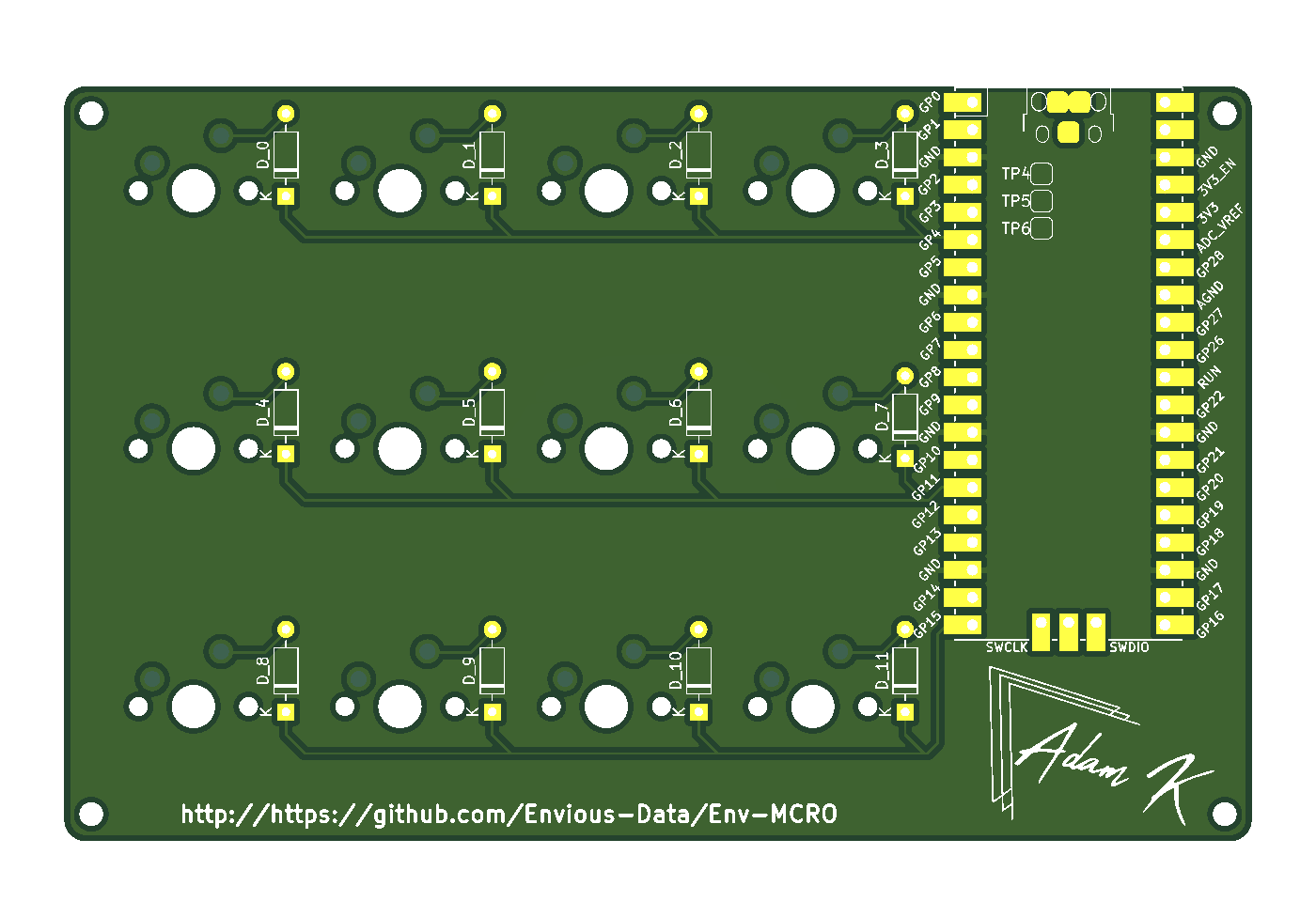 (btw this image is a bit outdated, some of the silkscreen has changed but its physically the same)
This is another another mechanical keyboard type thing, this is a small 12 key macro board intended to be used for F13 to F24 but you can do whatever. I do feel like the rpi pico is a bit overkill for this use, a tiny2040 will probably fit better, Ill have to see if someone has made kidcad bits for that if not Ill probably have to make them my self or whatever.
the board should reboot and startup with the default keymap, you are good to use it however you wish but if you wish to re-map the board you can look at the QMK code and modify it as you see fit.
By default the macro board is mapped with keys F13 to F24 but you can go Here and look at what keys you can re-map with.
not all software supports the F13 to F24 keys but a couple of examples that do are OBS and BeamNG.Drive
Ive built QMK for these boards, if you want to remap it be sure to use the VIA version of the MCRO firmware, download the respective via JSON from the folder and sideload it in via. https://github.com/Envious-Data/EnvKB-QMK/tree/main/_PREBUILTFIRMWARES
User TonyPJ on Thingiverse has made a small 3d printable stand: https://www.thingiverse.com/thing:4896875
Project was Selected for Booster Conf as part of a Mechanical Keyboards Talk, a 3d printable case was made and can be found here: https://github.com/vidarw/booster-2025-macroboard
| Qty | Value | Footprint | References |
|---|---|---|---|
| 12 | BSS138 | Package_TO_SOT_SMD:SOT-23 | Q1, Q2, Q3, Q4, Q5, Q6, Q7, Q8, Q9, Q10, Q11, Q12 |
| 12 | SM351LT | Package_TO_SOT_SMD:SOT-23 | U1, U2, U3, U4, U5, U6, U7, U8, U9, U10, U11, U12 |
| 4 | MountingHole | MountingHole:MountingHole_2.2mm_M2_Pad | H1, H2, H3, H4 |
| 1 | Pico | MCU_RaspberryPi_and_Boards:RPi_Pico_SMD_TH | MCU1 |
Envious-Data/Env-MCRO
A Raspberry Pi Pico powered Macro board, like a Streamdeck but cheaper and simpler.

Envious-Data/Env-MCRO
A Raspberry Pi Pico powered Macro board, like a Streamdeck but cheaper and simpler.


benjibst/echessboard
electronic chess board schematic and PCB layout using STM32 microcontroller and hall sensors for detecting pieces


Boardoza/Boardoza_SM351LT_Hall_Effect_Sensor_Breakout_Board
A compact hall-effect sensor module for detecting lid, door, and drawer positions with omnipolar sensing.


It measures 109.6 × 69.7 mm and has 2 copper layers, 1.6 mm thick.
29 parts, built around the SM351LT and BSS138. The full list of its parts is on this page, with links to each part's symbol and footprint where PCBKit's library has them.
From the Envious-Data/Env-MCRO repository on GitHub, at the commit this page was made from: the board is MainPCB_CONCEPT/EnvMCRO.kicad_pcb and its schematic MainPCB_CONCEPT/EnvMCRO.kicad_sch. PCBKit opens the board in the browser, with nothing to install.
Its repository publishes it under the GPL-3.0 licence: you may reuse it on that licence's terms (keep the author's notice, and for a copyleft licence share your changes alike).