4 layers36 × 69 mm

 ef15c/oberon_stm32f47
Portage of Oberon system to stm32f429i-disco or disc1 board
Oberon station is an open-source printed circuit board by ef15c, from the ef15c/oberon_stm32f4 repository on GitHub, published under the GPL-3.0 licence. It is a 4-layer board of 100 × 100 mm with 50 parts on 152 nets, routed with 650 tracks and 42 vias.
Its parts include 15 resistors, 8 switches, 7 diodes, 4 connectors and 3 capacitors. It belongs with the STM32 and MSP430 boards of this library.
Portage of Oberon system to stm32f429i-disco board
Version 15 released!
Improvements:
Version 14 released!
Improvements:
Fixes:
The compiler and linker were rewritten in order to eliminate unused code and data.
Libraries can now include many procedures and only the ones used in the program
will be placed in the generated firmware.
A new example including a bootloader and code in RAM feature has been added (bootloader and sDiary).
This toolchain is also available on GNU/Linux amd64 here.
The base board PCB can be ordered here
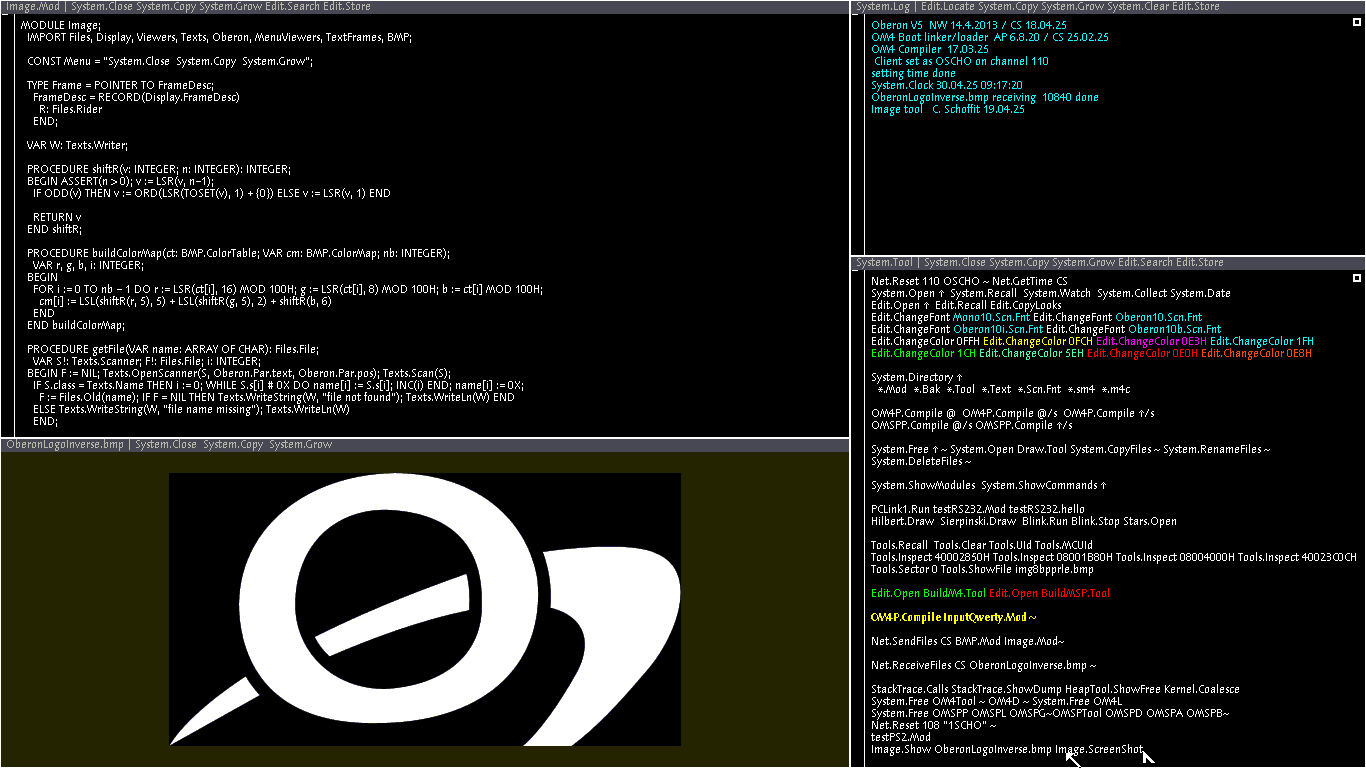
A rudimentary image manipulation module is available. It allows to display 8bpp indexed colors BMP and can take screenshots.
The 12th release contains a major improvement: the code and strings of the modules can be stored
in the microcontroller's flash memory and executed in place.
In this case, the global data will be placed is SRAM.
Previously, the modules had to be loaded into the SDRAM for execution.
There are a lot of advantages doing this:
To put modules in embedded flash, follow this procedure:
OM4L.LinkEF Modules System Edit OM4P ~OM4X.LoadEF OM4P.efbOM4L.CompareEF OM4P.efbOM4P 0802E7B4 0802F1F4 -1Reminder: starting wiht the release 9, it is now easy to launch user actions immediately after system startup. Put your code in the initialization section of the OnStartup module and compile it.
Changes in oberon 07 compiler:
Registers usage control in procedures
Cortex M4 microcontrollers save automatically a set of registers on stack when servicing an interruption.
If an Oberon exception handler contains too complicated expressions, there is a risk that a non saved register is used.
To prevent that case to happen, I introduced a new notation ^n after the PROCEDURE keyword:
PROCEDURE^3 handler;
BEGIN ....
END handler;
With this information, the compiler can check that no more than n registers are used. The save/restoration instructions are automatically generated according to the declared number of used registers.
Unsafe local variables marking
This Oberon compiler allow allocation of unitialized pointers on stack.
Those pointers are not checked at runtime, so they are not safe until they are properly intialized.
I made a change in the compiler to allow detection of the declaration of local variables containing pointers. The developer must check the code to be sure that no bad use is made with these variables.
For example, assume that a Files.Rider is declared as a local variable. Using of the "file" member (eg. via Files.Base) is unsafe until the rider has been initialized with Files.Set.
When the developer has determined that the code usage of the local variable is safe, he or she must mark the variable with an exclamation mark (!) in its declaration.
Oberon runs now on the STM32F429I-DISCO base board:
Hardware side:
| Qty | Value | Footprint | References |
|---|---|---|---|
| 8 | PB | Button_Switch_THT:SW_PUSH_6mm | SW1, SW2, SW3, SW4, SW5, SW6, SW7, SW8 |
| 7 | 220 | Resistor_THT:R_Axial_DIN0207_L6.3mm_D2.5mm_P10.16mm_Horizontal | R5, R6, R7, R8, R9, R10, R11 |
| 7 | LED | LED_THT:LED_D3.0mm | D1, D2, D3, D4, D5, D6, D7 |
| 4 | 10K | Resistor_THT:R_Axial_DIN0207_L6.3mm_D2.5mm_P10.16mm_Horizontal | R12, R13, R14, R15 |
| 4 | 4K7 | Resistor_THT:R_Axial_DIN0207_L6.3mm_D2.5mm_P10.16mm_Horizontal | R1, R2, R3, R4 |
| 4 | MountingHole_Pad | MountingHole:MountingHole_4.5mm_Pad_Small | H1, H2, H3, H4 |
| 2 | 100u | Capacitor_THT:CP_Radial_L10.0mm_D4.5mm_Horizontal | C2, C3 |
| 2 | Mini-DIN_6pins-KB_MOUSE | Custom_Footprints:Connector_Mini-DIN_Female_6Pin_2rows | P1, P2 |
| 1 | 100n | Capacitor_THT:C_Disc_D7.0mm_W2.5mm_P5.00mm | C1 |
| 1 | LED1 | TestPoint:TestPoint_2Pads_Pitch2.54mm_Drill0.8mm | JP1 |
| 1 | LED2 | TestPoint:TestPoint_2Pads_Pitch2.54mm_Drill0.8mm | JP2 |
| 1 | LED3 | TestPoint:TestPoint_2Pads_Pitch2.54mm_Drill0.8mm | JP3 |
| 1 | LED4 | TestPoint:TestPoint_2Pads_Pitch2.54mm_Drill0.8mm | JP4 |
| 1 | LED5 | TestPoint:TestPoint_2Pads_Pitch2.54mm_Drill0.8mm | JP5 |
| 1 | LED6 | TestPoint:TestPoint_2Pads_Pitch2.54mm_Drill0.8mm | JP6 |
| 1 | LED7 | TestPoint:TestPoint_2Pads_Pitch2.54mm_Drill0.8mm | JP7 |
| 1 | NRF24L01_Breakout | RF_Module:nRF24L01_Breakout | U1 |
| 1 | SD_Card | Connector_Card:SD_AC_SL1100 | J2 |
| 1 | STM32F429I_DISCO | Discovery_Board:STM32F429I_DISCO | B1 |
| 1 | VGA_666_ADAPTER | Connector_PinHeader_2.54mm:PinHeader_2x20_P2.54mm_Vertical | J1 |

beagleboard/pocketbeagle
BeagleBoard.org PocketBeagle - ultra small, ultra flexible, ultra affordable


rhalkyard/SEthernet
Modern, low-cost 10/100 Ethernet for the Macintosh SE and SE/30

NYDEREK/LineFollower_GRUZIK2.0-light
GRUZIK2.0 is simple light construction made for "line follower light" competition


It measures 100 × 100 mm and has 4 copper layers, 1.6 mm thick.
50 parts. The full list of its parts is on this page, with links to each part's symbol and footprint where PCBKit's library has them.
From the ef15c/oberon_stm32f4 repository on GitHub, at the commit this page was made from: the board is hardware/oberon_station/oberon_station.kicad_pcb and its schematic hardware/oberon_station/oberon_station.kicad_sch. PCBKit opens the board in the browser, with nothing to install.
Its repository publishes it under the GPL-3.0 licence: you may reuse it on that licence's terms (keep the author's notice, and for a copyleft licence share your changes alike).