2 layers116.8 × 30 mm
Type d
google/mozc-devices
Circuit diagrams and firmware source code for Gboard DIY keyboards
14 parts3kApache-2.0

 dogman1214/Simhub
A custom-designed macropad for my sim-racing use, and for general purpose as well.
Simhubb is an open-source printed circuit board by dogman1214, from the dogman1214/Simhub repository on GitHub, published under the MIT licence. It is a 2-layer board of 100 × 60.5 mm with 14 parts on 14 nets, routed with 120 tracks and 0 vias.
Its parts include 13 switches and 1 IC. It belongs with the keyboards and input boards of this library.
A custom-designed macropad design for my sim-racing use, and for general purpose as well. This isn't physical at the moment, but rather a design you use to build your own macropad!
Everything is secured in place with 4 M3 screws and bolts, with the bolts serving a dual purpose as the base legs. The case is to be 3d-printed, along with the knob for the rotary encoder.
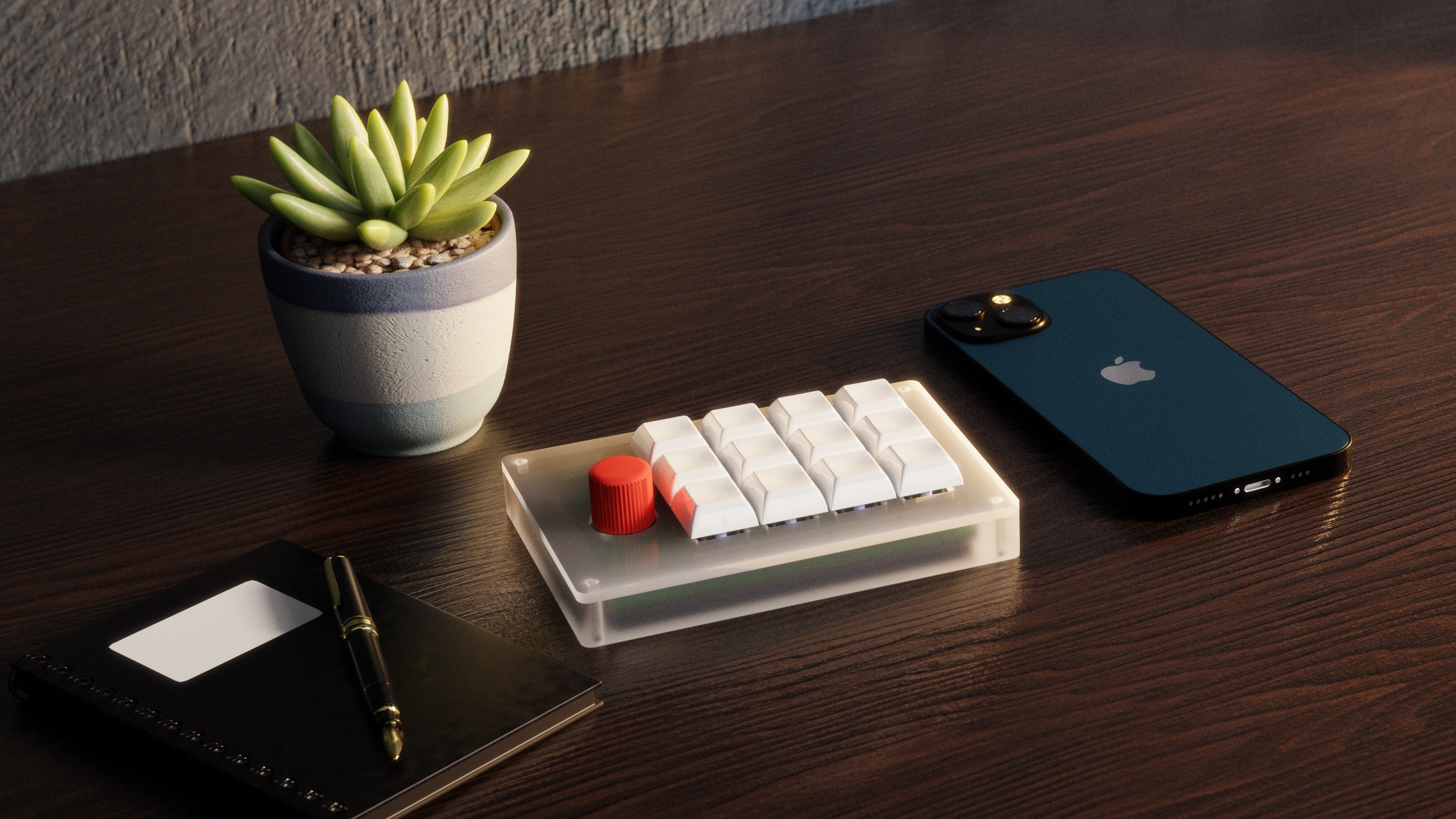 The render was made in Blender
The model was made in FreeCAD.
This is the PCB, it was designed in KiCad.
Schematic 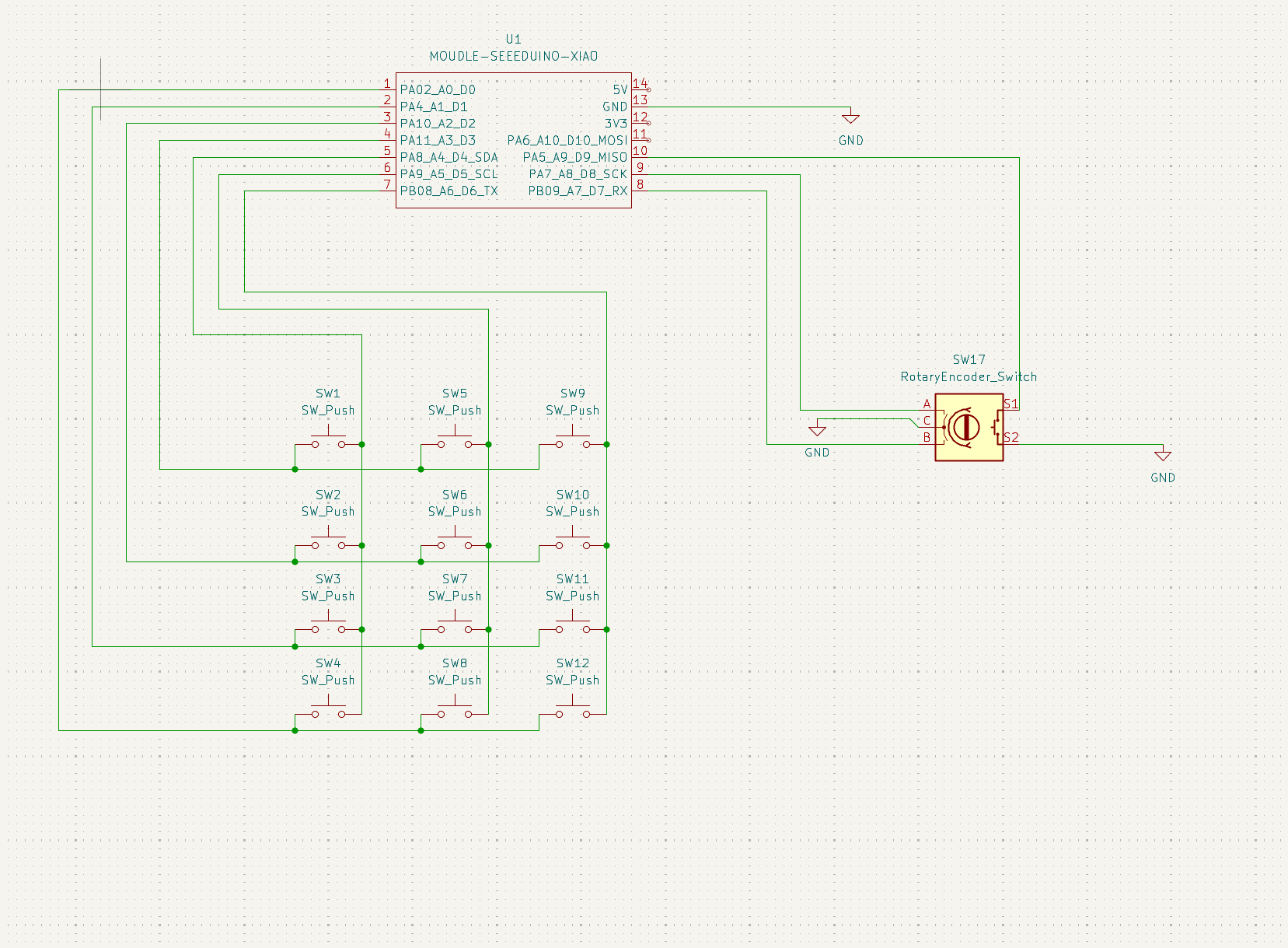
PCB 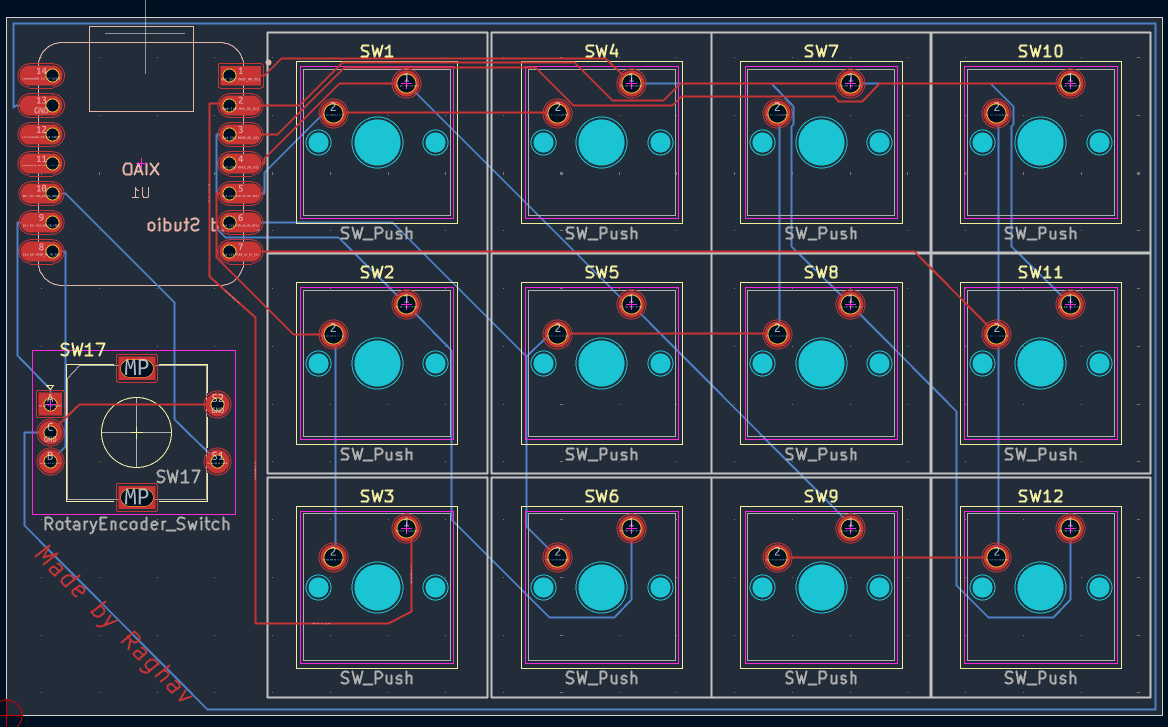
This hackpad uses QMK firmware for everything. Since it was designed with video-game assistance in mind, you have to map all the keys in-game to use them.
This keyboard has two modes.
To swap between custom in-game keyboard usage and a normal numpad style keyboard, click down on the rotary encoder.
#Be aware: This Bill of Materials is what is expected to be bought & used. I haven't built the macropad yet.
This is eveyrthing you need to make this macropad:
| Item Number | Description | Quantity | Unit Price (USD) | Extended Price (USD) | Vendor | Link |
|---|---|---|---|---|---|---|
| 4809-EC11E15204A3-ND | EC11E15204A3 Alps Alpine ENCODER INCREM QUAD VERT PC PIN | 1 | 4.41 | 4.41 | Digi-Key | https://www.digikey.com/en/products/detail/alps-alpine/EC11E15204A3/21721644 |
| 1597-102010428-ND | 102010428 Seeed Technology Co., Ltd XIAO RP2040 | 1 | 4.88 | 4.88 | Digi-Key | https://www.digikey.com/en/products/detail/seeed-technology-co-ltd/102010428/14672129 |
| CHERRY MX2A RGB Brown Kit | 36 mechanical keyboard switches (tactile, no click) | 1 | 19.99 | 19.99 | Amazon | https://www.amazon.com/dp/B0FYR9Z777 |
| Fgruh 750PCS M3 Screws | M3 hex socket bolts/nuts/washers set | 1 | 9.99 | 9.99 | Amazon | https://www.amazon.com/dp/B0FGV5FCBN |
| NeWear Relegendable Caps | DSA-style customizable transparent keycaps (12 pack) | 1 | 12.50 | 12.50 | Amazon | https://www.amazon.com/dp/B0DH91XV4T |
| Simhubb-PCBfiles_Y2 | PCB prototype Y2-13145810A, Green, 1.6mm, HASL (with lead) | 5 | 0.40 | 2.00 | JLCPCB | (Generated from your Gerber ZIP; no product link) |
| Body.stl | 3D print PETG FDM, Standard finish, Translucent | 1 | 5.40 | 5.40 | Hudson Creative Group | (Custom print; no link) |
| Cover.stl | 3D print PETG FDM, Standard finish, Translucent | 1 | 5.40 | 5.40 | Hudson Creative Group | (Custom print; no link) |
| Knob.stl | 3D print PETG FDM, Standard finish, Translucent | 1 | 5.40 | 5.40 | Hudson Creative Group | (Custom print; no link) |
I hope you like this project/macropad!
| Qty | Value | Footprint | References |
|---|---|---|---|
| 12 | SW_Push | Button_Switch_Keyboard:SW_Cherry_MX_1.00u_PCB | SW1, SW2, SW3, SW4, SW5, SW6, SW7, SW8, SW9, SW10, SW11, SW12 |
| 1 | MOUDLE-SEEEDUINO-XIAO | STARDANCE:XIAO-Generic-Hybrid-14P-2.54-21X17.8MM | U1 |
| 1 | RotaryEncoder_Switch | STARDANCE:RotaryEncoder_Alps_EC11E-Switch_Vertical_H20mm | SW17 |
It measures 100 × 60.5 mm and has 2 copper layers, 1.6 mm thick.
14 parts. The full list of its parts is on this page, with links to each part's symbol and footprint where PCBKit's library has them.
From the dogman1214/Simhub repository on GitHub, at the commit this page was made from: the board is pcb/simhubb.kicad_pcb and its schematic pcb/simhubb.kicad_sch. PCBKit opens the board in the browser, with nothing to install.
Its repository publishes it under the MIT licence: you may reuse it on that licence's terms (keep the author's notice, and for a copyleft licence share your changes alike).
google/mozc-devices
Circuit diagrams and firmware source code for Gboard DIY keyboards


hackclub/OnBoard
💡 Join 1,000 teenagers and make your first PCB with a $100 grant!


Twotoz/C5VRX
Ultra-minimal, zero-CPU 5.8 GHz analog FPV video receiver using ESP32-C5 Wi-Fi 6 PHY MODEM_DIAG, BitScrambler WBFM demodulation & resistor DAC CVBS

