Skip to the content
PCBKitNew board
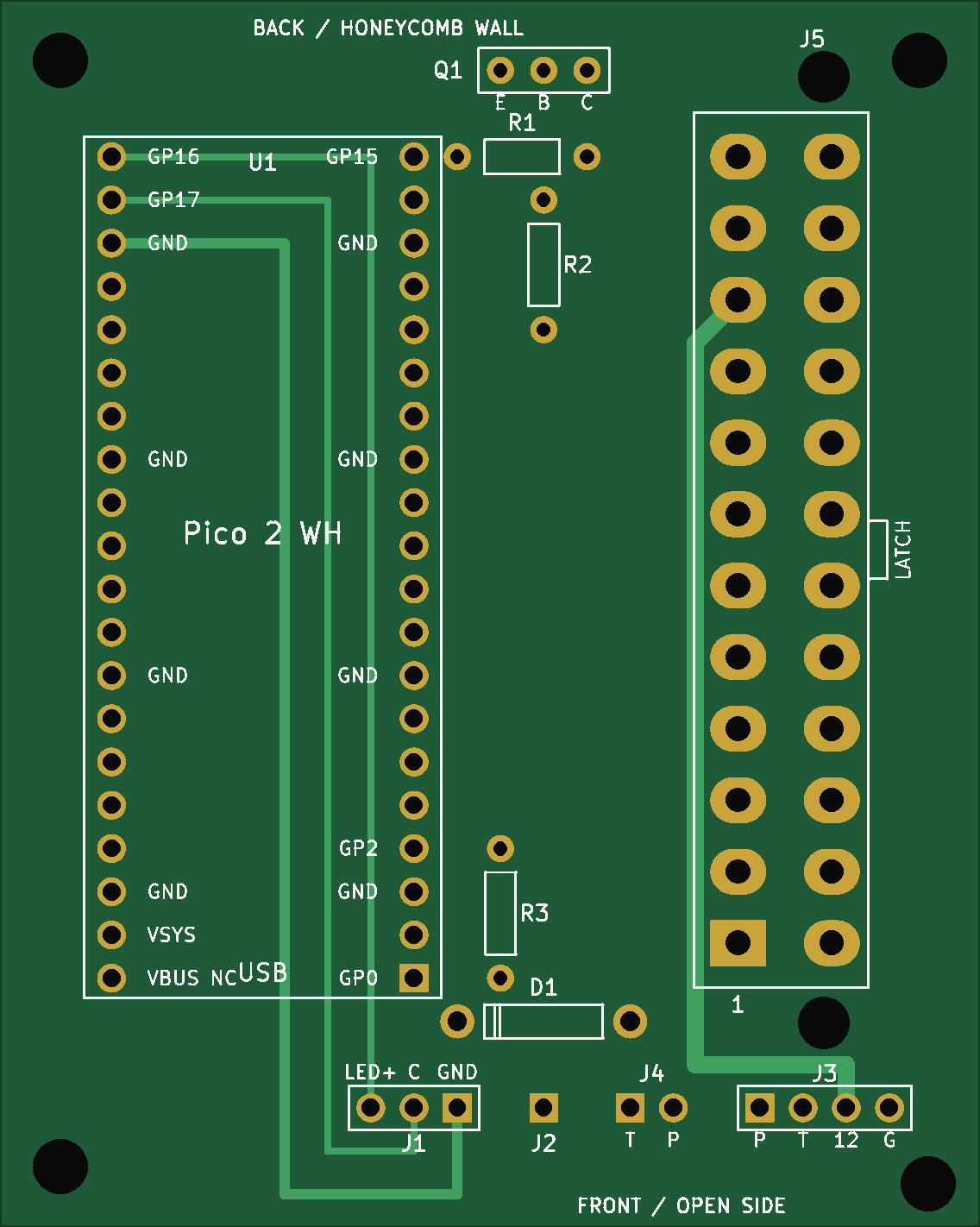
2 layers57.5 × 72 mmBc250 power, the printed circuit board in 3D

Power button + Bluetooth controller wake-up for the AMD BC-250 on SteamOS: Raspberry Pi Pico 2 W firmware, PCB (KiCad + Gerbers) and perfboard build.

Size
57.5 × 72 mm
Copper layers
2
Thickness
1.6 mm
Parts
15
Nets
13
Pads
91
Tracks, vias
44, 0
Routed
Yes
KiCad
KiCad 7 (file 20221018)
Created
20 Oct 2026
Updated
7 Nov 2026

Overview

Bc250 power is an open-source printed circuit board by Dkhanas, from the Dkhanas/bc250-power-controller repository on GitHub. It is a 2-layer board of 57.5 × 72 mm with 15 parts on 13 nets, routed with 44 tracks and 0 vias.

Its parts include 5 connectors, 3 resistors, 1 IC, 1 diode and 1 transistor. It belongs with the radio and wireless boards and the RP2350 boards of this library.

README

README.md

BC-250 power controller

A small board that gives an AMD BC-250 (running SteamOS) a real power button and Bluetooth controller wake-up. A Raspberry Pi Pico 2 W sits on the ATX power supply's 5 V standby rail and:

  • Case button short press: PSU on (the BC-250 auto-boots) / clean SteamOS shutdown (USB power key)
  • Case button held 5 s: force the PSU off
  • Wi-Fi (optional): a phone page / home-screen icon (http://bc250.local): power on, shut down, your controllers with battery, pair new ones, forget old ones. Home Assistant via MQTT (separate firmware file). Set up from your phone in a minute. Wi-Fi runs only when you want it: on request (default), only while the console is off, always, or never
  • Low-battery warning: the controller rumbles and the button LED blinks when a DualSense / DualShock is at 20 % or less
  • Case button held 8 s (console off): Wi-Fi on for the phone page
  • Case button held 2 s: pairing window, which accepts a new controller for 60 s. Outside it, controllers in pairing mode are ignored, so you can still pair yours with a phone or PC
  • Bluetooth controller (DualSense, DS4, Switch Pro, Xbox, 8BitDo…): pressing PS / Xbox / Home wakes the board, and the controller is passed to the BC-250 over USB (as itself, or as an Xbox 360 pad)
  • TPM pin 9 of the BC-250 goes low after shutdown -> PSU off after 5 s
  • Button LED: slow blink booting, solid running, fast blink shutting down
  • Second fan powered from the PSU's 12 V, speed controlled by the BC-250 (J4003)
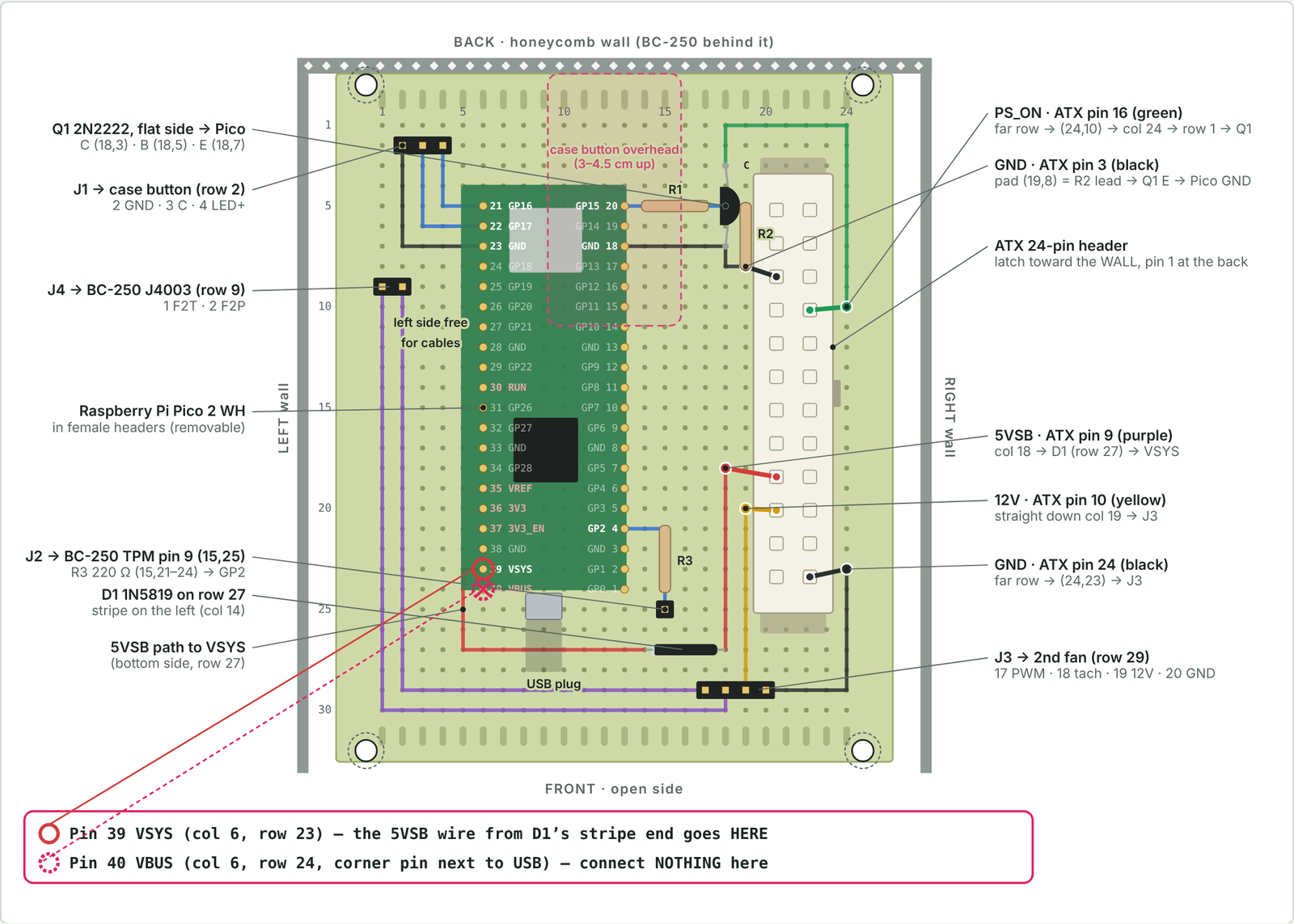
Printed board (PCB v12)Test board (perfboard)
PCB v12Perfboard

Repository

FolderWhat
firmware/Pico 2 W firmware (C, Pico SDK 2.3.1 + Bluepad32). Ready-to-flash file in firmware/release/
pcb/Printed board, v12: KiCad project, Gerbers for JLCPCB / PCBWay / Aisler, notes
perfboard/Test board on a 70×90 mm perfboard: hole-by-hole map
.github/workflows/Automatic firmware build on GitHub; a version tag (v8) publishes a Release with both .uf2 files
docs/Build plan (wiring to the BC-250, SteamOS settings, mounting) and pin drawings of every connector
CHANGELOG.mdRelease notes: what's new, fixed and known issues in each firmware and PCB version
bom.csvParts list for both boards (opens in Excel; GitHub shows it as a table)

Quick start

  1. Flash: hold BOOTSEL on the Pico, plug it into a PC, copy firmware/release/bc250_power_v8.uf2 onto the RP2350 drive (or bc250_power_v8_ha.uf2 if you use Home Assistant).
  2. BC-250: AUTO_PWRON jumper on pins 1–2; SteamOS HandlePowerKey=poweroff.
  3. Wire per docs/build-plan.md (Pico GP15 -> PSU, GP17 <- button, GP16 -> LED, GP2 <- TPM pin 9). Pin drawings of every connector (BC-250 J4003 / TPMS1, ATX, board headers, Pico): docs/pinout.md.
  4. Pair a controller: hold the case button 2 s and release (LED double-blinks), then put the controller in pairing mode within 60 s. Pairing turns the BC-250 on if it was off (expected).
  5. Optional Wi-Fi: console off, hold the case button 8 s (LED stays lit), release. On your phone tap the Wi-Fi BC250-setup; the setup page opens by itself. Pick your network, type its password, done. Then open http://bc250.local and Add to Home Screen. Wi-Fi switches itself off when unused (Settings → "Wi-Fi is on").

Downsides and known limitations

Testing status

  • Firmware v8 compiles cleanly but hasn't been tested on real hardware yet (v4 and v5 ran on the real board). Its web page was tested in a browser against a simulated Pico.
  • Wi-Fi and Bluetooth share one radio chip. If controllers lag with Wi-Fi "Always", use "Only while the console is off" (Settings). Home Assistant only sees the BC-250 while Wi-Fi is on. Wi-Fi is 2.4 GHz only and adds a little standby power. Until a network is saved (or when it stays unreachable), the Pico runs the open setup Wi-Fi BC250-setup; someone nearby could set it up first. bc250.local doesn't open on some Android phones: use the Pico's address from your router. Without a PIN (pin 1234), anyone on your network can use the web page's buttons.
  • Battery level only for DualSense / DualShock; Xbox, Switch Pro and 8BitDo don't report it to the Pico. Its key guard works around a Bluepad32 behaviour: after one failed reconnect Bluepad32 deletes the controller's pairing key, which made controllers "search" forever until re-paired. The Bluetooth repair from v5 stays for real radio hangs. The log (sudo cat /dev/ttyACM0) shows which one happened.
  • Controllers paired before v6 aren't protected until their first successful connection with v6. If one already lost its key, re-pair it once.
  • Bluetooth repair takes a moment: when Bluetooth is stuck, the Pico notices within about 30 s and restarts only Bluetooth, which takes a few more seconds. Until then, PS doesn't reconnect.
  • The log port only exists while no controller is connected, so controller identities stay exact.
  • PCB v12 was checked with KiCad DRC, not built yet. Everything except the ATX header was tested on a built v8 board; v12's ATX pin order matches what was measured there with the real PSU cable. Check the first board with a multimeter before connecting the PSU (see pcb/README.md). Check the first board with a multimeter before connecting the PSU (see pcb/README.md).
  • The perfboard map (v16) has the ATX header mirrored. Wire it by wire colour, not by the hole numbers.

Controllers

  • Whenever a controller joins or leaves, every controller drops for about 0.5 s. The Pico re-plugs itself on USB with the new layout, and Steam may reassign player numbers.
  • Several real DualSense / DS4 / Switch Pro controllers inside one USB device is unusual. Linux supports it, but Steam may show only one of them. Mixed groups fall back to Xbox 360 pads, which lose the touchpad, gyro, lightbar and adaptive triggers.
  • No audio: the DualSense / DS4 headphone jack, speaker and mic aren't passed through.
  • Up to 4 controllers. Only Bluetooth ones work: no wired controllers through the Pico, and no non-Bluetooth Xbox One pads.
  • New controllers only pair while the pairing window is open (case button held 2 s). Bluetooth LE controllers already bonded to the Pico (e.g. Xbox) are still taken when put in pairing mode, because they reconnect the same way.
  • Pairing a controller turns the BC-250 on. For 20 s after a shutdown, controllers that reconnect are ignored, so a quick press of PS right after power-off does nothing.

Power and shutdown

  • The shutdown key is a USB "Power" key. SteamOS has to be set to HandlePowerKey=poweroff. Gaming mode or an inhibitor can swallow it; then press again, or hold 5 s.
  • Holding the button for 5 s cuts power hard, with no clean shutdown, like pulling the plug.
  • A short press while the board is booting is ignored.
  • "Off" is detected from TPM header pin 9. If the board doesn't boot within 180 s, the PSU is switched off again.
  • When a controller identity is active, the power key needs a ~2 s USB re-plug first. The controllers vanish from SteamOS at that moment, which doesn't matter because it's shutting down.

Hardware

  • The Pico is always powered from the PSU's 5 V standby rail, with its Bluetooth radio on, so the PC draws a little more power while "off".
  • With a normal USB cable, a little standby power can leak into the switched-off BC-250 through the Pico's internal diode (its back-panel LEDs may glow faintly). The clean fix is a cable with the red 5 V wire cut, plus USE_VBUS_SENSE 0 in firmware/src/config.h.
  • Specific to the BC-250 and an ATX PSU (needs AUTO_PWRON, the TPM header and J4003). Other boards need new pin mapping and logic.
  • No Wi-Fi features (no web page or remote power-on over the network).

⚠️ Safety notes

  • ATX header orientation: the two pin rows are 5.5 mm apart (PCB v1–v8 used 4.2 mm: never use them). With the latch facing the wall, pin 1 is at the FRONT end (KiCad's official footprint, measured on a built v8 board). PCB v10 / v11 had it mirrored (12 V on GND): never use them. Use PCB v9 or v12.
  • Pico VBUS (pin 40) stays unconnected on the board. The USB cable's 5 V (red wire) can leak standby power into a switched-off BC-250; firmware v4 and later handle a normal cable (USE_VBUS_SENSE 1).

Versions

VersionDate
Firmwarev8 – Wi-Fi phone page (setup from the phone, controller list, pairing, forget) + Home Assistant, low-battery warning, pairing window, key guard, Bluetooth repair, event log2026-11-06
PCBv12 – v9 ATX pin order (confirmed with the real PSU cable) + gaps between the front headers2026-11-06
Perfboard mapv16 (ATX header mirrored – wire it by wire colour)2026-10-18

Building: bash firmware/build.sh (library versions pinned in firmware/deps.env), or download the .uf2 from GitHub (Actions / Releases).

Release notes for every version: CHANGELOG.md. Technical details: firmware/README.md, pcb/README.md.

Parts

15
QtyValueFootprintReferences
110kR2_10kR2
11N5819D1_1N5819D1
11kR1_1kR1
1220RR3_220RR3
12N2222Q1_2N2222Q1
1ATX24J5_ATX24J5
1BUTTONJ1_BUTTONJ1
1FAN2J3_FAN2J3
1J4003J4_J4003J4
1M3H1_M3H1
1M3H4_M3H4
1M3H2_M3H2
1M3H3_M3H3
1Pico2WHU1_Pico2WHU1
1TPM9J2_TPM9J2

Questions

How big is the Bc250 power PCB?

It measures 57.5 × 72 mm and has 2 copper layers, 1.6 mm thick.

What parts does the Bc250 power use?

15 parts. The full list of its parts is on this page, with links to each part's symbol and footprint where PCBKit's library has them.

Where can I download the Bc250 power KiCad files?

From the Dkhanas/bc250-power-controller repository on GitHub, at the commit this page was made from: the board is pcb/kicad/bc250_power.kicad_pcb. PCBKit opens the board in the browser, with nothing to install.

Can I use the Bc250 power design in my own project?

Its repository states no licence, so its author keeps all rights: ask Dkhanas before reusing the design.

Similar boards

  • 2 layers19 × 76 mmSub, the printed circuit board in 3D

    Sub

    google/mozc-devices

    Circuit diagrams and firmware source code for Gboard DIY keyboards

    15 parts3kApache-2.0
  • 2 layers26.7 × 62.2 mmDeniseadapter, the printed circuit board in 3D

    Deniseadapter

    hoglet67/RGBtoHDMI

    Bare-metal Raspberry Pi project that provides pixel-perfect sampling of Retro Computer RGB/YUV video and conversion to HDMI

    15 parts1kGPL-3.0
  • 2 layers100 × 44 mmVideoslot, the printed circuit board in 3D

    Videoslot

    mntmn/amiga2000-gfxcard

    MNT VA2000, an Open Source Amiga 2/3/4000 Graphics Card (Zorro II/III), written in Verilog

    15 parts1k
  • 2 layers91 × 51 mmBusinessCard, the printed circuit board in 3D

    BusinessCard

    hackclub/OnBoard

    💡 Join 1,000 teenagers and make your first PCB with a $100 grant!

    15 parts915
  • 2 layers24.3 × 57.9 mmFlosspods pro flex, the printed circuit board in 3D

    Flosspods pro flex

    kenp-io/not-for-airpods-repairs

    The content of this repository is licensed under the WTFPL License. Please have a close look at the terms before using this material.

    15 parts609WTFPL
  • 2 layers20.3 × 15.2 mmL0 Load, the printed circuit board in 3D

    L0 Load

    Luos-io/luos_engine

    Open-source and real-time orchestrator for cyber-physical-systems, to easily design, test and deploy embedded applications and digital twins.

    15 parts546MIT
  • 2 layers68 × 50 mmEleLab v2 PowerFeed, the printed circuit board in 3D

    EleLab v2 PowerFeed

    Chrismettal/EleLab_v2

    Cheap DIY lab system for hobbyists and the tinkering folk

    15 parts531GPL-3.0
  • 2 layers50.8 × 35.6 mmInterface, the printed circuit board in 3D

    Interface

    harbaum/I2C-Tiny-USB

    Cheap and simple I²C to USB interface

    15 parts454