2 layers285.8 × 95.3 mm

 cqa02303/hidloom
HIDloom programmable keyboard software and reproducible appliance image
Cqa02303v5rpi-01 is an open-source printed circuit board by cqa02303, from the cqa02303/hidloom repository on GitHub, published under the GPL-3.0 licence. It is a 2-layer board of 285.8 × 144.1 mm with 237 parts on 218 nets, routed with 1,900 tracks and 349 vias.
It is built around the 74AHC1G125GW, ADS1115IDGS and SK6812MINI-E, with the BAV70 and BAV99 among its other parts. Its parts include 119 diodes, 84 switches, 4 capacitors, 4 resistors and 3 connectors. It belongs with the keyboards and input boards of this library.


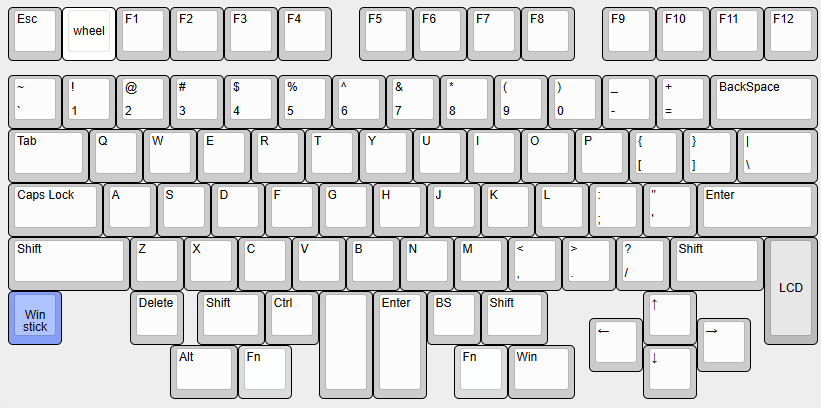
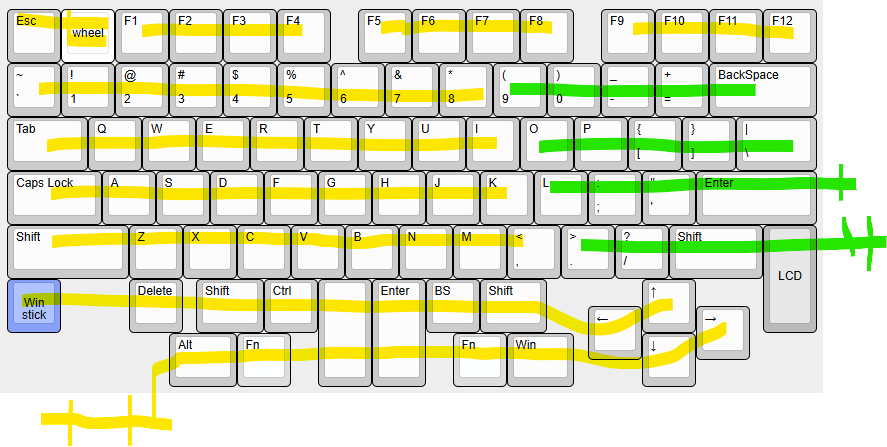
HIDloomは、Linux SBCをprogrammable keyboard applianceとして動かすsoftware projectです。GPIO matrix / charlieplex scan、USB HID gadget、BLE HID keyboard/mouse、Vial、HTTP UI、LED/OLED表示、analog stick、runtime keymapをまとめて扱います。cqa02303v5は最初のdevice profileです。
導入方式を選ぶ: INSTALL.md
Raspberry Pi Zero 2 W keyboardを試す: Keyboard Package and M6 Image
Raspberry Pi 4 touch panelを試す: Touch Panel Package
詳細ドキュメント目次: docs/README.md
画像ギャラリー: docs/gallery/README.md
回路図PDF: cqa02303v5 schematic
PCB fabrication-layer PDF: cqa02303v5 fabrication layers
編集可能なhardware source: KiCad project
メインターゲット: Raspberry Pi Zero 2 W
開発・貢献手順: CONTRIBUTING.md
公開sourceからの再現build: docs/ops/public-source-rebuild-runbook.md
公開文書とprivate運用資料の境界: docs/ops/public-documentation-boundary.md
実機失敗パターン: docs/ops/failure-patterns.md
MCPサーバ: read-only診断 / guarded write companion
Security: SECURITY.md
Support: SUPPORT.md
Community conduct: CODE_OF_CONDUCT.md
公開 Release では、同じ source revision から作成した3つの構成を選べます。
| 方式 | 適した用途 | 配布物 |
|---|---|---|
| Raspberry Pi OS Keyboard | Raspberry Pi Zero 2 Wでの通常運用、開発、ネットワーク管理 | hidloom-core + keyboard-ver1 profileの.deb |
| Raspberry Pi OS Touch Panel | Raspberry Pi 4 + Waveshare 8.8inch DSI touch kiosk | hidloom-core + touch-waveshare-8.8 profileの.deb |
| Buildroot M6 image | 高速起動する offline keyboard appliance | hidloom-<version>-buildroot-m6.img.zst |
選択基準、Release asset、導入手順: INSTALL.md。Zero 2 W向けのpackageとM6は Keyboard Package and M6 Imageにまとめています。
現在の構成は、Raspberry Pi Zero 2 W を USB HID 複合デバイス兼 BLE HID keyboard/mouse として動かし、Vial GUI / HTTP UI / 実キー入力を logicd-core-rs / logicd-companion / hidloom-outputd の runtime keymap と output control plane に集約します。
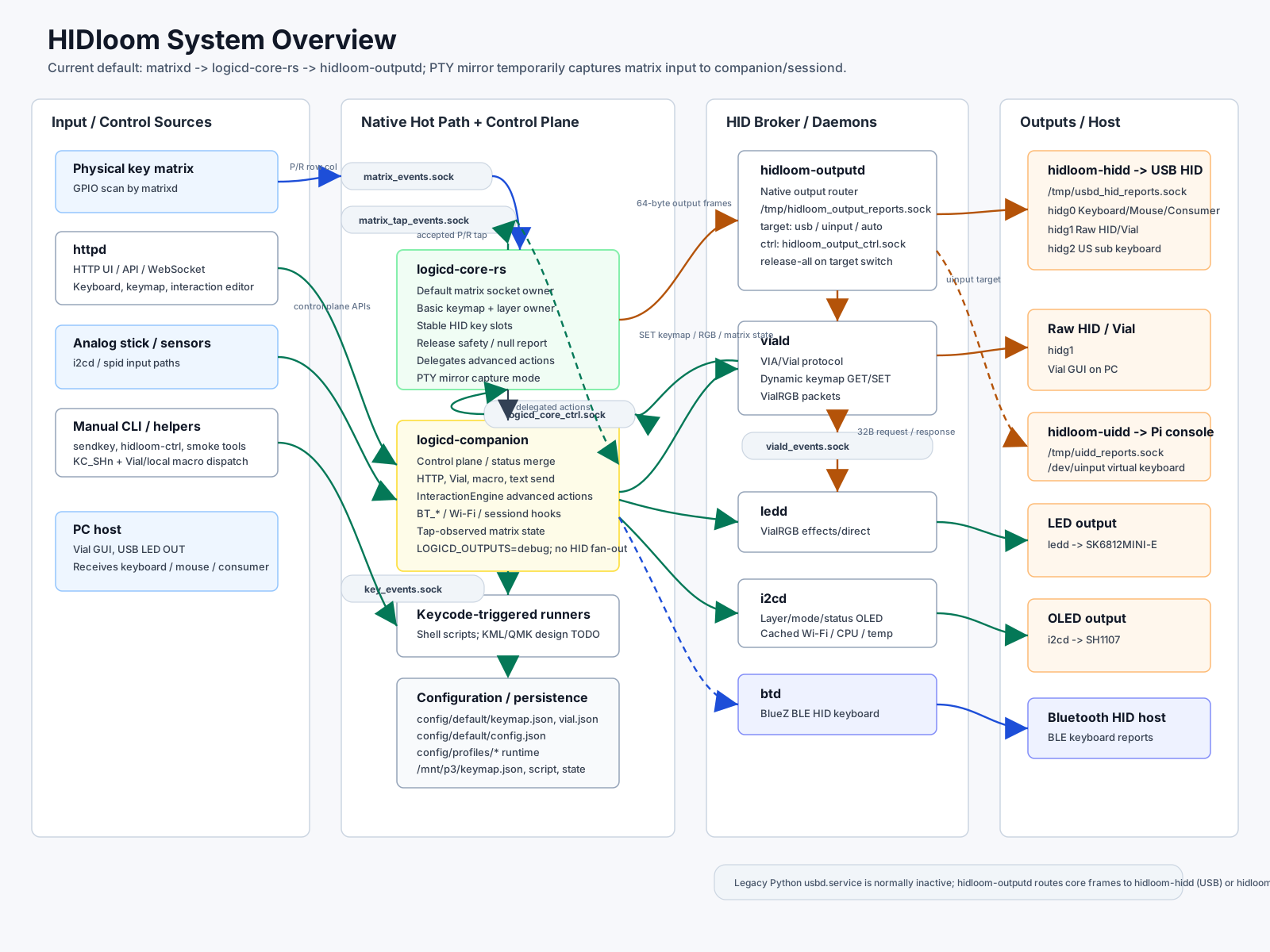
詳細: docs/architecture/system-overview.md
matrixd / httpd / i2cd / sendkey
        ↓
      logicd-core-rs + logicd-companion  ── keymap / layer / macro / output control
        ↓
      hidloom-outputd ── USB HID gadget / uinput
        └ logicd-companion ── BLE HID via btd
        ↓
PC / Linux input / log / Bluetooth host
主要 daemon:
| daemon | 役割 |
|---|---|
matrixd | GPIO matrix scan |
hidloom-logicd-core / logicd-companion | keymap、layer、macro、HID report、output routing |
hidloom-outputd | native output router。usb / uinput / bt / auto target へ broker frame を配送 |
hidloom-hidd | USB HID gadget owner、Raw HID / Vial packet bridge、LED OUT bridge |
hidloom-uidd | Pi local console 用 uinput report sink。KC_CONSOLE の uinput target |
usbd | legacy USB bridge / rollback path |
viald | Vial protocol、VialRGB、Matrix Test |
httpd | HTTPS UI、keymap editor、Lighting、Key Tester |
i2cd | OLED 表示、alert、analog stick 入力 |
ledd | LED animation / VialRGB direct control |
btd | BLE HID over GATT keyboard/mouse backend |
spid | SPI mouse sensor motion input |
出力先の内部名と表示名:
| 内部名 | UI / OLED 表示 | 意味 |
|---|---|---|
gadget | USB | USB HID gadget |
bt | BT | Bluetooth HID |
uinput | Pi | Raspberry Pi local input |
debug | Debug | HID report log |
「QRコード」は株式会社デンソーウェーブの登録商標です。
HIDloomのOLED Web UI QR機能、表示仕様、権利関係の説明は OLED Web UI QRを参照してください。
root 直下は、導入入口と主要 daemon の位置を見失わないための薄い入口として残しています。
| Path | 役割 |
|---|---|
system/install/, system/systemd/ | install script 実体、systemd unit source |
config/default/, config/boards/ | repository default config、board profile config |
build/generated/, build/generators/ | tracked generated data、生成 helper |
kicad/cqa02303v5rpi/ | 編集可能なKiCad hardware source、回路図・PCB review PDF |
dev/mcp/keyboard/ | Codex / MCP read-only keyboard diagnostics server |
dev/mcp/keyboard_write/ | key tapと1位置keymap変更だけを許すguarded write companion |
tools/ | 実機操作、計測、手動 smoke helper |
script/ | regression suite、install/systemd 直呼び helper、既存 live smoke 入口 |
daemon/logicd/, daemon/http/, daemon/matrixd/, daemon/i2cd/, daemon/ledd/, daemon/usbd/, daemon/viald/, daemon/btd/, daemon/spid/ | Python / native daemon 本体 |
setup_fresh_rpi.sh, setup_usb_gadget.sh, getkeymap.sh, setkeycode.sh | root 互換 wrapper / 操作入口 |
fresh Raspberry Pi OS では、まず project build を行わない platform 準備だけを実行します。
sudo ./setup_fresh_rpi.sh --prepare-only準備後の再起動が完了したら、x86_64 build host で作成した同じ version の
hidloom-core と device profile package を同時に install し、profile を適用します。
sudo apt-get install -y \
  /tmp/hidloom-core_<version>_arm64.deb \
  /tmp/hidloom-profile-keyboard-ver1_<version>_arm64.deb
sudo hidloom-profile keyboard-ver1 --apply --backup --restart
引数一覧は ./setup_fresh_rpi.sh --help で確認できます。引数なしの checkout bootstrap は
実機 native build と package 管理外 unit install を行う legacy/recovery path です。
方式の選択: INSTALL.md
詳しい Raspberry Pi OS 導入手順: FRESH_INSTALL.md
現在の標準反映手順は Debian package です。実機側 checkout での git pull や
native build は通常運用では使いません。
標準キーボード構成では、同じ version の core package と device profile package を 同時に install し、profile を明示適用します。
make core-deb-package
make keyboard-ver1-profile-deb
scp build/packages/hidloom-core_<version>_arm64.deb \
  build/packages/hidloom-profile-keyboard-ver1_<version>_arm64.deb \
  <user>@<keyboard-ip>:/tmp/
ssh <user>@<keyboard-ip> 'sudo apt-get install -y \
  /tmp/hidloom-core_<version>_arm64.deb \
  /tmp/hidloom-profile-keyboard-ver1_<version>_arm64.deb && \
  sudo hidloom-profile keyboard-ver1 --apply --backup --restart'
実際の package build / deploy / verify / rollback 手順は docs/ops/release-packaging-runbook.md を正とします。
checkout rsync、/opt release、pre-.deb layout は比較・復旧専用です。これらを使う場合も
project binary は x86_64 build host で ARM64 cross-buildし、Raspberry Pi 実機では build
しません。通常更新へ混在させず、先に dry-run と rollback path を確認します。
詳細は tools/package/README.md と release-packaging-runbook.md を参照してください。
systemctl status hidloom-usb-gadget hidloom-hidd hidloom-uidd hidloom-outputd hidloom-logicd-core logicd-companion matrixd i2cd ledd httpd viald btd --no-pager
systemctl is-active logicd usbd || true  # legacy/rollback owner は通常 inactive
ls -l /dev/hidg0 /dev/hidg1
test ! -e /dev/hidg2 || ls -l /dev/hidg2
test ! -e /dev/hidg4 || ls -l /dev/hidg4
journalctl -u viald -u logicd-companion -u hidloom-logicd-core -u hidloom-outputd -u hidloom-uidd -u btd -u ledd -u hidloom-hidd -n 200 --no-pager
curl -k -u admin:$(hostname) https://127.0.0.1/api/status
USB gadget の割り当て:
| Device | 用途 |
|---|---|
/dev/hidg0 | Keyboard / Mouse / Consumer Control multi-report HID |
/dev/hidg1 | Raw HID / Vial |
/dev/hidg2 | Optional US sub keyboard HID |
/dev/hidg4 | Optional Windows IME custom HID |
logicd-core-rs / logicd-companion による runtime keymap / layer / macro 処理.vil keymap export / importsendkey.py による CLI キー入力getkeymap.sh / setkeycode.sh による runtime keymap 操作gadget/uinput/bt/debug output backend モデルdebug output による HID report ログ確認| 項目 | ドキュメント |
|---|---|
| 詳細ドキュメント目次 | docs/README.md |
| 導入方式の選択 | INSTALL.md |
| Raspberry Pi OSへの導入 | FRESH_INSTALL.md |
| リリース確認 | RELEASE_CHECKLIST.md |
| 全体仕様・構成 | docs/architecture/README.md |
| 方針・決定事項 | docs/policy/README.md |
| daemon / IPC | docs/daemon/README.md |
| keycode / QMK / Vial 互換 | docs/keycode/README.md |
| lighting / VialRGB | docs/lighting/README.md |
| Bluetooth / BLE | docs/bluetooth/README.md |
| MCP / Codex 診断 | docs/ops/keyboard-mcp-server.md |
| MCP guarded write companion | docs/ops/keyboard-write-mcp-server.md |
| MCP write-capable 境界設計 | docs/policy/mcp-write-capable-tool-design.md |
| Technical design backlog | docs/feature/design-todo-backlog.md |
| 開発・貢献手順 | CONTRIBUTING.md |
| 実機失敗パターン | docs/ops/failure-patterns.md |
| ドキュメント方針 | docs/policy/documentation-policy.md |
./sendkey.py tap 0x04
./getkeymap.sh --pretty
./setkeycode.sh 7,0 KC_ESC
./script/showlog.sh -s all -f
詳細:
README は概要と入口に留め、長い手順・プロトコル詳細・設計メモは docs/ 配下へ分割します。方針は docs/policy/documentation-policy.md を参照してください。
HIDloom自身のsource codeはGPL-3.0-or-laterで提供します。
著作権は個々のcontributorに残り、包括的な権利譲渡は求めません。公開上の表記と
contribution条件はAUTHORS.mdとCONTRIBUTING.mdを参照してください。
Buildroot、Linux kernel、BusyBox、Python/Rust dependencies、KiCad library、画像などの
第三者componentにはそれぞれのライセンスが適用されます。第三者componentの一覧と
再配布条件の確認状況はTHIRD_PARTY_NOTICES.mdに生成します。
公開exportはCycloneDX 1.7 SBOM.cdx.jsonと全export fileのSHA-256 manifestも生成します。
| Qty | Value | Footprint | References |
|---|---|---|---|
| 81 | SK6812MINI | HF:YS-SK6812MINI-E_slim | LED1, LED2, LED10, LED11, LED12, LED13, LED16, LED17, LED18, LED19, LED20, LED21, LED22, LED23, LED24, LED25 +65 |
| 79 | SW_PUSH | HF:hf_kbd_GateronKS33B_w_choc | SW1, SW2, SW10, SW11, SW12, SW13, SW14, SW15, SW16, SW17, SW18, SW19, SW20, SW21, SW22, SW23 +63 |
| 38 | BAV70 | Package_TO_SOT_SMD:SOT-23 | D1, D2, D10, D11, D12, D13, D14, D15, D16, D17, D18, D19, D20, D22, D23, D24 +22 |
| 10 | BAV99 | Package_TO_SOT_SMD:SOT-23 | BAV1, BAV2, BAV3, BAV4, BAV5, BAV6, BAV7, BAV8, BAV9, BAV10 |
| 7 | ~ | HF:2mmScrew | 2mm1, 2mm2, 2mm3, 2mm4, 2mm5, 2mm6, 2mm7 |
| 3 | 100nF | Capacitor_SMD:C_0603_1608Metric_Pad1.08x0.95mm_HandSolder | C1, C2, C4 |
| 2 | 2.2K | Resistor_SMD:R_0603_1608Metric_Pad0.98x0.95mm_HandSolder | R1, R2 |
| 2 | SW_PUSH | HF:SW_V6x36x15 | SW55, SW90 |
| 2 | SW_PUSH | HF:hf_kbd_kailh_hotswap_MX | SW49, SW51 |
| 1 | 10uF | Capacitor_SMD:C_0603_1608Metric_Pad1.08x0.95mm_HandSolder | C3 |
| 1 | 220-470 | Resistor_SMD:R_0603_1608Metric_Pad0.98x0.95mm_HandSolder | R6 |
| 1 | 3.3K | Resistor_SMD:R_0603_1608Metric_Pad0.98x0.95mm_HandSolder | R3 |
| 1 | 74AHC1G125 | HF:SOT23-5 | U2 |
| 1 | ADS1115IDGS | Package_SO:TSSOP-10_3x3mm_P0.5mm | U1 |
| 1 | Conn_01x03_Pin | Connector_PinHeader_2.54mm:PinHeader_1x03_P2.54mm_Vertical | J1 |
| 1 | Conn_01x07_Pin | Connector_PinHeader_2.54mm:PinHeader_1x07_P2.54mm_Vertical | J3 |
| 1 | LOGO | LOGO | G*** |
| 1 | NetTie_2 | NetTie:NetTie-2_SMD_Pad0.5mm | NT1 |
| 1 | Raspberry_Pi_4 | HF:Raspberry_Pi_Zero_Socketed_THT_FaceDown_MountingHoles | J2 |
| 1 | RotaryEncoder | HF:MouseEncoder | SW91 |
| 1 | ~ | HF:OLED | OLED1 |
| 1 | ~ | HF:AnalogJoyCon_cutScrew | JOY1 |
It measures 285.8 × 144.1 mm and has 2 copper layers, 1.6 mm thick.
237 parts, built around the 74AHC1G125GW, ADS1115IDGS, SK6812MINI-E and BAV70. The full list of its parts is on this page, with links to each part's symbol and footprint where PCBKit's library has them.
From the cqa02303/hidloom repository on GitHub, at the commit this page was made from: the board is kicad/cqa02303v5rpi-01/cqa02303v5rpi-01.kicad_pcb and its schematic kicad/cqa02303v5rpi-01/cqa02303v5rpi-01.kicad_sch. PCBKit opens the board in the browser, with nothing to install.
Its repository publishes it under the GPL-3.0 licence: you may reuse it on that licence's terms (keep the author's notice, and for a copyleft licence share your changes alike).


Yusufumben08/My-macropad
first electronics project. I found this last second so i couldnt do much more than this because of the time constraint. Made in 5 hours.

janni0609/DC-Load
A programmable DC electronic load built on the Raspberry Pi Pico 2 (RP2350). It sinks a user-defined current from a DC source under test and measures voltage, current, power, capacity, and energy in real time on a…

