2 layers326.7 × 132.7 mm

 cozykeys/bloomer61
An 87 key ergonomic mechanical keyboard
Bloomer is an open-source printed circuit board by cozykeys, from the cozykeys/bloomer repository on GitHub, published under the MIT licence. It is a 2-layer board of 322.7 × 132.7 mm with 188 parts on 124 nets, routed with 1,930 tracks and 44 vias.
Its parts include 87 diodes, 87 switches and 1 IC. It belongs with the keyboards and input boards of this library.
This repository contains the design files for the CozyKeys Bloomer, an 87-key ergonomic mechanical keyboard.
This keyboard has undergone several revisions and name changes. Previous names were Atreus87 and Ergo87 and artifacts of these may still be present in the repository.
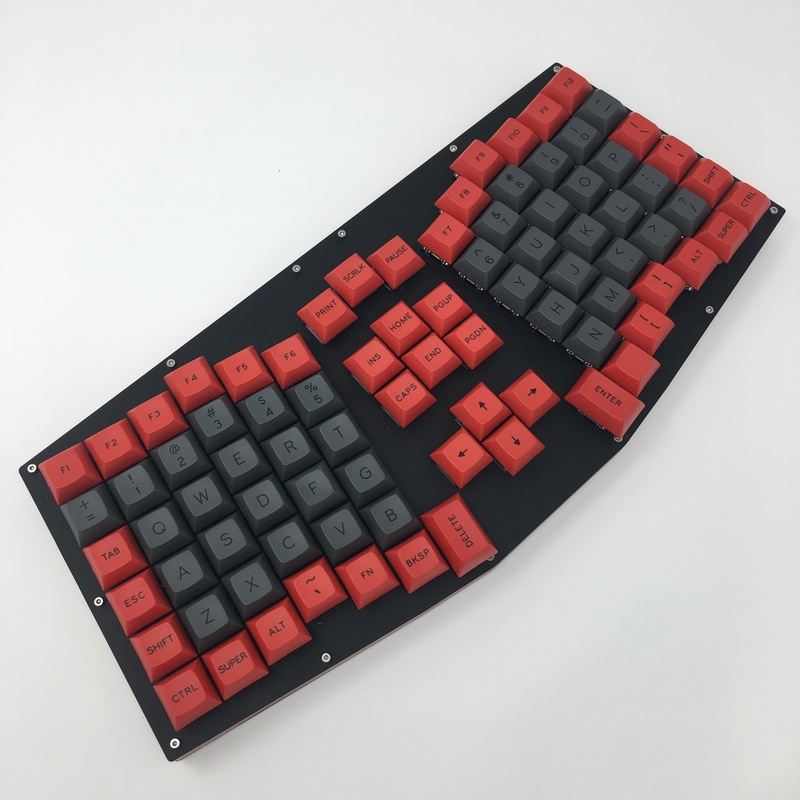
The first revision of the board was hand-wired and built as a proof of concept to ensure that the layout is comfortable.
The second revision added a PCB and a complete redesign of the case so that the PCB would fit accurately.
This initial PCB was functional but lacked any RGB support. It also had a few issues:
The second revision added several features and fixes:
See: v3.0 README
| Qty | Value | Footprint | References |
|---|---|---|---|
| 87 | MX_FLIP | SW0:0, SW0:1, SW0:2, SW0:3, SW0:4, SW0:5, SW0:6, SW0:7, SW0:8, SW0:9, SW0:10, SW0:11, SW0:12, SW0:13, SW0:14, SW1:0 +71 | |
| 87 | DIODE | D0:0, D0:1, D0:2, D0:3, D0:4, D0:5, D0:6, D0:7, D0:8, D0:9, D0:10, D0:11, D0:12, D0:13, D0:14, D1:0 +71 | |
| 12 | VAL** | WS2812B | RGB0, RGB1, RGB2, RGB3, RGB4, RGB5, RGB6, RGB7, RGB8, RGB9, RGB10, RGB11 |
| 1 | ItsyBitsy | ItsyBitsy | U1 |
| 1 | VAL** | B3F-10XX | B1 |


jmdaly/steamvan
KiCAD design files for the SteamVan PCB - a 40% keyboard PCB based on an STM32 MCU

thebiguno/microcontroller-projects
A home for a bunch of microcontroller projects which don't warrant their own repos.

yiancar/Seigaiha
A Alice layout throughole keyboard with USBC. Inspired by the Plaid and TGR Alice


jamesmunns/brick-mount
Put your circuits on your plastic bricks of choice

lynchaj/duodyne
Duodyne is a hobbyist retrocomputer system designed to run ROMWBW. It is comprised of modules on a system bus
It measures 322.7 × 132.7 mm and has 2 copper layers, 1.6 mm thick.
188 parts. The full list of its parts is on this page, with links to each part's symbol and footprint where PCBKit's library has them.
From the cozykeys/bloomer repository on GitHub, at the commit this page was made from: the board is pcb/bloomer.kicad_pcb. PCBKit opens the board in the browser, with nothing to install.
Its repository publishes it under the MIT licence: you may reuse it on that licence's terms (keep the author's notice, and for a copyleft licence share your changes alike).