
11 layers14.6 × 17.3 mm
Gb video breakout
chromalock/CGBLinkVideo
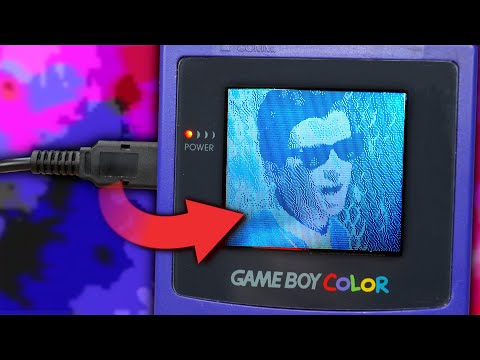
Playing media on a gameboy color over the link cable, with the help of an RPi Pico
11 parts39

 chromalock/CGBLinkVideo39
Playing media on a gameboy color over the link cable, with the help of an RPi Pico
Gb video pico breakout is an open-source printed circuit board by chromalock, from the chromalock/CGBLinkVideo repository on GitHub. It is an 11-layer board of 44 × 73 mm with 15 parts on 45 nets, routed with 114 tracks and 88 vias.
It is built around the SN74LVC1G17QDCKRQ1. Its parts include 4 ICs, 2 capacitors, 2 resistors, 2 diodes and 1 connector. It belongs with the retro computing and games and interfaces and adapters boards and the RP2040 boards of this library.
Playing media on a gameboy color over the link cable, with the help of an RPi Pico

This project was heavily inspired by Staacks/wifi-game-boy-cartridge, and borrows utility macros, cartridge headers, and some random python snippets.
You can find more detailed information on the individual components in the following locations:
/firmware/  |   Firmware + PIO programs for an RPi Pico (W)
/pcb/       |   Schematics, PCB designs, and gerber files for the GBLink board.
/roms/      |   Gameboy Color ROMs
/scripts/   |   Python package + scripts for streaming data to the gameboy color
/stream/ | Wrapper scripts for hooking up video sources to the gameboy script- Python 3 (3.10.12 for me)
- FFMpeg (4.4.2-0ubuntu0.22.04.1 for me)
- RGBASM (v0.7.0-37-gc70cecc2 for me) <-- only if you want to build the roms yourself- Gameboy Color + Link Cable
- Raspberry PI Pico
- GBLink Board (or some other method of level shifting)
- GBC Flash Cartridge| PC | <--UART--> | RPi Pico + GBLink Board | <--PIO--> | Gameboy Color | PC Handles video encoding, then sends the encoded data to the RPi pico over UART, which is stored in a buffer (triple buffered). This happens at roughly 1Mbps.
Meanwhile, the Gameboy color makes requests to the RPi Pico over its serial port, with the voltage levels being shifted by the GBLink board. The PIO handle the job of parsing these signals and shifting data out to the gameboy.
First, you will need to put the files from this release onto a gameboy flash cartridge. (or you can choose only the rom files you need)
Plug in your GBLink adapter to your computer and connect it to your gameboy. On the gameboy, start the rom file you need for your application. (view the above release for the descriptions)
You will need OBS.
# install dependencies
git clone https://github.com/chromalock/CGBLinkVideo
cd CGBLinkVideo

sudo apt install ffmpeg
pip install -r ./scripts/requirements.txt
get list of video devices (optional)
# get list of current video devices
v4l2-ctl --list-devices
# Dummy video device (0x0000) (platform:v4l2loopback-000):
#         /dev/video0
get list of serial ports
sudo dmesg | grep tty
# [484956.666636] cdc_acm 3-4.1.2.1.4:1.0: ttyACM0: USB ACM device
run appropriate script
# td2018.gbc            | bw stream
# td2018-vsync.gbc      | bw stream, but with larger transfers to reduce tearing
./stream/cam-stream-full.sh /dev/video0 /dev/ttyACM0

# tdc2018.gbc           | color stream
# tdc2018-vsync.gbc     | color stream, but with larger transfers to reduce tearing
./stream/color-cam-stream-full.sh /dev/video0 /dev/ttyACM0

# tile-index.gbc        |  the low-res grayscale stream that sends a new tilemap every frame
./stream/cam-stream.sh /dev/video0 /dev/ttyACM0You will need to install ffmpeg from here, and Python 3 from here
I recommend using choco to do it via choco install ffmpeg-full and choco install python.
To get pip, run:
python -m pip install -U pipthen, clone the repository (or you can download/extract the zip file)
git clone https://github.com/chromalock/CGBLinkVideo
cd CGBLinkVideo
install python dependencies:
pip install -r .\scripts\requirements.txtGet list of serial ports
mode
:: Status for device COM3:
:: -----------------------
::     Baud:            115200
::     Parity:          None
::     Data Bits:       8
::     Stop Bits:       1
::     Timeout:         OFF
::     XON/XOFF:        OFF
::     CTS handshaking: OFF
::     DSR handshaking: OFF
::     DSR sensitivity: OFF
::     DTR circuit:     OFF
::     RTS circuit:     ON
::
::
:: Status for device CON:
:: ----------------------
::     Lines:          3000
::     Columns:        120
::     Keyboard rate:  31
::     Keyboard delay: 1
::     Code page:      437
then (in cmd.exe, powershell will not work) run the script for whichever rom you are running
:: td2018.gbc            | bw stream
:: td2018-vsync.gbc      | bw stream, but with larger transfers to reduce tearing
.\stream\cam-stream-full.sh COM3

:: tdc2018.gbc           | color stream
:: tdc2018-vsync.gbc     | color stream, but with larger transfers to reduce tearing
.\stream\color-cam-stream-full.bat COM3

:: tile-index.gbc        |  the low-res grayscale stream that sends a new tilemap every frame
.\stream\cam-stream.bat COM3Due to either my bad code or an issue in the pySerialTransfer library, occasionally when stopping the stream program the arduino will be left in a state where it wont respond any more.
The solution is to simply unplug and re-plug in the GBLink. After this, the serial port name may change and you will need to determine which is the new one via the steps above.
Hold right on the dpad of the gameboy for a few seconds. This should allow enough time for the pico to reset its state machines, and will restart communication on the gameboy.
If the link cable isnt making good contact with either tha gameboy or the gblink, data may not transfer. Try a different link cable or cleaning the contacts on both devices.
| Qty | Value | Footprint | References |
|---|---|---|---|
| 3 | SN74LVC1G17QDCKRQ1 | SN74LVC:SOT65P210X110-5N | U1, U2, U3 |
| 3 | TestPoint | Connector_PinHeader_2.54mm:PinHeader_1x01_P2.54mm_Vertical | TP1, TP2, TP3 |
| 2 | C | Capacitor_SMD:C_0805_2012Metric | C1, C2 |
| 2 | LED | LED_SMD:LED_0805_2012Metric | D1, D2 |
| 2 | R | Resistor_SMD:R_0805_2012Metric | R3, R4 |
| 1 | Conn_01x05 | Connector_PinHeader_2.54mm:PinHeader_1x05_P2.54mm_Vertical | J1 |
| 1 | Pico | MCU_RaspberryPi_and_Boards:RPi_Pico_SMD_TH | U4 |
| 1 | gb-link-socket | gb-link-socket:gb-link-socket | GB1 |
chromalock/CGBLinkVideo
Playing media on a gameboy color over the link cable, with the help of an RPi Pico

Student-Satellite-IITB/Communication-Subsystem
Communication Subsystem for IITBSSP CubeSat Mission


andrew-c-tran/byteshift-fuel-center
Automotive-grade CAN module for fuel pressure, temperature and ethanol content. AEC-qualified parts, fail-safe protocol, JLCPCB-ready.


shvmm/espcb-bms-comms
An ESP32 series based PCB for implementing BMS comms to Solar Inverters

ForestKatsch/unofficial-tesla-seat-controller
STM32G0-based controller for four seat motors, two ventilation fans, and the seat switchpack. Input is a regulated 12 V Mean Well power supply; record the exact model before system testing.

Redherring32/Xbox-Portable
Fully portable original (2001) Xbox handheld using real hardware
It measures 44 × 73 mm and has 11 copper layers, 1.6 mm thick.
15 parts, built around the SN74LVC1G17QDCKRQ1. The full list of its parts is on this page, with links to each part's symbol and footprint where PCBKit's library has them.
From the chromalock/CGBLinkVideo repository on GitHub, at the commit this page was made from: the board is pcb/gb_video_pico_breakout/gb_video_pico_breakout.kicad_pcb and its schematic pcb/gb_video_breakout/gb_video_breakout.kicad_sch. PCBKit opens the board in the browser, with nothing to install.
Its repository states no licence, so its author keeps all rights: ask chromalock before reusing the design.