

2 layers56 × 84 mm
OpenLaserMouseTHT
chris-jh/OpenLaserMouse
Quadrature Optical Mouse Replacement Using an Arduino for the Amiga Tank Mouse
24 parts61LGPL-3.0

 chris-jh/OpenLaserMouse61
Quadrature Optical Mouse Replacement Using an Arduino for the Amiga Tank Mouse
OpenLaserMouse is an open-source printed circuit board by chris-jh, from the chris-jh/OpenLaserMouse repository on GitHub, published under the LGPL-3.0 licence. It is a 2-layer board of 56 × 84 mm with 24 parts on 38 nets, routed with 189 tracks and 15 vias.
It is built around the ADNS-9800 and IRLML6302TRPBF. Its parts include 9 capacitors, 6 resistors, 2 switches, 1 transistor and 1 connector. It belongs with the AVR (ATmega, ATtiny) boards of this library.
Quadrature Optical Mouse Replacement Using an Arduino for the Amiga Tank Mouse
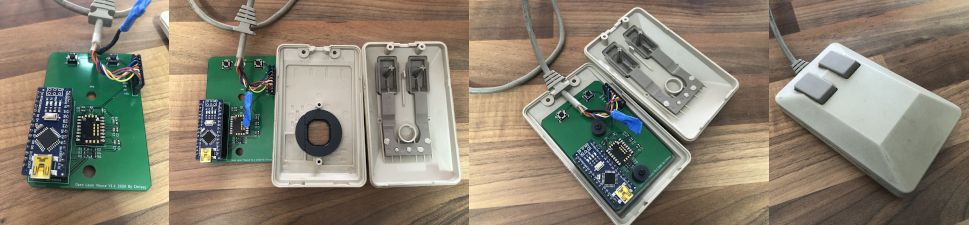
Version 1.4.1 Copyright 2020 Chrissy
Version 1.4 Copyright 2020 Chrissy
Version 1.3 Copyright 2020 Chrissy
Two versions of the PCB, a SMD version (v1.1 Tested, not v1.3 yet) and a THT version which is currently untested.
Requires an Arduino Nano and a ADNS9800 Laser, which you can get still get from Aliexpress. Make sure to also get the Lens.
Gerbers have been created from the recommendations at JLCPCB.
(https://support.jlcpcb.com/article/102-kicad-515---generating-gerber-and-drill-files)
You may need to re-generate for your chosen PCB Manufacturer
get the 1.2mm PCB Thickness or get smaller height tact switches if you use 1.6mm thickness. It is a tight tolerance between the tact switch mouse buttons and the posts on the mouse buttons.
3D Printable Lens Cover still requires testing, Sketchup model file is included to modify for tolerances of your printer.
Only for Amiga SMD Version at the moment
Print Settings
3D printed on a Ender 3 using Cura
A fully printable Amiga Tank Mouse is available here
Although looks tough to print :)
Don't Plug in the USB to the Arduino while connected to the Amiga/Computer, as this will join the 5V together and may damage something.
This is still a work in progress, use at your own risk. I accept no responsibility if this damages any of your equipment.
| Qty | Value | Footprint | References |
|---|---|---|---|
| 4 | 100nf | Capacitor_SMD:C_0805_2012Metric | C1, C3, C5, C8 |
| 3 | 1.8K | Resistor_SMD:R_0805_2012Metric | R1, R3, R5 |
| 3 | 3.3K | Resistor_SMD:R_0805_2012Metric | R2, R4, R6 |
| 2 | 10uF | Capacitor_SMD:C_0805_2012Metric | C2, C4 |
| 1 | 1uF | Capacitor_SMD:C_0805_2012Metric | C9 |
| 1 | 3.3uF | Capacitor_SMD:C_0805_2012Metric | C6 |
| 1 | 470pF | Capacitor_SMD:C_0805_2012Metric | C7 |
| 1 | ADNS-9800 | OptoDevice:ADNS-9800 | M1 |
| 1 | Amiga_Conn | Connector_PinHeader_2.54mm:PinHeader_1x08_P2.54mm_Vertical | J1 |
| 1 | Arduino_Nano_v3.x | Module:Arduino_Nano | A1 |
| 1 | IRLML6302TRPBF | Package_TO_SOT_SMD:SOT-23 | Q1 |
| 1 | LEFT | Button_Switch_THT:SW_PUSH_6mm | SW2 |
| 1 | Mouse Hole 1 | MountingHole:MountingHole_5.3mm_M5 | MH1 |
| 1 | Mouse Hole 2 | MountingHole:MountingHole_5.3mm_M5 | MHe |
| 1 | RIGHT | Button_Switch_THT:SW_PUSH_6mm | SW3 |
| 1 | SHEILD | Connector_Pin:Pin_D1.3mm_L11.0mm_LooseFit | SH1 |
chris-jh/OpenLaserMouse
Quadrature Optical Mouse Replacement Using an Arduino for the Amiga Tank Mouse

Board-Folk/PregnantLaserMouse
A optical mouse replacement pcb for the Amiga pregnant mouse

dotnet/iot
This repo includes .NET Core implementations for various IoT boards, chips, displays and PCBs.

pascallanger/DIY-Multiprotocol-TX-Module
Multiprotocol TX Module (or MULTI-Module) is a 2.4GHz transmitter module which controls many different receivers and models.


rusefi/rusefi
rusefi - GPL internal combustion engine control unit

DraftShift/StealthChanger
Tool changing system for Vorons and other front mount printer motion systems, not just stealthburner.

VoronDesign/Voron-Hardware
Cool Hardware designed by the Voron Design group

hackclub/OnBoard
💡 Join 1,000 teenagers and make your first PCB with a $100 grant!
It measures 56 × 84 mm and has 2 copper layers, 1.6 mm thick.
24 parts, built around the ADNS-9800 and IRLML6302TRPBF. The full list of its parts is on this page, with links to each part's symbol and footprint where PCBKit's library has them.
From the chris-jh/OpenLaserMouse repository on GitHub, at the commit this page was made from: the board is PCB/SMD/OpenLaserMouse.kicad_pcb. PCBKit opens the board in the browser, with nothing to install.
Its repository publishes it under the LGPL-3.0 licence: you may reuse it on that licence's terms (keep the author's notice, and for a copyleft licence share your changes alike).