2 layers78 × 77.7 mm
Speaker Stake
cablesquirrel/snapcast-speaker-stake
ESP32 Snapcast Client - Board Design + Pre-compiled Binaries
5 parts

 cablesquirrel/snapcast-speaker-stake
ESP32 Snapcast Client - Board Design + Pre-compiled Binaries
Speaker Stake v2.0.1 is an open-source printed circuit board by cablesquirrel, from the cablesquirrel/snapcast-speaker-stake repository on GitHub. It is a 2-layer board of 78 × 77.7 mm with 6 parts on 22 nets, routed with 45 tracks and 25 vias.
Its parts include 3 ICs, 1 diode and 1 connector. It belongs with the audio and music boards and the ESP32 boards of this library.
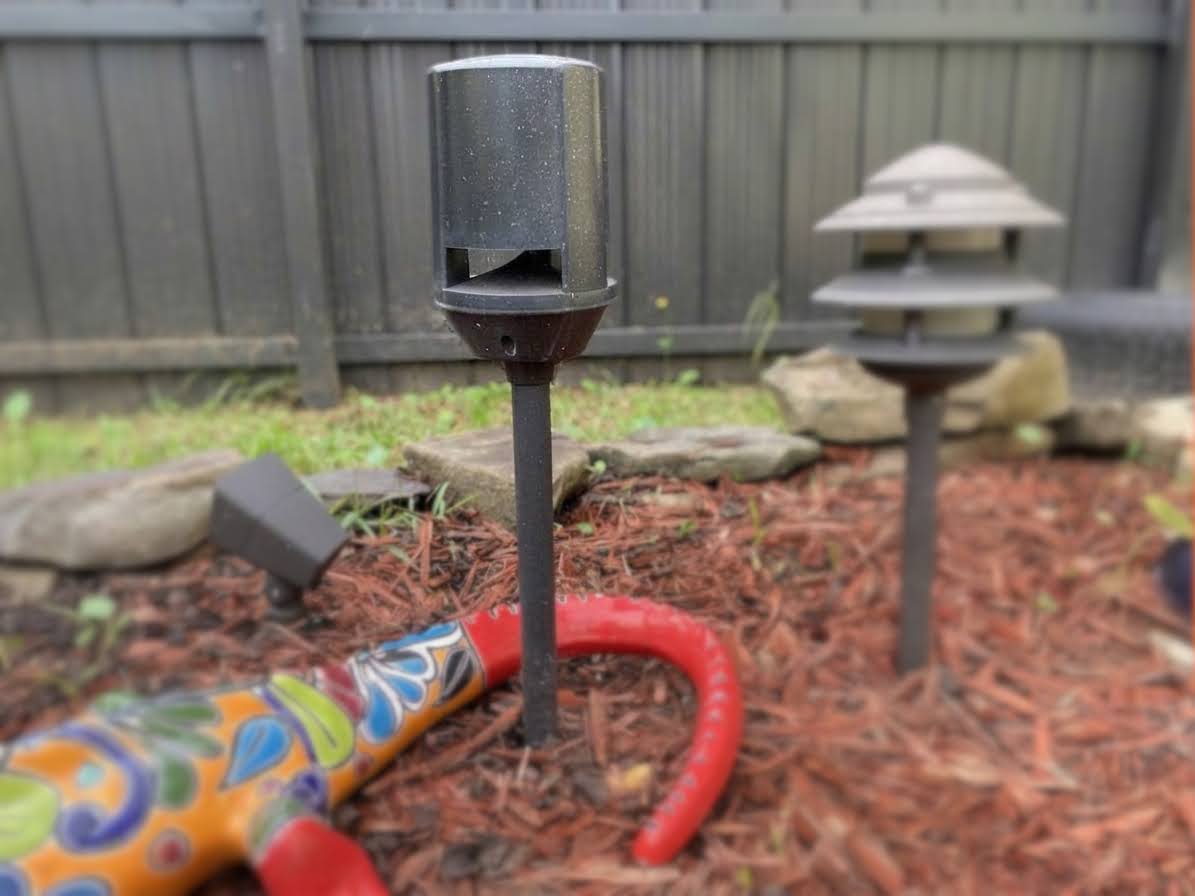
Hardware and firmware design to retrofit the Hampton Bay B0029RA outdoor Bluetooth speaker into a Snapcast client.
The design uses an ESP32-S3 (Seeed XIAO) along with a I2S DAC and 5-watt amplifier.
hardware/
  LICENSE          CERN-OHL-S-2.0
  libraries/       Footprint and symbol libraries used by both boards
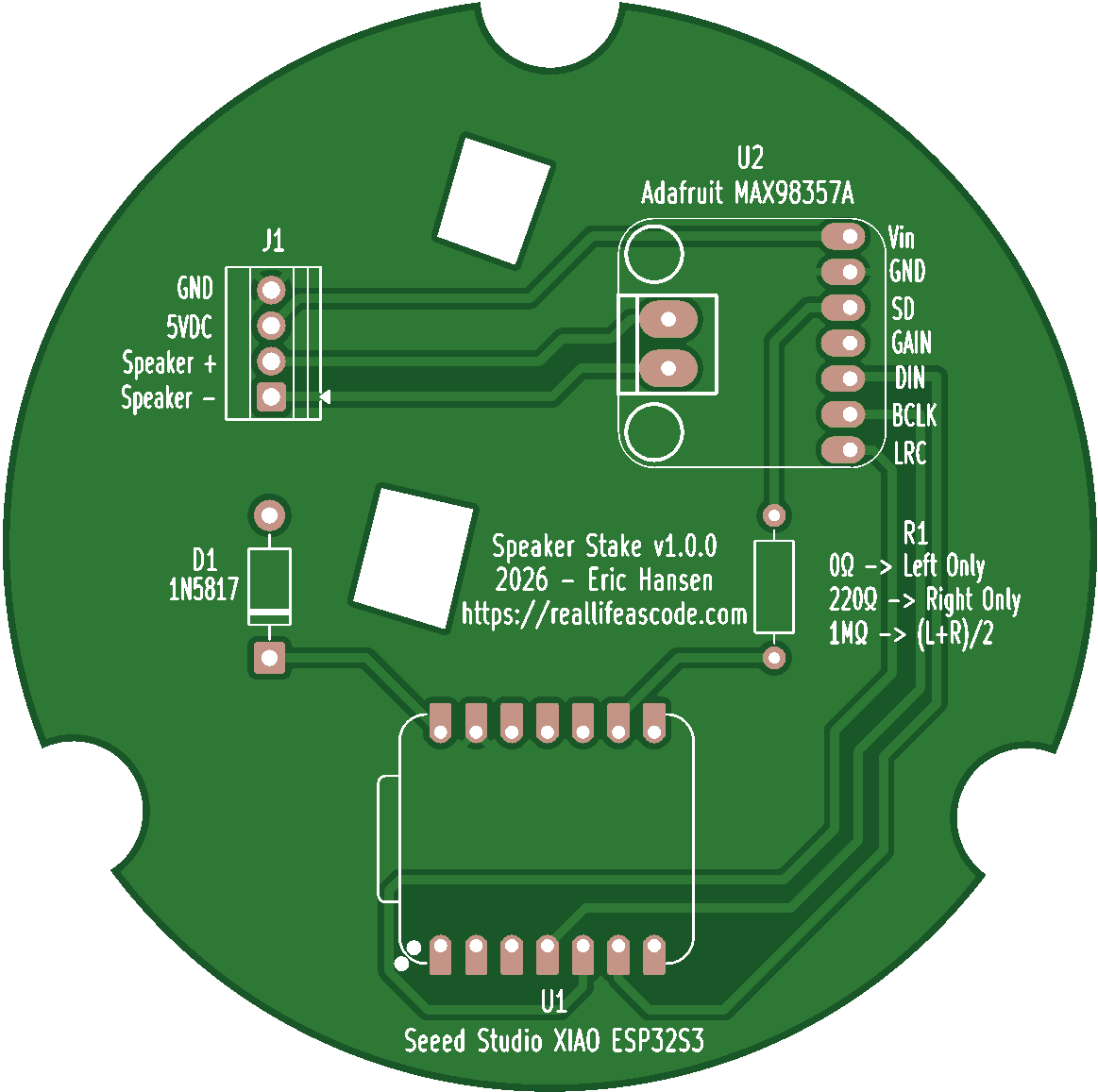
  v1/              KiCad project and Gerbers, original 3 W design (MAX98357A)
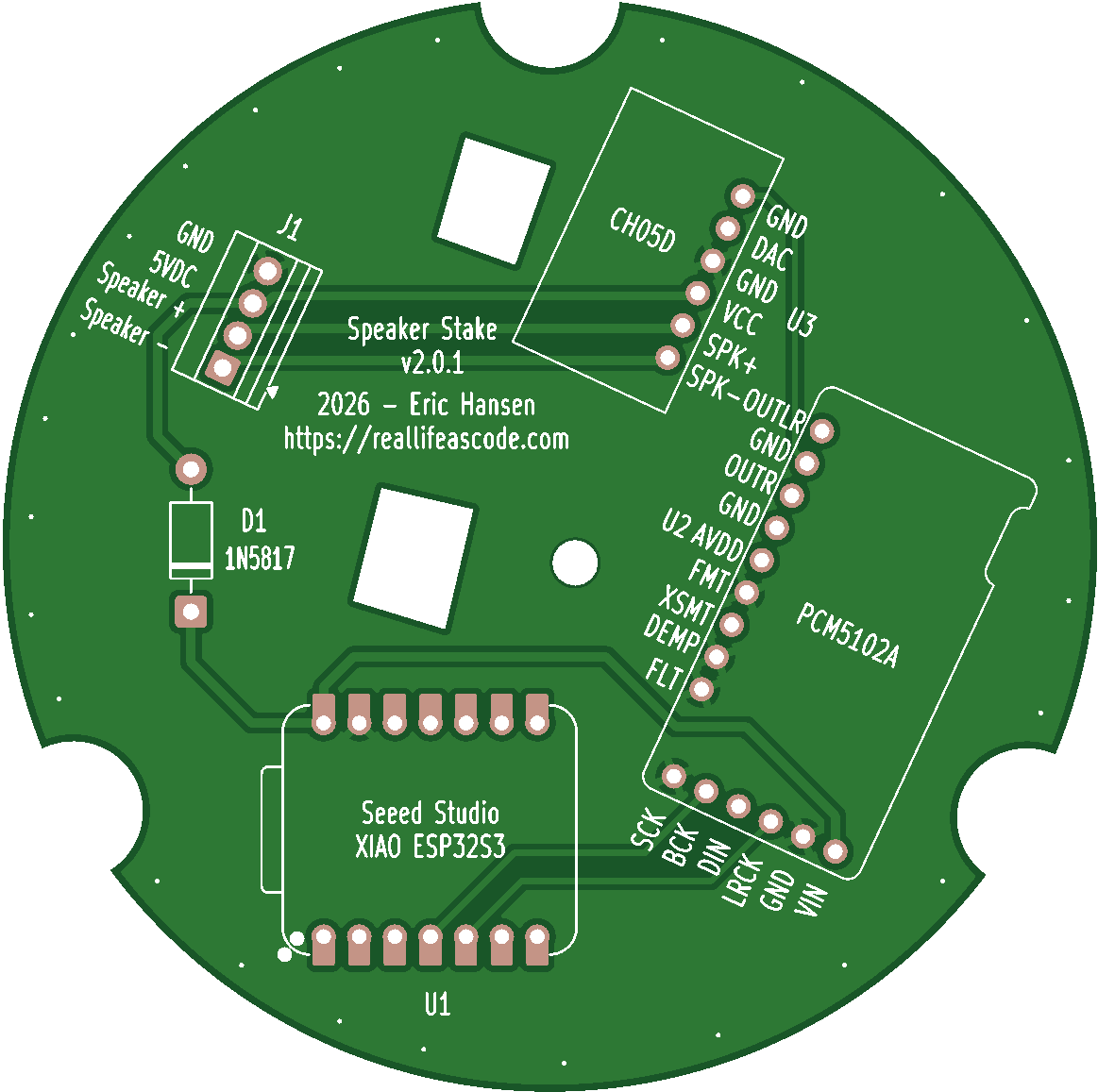
  v2.0.1/          KiCad project and Gerbers, 5 W design (GY-PCM5102A + CH05D)
firmware/
  snapclient/      Upstream firmware (submodule, pinned to 5cda3a7)
  patches/         upstream-changes.patch: our changes to four upstream files
  overlay/         New files we add (status_led component, speaker-stake sdkconfigs)
  CHANGES.md       Every file and line changed from upstream, with rationale
scripts/
  setup-firmware.ps1  Applies the patch and overlay to firmware/snapclient
releases/
  max98357_combo/  Prebuilt flash images for the 3 W flavor
pcm5102a_ch05d/ Prebuilt flash images for the 5 W flavor| Flavor | Hardware | Config | Release |
|---|---|---|---|
| 3 W combo | XIAO + MAX98357A | firmware/overlay/sdkconfig.max98357_combo | releases/max98357_combo/ |
 | |||
| 5 W separate | XIAO + GY-PCM5102A + CH05D | firmware/overlay/sdkconfig.pcm5102a_ch05d | releases/pcm5102a_ch05d/ |
 |
Both flavors are built from the same source tree. They differ only in DAC configuration. See firmware/CHANGES.md for the full list of changes from upstream.
Each release folder contains the four images needed for a full flash:
python -m esptool --chip esp32s3 -p COMx write_flash \
  0x0 bootloader.bin 0x8000 partition-table.bin 0x1d000 ota_data_initial.bin 0x20000 snapclient.bin
Replace COMx with the board's port. Run this from inside the release folder.
The firmware builds with ESP-IDF v5.5.1. Other versions are untested.
Install Git for Windows from https://git-scm.com/download/win if you don't have it.
Clone ESP-IDF v5.5.1 with submodules. This takes a while. In PowerShell:
mkdir C:\Espressif
cd C:\Espressif
git clone -b v5.5.1 --recursive https://github.com/espressif/esp-idf.git
Install the toolchain for the ESP32-S3:
cd C:\Espressif\esp-idf
.\install.ps1 esp32s3
This downloads the Xtensa compiler, CMake, Ninja, and a Python virtual environment. By default they go under %USERPROFILE%\.espressif. To put them elsewhere, set IDF_TOOLS_PATH before running the script, for example $env:IDF_TOOLS_PATH = "C:\Espressif\tools".
If PowerShell blocks the script, run Set-ExecutionPolicy -Scope CurrentUser RemoteSigned once and try again.
Activate the environment in every new terminal. From the esp-idf folder:
.\export.ps1If you set IDF_TOOLS_PATH in step 3, set it again in the terminal first.
Check the install:
idf.py --versionIt should print ESP-IDF v5.5.1.
Connect the board. The XIAO ESP32-S3 uses its built-in USB-C port, so no USB-serial driver is needed. If no COM port appears, try a different cable. Some cables only charge and don't carry data.
When idf.py --version works, continue to Build from source below.
First, clone the repo with its submodules and prepare the firmware. This only needs to be done once per clone:
git clone --recursive https://github.com/cablesquirrel/snapcast-speaker-stake
cd snapcast-speaker-stake
.\scripts\setup-firmware.ps1
The script checks out upstream at the pinned commit, applies firmware/patches/upstream-changes.patch, and copies in the overlay files. It is safe to run again.
Requires ESP-IDF 5.5.1 (see above). Build each flavor from firmware/snapclient into its own directory:
cd firmware\snapclient
idf.py -B build -D SDKCONFIG=sdkconfig.max98357_combo build
idf.py -B build.pcm5102a_ch05d -D SDKCONFIG=sdkconfig.pcm5102a_ch05d buildWith the device on the network, push a new app image to its OTA listener on port 8032. Use a direct file reference so curl sends a Content-Length header:
curl <device-ip>:8032 --data-binary @releases/pcm5102a_ch05d/snapclient.binThe connection is reset when the transfer completes. That is expected: the device reboots into the new image.
WiFi credentials are not compiled in. Provision them over USB-C with Improv WiFi (for example, web.esphome.io).
hardware/libraries/. Each project's fp-lib-table and sym-lib-table reference them with ${KIPRJMOD}/../libraries/, so the projects open from a fresh clone. Add the libraries to your global KiCad tables only if you need them outside these projects.hardware/libraries/ contains the Seeed XIAO series, GY-PCM5102A, CH05D (provisional, see its KNOWN_ISSUES), and Adafruit MAX98357A libraries as copied from the local KiCad setup.hardware/v2.0.1/KNOWN_ISSUES.md. That board was sent to fab with them.hardware/): CERN-OHL-S-2.0, the strongly reciprocal open-source hardware license. The GY-PCM5102A footprint in this project derives from a CERN-OHL-S library, and that license requires derivatives to stay under the same terms.firmware/): upstream CarlosDerSeher/snapclient is pulled in as a submodule under GPL-3.0 (see firmware/snapclient/LICENSE). Our changes are listed in firmware/CHANGES.md. Because they modify GPL-3.0 code, they are also GPL-3.0. The firmware overlay files (status_led and the sdkconfigs) are included in that same GPL-3.0 grant.adafruit-MAX98357.*) comes from besi/kicad-adafruit-MAX98357, and the Seeed XIAO library (Seeed_Studio_XIAO_Series.*) comes from Seeed Studio. The Seeed library is CC-BY-SA-4.0 (see hardware/libraries/LICENSES/). The Adafruit library has no declared license upstream and is included as-is, pending a takedown request if the owner objects. See hardware/libraries/README.md.| Qty | Value | Footprint | References |
|---|---|---|---|
| 1 | 1N5817 | Diode_THT:D_DO-41_SOD81_P10.16mm_Horizontal | D1 |
| 1 | CH05D | CH05D:CH05D | U3 |
| 1 | GY-PCM5102A | PCM5102A:GY-PCM5102A | U2 |
| 1 | Screw_Terminal_01x04 | TerminalBlock:TerminalBlock_Xinya_XY308-2.54-4P_1x04_P2.54mm_Horizontal | J1 |
| 1 | XIAO-ESP32-S3-SMD | XIAO ESP:XIAO-ESP32-S3-DIP | U1 |
The 5 most common of 6 parts.
cablesquirrel/snapcast-speaker-stake
ESP32 Snapcast Client - Board Design + Pre-compiled Binaries

byrantech/laptop
anyon_e, a highly integrated, high end, open source laptop. Attempt the impossible.


Jcparkyn/dpoint
Open-source digital stylus using camera tracking and inertial measurements

VoronDesign/Voron-Hardware
Cool Hardware designed by the Voron Design group

hoglet67/RGBtoHDMI
Bare-metal Raspberry Pi project that provides pixel-perfect sampling of Retro Computer RGB/YUV video and conversion to HDMI

hackclub/OnBoard
💡 Join 1,000 teenagers and make your first PCB with a $100 grant!

Luos-io/luos_engine
Open-source and real-time orchestrator for cyber-physical-systems, to easily design, test and deploy embedded applications and digital twins.

It measures 78 × 77.7 mm and has 2 copper layers, 1.6 mm thick.
6 parts. The full list of its parts is on this page, with links to each part's symbol and footprint where PCBKit's library has them.
From the cablesquirrel/snapcast-speaker-stake repository on GitHub, at the commit this page was made from: the board is hardware/v2.0.1/Speaker_Stake_v2.0.1.kicad_pcb and its schematic hardware/v1/Speaker_Stake.kicad_sch. PCBKit opens the board in the browser, with nothing to install.
Its repository states no licence, so its author keeps all rights: ask cablesquirrel before reusing the design.