2 layers37 × 19 mm
Passive rpi hub75-adapter
hzeller/rpi-rgb-led-matrix
Controlling up to three chains of 64x64, 32x32, 16x32 or similar RGB LED displays using Raspberry Pi GPIO
2 parts4.4kGPL-2.0
 burhop/wright10
A digital engineer, designer, and mechanical analyst
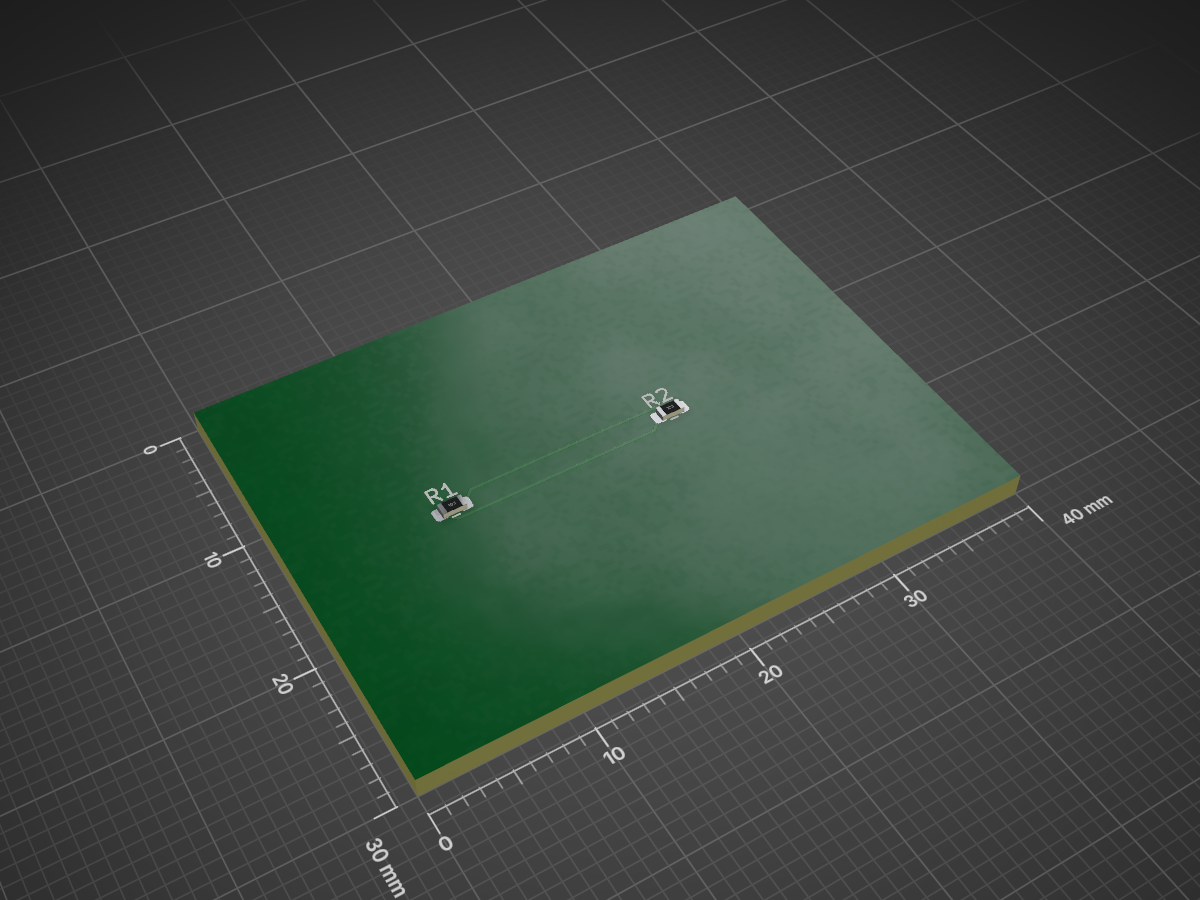
Probe is an open-source printed circuit board by burhop, from the burhop/wright repository on GitHub, published under the MIT licence. It is a 2-layer board of 40 × 30 mm with 2 parts on 2 nets, routed with 6 tracks and 0 vias.
It belongs with the sensors and measurement boards of this library.
Public-alpha, local-first agent orchestration for physical engineering.





Wright is alpha software for developer testing, MCP porting, demos, and selected beta feedback. Expect rough edges, incomplete workflows, and changing APIs.
The status badges above are pinned to the production branch, main. Integration
work happens on dev, so dev CI may fail while production remains green; use
the GitHub Actions branch filter when checking a specific branch.
Wright is bring-your-own-AI. The repository and Docker image do not bundle an
LLM, API key, local model, hosted model, or paid engineering backend. Configure
LLM_API_URL, LLM_API_KEY, and LLM_API_MODEL for an OpenAI-compatible
endpoint, a local model server, or a hosted provider.
MCP-specific host software such as FreeCAD, OpenSCAD, CalculiX, Blender, vendor CAD systems, license managers, or hardware drivers is installed only for the selected MCP validation or usage case. It is not part of the base Docker image. Engineering MCP server validation follows the clean-container process.
Engineering teams need AI-assisted workflows without handing every design to a single hosted black box. Wright coordinates agents and deterministic tools while leaving LLM/provider choice, credentials, licenses, and host software under the operator's control.
Engineers build a process with blocks, connections and source, then carry out that same process in a working view inside a Wright workspace tab. They can provide inputs, inspect designs and calculations, trace findings to their evidence, and respond at declared questions or review steps. An optional AI-created interface can present the job as a dashboard, comparison or guided sequence.
The workflow platform vision and process UI design keep these experiences on shared execution, validation and storage services. Engineering tools remain independent MCP providers. Manufacturing is one use; analysis, investigation and documentation can use different workflow structures.
The first public alpha is aimed at developers, MCP porters, demo users, and selected beta feedback. Local and hybrid deployments are supported, but real engineering toolchains still require explicit configuration.
The Docker appliance is not a complete CAD/CAE/CAM workstation and does not silently install every possible backend.
These descriptions cover the current development source. Published releases may lag it. The workflow editor and process views require their build configuration; see the current-source setup and user guide. Provider availability, licensing and engineering acceptance must be established for the selected workflow.
See the illustrated workspace guide and working-view reference for current controls, screenshots and limitations. Agent chat, workspace files and the tool registry support these journeys in the same workspace.
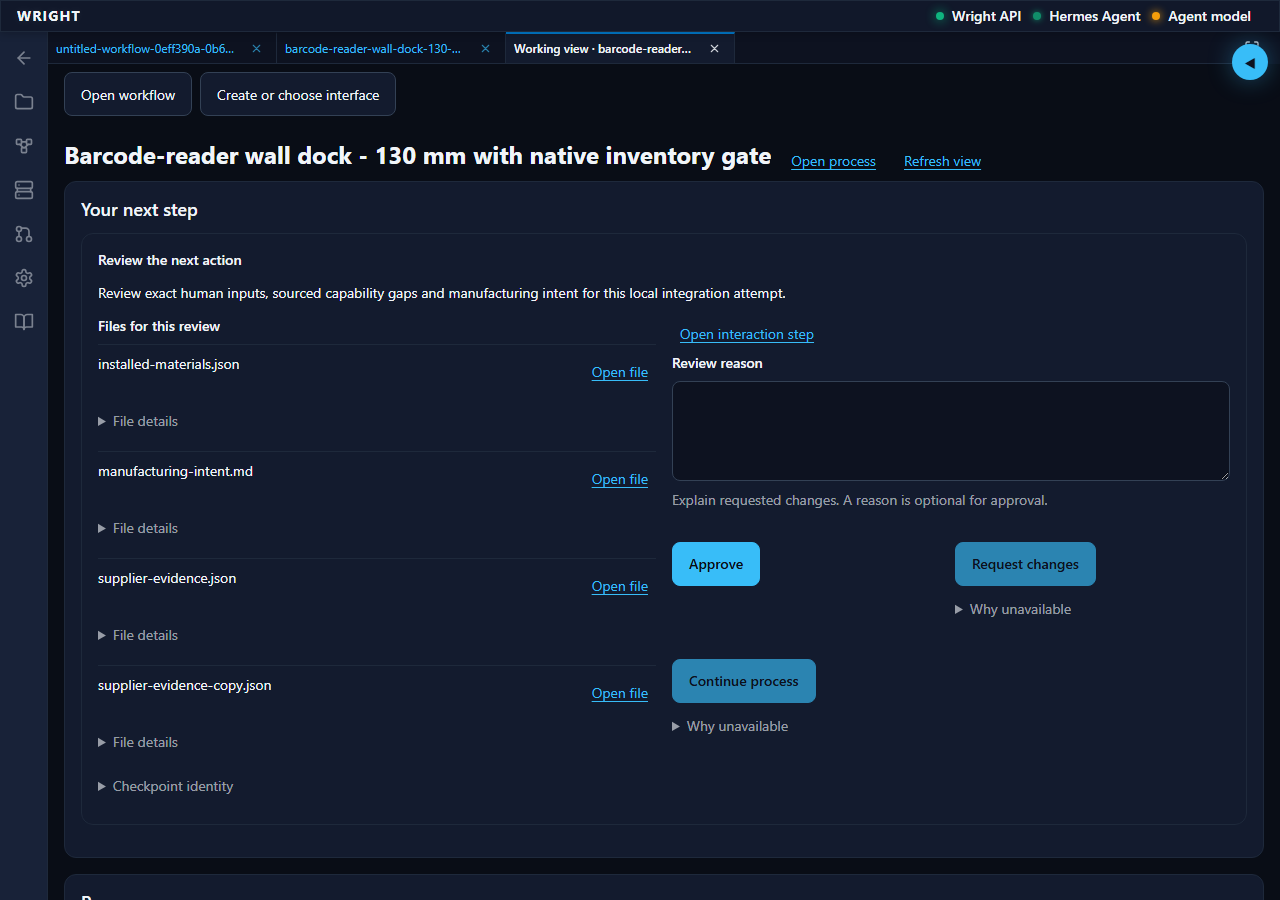
Current development UI: the saved process is waiting for its declared intent review. Evidence is available; the design has not been approved or manufactured.
Hermes is Wright's primary manager path. Hermes uses Git for plugin installation,
so Git is its one adapter prerequisite; Wright itself does not require Docker,
Node.js, npm, a Wright checkout, WRIGHT_REPO_DIR, or a manual Python package
command. Install the thin production adapter through Hermes:
hermes plugins install https://github.com/burhop/hermes-plugin-wright --enableThen use /wright start, /wright status, /wright doctor, /wright stop,
/wright update, /wright rollback, /wright uninstall, and the separately
confirmed /wright purge. See the
native Hermes guide for data behavior
and the live availability gate.
Docker is the mandatory turnkey path for users who want a working appliance
without Hermes setup. Published release images use burhop/wright:<tag> on Docker Hub and
ghcr.io/burhop/wright:<tag> on GHCR.
With a release image and an env file:
cp docker/.env.example docker/.env
# Edit docker/.env and set LLM_API_URL, LLM_API_KEY, and LLM_API_MODEL
docker run --rm -p 127.0.0.1:8080:8000 --env-file docker/.env burhop/wright:<tag>
From a source checkout while developing or before a release image is cut:
git clone https://github.com/burhop/wright.git
cd wright
cp docker/.env.example docker/.env
# Edit docker/.env and set LLM_API_URL, LLM_API_KEY, and LLM_API_MODEL
docker compose -f docker-compose.minimal.yml up -d --build
Then open:
http://localhost:8080The default docker-compose.yml also starts Jaeger and maps Wright to
http://localhost:8000. See the
Docker quickstart and
Docker deployment guide for LAN access, local model
server, persistent volume, and cleanup examples.
An experimental MCP-enabled appliance flavor is documented in the MCP Docker quickstart. It keeps the same Wright UI access pattern but uses separate default volumes and a reviewed MCP bundle. The managed platform image matrix is documented in the Docker image family guide.
For development outside Docker, see CONTRIBUTING.md.
Public release images are published as:
burhop/wright:<tag>
ghcr.io/burhop/wright:<tag>
wright-engineering is the one complete public application distribution used
by every supported manager adapter. The Hermes repository is a standard-library-only
Git adapter; Codex connects directly through an MCP profile. Neither adapter
duplicates Wright lifecycle or application code, and the public wheel
has no dependency on private wright-* packages.
Every production release requires both the published native Hermes lifecycle
and byte-identical Docker publication to GHCR and Docker Hub. Prerelease tags
such as v0.1.0-alpha.1 do not move latest; stable tags may.
Wright is a modular monorepo with a FastAPI gateway, React/Vite web UI, agent-neutral workspace services, Hermes and future runtime adapters, an MCP tool registry, and local workspace state.
Models, drawings, images and verification documents are kept in the workspace volume or checkout you control. Open them through Workspace Files or a workflow's results. SQLite stores durable run state and artifact references; files retain their exact revisions and remain available after a view closes.
flowchart TD
    User([User Web Browser]) -->|HTTP / WebSockets| API[FastAPI API Gateway]
    API -->|Thin HTTP translation| Workspace[Workspace Service]
    Workspace -->|Runtime selection and context| Agent[Agent Adapters]
    Workspace -->|Tool assignment and policy| MCP[MCP Tool Registry]
    API -->|Catalog and lifecycle reads| MCP
    Agent -->|Wright gateway protocol| MCP
    MCP -->|Selected server| Tools[CAD, CAE, CAM, calculators]
    API -->|State, files, and logs| LocalState[SQLite and local workspace files]
Hermes remains the default first-class adapter, but .hermes.md and
~/.hermes profile behavior lives in Hermes adapter/profile code. Generic
workspace lifecycle code delegates context materialization through
packages/agent_adapters contracts so OpenClaw and future engines can plug in
without inheriting Hermes file formats.
wright/
|-- apps/
|   |-- api/                    # FastAPI gateway
|   `-- web/                    # React + Vite frontend
|-- packages/
|   |-- core/                   # Shared domain models and logging
|   |-- agent_adapters/         # Adapter pattern for agent runtimes
|   |-- workspace_service/      # Workspace application use cases and local adapters
|   |-- tool_registry/          # MCP registry and validation logic
|   `-- data_vault/             # SQLite lifecycle, repositories, and secret storage
|-- hermes-plugin-wright/       # Wright Hermes plugin compatibility package
|-- tests/
|   |-- ui-integration/         # Playwright integration tests
|   `-- e2e/                    # Smoke and system tests
|-- docker/                     # Dockerfile and supervisord configuration
|-- docs/                       # Documentation site content and runbooks
|-- specs/                      # Spec Kit feature artifacts
`-- .github/                   # Community templates and CI workflows
Refer to docs/virtual_engineer_architecture.pdf for the formal architecture analysis and constitution.md for core project engineering standards.
Run the main local quality gates:
uv run --extra runtime --extra engineering-models python -m pytest
uv run ruff check apps/api/ packages/
uv run ruff format --check apps/api/ packages/
npm ci
npx -w apps/web eslint .
npx prettier --check apps/web/
npx tsc --noEmit -p apps/web/tsconfig.app.json
npm run test --workspace=apps/web
npm run build --workspace=apps/web
mkdocs build --strict
Run repository-wide and history-sensitive checks from a full clone. If an
existing checkout is shallow, fetch the missing history first with
git fetch --unshallow (or use git fetch --depth=<larger-number> when a full
history download is impractical).
Helper scripts live in scripts/, including public-alpha leak scans, Docker smoke tests, CI failure log fetching, and release checks.
Wright uses spec-kit for design-led
feature work. Most substantive changes should start with a feature spec, plan,
tasks, and implementation checklist under specs/.
Contributions are welcome. Please read CONTRIBUTING.md for local setup, branch discipline, testing, pull request expectations, and the Spec Kit workflow.
Looking for a place to start? Browse issues labeled
good-first-issue.
wright@makerengineer.com.Wright is open source, but integration testing, model evaluation, and engineering tool adapters require ongoing resources.
This project is licensed under the MIT License. See LICENSE.
| Qty | Value | Footprint | References |
|---|---|---|---|
| 2 | 10k | R_0603_1608Metric | R1, R2 |
It measures 40 × 30 mm and has 2 copper layers, 1.6 mm thick.
2 parts. The full list of its parts is on this page, with links to each part's symbol and footprint where PCBKit's library has them.
From the burhop/wright repository on GitHub, at the commit this page was made from: the board is docs/mcp-catalog/evidence/kicad-2026-09-12/probe.kicad_pcb and its schematic artifacts/campaign-example-renewal/qualification/harness-native-20260922/01/harness.kicad_sch. PCBKit opens the board in the browser, with nothing to install.
Its repository publishes it under the MIT licence: you may reuse it on that licence's terms (keep the author's notice, and for a copyleft licence share your changes alike).
hzeller/rpi-rgb-led-matrix
Controlling up to three chains of 64x64, 32x32, 16x32 or similar RGB LED displays using Raspberry Pi GPIO


adamws/kicad-kbplacer
KiCad plugin for automatic keyboard's key placement and routing

Luos-io/luos_engine
Open-source and real-time orchestrator for cyber-physical-systems, to easily design, test and deploy embedded applications and digital twins.

NVNTLabs/switch2-SDEX2M2
Micro SD Express to M.2 NVME Adapter for Nintendo Switch 2

BlueSCSI/BlueSCSI-v2
BlueSCSI v2/Ultra - an open source, open hardware, SCSI emulator using the Pi Pico PR2040 and Pico 2 RP2350

ohmtech-rdi/eurorack-blocks
Software to Hardware Prototyping for Eurorack using C++, Max/Gen~ or Faust
