2 layers56 × 65 mm
SeaTalk1
dotnet/iot
This repo includes .NET Core implementations for various IoT boards, chips, displays and PCBs.
24 parts2.4kMIT

 bugcounting/nezoba
A custom button-only game controller for NS and PC.
Nezoba is an open-source printed circuit board by bugcounting, from the bugcounting/nezoba repository on GitHub, published under the GPL-3.0 licence. It is a 2-layer board of 178.9 × 103.8 mm with 24 parts on 23 nets, routed with 112 tracks and 2 vias.
It belongs with the keyboards and input boards of this library.
The Nez-Oba1 project provides the schematics of a fully-programmable all-button wired game controller board, as well as software to program the controller's behavior to emulate a standard gamepad, and to reconfigure its button layout.
The controller software works with Nintendo Switch (as a Pro Controller), as well as with PC/Raspberry PI (as a generic USB controller). While it can be used, in principle, for any game, it is primarily intended to play 2D games that require precise button and D-pad input — such as platformers.
Proficiency at 2D platforming games (Super Mario Maker 2, Celeste, Super Meat Boy, Levelhead, Super Mario Bros. Wonder, Slime-san, Super One More Jump, ...) requires being able to precisely enter complex button and directional inputs. A standard gamepad is not ideal for this because:2
It usually has membrane button switches, which provide a suboptimal feedback and may not be as precise as mechanical switches.
Its button layout requires to frequently move fingers (especially thumbs) from one button to the other. In contrast, an all-button/button-only/hitbox style controller minimizes hand and finger movement, and simplifies reliably entering complex presses.
There are numerous all-button controllers for PCs, and a few even work with the Nintendo Switch. In particular, I like the Junk Food Arcades' Snack Box Micro, as well as 8bitdo's Arcade Stick modded with MyrzArcade's L-shaped T-Spin (see also OmniArcade's Odin if you like the WASD layout). The Edgeguard keyboard adapter also looks great. However, none of these options supports switching between different programmable button layouts without reconfiguring the board's software; their default layout is not ideal for games like SMM2; and the distance between buttons is somewhat wide, which can make repeatedly pressing certain button combinations unconformable in the long run.
Hence, I went down this rabbit hole starting in the fall of 2021. The first (and, so far, only) two fully working Nez-Oba game controllers were completed in March 2022, and I've been using them with gusto ever since.
After that, I worked on and off to improve the software, develop a usable web-based GUI for definining the custom mappings, and to provide detailed documentation. While there are still plenty of things that could be improved, this is the first public release of the whole project.3
This is what the Nez-Oba game controller looks like IRL (this is the version with black case and red linear Kahil low-profile switches):
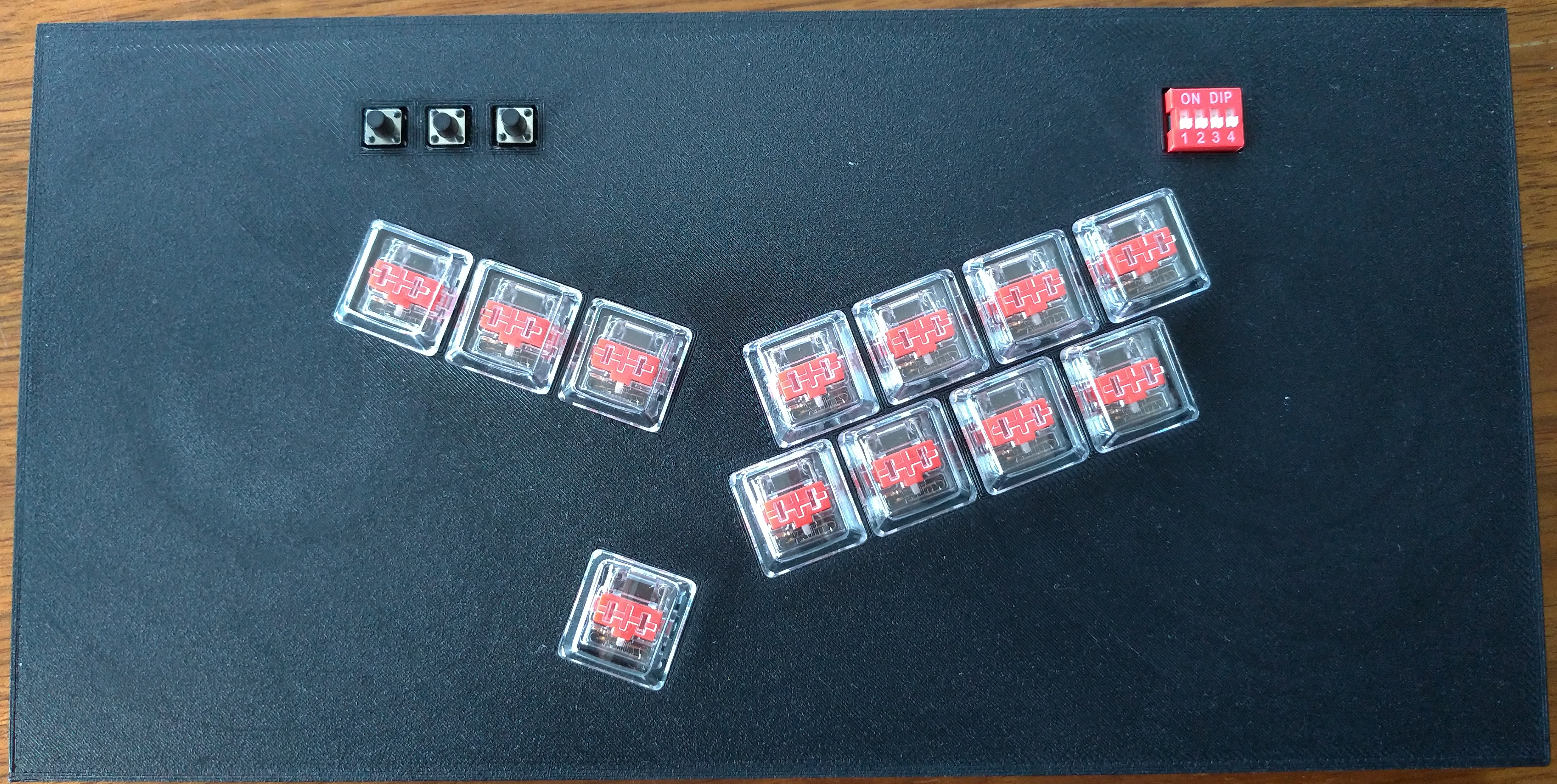
Its main features:
Game controller board with twelve mechanical switches (as well as three auxiliary switches) and tight, comfortable physical layout.
Fully remappable layout with capacity to store sixteen different button-to-key-press mappings.
Each physical button can map to a combination of up to three simultaneous key presses.
Support for turbo functionality (fast repeated key presses).
The Nez-Oba projects includes both hardware and software components.
Under hw/kicad/ you will find:
PCB schematics of the Nez-Oba board and how to manufacture them
A list of components that have to be soldered onto the board
You will also need a USB-micro-to-USB-A cable to connect the board's controller to the Switch or PC.
Under hw/case/ you will find 3D models of a case for the game controller board, which you can 3D-print.
The Nez-Oba software is actually in two parts:
An Arduino project in C/C++ with the software that runs on the board's microcontroller.
A Python project to configure the button-to-key-press mappings that the on-board software supports.
The Python project is the single entry point to all software, since it also provides commands to configure, compile, and upload the microcontroller software.
You install this software as a regular Python project. As usual, it's recommended that you create a virtual environment to install dependencies more easily:
python3 -m venv venv
source vent/bin/activate
python3 -m pip install --upgrade pip
Then, there are different options to install the software:
python3 -m pip install git+https://github.com/bugcounting/nezobagit clone https://github.com/bugcounting/nezoba
cd nezoba
python3 -m pip install .Download
[/releases/latest/](latest
release wheel nezoba*.whl) and install it:
python3 -m pip install "$NEZOBA.whl"You can also avoid downloading dependencies by using the /releases/latest/:
tar xf "$NEZOBA.wheels.tgz"
python3 -m pip install wheels/nezoba-*.whl --find-links=./wheelsCommand nezoba is the entry point for using the whole
software. Start with nezoba -h.
A common workflow:
Have a look at the default button-to-key-presses mappings that I
defined for 2d platformers: nezoba show.
If you want to define your own mappings, start the GUI with:
nezoba gui (the GUI will appear at
http://127.0.0.1:8000/). Alternatively, there's a simpler CLI
shell that supports similar functionality: nezoba cli $MAPPINGS_YAML.
Setup the Arduino compiler and libraries with nezoba setup "$SYSTEM_DIR", where $SYSTEM_DIR is the directory where you want
to install them.
Alternatively, among the [/releases/latest/](release files) you
will also find an archive arduino-cli-4nez.tar.xz that includes a
fully setup environment for Linux systems. Unpacking the content of
that archive under $SYSTEM_DIR is an equivalent way of setting up
your system.
Deploy the controller's software with your YAML mappings
$MAPPINGS: nezoba deploy "$SYSTEM_DIR" "$MAPPINGS". If you omit
$MAPPINGS, the default mappings for 2d platformers will be
deployed.
The deploy command will finally upload to the board. For this to
work, the board has to be plugged in to a USB port of the computer,
and it may have to be reset. See the troubleshooting
section for a few practical
tips.
If you want to test the installation of the Nez-Oba software, and possibly change or extend its functionalities:
# Install the `test` target in editable mode
python3 -m pip install -e .[test]
# Run the Python tests
cd test/nezoba
pytest .
# Run the Arduino software tests
cd test/board
make test
./testWhat does the acronym "Nez-Oba" mean? I'm afraid I don't remember :-/ ↩
Of course, top players make the most out of regular controller. On the other hand, Niftski, the top Mario Bros. speedrunner at the time of writing, often uses a mechanical keyboard! ↩
The dev repository includes nearly 900 commits in 120 days over more than 3 years! ↩
| Qty | Value | Footprint | References |
|---|---|---|---|
| 12 | SW_DIP_x01_Kailh_Choc_Red | nez-footprints:Kailh_Choc_LowProfile_CPG135001D02 | SW.A1, SW.B1, SW.down1, SW.L1, SW.left1, SW.R1, SW.right1, SW.up1, SW.X1, SW.Y1, SW.ZL1, SW.ZR1 |
| 3 | SW_DIP_x01_tactile | nez-footprints:SW_SPST_B3S-1000 | SW.-1, SW.+1, SW.home1 |
| 2 | R_US | nez-footprints:R_LDR_P12mm_narrow | R.4.7k1, R.4.7k2 |
| 1 | MCP23017-E_SP | nez-footprints:DIP-28_W7.62mm | MCP1 |
| 1 | SW_DIP_x04 | nez-footprints:SW_DIP_SPSTx04_Slide_6.7x11.72mm_W7.8mm_P2.54mm | CFG1 |
| 1 | TrinketM0 | nez-footprints:Trinket_M0 | Trinket1 |
The 20 most common of 24 parts.
It measures 178.9 × 103.8 mm and has 2 copper layers, 1.6 mm thick.
24 parts. The full list of its parts is on this page, with links to each part's symbol and footprint where PCBKit's library has them.
From the bugcounting/nezoba repository on GitHub, at the commit this page was made from: the board is hw/kicad/nez-oba/nez-oba.kicad_pcb. PCBKit opens the board in the browser, with nothing to install.
Its repository publishes it under the GPL-3.0 licence: you may reuse it on that licence's terms (keep the author's notice, and for a copyleft licence share your changes alike).
dotnet/iot
This repo includes .NET Core implementations for various IoT boards, chips, displays and PCBs.

pascallanger/DIY-Multiprotocol-TX-Module
Multiprotocol TX Module (or MULTI-Module) is a 2.4GHz transmitter module which controls many different receivers and models.


rusefi/rusefi
rusefi - GPL internal combustion engine control unit

DraftShift/StealthChanger
Tool changing system for Vorons and other front mount printer motion systems, not just stealthburner.

VoronDesign/Voron-Hardware
Cool Hardware designed by the Voron Design group

hackclub/OnBoard
💡 Join 1,000 teenagers and make your first PCB with a $100 grant!
