Skip to the content
2 layers164.4 × 79 mmOmni X II PCB, the printed circuit board in 3D

Omni X II PCB

brodenn/RoboRacer

Welcome to the RoboRacer project! This repository contains the full stack for the Omnix robot platform, including embedded firmware, Python-based visualization and configuration tools, and supporting documentation.

Size
164.4 × 79 mm
Copper layers
2
Thickness
1.6 mm
Parts
23
Nets
95
Pads
141
Tracks, vias
219, 13
Routed
Yes
KiCad
KiCad 9.0 (file 20241229)
Created
10 Jan 2025
Updated
4 Jul 2025

Overview

Omni X II PCB is an open-source printed circuit board by brodenn, from the brodenn/RoboRacer repository on GitHub. It is a 2-layer board of 164.4 × 79 mm with 23 parts on 95 nets, routed with 219 tracks and 13 vias.

Its parts include 9 connectors and 3 switches. It belongs with the ESP32 boards of this library.

README

README.md

RoboRacer

📄 Download the full report: Report ghost divsion.pdf

Welcome to the RoboRacer project! This repository contains the full stack for the Omnix robot platform, including embedded firmware, Python-based visualization and configuration tools, and supporting documentation.


Project Images

Robots
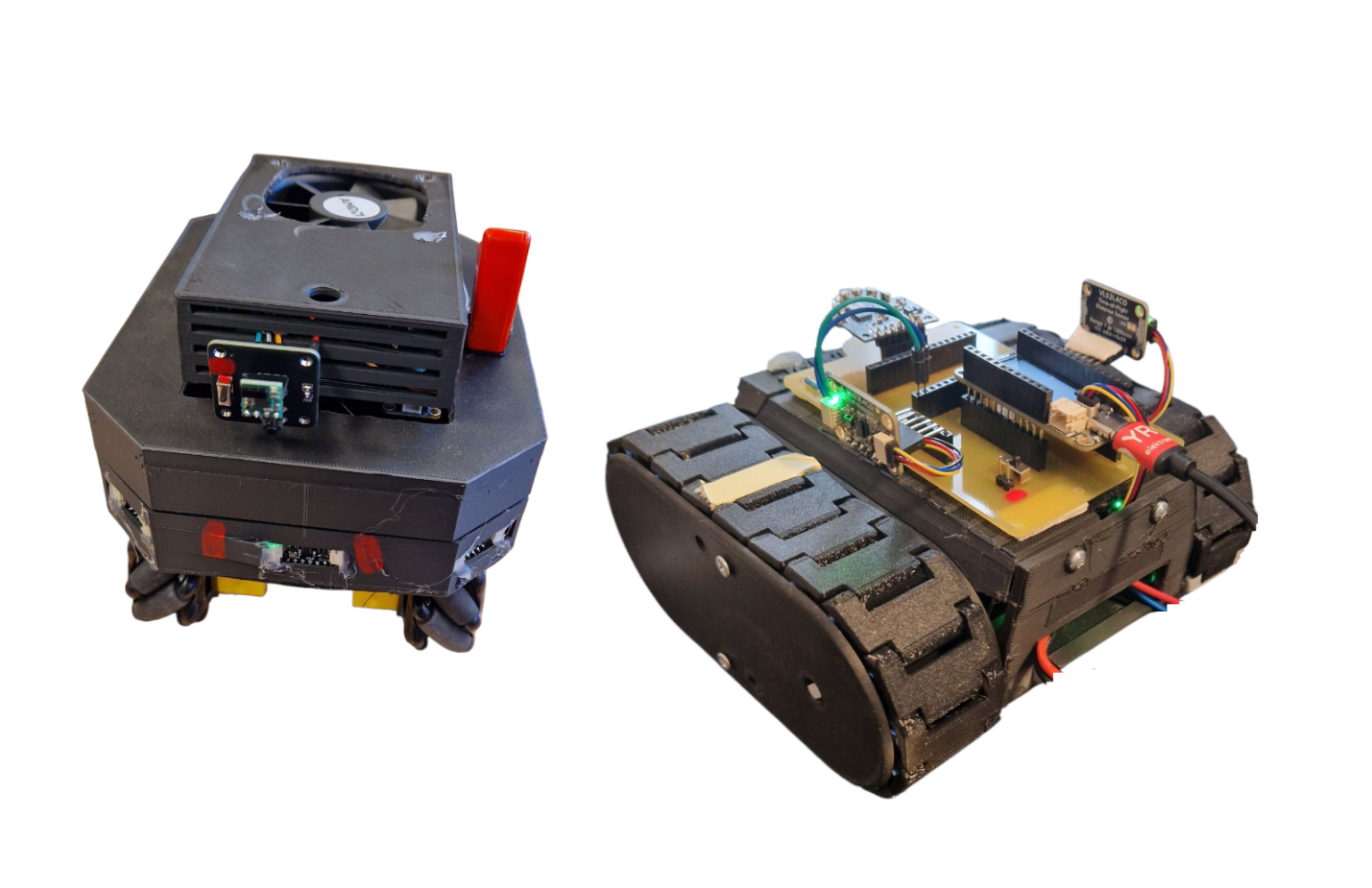
Robots


Omnix Overview

The omnix robot is a core vehicle in the RoboRacer project, equipped with omni wheels for enhanced maneuverability. It handles sensor management, motor control, AI steering, and wireless communication, and is supported by a Python toolkit for visualization and configuration.


Directory Structure

  • ai.cpp / ai.h: AI steering logic for autonomous navigation.
  • controller.cpp / controller.h: Gamepad/controller input management.
  • globals.cpp / globals.h: Global variables and constants.
  • imu.cpp / imu.h: IMU (Inertial Measurement Unit) initialization and data reading.
  • interrupts.cpp / interrupts.h: Sensor interrupt configuration and management.
  • motors.cpp / motors.h: Motor initialization and control.
  • mux.cpp / mux.h: I2C multiplexer for sensor communication.
  • params.cpp / params.h: Steering and sensor parameter management.
  • sensors.cpp / sensors.h: Sensor initialization, reading, and management.
  • tasks.cpp / tasks.h: FreeRTOS tasks for sensors, motors, and logic.
  • udp_handler.cpp / udp_comm.h: UDP communication for parameters and telemetry.
  • udp_sender.cpp: Telemetry data transmission over UDP.
  • wifi_setup.cpp / wifi_setup.h: WiFi and UDP setup.
  • xshut.cpp / xshut.h: Sensor power control via GPIO.
  • omnix_py/: Python scripts for visualization, configuration, and debugging.

Python Toolkit Overview

The omnix_py directory provides Python scripts that complement the robot's firmware:

  • main.py: Entry point for the Python tools (UI and visualizer).
  • udp_comm.py: UDP communication for telemetry and commands.
  • ui.py: Tkinter-based GUI for parameter tuning and monitoring.
  • visualizer.py: Pygame-based visualization of sensor and IMU data.
  • config.py: Shared configuration (ports, IPs, parameters).
  • logger.py: Telemetry and sensor data logging to CSV.

Key Features

  • Omni Wheels: Smooth, precise movement in any direction.
  • Sensor Management: Multiple VL53L4CD sensors via I2C multiplexers.
  • Motor Control: Smooth updates and autonomous driving logic.
  • AI Steering: Wall centering, curve anticipation, and obstacle avoidance.
  • Wireless Communication: Real-time telemetry and parameter updates via UDP.
  • IMU Integration: Acceleration, gyroscope, and temperature data.
  • Python Tools: UI for parameter tuning and real-time telemetry visualization.

Setup Instructions

  1. Initialize the I2C buses and configure the multiplexer.
  2. Set up sensors, motors, and WiFi.
  3. Start FreeRTOS tasks for sensor reading, motor control, and auxiliary logic.
  4. Run the Python tools using python3 main.py in the omnix_py directory.

Usage

  • Autonomous Mode: AI steering logic controls the motors based on sensor data.
  • Controller Mode: Use a gamepad for manual control.
  • Python Tools: Tune parameters and monitor telemetry in real time.

Dependencies


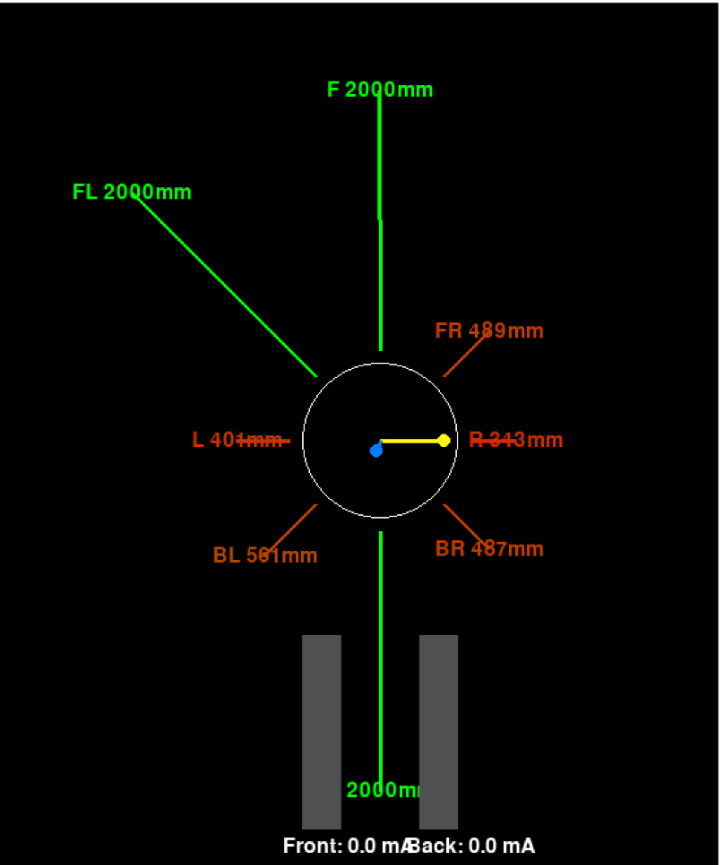
Visualizer Example

Visualizer


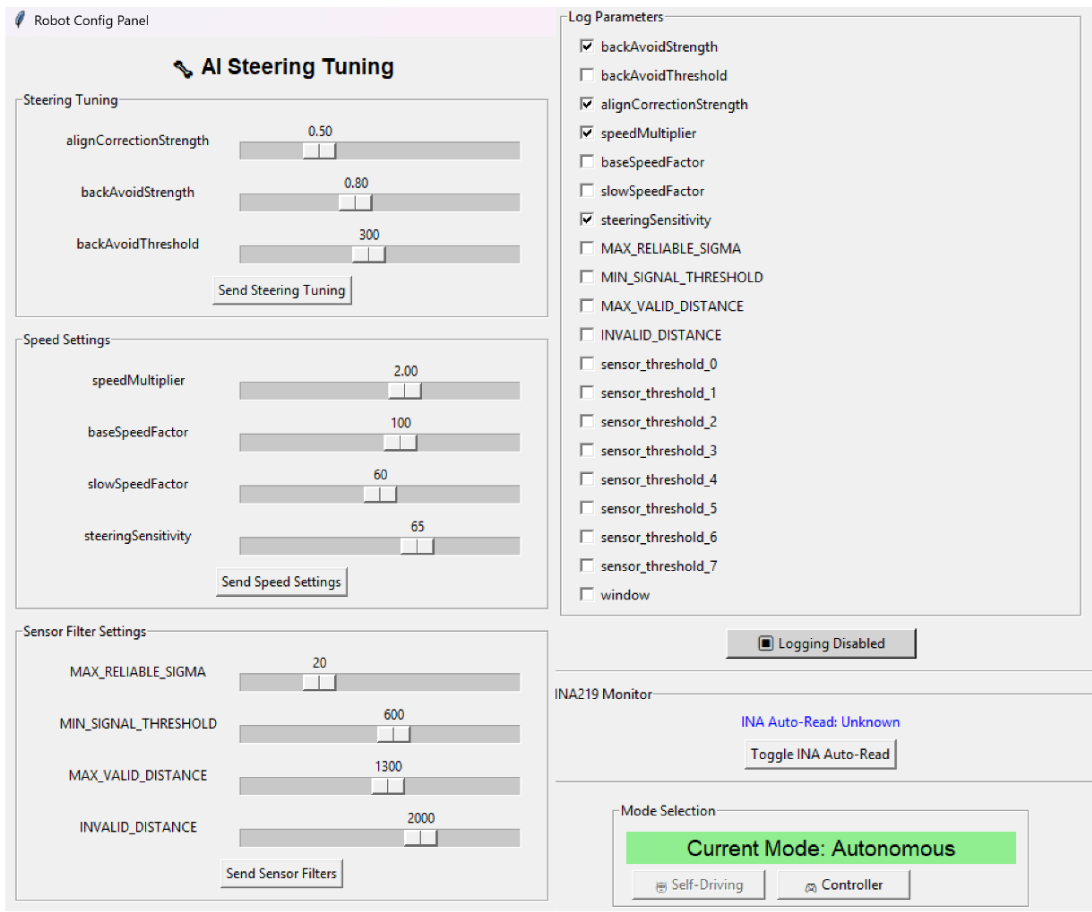
Configuration GUI

GUI

Parts

23
QtyValueFootprintReferences
8Conn_01x01_PinConnector_PinHeader_2.54mm:PinHeader_1x01_P2.54mm_VerticalJX-Shut_FL1, X-Shut__FR1, X-Shut_Back1, X-Shut_BL1, X-Shut_BR1, X-Shut_F1, X-Shut_LEFT1, X-Shut_R1
2Conn_01x06_INA219Connector_PinSocket_2.54mm:PinSocket_1x06_P2.54mm_VerticalJ1, J2
2SW_Wuerth_450301014042Button_Switch_THT:SW_Slide-03_Wuerth-WS-SLTV_10x2.5x6.4_P2.54mmSW1, SW2
1Adafruit_Feather_Front_M-ShieldModule:Adafruit_FeatherA2
1Adafruit_Feather_HUZZAH32_ESP32Module:Adafruit_FeatherA1
1Adafruit_Feather_Rear_M-ShieldModule:Adafruit_FeatherA3
1C-P_KS_PinsConnector_PinHeader_2.54mm:PinHeader_1x04_P2.54mm_VerticalJ6
1C-P_Kill_SwitchConnector_PinHeader_2.54mm:PinHeader_1x04_P2.54mm_VerticalJ5
1Conn_01x02_SocketConnector_PinHeader_2.54mm:PinHeader_1x02_P2.54mm_VerticalJ10
1Conn_01x09_GYROConnector_PinSocket_2.54mm:PinSocket_1x09_P2.54mm_VerticalJ3
1ESP32-BatteryConnector_JST:JST_EH_B2B-EH-A_1x02_P2.50mm_VerticalJ4
1Kill_Switch_ConnConnector_PinHeader_2.54mm:PinHeader_1x04_P2.54mm_VerticalJ7
1RESET_Conn.Connector_PinHeader_2.54mm:PinHeader_1x02_P2.54mm_VerticalJ8
1RESET_SWMilads_Library:Tac_Switch_THTSW3

More from brodenn/RoboRacer

1
  • 2 layers121 × 70 mmPanzer PCB, the printed circuit board in 3D

    Panzer PCB

    brodenn/RoboRacer

    Welcome to the RoboRacer project! This repository contains the full stack for the Omnix robot platform, including embedded firmware, Python-based visualization and configuration tools, and supporting documentation.

    16 parts

Similar boards

  • 2 layers65 × 56 mmPi servo hat, the printed circuit board in 3D

    Pi servo hat

    earthtojake/text-to-cad

    Design physical products with AI

    23 parts26kMIT
  • 2 layers14 × 100 mmYunomi, the printed circuit board in 3D

    Yunomi

    google/mozc-devices

    Circuit diagrams and firmware source code for Gboard DIY keyboards

    23 parts3kApache-2.0
  • 2 layers50.8 × 52.2 mmFuhhni, the printed circuit board in 3D

    Fuhhni

    hackclub/OnBoard

    💡 Join 1,000 teenagers and make your first PCB with a $100 grant!

    23 parts915
  • 2 layers138.8 × 89.8 mmKeyboard pcb, the printed circuit board in 3D

    Keyboard pcb

    diepala/cantor

    Cantor keyboard, a 42 key diodeless split keyboard.

    23 parts756GPL-3.0
  • 2 layers32.9 × 53.3 mmGoatgdo, the printed circuit board in 3D

    Goatgdo

    Kaldek/rat-ratgdo

    Open source schematics for ratgdo PCB

    23 parts511MIT
  • 2 layers35.5 × 50 mmTobo, the printed circuit board in 3D

    Tobo

    kelu124/echomods

    Open source ultrasound processing modules and building blocks

    23 parts463
  • 2 layers19 × 19 mmKeybit, the printed circuit board in 3D

    Keybit

    notaroomba/keybytes

    A truly modular keyboard

    23 parts444
  • 2 layers88.5 × 28 mmExpBreakout, the printed circuit board in 3D

    ExpBreakout

    Duet3D/Duet-2-Hardware

    The KiCAD source for the Duet 3d printer controller see www.duet3d.com

    23 parts258

Questions

How big is the Omni X II PCB PCB?

It measures 164.4 × 79 mm and has 2 copper layers, 1.6 mm thick.

What parts does the Omni X II PCB use?

23 parts. The full list of its parts is on this page, with links to each part's symbol and footprint where PCBKit's library has them.

Where can I download the Omni X II PCB KiCad files?

From the brodenn/RoboRacer repository on GitHub, at the commit this page was made from: the board is Omni_X-PCB/Omni-X-II-PCB/Omni-X-II-PCB.kicad_pcb and its schematic Omni_X-PCB/Omni-X-II-PCB/Omni-X-II-PCB.kicad_sch. PCBKit opens the board in the browser, with nothing to install.

Can I use the Omni X II PCB design in my own project?

Its repository states no licence, so its author keeps all rights: ask brodenn before reusing the design.