2 layers57 × 55.2 mm
LogicAnalyzer
gusmanb/logicanalyzer
24 channel, 100Msps logic analyzer hardware and software
10 parts5.1kGPL-3.0
 bitzombie1/ShyBot22
Ver 2 of Joel Hobbie's sculpture code
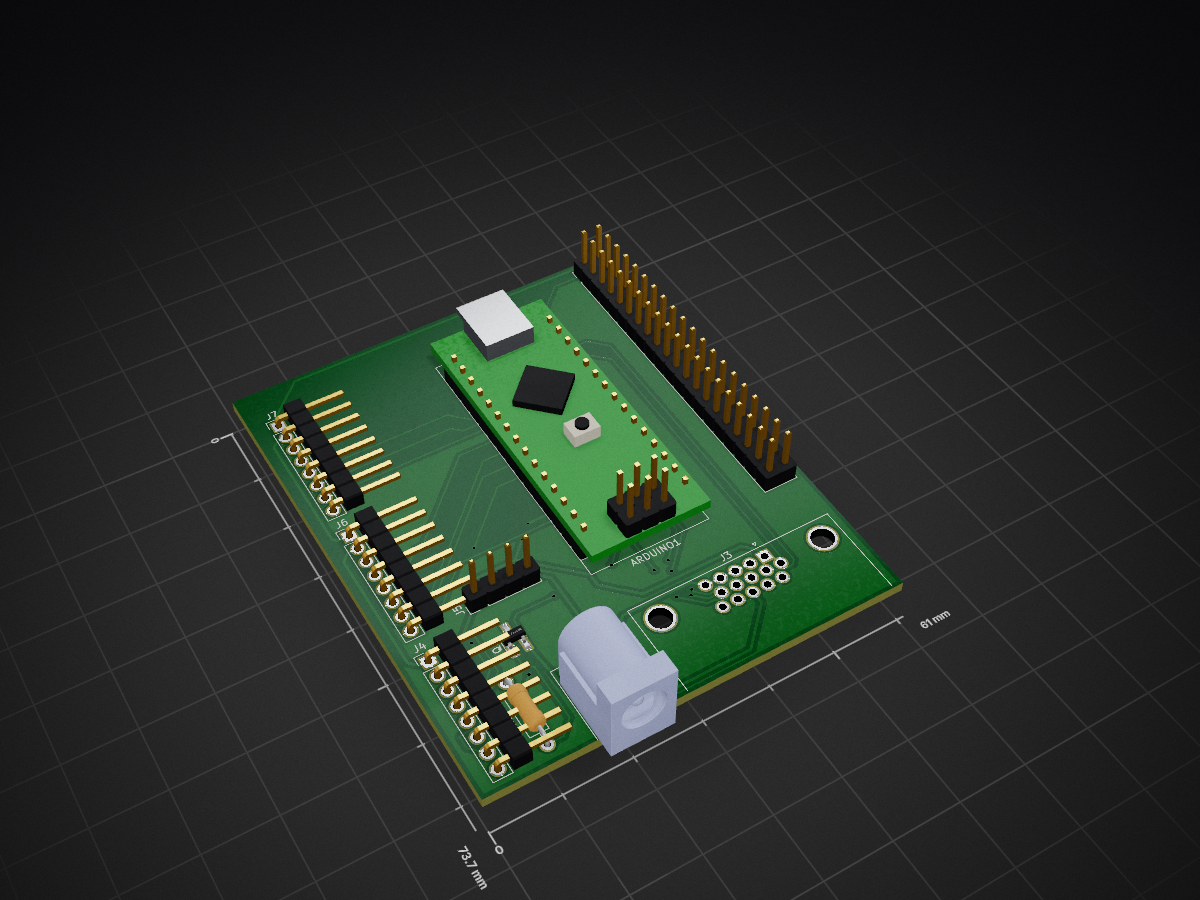
JoelHobbieRobots is an open-source printed circuit board by bitzombie1, from the bitzombie1/ShyBot2 repository on GitHub. It is a 2-layer board of 61 × 73.7 mm with 10 parts on 67 nets, routed with 219 tracks and 23 vias.
Its parts include 7 connectors, 1 resistor and 1 transistor. It belongs with the AVR (ATmega, ATtiny) boards of this library.
Ver 2 of Joel Hobbie's sculpture code This project includes code for facial detection and motor control. The facial detection utilizes OpenCV (ver 2) and runs on the UpBoard with a Ubuntu 14.04 system (Kernel 4.12.14 generic). Unlike version 1 of this project I opted to program with Python instead of C++. I am using multiple CV recognizers for front face, side face, and upper body in that order. I am using an Intel Realsense RS300 depth sensing camera so once I find a person, I can detect how far away that person is from the camera. This gives me the X,Y, and Z values of people in relation to the RS300 and then I send this information out of the serial connection to the Arduino Nano that controls multiple servo motors. This allows the sculpture to follow people in view with a pan/tilt controlled faux eyeball and retract its limbs if the person comes toward the sculpture thus giving it a shy behavior.
| Qty | Value | Footprint | References |
|---|---|---|---|
| 1 | 10K | Resistors_THT:R_Axial_DIN0207_L6.3mm_D2.5mm_P10.16mm_Horizontal | R1 |
| 1 | ARDUINO_NANO | Modules:Arduino_Nano | ARDUINO1 |
| 1 | Barrel_Jack | Connectors:BARREL_JACK | J2 |
| 1 | Conn_01x04 | Pin_Headers:Pin_Header_Straight_1x04_Pitch2.54mm | J5 |
| 1 | DSub_Out | Connectors_DSub:DSUB-15-HD_Female_Horizontal_Pitch2.29x1.98mm_EdgePinOffset8.35mm_Housed_MountingHolesOffset10.89mm | J3 |
| 1 | H-Bridge_1 | Pin_Headers:Pin_Header_Straight_1x08_Pitch2.54mm | J7 |
| 1 | H-Bridge_2 | Pin_Headers:Pin_Header_Straight_1x08_Pitch2.54mm | J6 |
| 1 | H-Bridge_3 | Pin_Headers:Pin_Header_Straight_1x08_Pitch2.54mm | J4 |
| 1 | MOSFET-N | TO_SOT_Packages_SMD:SOT-23_Handsoldering | Q1 |
| 1 | UpBoard 2x20 | Pin_Headers:Pin_Header_Straight_2x20_Pitch2.54mm | J1 |
gusmanb/logicanalyzer
24 channel, 100Msps logic analyzer hardware and software

byrantech/laptop
anyon_e, a highly integrated, high end, open source laptop. Attempt the impossible.

joeycastillo/Sensor-Watch
A board replacement for the classic Casio F-91W wristwatch


OLIMEX/OLINUXINO
OLINUXINO is Open Source / Open Hardware, low cost from EUR 24 Linux Industrial grade Single Board Computer capable to operate -25+85C

rusefi/rusefi
rusefi - GPL internal combustion engine control unit

VoronDesign/Voron-Hardware
Cool Hardware designed by the Voron Design group

hoglet67/RGBtoHDMI
Bare-metal Raspberry Pi project that provides pixel-perfect sampling of Retro Computer RGB/YUV video and conversion to HDMI
It measures 61 × 73.7 mm and has 2 copper layers, 1.6 mm thick.
10 parts. The full list of its parts is on this page, with links to each part's symbol and footprint where PCBKit's library has them.
From the bitzombie1/ShyBot2 repository on GitHub, at the commit this page was made from: the board is PCB_V2/JoelHobbieRobots.kicad_pcb. PCBKit opens the board in the browser, with nothing to install.
Its repository states no licence, so its author keeps all rights: ask bitzombie1 before reusing the design.