
2 layers116.8 × 30 mm
Type d
google/mozc-devices
Circuit diagrams and firmware source code for Gboard DIY keyboards
14 parts3kApache-2.0
 Av1zi/Ebeep3
a custom 'beeper' with an eInk display and 3 mechanical switches
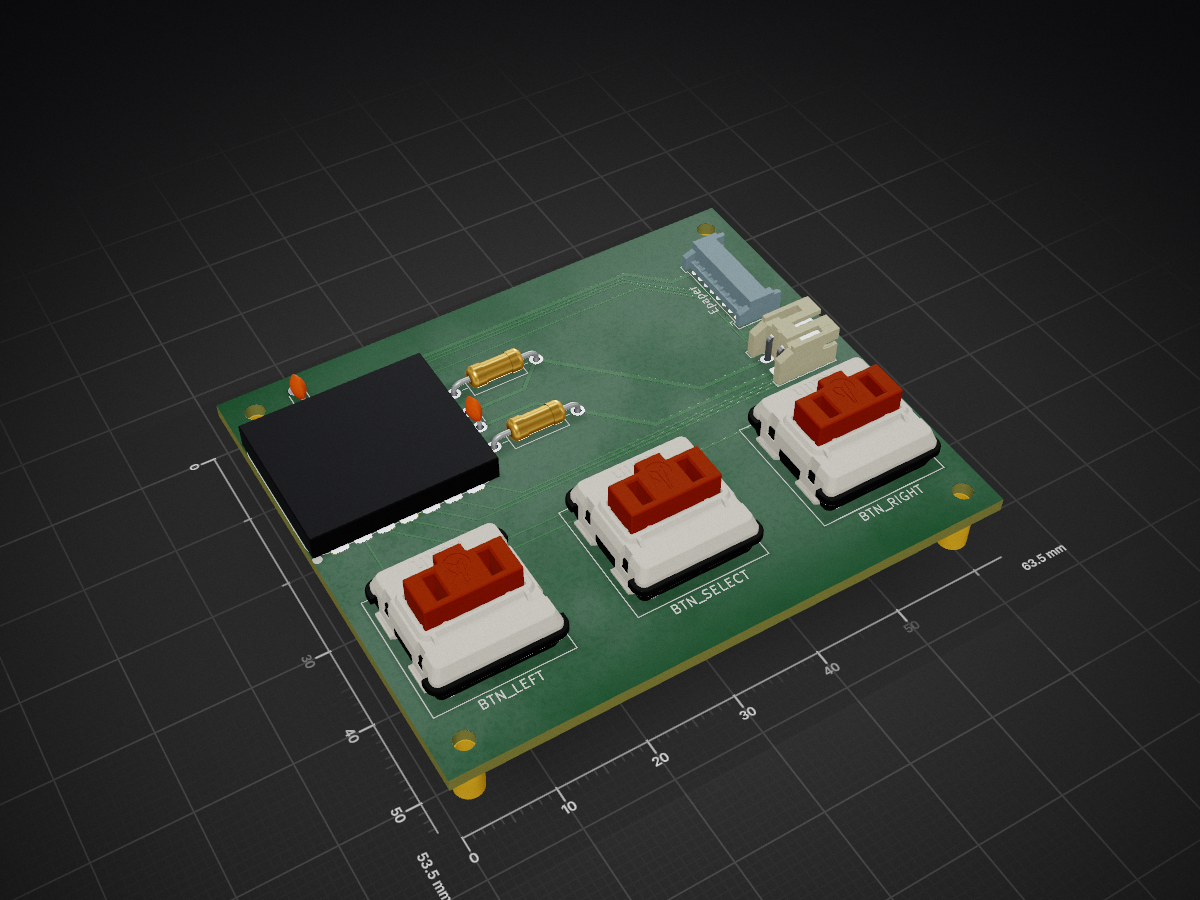
Ebeep is an open-source printed circuit board by Av1zi, from the Av1zi/Ebeep repository on GitHub, published under the GPL-3.0 licence. It is a 2-layer board of 63.5 × 53.5 mm with 14 parts on 24 nets, routed with 79 tracks and 1 via.
Its parts include 2 capacitors and 2 resistors. It belongs with the lEDs and displays and keyboards and input boards and the ESP32 and RISC-V boards of this library.


Two handheld wireless devices that can message each other and play games, built as a personal gift.
E for eInk. Beep for beeper
https://github.com/user-attachments/assets/bd9d271b-df7e-4e4d-8fb2-d193bfb4d486
https://github.com/user-attachments/assets/030f00d7-5b2a-4592-a6ae-74eca7de7010
| Component | Part |
|---|---|
| Microcontroller | Seeed XIAO ESP32-C6 |
| Display | WeAct 2.9" eInk |
| Battery | 3.7V LiPo, 3000mAh |
| Buttons | 3× low profile mechanical keyboard switches |
| Case | ~76g PLA, 4× M4 heated inserts, 4× M4×25 screws |
| Other | 2× 200kΩ resistors, 5×7cm perfboard |
Both devices connect to WiFi and talk through an MQTT broker (I used the free HiveMQ Cloud tier). Each device listens on its own topic and publishes to the other one's.
When the device wakes up and none of its known networks are in range, it opens a hotspot (Ebeep_1_config or Ebeep_2_config). Connect to it from any phone/pc and a setup page pops up automatically, there you will have to enter the wifi details and press done. (to save battery the hotspot will close by itself after 5 minutes) The device remembers up to 5 networks and picks whichever one is in range.
Walkthrough:
https://github.com/user-attachments/assets/75ae72dc-5833-4c83-8c6c-1c9a049145ae
SPC A B C ... Z . ! ? <3)The beeper goes to sleep if you don't use it for 10 minutes (you can change this in config.h). While asleep it disconnects from WiFi and the MQTT server and basically shuts off to save battery.
Wake it by pressing the left or middle button. On wake-up it looks for a network it remembers, and if it can't find one it starts its own hotspot so you can set up WiFi again (see WiFi Setup).
A custom PCB has been fully designed and routed in KiCad to replace the hand-wired perfboard build. It's not ordered or fabricated yet, so the build instructions below are still perfboard based. The PCB is a planned upgrade for a future revision.
[!WARNING] The PCB has not been fitted or tested against the case files in this repo. If you order it, expect to redesign the case (or at least the mounting points) to fit. It is not a drop-in replacement yet.
I used the printer default settings, with tree supports. I have a multi-nozzle printer so I used a support interface layer for a cleaner surface, but it's not necessary.
CAD/STL folderinclude/config.h change DEVICE_NUM to 1 on one device and 2 on the otherinclude/secret.example.h to include/secret.h and fill in your MQTT broker credentials (secret.h is gitignored so it stays private)huge_app.csv partition scheme is requiredEbeep_1_config or Ebeep_2_config) and enter your WiFi credentialsGPL 3.0 - Do whatever you want with it, just keep it open source as well.
| Qty | Value | Footprint | References |
|---|---|---|---|
| 3 | SW_Push | PCM_Switch_Keyboard_Kailh:SW_Kailh_Choc_V2_1.00u | BTN_LEFT, BTN_RIGHT, BTN_SELECT |
| 2 | 100nF | Capacitor_THT:C_Disc_D3.0mm_W1.6mm_P2.50mm | C1, C2 |
| 2 | 200K | Resistor_THT:R_Axial_DIN0207_L6.3mm_D2.5mm_P10.16mm_Horizontal | R1, R2 |
| 1 | Conn_01x02 | Connector_JST:JST_PH_S2B-PH-K_1x02_P2.00mm_Horizontal | JST-PH-2pin1 |
| 1 | WeAct 2.9" ePaper | Connector_Molex:Molex_PicoBlade_53048-0810_1x08_P1.25mm_Horizontal | Epaper |
| 1 | XIAO-ESP32-C6-SMD | Seeed_Studio_XIAO_Series:XIAO-ESP32-C6-SMD | ESP32 |
The 10 most common of 14 parts.
It measures 63.5 × 53.5 mm and has 2 copper layers, 1.6 mm thick.
14 parts. The full list of its parts is on this page, with links to each part's symbol and footprint where PCBKit's library has them.
From the Av1zi/Ebeep repository on GitHub, at the commit this page was made from: the board is PCB/Ebeep.kicad_pcb and its schematic PCB/Ebeep.kicad_sch. PCBKit opens the board in the browser, with nothing to install.
Its repository publishes it under the GPL-3.0 licence: you may reuse it on that licence's terms (keep the author's notice, and for a copyleft licence share your changes alike).
google/mozc-devices
Circuit diagrams and firmware source code for Gboard DIY keyboards


hackclub/OnBoard
💡 Join 1,000 teenagers and make your first PCB with a $100 grant!


Twotoz/C5VRX
Ultra-minimal, zero-CPU 5.8 GHz analog FPV video receiver using ESP32-C5 Wi-Fi 6 PHY MODEM_DIAG, BitScrambler WBFM demodulation & resistor DAC CVBS

