4 layers93.3 × 155.8 mm

 atechofficials/protokeeb1
Open Source 16-Key Mechanical Keyboard with rotary encoder and ARGB backlight. Powered by Raspberry Pi Pico. Supports QMK, KMK and ZMK Keyboard Firmware.
AT ProtoKeeb rev1 is an open-source printed circuit board by atechofficials, from the atechofficials/protokeeb repository on GitHub, published under the MIT licence. It is a 2-layer board of 80.2 × 99 mm with 114 parts on 115 nets, routed with 812 tracks and 108 vias.
It is built around the USBLC6-2SC6, 1N4148WS and MX1A-11NW, with the WS2812B-2020, PEC11R-4215F-S0024 and USB4105-GF-A among its other parts. Its parts include 33 diodes, 21 capacitors, 16 switches, 9 resistors and 3 ICs. It belongs with the keyboards and input boards and the RP2040 boards of this library.


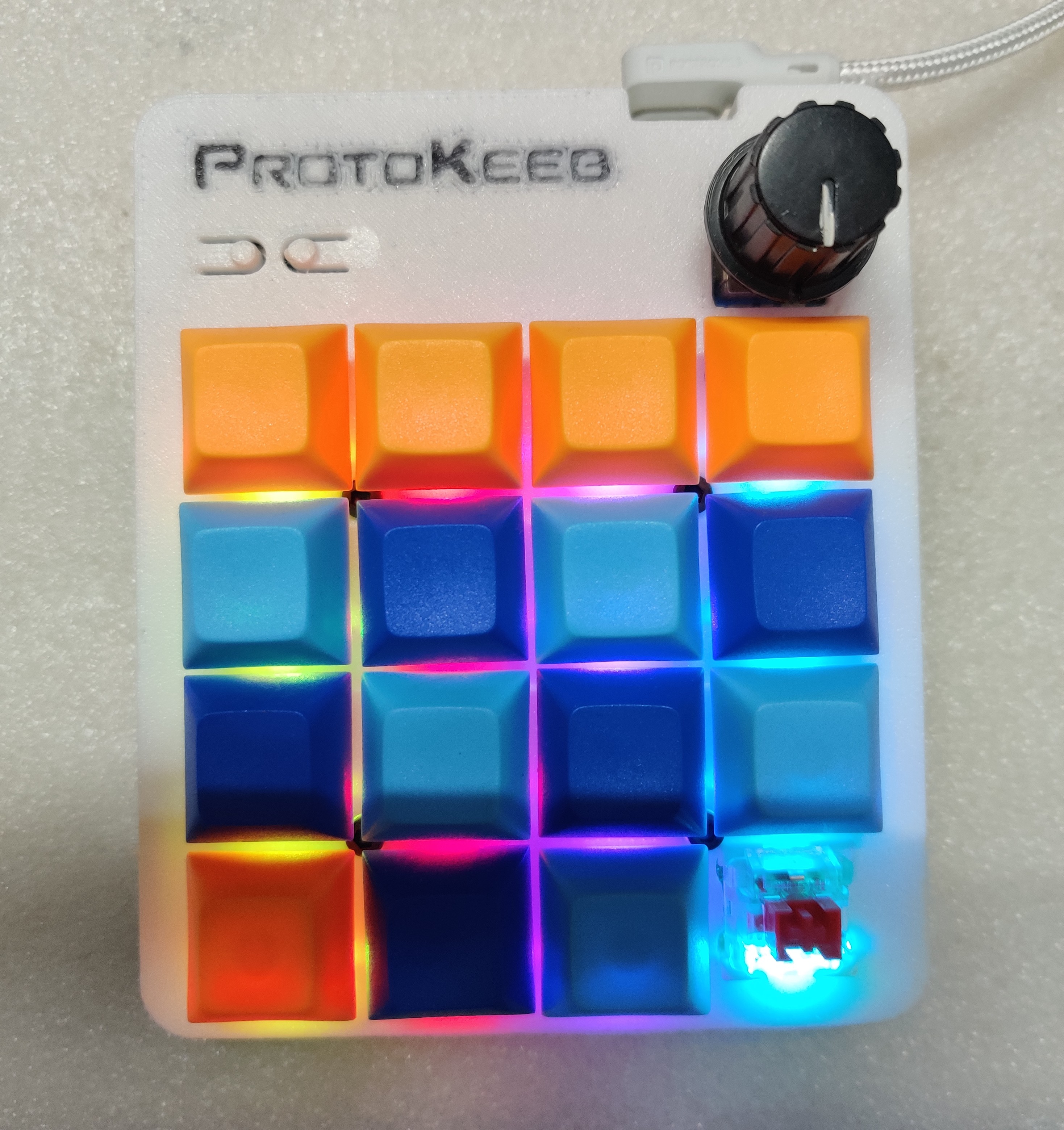
Protokeeb is a 16-key (4 x 4) keyboard/numpad/macropad/MIDI device designed by A-Tech Officials. It is ideal for those looking to get started with custom keyboards and open-source keyboard firmware. The PCB is based on a Raspberry Pi Pico development board, making it perfect for developers and enthusiasts eager to explore the world of custom keyboards and firmware.
You can get started with Protokeeb hardware in two ways:
Option 1 is a straightforward plug-and-play option, as each Protokeeb board comes pre-flashed with QMK firmware and a default keymap, allowing easy customization without worrying about the electronics.
Option 2 is a DIY approach with detailed instructions provided for almost every step, ideal for those who want to immerse themselves in the learning, development, and customization aspects of custom keyboards.
[!NOTE] Option 2 is not recommended for absolute beginners in electronics, as it requires specific skills and basic electronics knowledge, including proficient SMD soldering skills.
For detailed assembly instructions, follow this guide: Assembly Instructions
This project is licensed under the MIT License. See the LICENSE file for details.
Contributions are welcome! Please fork this repository and submit a pull request with your changes.
For any issues or questions, please open an issue on GitHub.
Thanks to the open-source community for their support and contributions.
| Qty | Value | Footprint | References |
|---|---|---|---|
| 19 | 100nF | Capacitor_SMD:C_0603_1608Metric | C2, C4, C5, C6, C10, C11, C12, C13, C14, C15, C16, C17, C18, C19, C20, C21 +3 |
| 16 | 1N4148WS | Diode_SMD:D_SOD-323 | D2, D3, D4, D5, D6, D7, D8, D9, D10, D11, D12, D13, D14, D15, D16, D17 |
| 16 | MX1A-11NW | MX1A-11NW:MX1A11NW | S1, S2, S3, S4, S5, S6, S7, S8, S9, S10, S11, S12, S13, S14, S15, S16 |
| 16 | WS2812B-2020 | WS2812B-2020:WS2812B2020 | LED1, LED2, LED3, LED4, LED5, LED6, LED7, LED8, LED9, LED10, LED11, LED12, LED13, LED14, LED15, LED16 |
| 5 | MountingHole | MountingHole:MountingHole_2.7mm_M2.5_ISO7380 | H1, H2, H3, H4, H5 |
| 3 | 10K | Resistor_SMD:R_0603_1608Metric | R5, R6, R7 |
| 3 | 51K | Resistor_SMD:R_0603_1608Metric | R3, R4, R9 |
| 3 | ARGB LED Data Link | Jumper:SolderJumper-2_P1.3mm_Open_TrianglePad1.0x1.5mm | JP1, JP2, JP3 |
| 3 | GND | TestPoint:TestPoint_Pad_D1.0mm | TP2, TP8, TP12 |
| 2 | +3.3V | TestPoint:TestPoint_Pad_D1.0mm | TP7, TP11 |
| 2 | 5.1K | Resistor_SMD:R_0603_1608Metric | R1, R2 |
| 2 | LOGO | Protokeeb:ProtoKeeb_Logo_10mm | G***, G*** |
| 2 | LOGO | Protokeeb:ProtoKeeb_Logo_Text_50mm | G***, G*** |
| 1 | +5V | TestPoint:TestPoint_Pad_D1.0mm | TP1 |
| 1 | 10nF | Capacitor_SMD:C_0603_1608Metric | C1 |
| 1 | 1N5819(SMA) | Diode_SMD:D_SMA | D1 |
| 1 | 2A | Inductor_SMD:L_0603_1608Metric | FB1 |
| 1 | 4.7uF | Capacitor_SMD:C_0603_1608Metric | C3 |
| 1 | 51K (NC) | Resistor_SMD:R_0603_1608Metric | R8 |
| 1 | ARGB-1 | TestPoint:TestPoint_Pad_D1.0mm | TP3 |
| 1 | ARGB-1-OUT | TestPoint:TestPoint_Pad_D1.0mm | TP5 |
| 1 | ARGB-2 | TestPoint:TestPoint_Pad_D1.0mm | TP4 |
| 1 | ARGB-2-OUT | TestPoint:TestPoint_Pad_D1.0mm | TP6 |
| 1 | BOOTSEL | 4982:4982 | BTN2 |
| 1 | PEC11R-4215F-S0024 | PEC11R-4215F-S0024:XDCR_PEC11R-4215F-S0024 | MT1 |
| 1 | RESET | 4982:4982 | BTN1 |
| 1 | RX | TestPoint:TestPoint_Pad_D1.0mm | TP10 |
| 1 | Raspberry Pi Pico | RPi_Pico_SMD:RPi_Pico_SMD | U1 |
| 1 | SCL | TestPoint:TestPoint_Pad_D1.0mm | TP13 |
| 1 | SDA | TestPoint:TestPoint_Pad_D1.0mm | TP14 |
| 1 | TX | TestPoint:TestPoint_Pad_D1.0mm | TP9 |
| 1 | TXB0102DCUR | TXB0102DCUR:SOP50P310X90-8N | U2 |
| 1 | USB4105-GF-A | USB4105-GF-A:GCT_USB4105-GF-A | J1 |
| 1 | USBLC6-2SC6 | USBLC6-2SC6:SOT95P280X145-6N | U3 |
The 113 most common of 114 parts.
It measures 80.2 × 99 mm and has 2 copper layers, 1.6 mm thick.
114 parts, built around the USBLC6-2SC6, 1N4148WS, MX1A-11NW and WS2812B-2020. The full list of its parts is on this page, with links to each part's symbol and footprint where PCBKit's library has them.
From the atechofficials/protokeeb repository on GitHub, at the commit this page was made from: the board is PCB/Rev1.0/AT-ProtoKeeb_rev1/AT-ProtoKeeb_rev1.kicad_pcb and its schematic PCB/Rev1.0/AT-ProtoKeeb_rev1/AT-ProtoKeeb_rev1.kicad_sch. PCBKit opens the board in the browser, with nothing to install.
Its repository publishes it under the MIT licence: you may reuse it on that licence's terms (keep the author's notice, and for a copyleft licence share your changes alike).


