2 layers31.7 × 58.4 mm

 aspro648/OSTR88
Open Source Turtle Robot
Design files KiCAD V6 BRDBD IR R is an open-source printed circuit board by aspro648, from the aspro648/OSTR repository on GitHub. It is a 2-layer board of 10.2 × 11.4 mm with 5 parts on 4 nets, routed with 22 tracks and 0 vias.
Its parts include 2 resistors, 1 diode, 1 transistor and 1 connector. It belongs with the robots and motor control boards of this library.
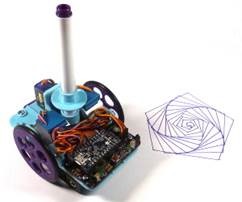
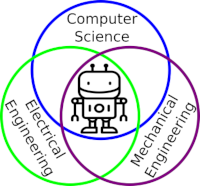
I designed this project for a 10-hour workshop for ChickTech.org whose goal is to introduce teenage women to STEM topics. The goals for this project were:
Robotics is the exciting intersection of a number of engineering fields including mechanical engineering, electrical engineering, and computer science. This project was designed to make learning about these fields accessible and exciting.
Turtle robots are controled by simple instructions like "forward(distance)" and "left(degrees)", and their visual tracks are instructive as well as entertaining. They also demonstrate how systems with simple rules can have complex behaviors, something we see in nature all the time.
New to Version 2 is the shift from the Adafruit Trinket Pro to their ItsyBitsy 32U4 3V which enables USB communication for easier troubleshooting, or the ItsyBitsy M0 Express which allows programing in Python!
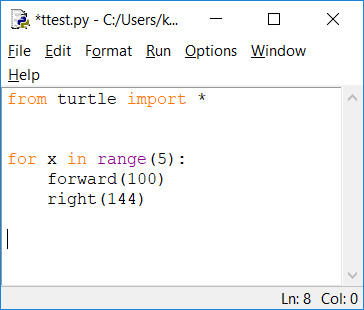
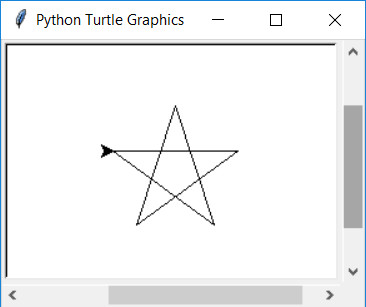
Python is a popular and easy to learn programming language that already has Turle Graphics built in. Since the robots instructions are the same, programs and paterns can be evaluated on the computer and then run on the robot.
from turtle import *

for x in range(5):
    forward(100)
    right(144)
Here is a great Hour of Code tutorial to get you introduced to Python Turtle: https://groklearning.com/hoc/activity/snowflake/. The only thing pysical Turtle Robot can't do is change colors automatically, but you can alway swap the pens around manually.
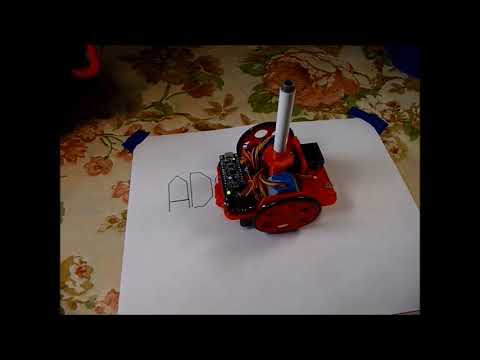
This robot has been refined through a number workshops, but still has room for improvement. Please share your ideas and modifications so it can continue to improve.
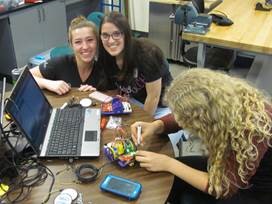
In bulk quantities, the cost per robot is about $40. The Bill of Materials is available here. Having told you the at-cost and provided you my BOM, I'd still offer to sell you a kit if you'd like to pay for the convenience of a single-source or you don't have access to a 3D printer. This also allows me continue development for future workshops.

The electronics were designed using Open Source KiCad. Design files are located in the design_files folder. You can oogle the schematic.
The 3D Design files were created with a combination of FreeCad, OpenSCAD (both Open Source), and online TinkerCad. Design files and STLs are located in the 3D folder.
This project is programed using Open Source Arduino or Adafruit's Circuit Python depending on the microcontroller used. The firmware is located in the firmware folder. Instructions for setting up the Arduino environment for the ItsyBitsy 32U4 are at https://learn.adafruit.com/introducting-itsy-bitsy-32u4/.
https://www.instructables.com/id/OSTR/.
Also, check the docs folder for handouts, etc. May still have pictures of V1 assembly, but they are nearly identical.
Attribution-ShareAlike 3.0 United States (CC BY-SA 3.0 US)
You are free to:
Under the following terms:
This project as been certified by the Open Source Hardward Association:

| Qty | Value | Footprint | References |
|---|---|---|---|
| 1 | 100 | footprints:Resistor_Horz | R2 |
| 1 | 10K | footprints:Resistor_Horz | R1 |
| 1 | Conn_01x04 | Connector_PinHeader_2.54mm:PinHeader_1x04_P2.54mm_Vertical | J1 |
| 1 | IR_LED | footprints:LED-3MM_RA | D2 |
| 1 | OPTO_NPN | footprints:PHOTOTRANS-RA | Q1 |


joypad-ai/joypad-os
Universal controller firmware for building adapters, dongles, and custom controllers.

OLIMEX/OLINUXINO
OLINUXINO is Open Source / Open Hardware, low cost from EUR 24 Linux Industrial grade Single Board Computer capable to operate -25+85C

jamro/tiny-engineer
A small desktop robot that brings an AI coding assistant to life, physically acting out when it reads files, thinks, writes code, and finishes work.

hackclub/OnBoard
💡 Join 1,000 teenagers and make your first PCB with a $100 grant!


Luos-io/luos_engine
Open-source and real-time orchestrator for cyber-physical-systems, to easily design, test and deploy embedded applications and digital twins.
It measures 10.2 × 11.4 mm and has 2 copper layers, 1.6 mm thick.
5 parts. The full list of its parts is on this page, with links to each part's symbol and footprint where PCBKit's library has them.
From the aspro648/OSTR repository on GitHub, at the commit this page was made from: the board is V3/electrical/design_files_KiCAD_V6 BRDBD_IR R/project.kicad_pcb and its schematic V3/electrical/design_files_KiCAD_V6 BRDBD_IR L/project.kicad_sch. PCBKit opens the board in the browser, with nothing to install.
Its repository states no licence, so its author keeps all rights: ask aspro648 before reusing the design.