2 layers19 × 76 mm
Sub
google/mozc-devices
Circuit diagrams and firmware source code for Gboard DIY keyboards
15 parts3kApache-2.0

 arush-garg/ClaudeNotifications
Physical notifications (OLED display + buzzer) for any MCP-capable agent. Prevents leaving an agent working only to find it waiting for input.
Notifications shield is an open-source printed circuit board by arush-garg, from the arush-garg/ClaudeNotifications repository on GitHub. It is a 2-layer board of 68.6 × 53.3 mm with 15 parts on 8 nets, routed with 56 tracks and 0 vias.
Its parts include 5 connectors, 2 capacitors, 1 resistor, 1 transistor and 1 switch.
Physical notifications (OLED display + buzzer) for any MCP-capable agent. Prevents leaving an agent working only to find it waiting for input.
curl -sSL https://raw.githubusercontent.com/arush-garg/ClaudeNotifications/refs/heads/main/setup.sh | bash (this installs it globally to ~/.notifications/. If you want to install it in a project, add --local flag and run it inside your project directory.)config.jsonsetup.sh also installs the Arduino CLI and adds it to your pathconfig.json changes)Edit config.json at project root:
{
  "baud_rate": 9600,
  "screen_width": 128,
  "screen_height": 64,
  "text_size": 1,
  "text_color": "white",
  "num_beeps": 3,
  "notification_duration": 60,
  "buzzer_pin": 8,
  "serial_port": "/dev/cu.usbmodem2101"
}{
"mcpServers": {
"notifications": {
"command": "uv",
"args": ["run", "--project", "<PATH_TO_NOTIFICATIONS_SERVER>", "--directory", "<PATH_TO_NOTIFICATIONS_SERVER>", "python", "main.py"]
}
}
}Don't worry about finding the correct path to the notifications server. The setup.sh script will print it out for you after installation.
| Tool | Description |
|---|---|
send_notification(message, beeps, duration) | Show message on OLED, beep buzzer |
get_status() | Check hardware connection |
flash_firmware(port) | Compile & upload Arduino firmware |
Auto-notify when agent asks clarifying questions:
.claude/settings.json (global) or .claude/settings.local.json (project){
"hooks": {
"PreToolUse": [{
"matcher": "AskUserQuestion",
"hooks": [{
"type": "command",
"command": "python3 /path/to/project/.claude/hooks/ask.py"
}]
}]
}
}It is possible to add hooks for other agents. You might have to edit hooks/ask.py to match your agent's tool format.
Arduino Uno          SSD1306 OLED
─────────────────    ────────────────
5V                 → VCC
GND                → GND
A4 (SDA)           → SDA
A5 (SCL)           → SCL

Arduino Uno          Buzzer
─────────────────    ──────────────
Pin 9                → +
GND                  → -

Arduino Uno          Push Button
─────────────────    ────────────────
Pin 12                → One side of button
GND                  → Other side of button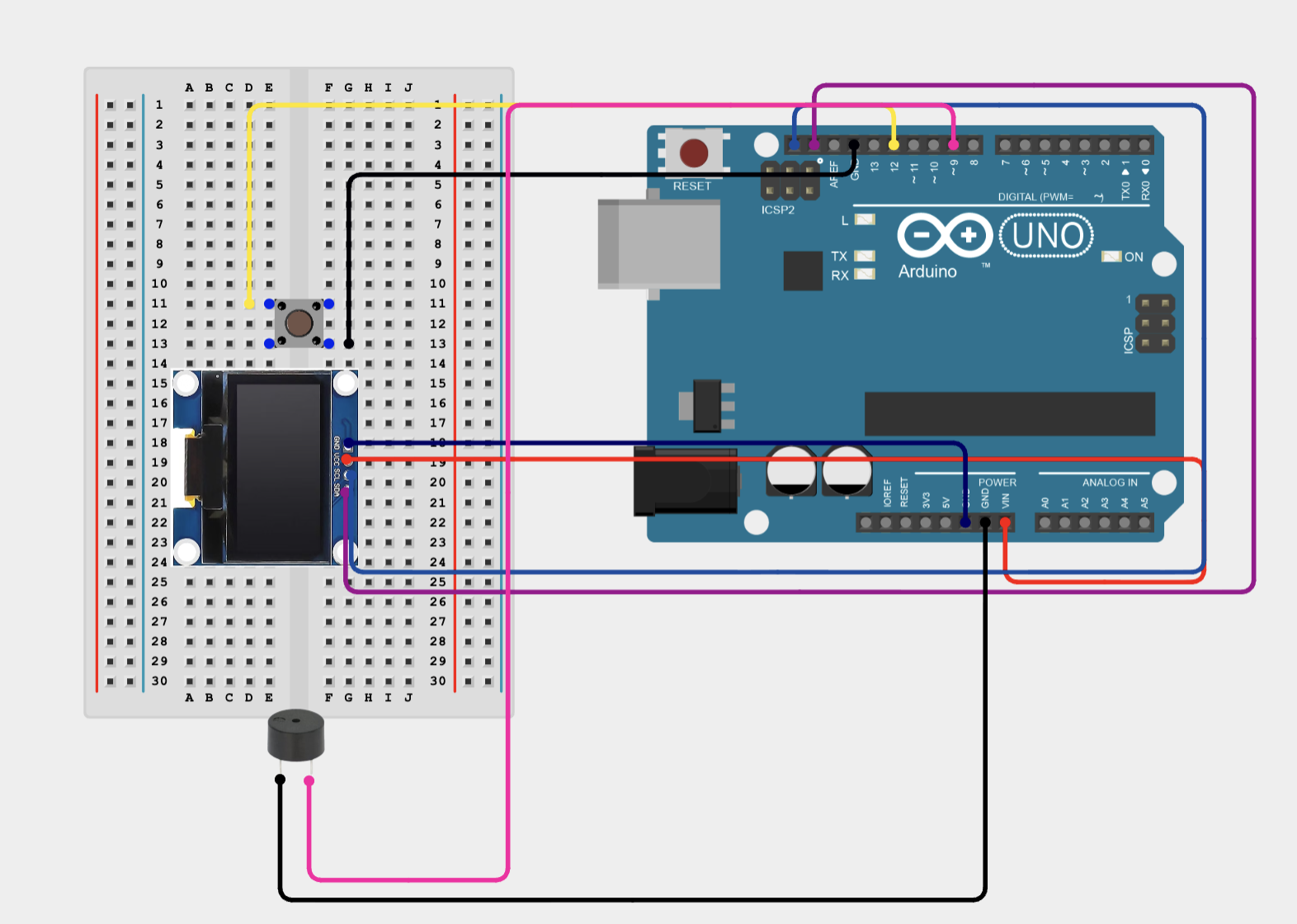
| Qty | Value | Footprint | References |
|---|---|---|---|
| 4 | MountingHole_3.2mm | Arduino_MountingHole:MountingHole_3.2mm | MH1, MH2, MH3, MH4 |
| 1 | 100n | C_Disc_D5.0mm_W2.5mm_P2.50mm | C1 |
| 1 | 10u | C_Radial_D5.0mm_H5.0mm_P2.00mm | C2 |
| 1 | 1k | R_Axial_DIN0207_L6.3mm_D2.5mm_P7.62mm_Horizontal | R1 |
| 1 | 2N3904 | TO-92_Inline | Q1 |
| 1 | Analog | Connector_PinSocket_2.54mm:PinSocket_1x06_P2.54mm_Vertical | J4 |
| 1 | DISMISS | SW_PUSH_6mm | SW1 |
| 1 | Digital/PWM | Connector_PinSocket_2.54mm:PinSocket_1x10_P2.54mm_Vertical | J2 |
| 1 | Digital/PWM | Connector_PinSocket_2.54mm:PinSocket_1x08_P2.54mm_Vertical | J3 |
| 1 | OLED GND 5V SCL SDA | PinHeader_1x04_P2.54mm_Vertical | J5 |
| 1 | PASSIVE PIEZO | Buzzer_12x9.5RM7.6 | BZ1 |
| 1 | Power | Connector_PinSocket_2.54mm:PinSocket_1x08_P2.54mm_Vertical | J1 |
google/mozc-devices
Circuit diagrams and firmware source code for Gboard DIY keyboards

hoglet67/RGBtoHDMI
Bare-metal Raspberry Pi project that provides pixel-perfect sampling of Retro Computer RGB/YUV video and conversion to HDMI

mntmn/amiga2000-gfxcard
MNT VA2000, an Open Source Amiga 2/3/4000 Graphics Card (Zorro II/III), written in Verilog

hackclub/OnBoard
💡 Join 1,000 teenagers and make your first PCB with a $100 grant!

kenp-io/not-for-airpods-repairs
The content of this repository is licensed under the WTFPL License. Please have a close look at the terms before using this material.

Luos-io/luos_engine
Open-source and real-time orchestrator for cyber-physical-systems, to easily design, test and deploy embedded applications and digital twins.

Chrismettal/EleLab_v2
Cheap DIY lab system for hobbyists and the tinkering folk

It measures 68.6 × 53.3 mm and has 2 copper layers, 1.6 mm thick.
15 parts. The full list of its parts is on this page, with links to each part's symbol and footprint where PCBKit's library has them.
From the arush-garg/ClaudeNotifications repository on GitHub, at the commit this page was made from: the board is kicad/notifications_shield.kicad_pcb and its schematic kicad/notifications_shield.kicad_sch. PCBKit opens the board in the browser, with nothing to install.
Its repository states no licence, so its author keeps all rights: ask arush-garg before reusing the design.