2 layers159.5 × 30 mm
Type f
google/mozc-devices
Circuit diagrams and firmware source code for Gboard DIY keyboards
25 parts3kApache-2.0
 arnv15/Command-Node
My custom Macropad designed and built from scratch
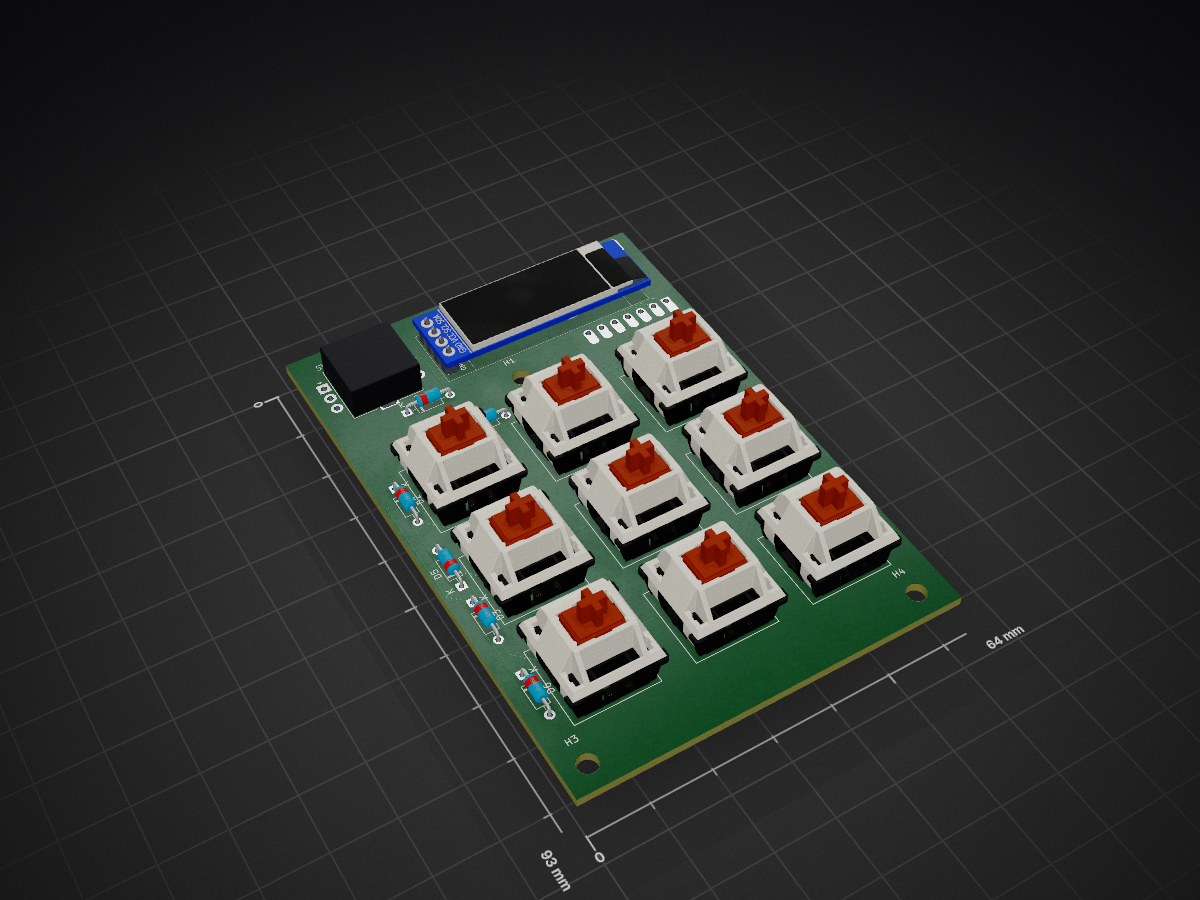
Macropad is an open-source printed circuit board by arnv15, from the arnv15/Command-Node repository on GitHub. It is a 2-layer board of 64 × 93 mm with 25 parts on 24 nets, routed with 126 tracks and 0 vias.
Its parts include 10 diodes, 10 switches and 2 ICs. It belongs with the keyboards and input boards of this library.
A fully custom 3D printed macropad built from scratch with a 3×3 key grid, rotary encoder, and OLED display.
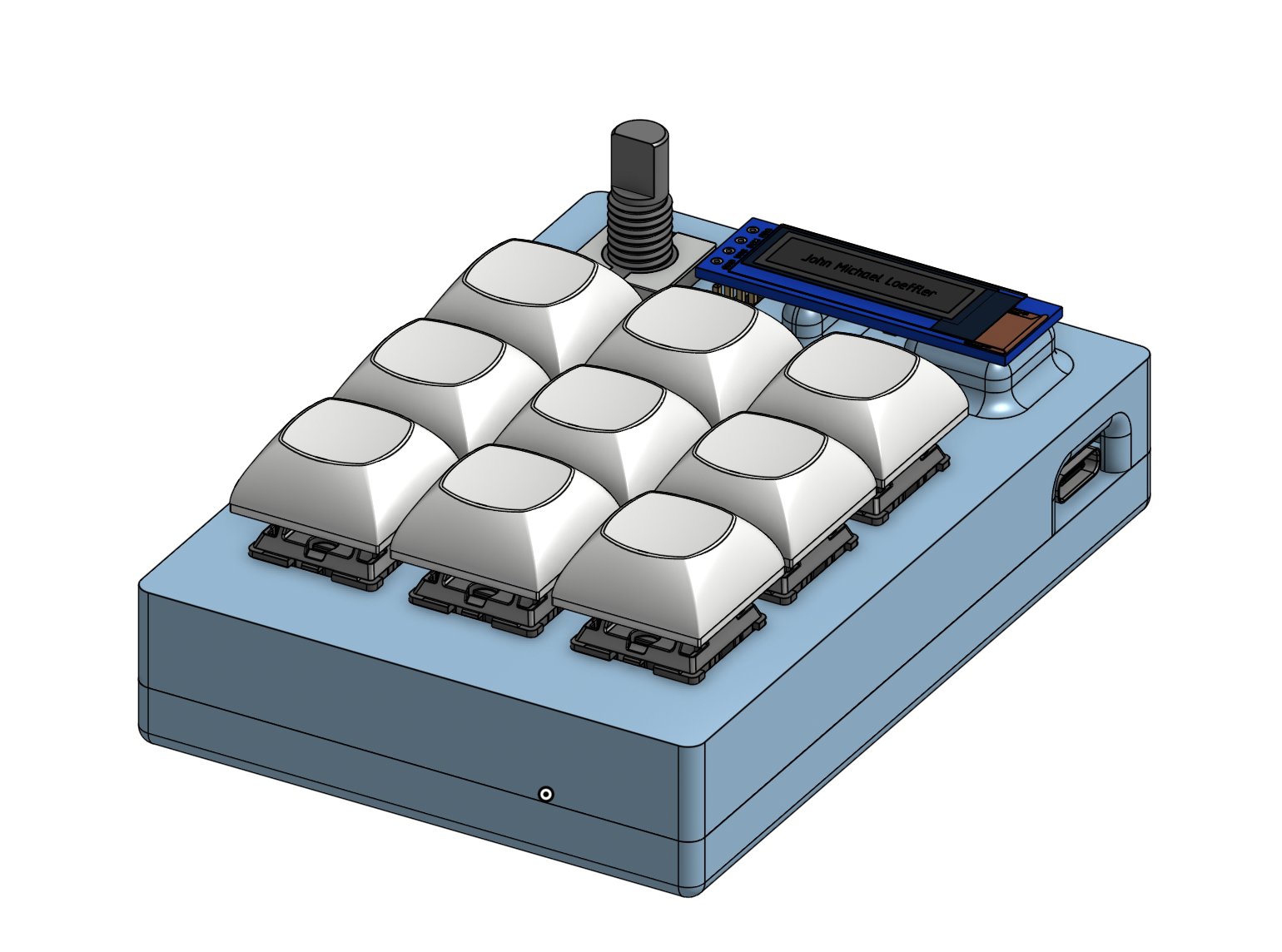
The macropad features a compact 3×3 key layout with the rotary encoder and OLED display across the top. The USB-C port is accessible from the right side. The two-part 3D printed case is held together with M3 screws and heat-set inserts.
| Schematic | PCB Layout |
|---|---|
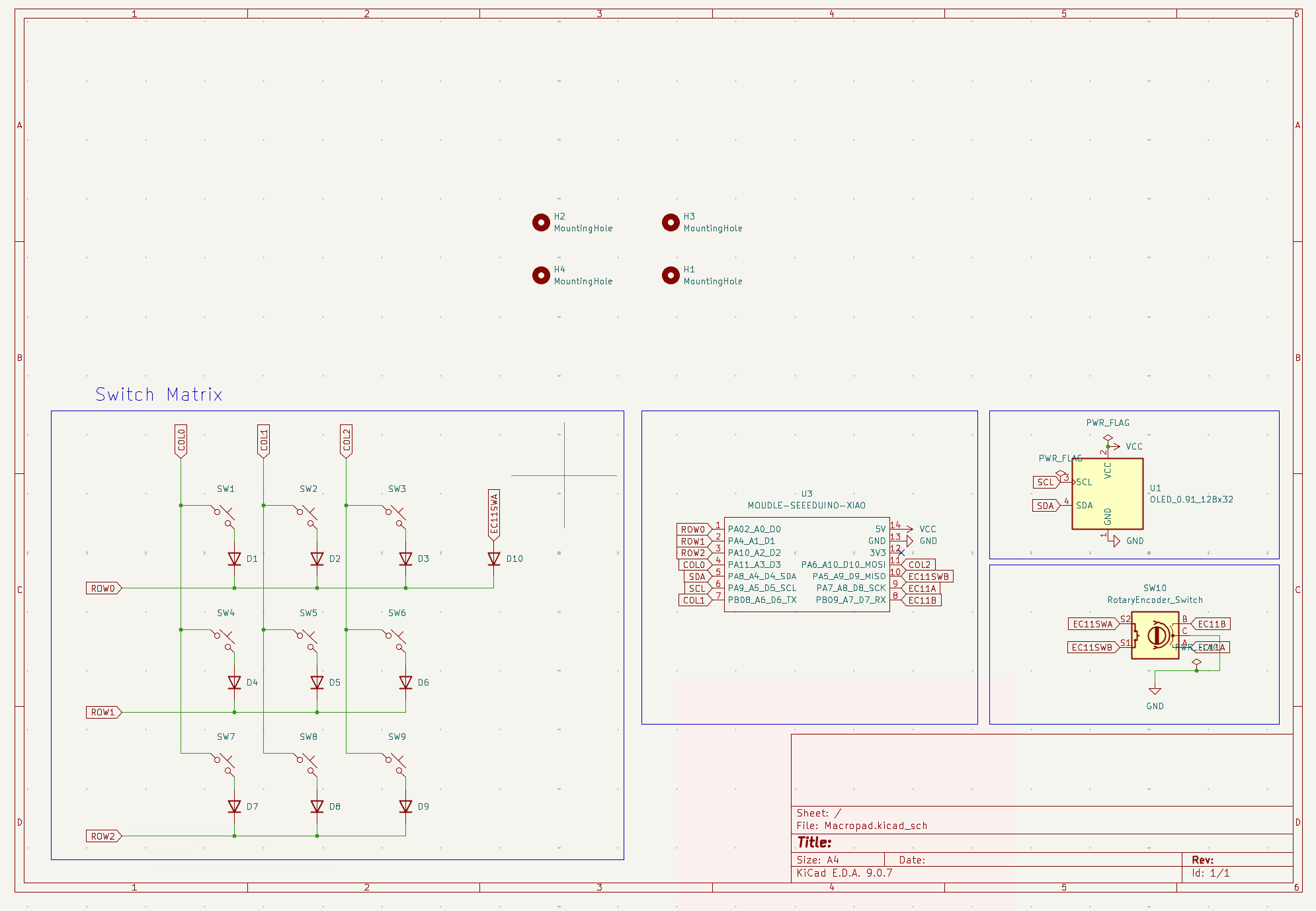 | 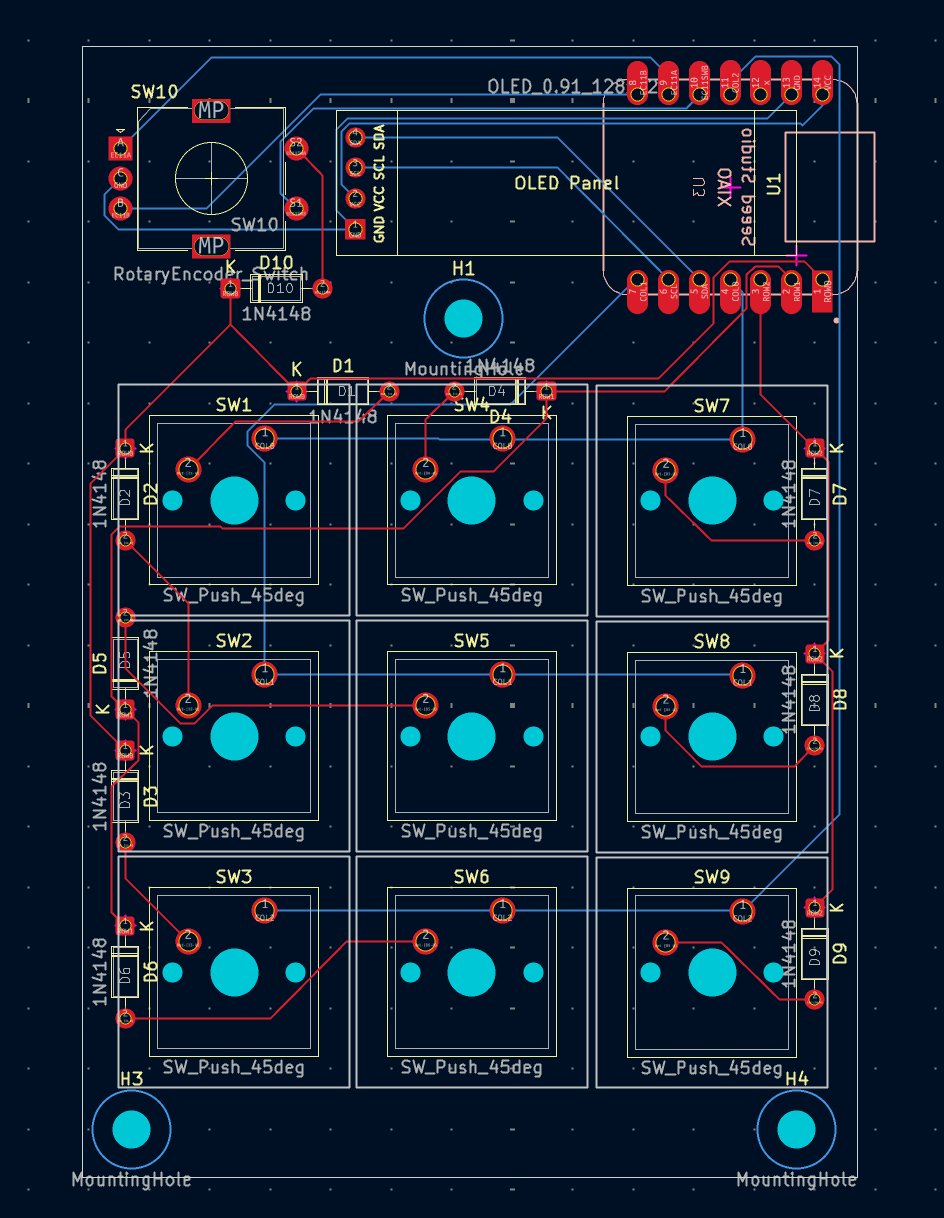 |
The PCB was designed in KiCad. The switch matrix uses COL2ROW diode direction with 1N4148 diodes. The OLED connects via I2C on SDA/SCL pins, and the EC11 encoder click is wired as a direct pin (no diode needed).
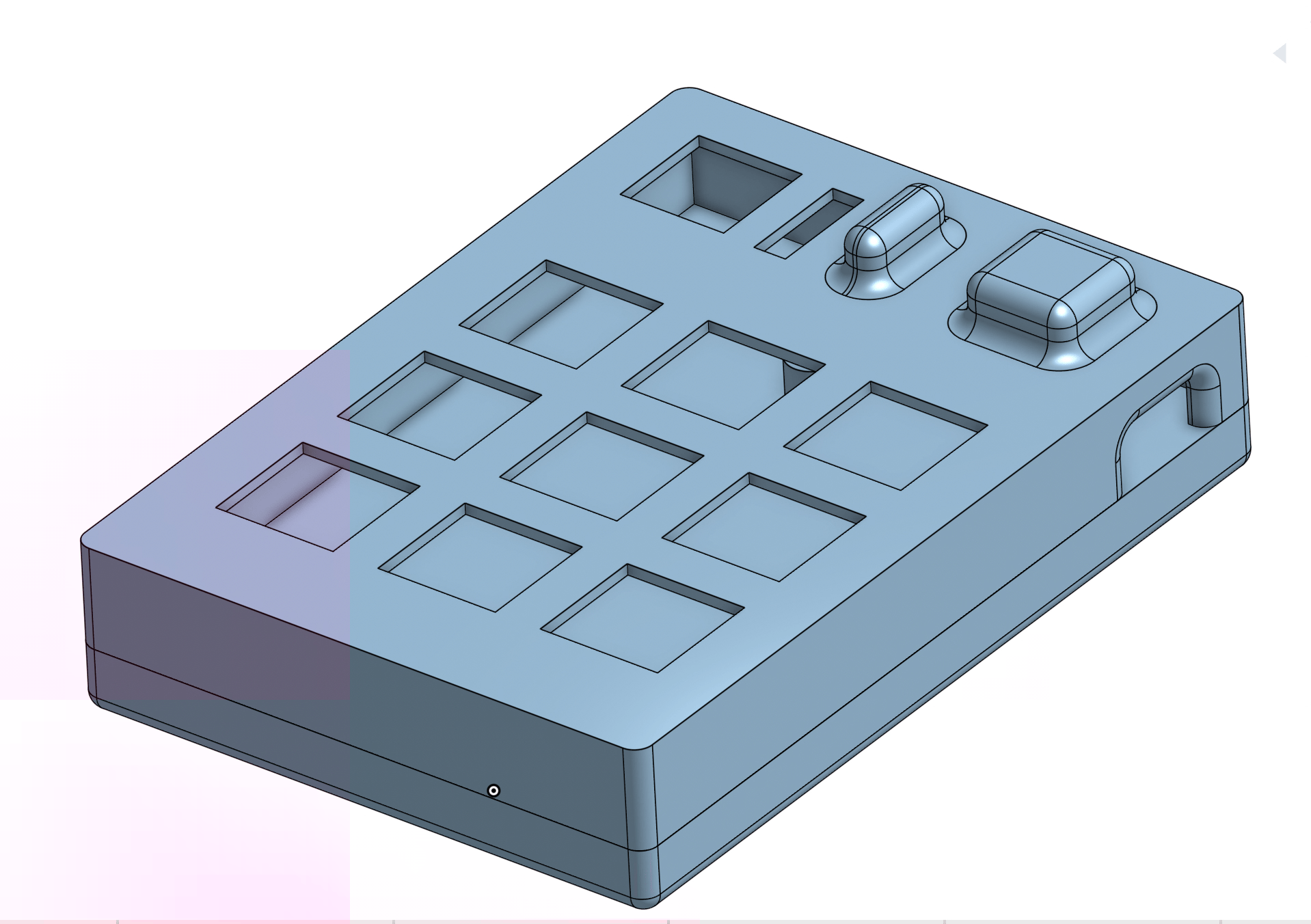
The case is two-part and 3D printed. The top shell holds the switches, encoder, and OLED in place, while the bottom shell houses the PCB. Everything is secured with 4x M3x16mm screws threading into M3x5x4mm heat-set inserts pressed into the bottom shell.
Written using KMK (CircuitPython) — no compiling or flashing needed after the initial CircuitPython setup. Just edit code.py on the CIRCUITPY drive and it reloads automatically.
Key layout:
[ Prev  ] [ Play  ] [ Next  ]
[ Ctrl+Z] [ Ctrl+C] [ Ctrl+V]
[ Scrnsh] [ Sleep ] [ Scrnsvr]
         [Enc Click = OS Toggle]
Encoder rotation: Volume down / Volume up
OS Toggle: Pressing the encoder switches between Windows mode (Ctrl shortcuts, Print Screen) and Mac mode (Cmd shortcuts, Cmd+Shift+4 screenshot). The OLED updates to show the current OS.
OLED display: Shows name and current active OS layer dynamically.
You can find the full main.py in the firmware/ folder of this repo.
| Part | Quantity | Notes |
|---|---|---|
| Seeed XIAO RP2040 | 1 | Microcontroller |
| Cherry MX Switches | 9 | Any MX-compatible switch |
| 1N4148 Diodes (through-hole) | 10 | 9 for switch matrix + 1 for encoder click |
| EC11 Rotary Encoder | 1 | With push-click |
| 0.91" SSD1306 OLED (128×32, I2C) | 1 | Pin order: GND-VCC-SCL-SDA |
| DSA Keycaps | 9 | White blank |
| M3x16mm Screws | 4 | For case assembly |
| M3x5x4mm Heat-set Inserts | 4 | Press into bottom shell |
| PCB | 1 | Custom KiCad design |
| 3D Printed Case (top + bottom) | 1 set | PLA or PETG |
| Qty | Value | Footprint | References |
|---|---|---|---|
| 10 | 1N4148 | Diode_THT:D_DO-35_SOD27_P7.62mm_Horizontal | D1, D2, D3, D4, D5, D6, D7, D8, D9, D10 |
| 9 | SW_Push_45deg | Button_Switch_Keyboard:SW_Cherry_MX_1.00u_PCB | SW1, SW2, SW3, SW4, SW5, SW6, SW7, SW8, SW9 |
| 3 | MountingHole | MountingHole:MountingHole_3.2mm_M3 | H1, H3, H4 |
| 1 | MOUDLE-SEEEDUINO-XIAO | footprints:XIAO-Generic-Hybrid-14P-2.54-21X17.8MM | U3 |
| 1 | OLED_0.91_128x32 | KiCad-SSD1306-0.91-OLED-4pin-128x32.pretty-master:SSD1306-0.91-OLED-4pin-128x32 | U1 |
| 1 | RotaryEncoder_Switch | Rotary_Encoder:RotaryEncoder_Alps_EC11E-Switch_Vertical_H20mm | SW10 |
It measures 64 × 93 mm and has 2 copper layers, 1.6 mm thick.
25 parts. The full list of its parts is on this page, with links to each part's symbol and footprint where PCBKit's library has them.
From the arnv15/Command-Node repository on GitHub, at the commit this page was made from: the board is PCB/Macropad.kicad_pcb and its schematic PCB/Macropad.kicad_sch. PCBKit opens the board in the browser, with nothing to install.
Its repository states no licence, so its author keeps all rights: ask arnv15 before reusing the design.
google/mozc-devices
Circuit diagrams and firmware source code for Gboard DIY keyboards

davidphilipbarr/Sweep
Sweep - a small promicro based keyboard inspired by the Ferris.


hackclub/OnBoard
💡 Join 1,000 teenagers and make your first PCB with a $100 grant!

xyphro/UsbGpib
Versatile, cheap and portable USB to GPIB converter (USBTMC class based)


jes/scamp-cpu
A homebrew 16-bit CPU with a homebrew Unix-like-ish operating system.
