2 layers98 × 27 mm

 aotta/PiCOLECO60
Colecovision flash multicart based on Pico clone
PiCOLECO is an open-source printed circuit board by aotta, from the aotta/PiCOLECO repository on GitHub, published under the GPL-3.0 licence. It is a 2-layer board of 40.6 × 82.4 mm with 5 parts on 37 nets, routed with 262 tracks and 19 vias.
Its parts include 2 connectors, 1 diode, 1 switch and 1 crystal.
Colecovision flash multicart based on Pico clone
NEW version 1.0a uploaded with partial support for Megacart switch banking roms up to 128kb
version 1.0c uploaded (fixed sprite bug in Pac-Man Compilation), porting to SDK 2.2 in progress
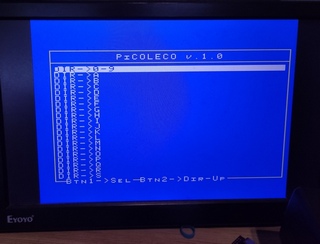
version 1.0d uploaded (both controller works in file selector menu)
PiCOLECO is a multicart DIY yourself based on cheap "purple" Raspberry Pi Pico clone. It should works for all roms up to 32k, but there's no enough RAM on Pico to handle 128k or larger multirom.
WARNING! "purple" Pico has not the same pinout of original Raspberry "green" ones, you MUST use the clone or you may damage your hardware.
NOTE FAT FS used for flash file management is quite simple, you can't use FILENAME LONGER THAN 32 BYTES INCLUDED SUFFIX!!!!! PLEASE RENAME YOUR BIN FILES OR THE GAMES WON'T START AT ALL!!!
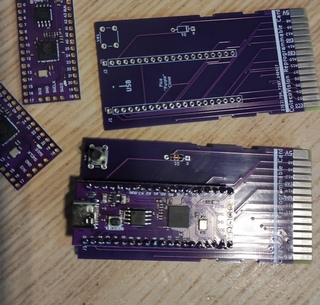
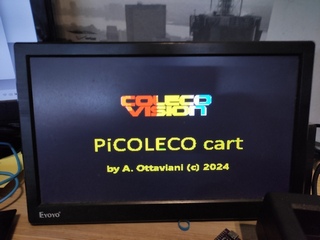
Kicad project and gerbers files for the pcb are in the PCB folder, you need only a diode and a push buttons for resetting the cart if needed or want restart. Add you pico clone, and flash the firmware ".uf2" in the Pico by connecting it while pressing button on Pico and drop it in the opened windows on PC. After flashed with firmware, and every time you have to change your ROMS repository, you can simply connect the Pico to PC and drag&drop "BIN" files into.
More info on AtariAge forum: https://forums.atariage.com/topic/366660-picoleco-a-diy-multicart-for-colecovision/
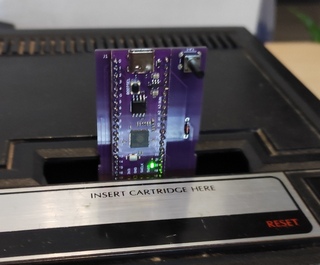
Even if the diode should protect your console, DO NOT CONNECT PICO WHILE INSERTED IN A POWERED ON CONSOLE!
Thank to Robin Robin Edwards and his A8PicoCart (https://github.com/robinhedwards/A8PicoCart), i found very smart his way to manage the Flash RAM and the USB updates, so i admit i took large parte of his code for it!. I used also the new and fantastic CVBasic for writing menu and file selector in Colecovision, thank to Oscar Toledo (https://nanochess.org/) for creating it.
| Qty | Value | Footprint | References |
|---|---|---|---|
| 2 | Conn_01x20 | Connector_PinSocket_2.54mm:PinSocket_1x20_P2.54mm_Vertical | J1, J2 |
| 1 | CVS-Card | Library:Coleco_Expansion_Card | X1 |
| 1 | Diode | Diode_THT:D_DO-35_SOD27_P7.62mm_Horizontal | D1 |
| 1 | SW_Push | Button_Switch_THT:SW_PUSH_6mm | SW1 |
It measures 40.6 × 82.4 mm and has 2 copper layers, 1.6 mm thick.
5 parts. The full list of its parts is on this page, with links to each part's symbol and footprint where PCBKit's library has them.
From the aotta/PiCOLECO repository on GitHub, at the commit this page was made from: the board is PCB/PiCOLECO/PiCOLECO.kicad_pcb and its schematic PCB/PiCOLECO/PiCOLECO.kicad_sch. PCBKit opens the board in the browser, with nothing to install.
Its repository publishes it under the GPL-3.0 licence: you may reuse it on that licence's terms (keep the author's notice, and for a copyleft licence share your changes alike).

joypad-ai/joypad-os
Universal controller firmware for building adapters, dongles, and custom controllers.

OLIMEX/OLINUXINO
OLINUXINO is Open Source / Open Hardware, low cost from EUR 24 Linux Industrial grade Single Board Computer capable to operate -25+85C

jamro/tiny-engineer
A small desktop robot that brings an AI coding assistant to life, physically acting out when it reads files, thinks, writes code, and finishes work.

hackclub/OnBoard
💡 Join 1,000 teenagers and make your first PCB with a $100 grant!


Luos-io/luos_engine
Open-source and real-time orchestrator for cyber-physical-systems, to easily design, test and deploy embedded applications and digital twins.