
2 layers118.1 × 101.6 mm
Teensy eurorack
newdigate/teensy-eurorack
Hardware Design: Eurorack shield for teensy 4.1 with 14 in / 16 out analog channels
102 parts259MIT
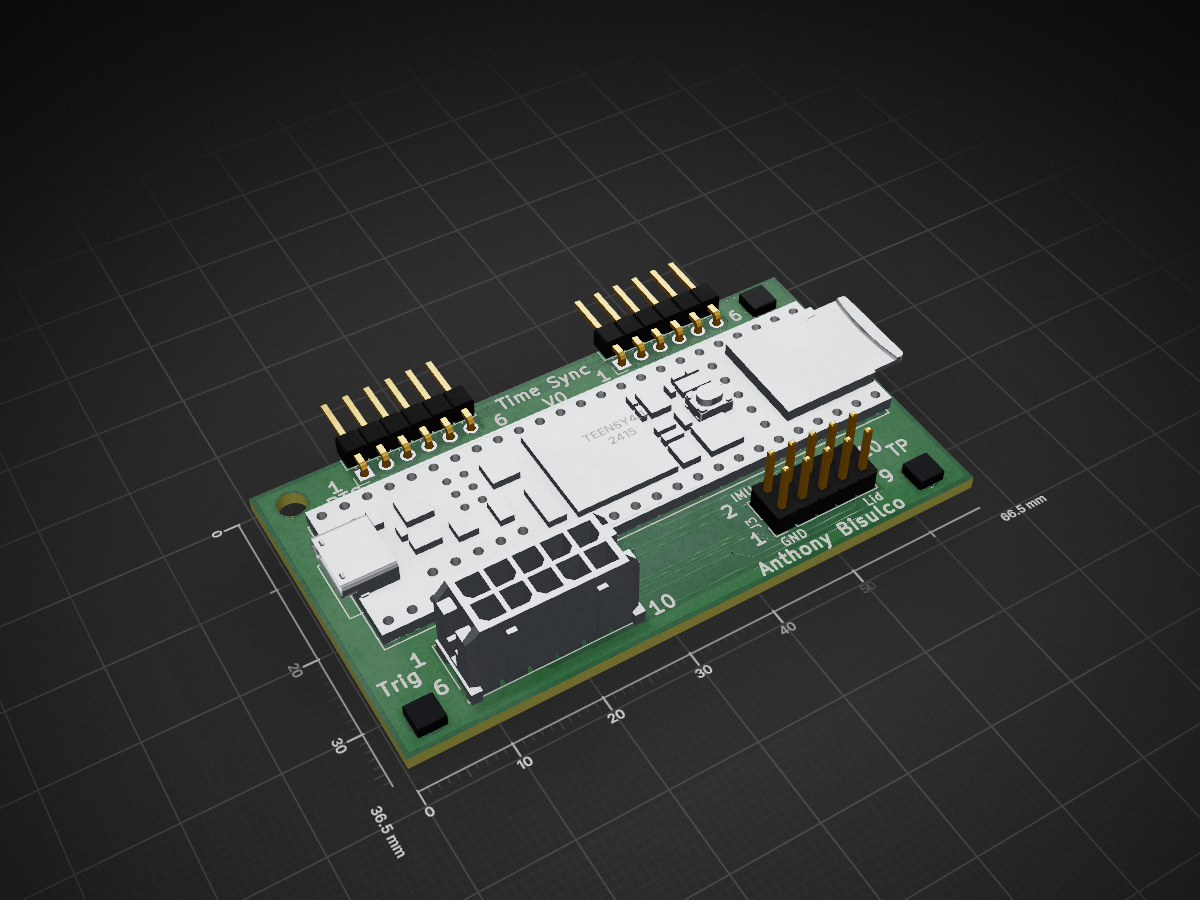
 anthonytec2/OctoSense211
OctoSense is a multimodal dataset
SyncBoard is an open-source printed circuit board by anthonytec2, from the anthonytec2/OctoSense repository on GitHub, published under the MIT licence. It is a 2-layer board of 66.5 × 36.5 mm with 9 parts on 66 nets, routed with 141 tracks and 7 vias.
It is built around the TEENSY 4.1. Its parts include 4 connectors and 1 IC. It belongs with the NXP (LPC, Kinetis, i.MX RT) boards of this library.

Self-Supervised Learning for Multimodal Robot Perception


Watch the OctoSense overview video
OctoSense is a multimodal dataset spanning a car, boat, and quadruped on a shared sensor platform. The bulk is large-scale driving: 59 hours / 2,474 km / 8.43 TB of time-synchronized data from stereo RGB + event cameras, LiDAR, thermal, IMU, RTK-GPS, and the vehicle CAN bus, recorded across urban, suburban, and rural roads from sunrise to night and through degraded sensors, with ground truth for depth, optical flow, semantic segmentation, and ego-motion. We also include sequences recorded on a boat and a Unitree quadruped using the same sensor platform. Every sequence is captured by a fully open-source sensor platform and processed with the pipeline in this repo.
Getting started with OctoSense data: the getting-started notebook downloads a sequence and walks through every modality. Open it with zero setup in Colab, or run it locally after the install below (activate the env first:
conda activate octosense).The dataset (sensor specs, HDF5 schema, per-sequence metadata, and downloads) lives on the Hugging Face dataset page. This repository is the tooling around it: how the data is collected, visualized, and produced.
OctoSense has two parts with separate environments:
OctoSense/) and the
raw-bag conversion run in a custom-built Docker container (ROS 2 Jazzy + source-built FFmpeg);
only the raw-bag conversion in data_processing/timesync/ needs the ROS 2 container. See
OctoSense/README.md to build and run it.git clone https://github.com/anthonytec2/OctoSense.git
cd OctoSense
conda env create -f environment.yml # installs Python, FFmpeg, and a CPU build of PyTorch
conda activate octosenseThis installs a CPU build of PyTorch + torchcodec by default. On a CUDA GPU (faster video decoding and model inference) reinstall the GPU wheels for torch, torchvision, and torchcodec after activating, picking versions per the torchcodec compatibility table:
pip install 'torch==2.12.*' 'torchvision==0.27.*' 'torchcodec>=0.14' \
--index-url https://download.pytorch.org/whl/cu130The full dataset (8+ TB) lives on the
Hugging Face dataset page.
Use download_octosense.py (repo root) to grab a subset by platform, sequence, and modality,
and skip the raw event streams (events.h5, ~78% of each sequence's bytes):
pip install huggingface_hub

# all car sequences (everything)
python download_octosense.py --platform car --out ./octosense

# the same, but skip the raw event streams (events.h5, ~78% of the bytes)
python download_octosense.py --platform car --no-events

# one sequence, only the core LiDAR/IMU/GPS h5 + depth + segmentation
python download_octosense.py --sequence rosbag2_2026_01_04-13_51_24 --modalities data,depth,seg

# download_octosense.py just wraps huggingface_hub, so you can also use the HF CLI directly
hf download anthonytec2/OctoSense --repo-type dataset --local-dir ./octosense
--modalities picks from data, events, captions, depth, seg, rgb, ir.
Five entry points into OctoSense from this repository, start with the notebook:
octosense_quickstart.ipynb)The getting-started notebook downloads a sequence and walks
through every modality (LiDAR, stereo RGB, events, depth, segmentation, GPS, IMU, CAN, and captions).
Open it with zero setup in
Colab, or run
it locally after the install above (activate the env first: conda activate octosense).
data_processing/viz/)Rerun viewer scrubbing an OctoSense sequence across every modality.
Generate a Rerun recording from a downloaded sequence with the script below,
then open the resulting .rrd in the Rerun viewer to scrub every modality on one shared timeline
(LiDAR, stereo RGB, reconstructed event video, depth, GPS track, IMU, CAN signals, and captions) with
a bundled viewer layout:
python data_processing/viz/rerun_viz.py --dir <sequence_dir>data_processing/sem_search/)
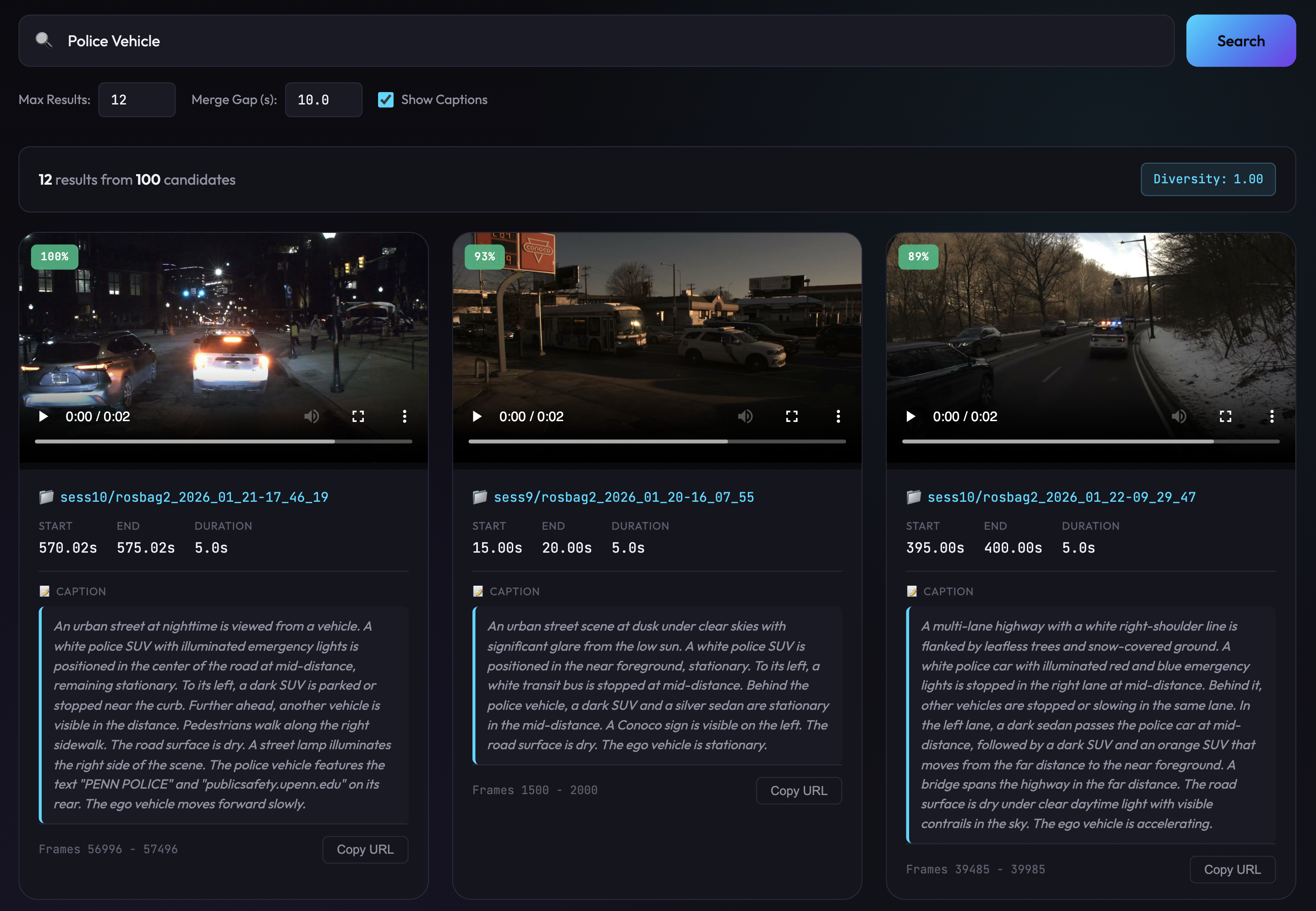
The serve web UI: a natural-language query returning ranked clips with scores and scene captions.
Every 5s of image sensor data is captioned and embedded into a hybrid FAISS + BM25 index, so you can find moments across all 2,474 km by description ("a car turning left at dusk", "wet road at night", "pedestrian crossing"). Download the prebuilt index from the dataset and query it from the CLI (CPU works; a GPU just speeds up the query encoder):
# 1) prebuilt search index (~700 MB) from the dataset
hf download anthonytec2/OctoSense --repo-type dataset --include "semantic_search/*" --local-dir ./octosense

# 2) natural-language query -> ranked sequences + timestamps (run from data_processing/)
cd data_processing
python -m sem_search.main query "a car turning left at dusk" --index-dir ../octosense/semantic_search

# 3) or browse results in a web UI (matching video clips in the browser at http://localhost:8000)
#    set DATA_BASE_PATH so the UI can play each result's clip (see note below)
DATA_BASE_PATH=./octosense/car python -m sem_search.main serve --index-dir ../octosense/semantic_search --port 8000
First run pulls the Qwen3-Embedding query encoder. Searching needs no video, but to play the
matching clips in the web UI, set the DATA_BASE_PATH env var to the dataset root that holds
<session>/<bag>/{img_left.mp4, data.h5} (e.g. ./octosense/car); the clip/thumbnail endpoints read
img_left.mp4 from there per request. Results can come from any sequence, so a clip only plays if
that sequence's img_left.mp4 is present under DATA_BASE_PATH (others return 404; the text results
still show). For how the index is built, see the
sem_search stage details.
OctoSense/)Everything to reproduce the sensor platform and record your own synchronized data: the ROS 2 (Jazzy) capture stack, hardware PPS time-sync (Teensy firmware + KiCad SyncBoard distributing a pulse-per-second to every sensor), the mechanical CAD, the containerized capture environment, and a web monitor to watch per-sensor health and start/stop recording. Build and run instructions
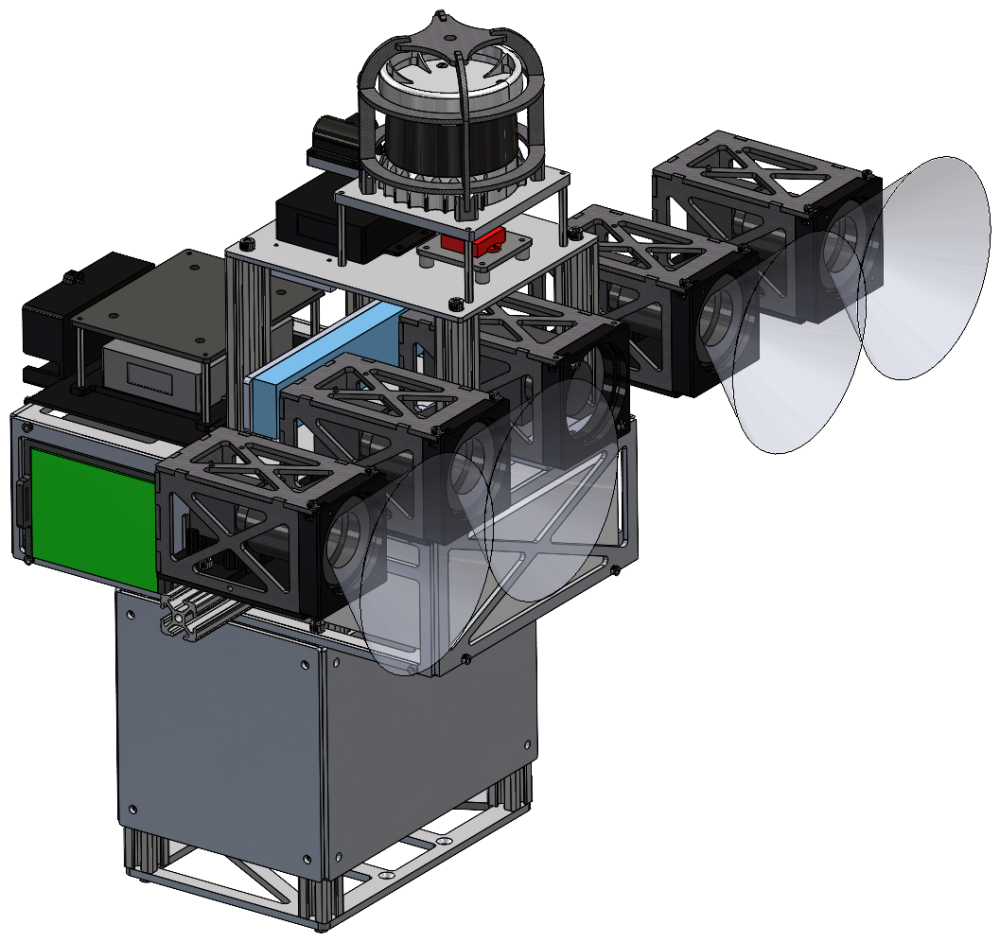 | 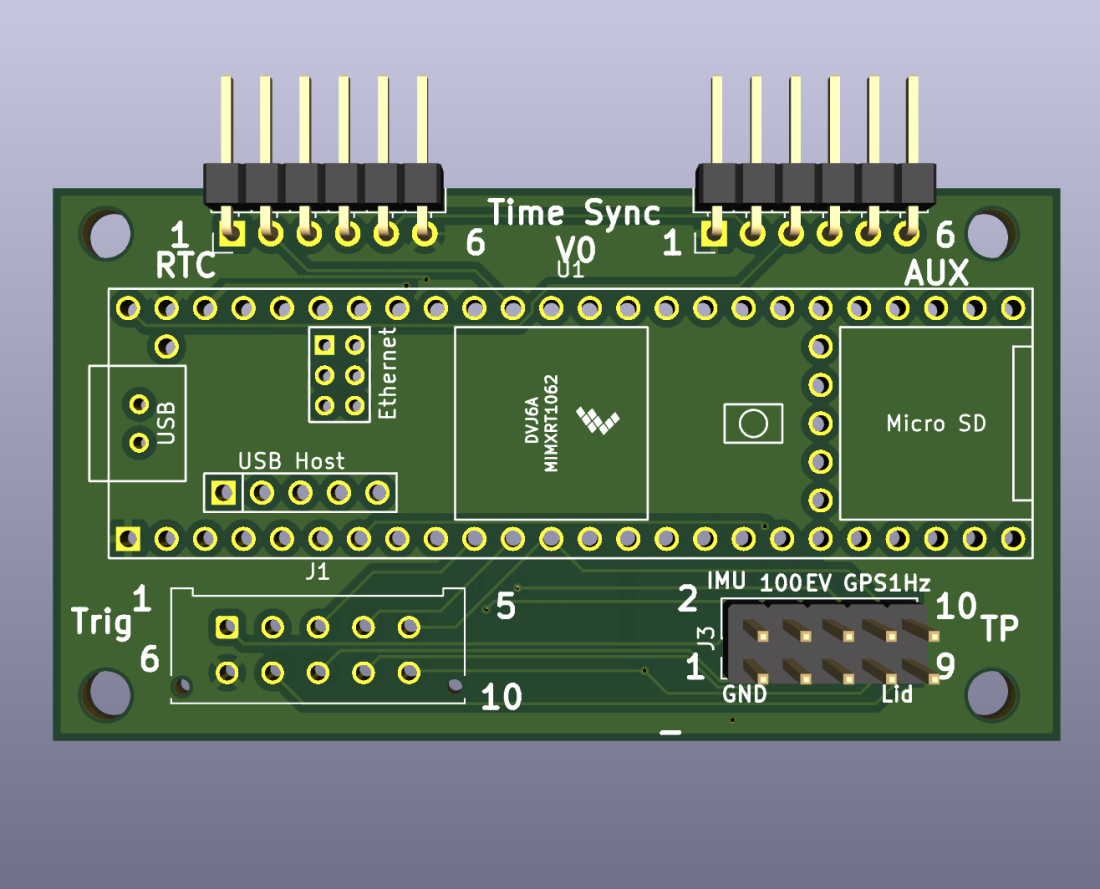 |
| OctoSense Sensor Platform (CAD) | Time Synchronization Custom PCB |
data_processing/)The pipeline that turns a raw ROS 2 bag into the released sequences, as independent stages:
timesync (PPS clock-sync of all sensors to per-bag HDF5 + H.265 video), lidar_cal
(LiDAR/camera extrinsics), depth_gt (accumulated-LiDAR depth + derived ego-motion optical
flow), seg_gt (EoMT semantic labels), and sem_search (caption + embed to natural-language
search index). Per-stage details
This repo releases the platform + data tooling only. The multi-modal masked auto-encoder (model, training, and dataloader code) will be released at a later date.
@misc{bisulco2026octosense,
  title        = {{OctoSense}: Self-Supervised Learning for Multimodal Robot Perception},
  author       = {Bisulco, Anthony and Wang, Jeremy and Daniilidis, Kostas and Balestriero, Randall and Chaudhari, Pratik},
  year         = {2026},
  howpublished = {Preprint},
}Released under the MIT License: free to use, modify, and redistribute with attribution; provided "as is" without warranty. If you use OctoSense, please cite the paper above.
| Qty | Value | Footprint | References |
|---|---|---|---|
| 3 | , , | ||
| 1 | Aux Pins | Connector_PinHeader_2.54mm:PinHeader_1x06_P2.54mm_Horizontal | J4 |
| 1 | Connector for RTC | Connector_PinHeader_2.54mm:PinHeader_1x06_P2.54mm_Horizontal | J2 |
| 1 | Teensy4.1 | teensy:Teensy41 | U1 |
| 1 | Trigger Pin Connector | Connector_Molex:Molex_Micro-Fit_3.0_43045-1012_2x05_P3.00mm_Vertical | J1 |
| 1 | Trigger Pin Test Point Connector | Connector_PinHeader_2.54mm:PinHeader_2x05_P2.54mm_Vertical | J3 |
The 8 most common of 9 parts.
It measures 66.5 × 36.5 mm and has 2 copper layers, 1.6 mm thick.
9 parts, built around the TEENSY 4.1. The full list of its parts is on this page, with links to each part's symbol and footprint where PCBKit's library has them.
From the anthonytec2/OctoSense repository on GitHub, at the commit this page was made from: the board is OctoSense/SyncBoard/SyncBoard.kicad_pcb and its schematic OctoSense/SyncBoard/SyncBoard.kicad_sch. PCBKit opens the board in the browser, with nothing to install.
Its repository publishes it under the MIT licence: you may reuse it on that licence's terms (keep the author's notice, and for a copyleft licence share your changes alike).
newdigate/teensy-eurorack
Hardware Design: Eurorack shield for teensy 4.1 with 14 in / 16 out analog channels


jerry20091103/Teensy_Grovebox
A portable synth and music multi-tool made with Teensy 4.1

FundamentalFrequency/LMN-3-ECAD
Electrical CAD Files for the LMN-3 Project

DRWJSCHMIDT/T41
This is the repository for the officially released V10, V11, and V12 versions of the T41 Software Defined Transceiver hardware and kits.

NoEngineerHere/TeensyELS
The "blessed" way to debug is to: - Use vscode - Set your environment to "native" (this is the default) - Ensure that 'gdb' is installed - Set your breakpoints in your code to test - note: if you want to debug a single…