Skip to the content
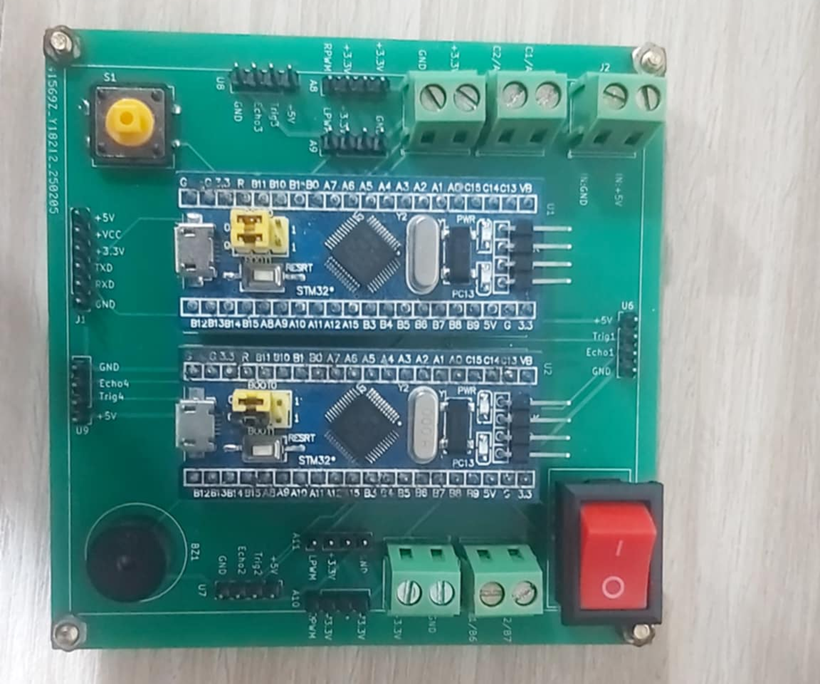
2 layers94 × 94.5 mmAll in one, the printed circuit board in 3D

abovecam=VisionESP32("http://192.168.137.235/capture","stockv19.pt","oosv12.pt",0.75,0.6,"Shelf1,22 detection","Shelf1,22 outofstock")…

Size
94 × 94.5 mm
Copper layers
2
Thickness
1.6 mm
Parts
19
Nets
76
Pads
138
Tracks, vias
250, 8
Routed
Yes
KiCad
KiCad 8.0 (file 20240108)
Created
18 Feb 2025
Updated
24 Jun 2025

Overview

All in one is an open-source printed circuit board by anh-phi-dao, from the anh-phi-dao/DATN_Nhung_Firmware_Raspberrypi repository on GitHub. It is a 2-layer board of 94 × 94.5 mm with 19 parts on 76 nets, routed with 250 tracks and 8 vias.

It is built around the B3F-4055. Its parts include 6 ICs, 6 connectors and 2 switches.

Main components

1

README

readme.md

Shelves store monitoring robot

Introduction

This project focus on creating a mobile robot that can monitor shelves information like the shortage of goods, or misplaced goods

Contributors

  • Vu Quoc Khanh : EKF SLAM, EKF Localization, Path-tracking algorithm
  • Dao Anh Phi : Circuit design, STM32F103C8T6 firmware, GUI with QT5 on python
  • Dang Van Vinh : Camera handling, image processing algorithm, Yolov8 model, Yolov8 training data

Features

  • Using 2-wheel mobile robot
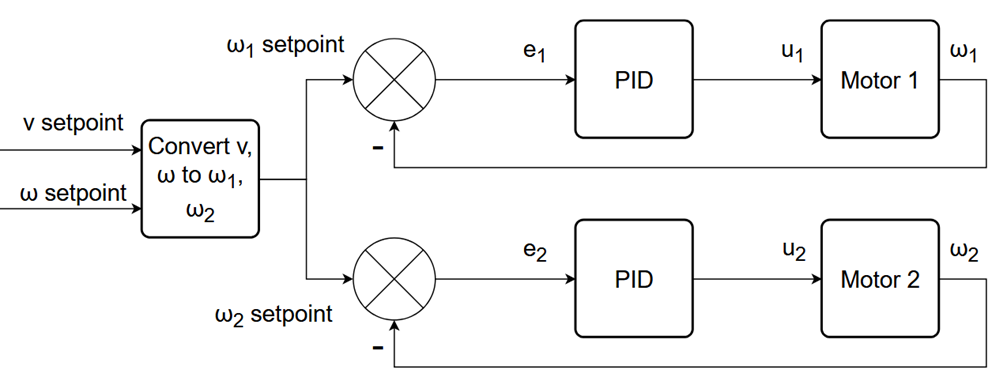
  • Speed control with STM32F103C8T6
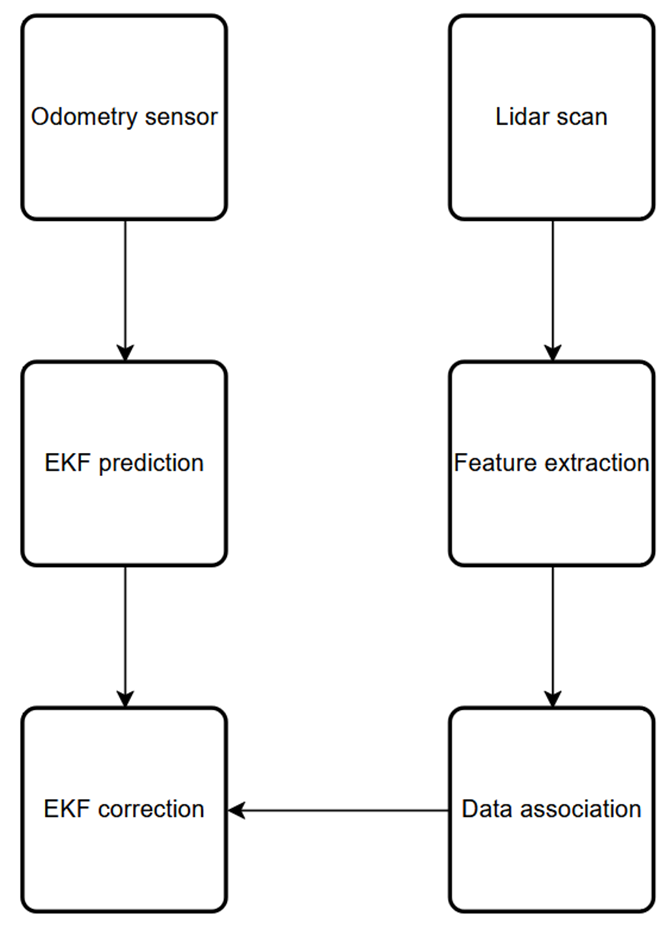
  • Lidar with Extended Kalman Filter SLAM algorithm for creating features map and define path for robot movement, Extended Kalman Filter localization for position tracking, path-tracking algorithm
  • ESP32 Camera for gathering shelves information
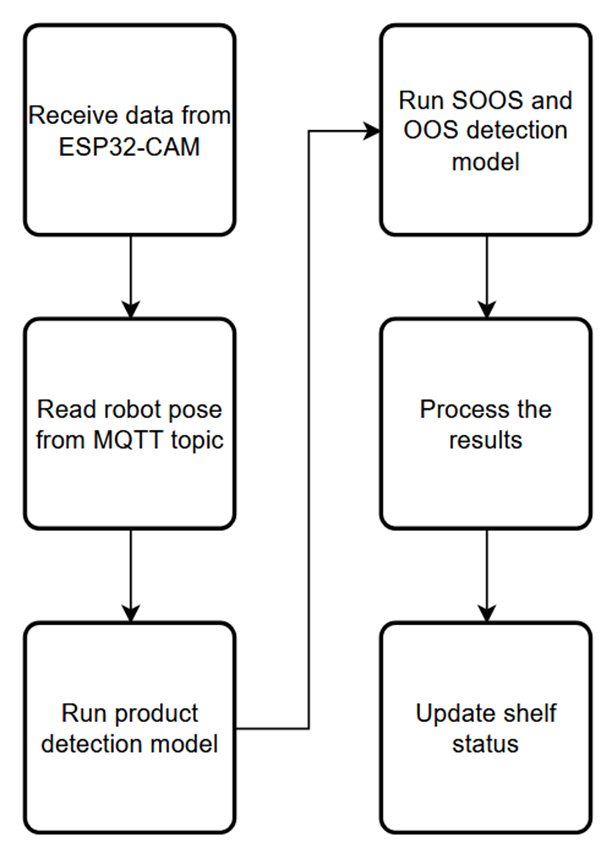
  • Using Yolov8 model combining with robot position to determine shelves states
  • A gui based on QT5 framework for observing the state of the shelves in real-time, toggling the states of the shelf

System Overview

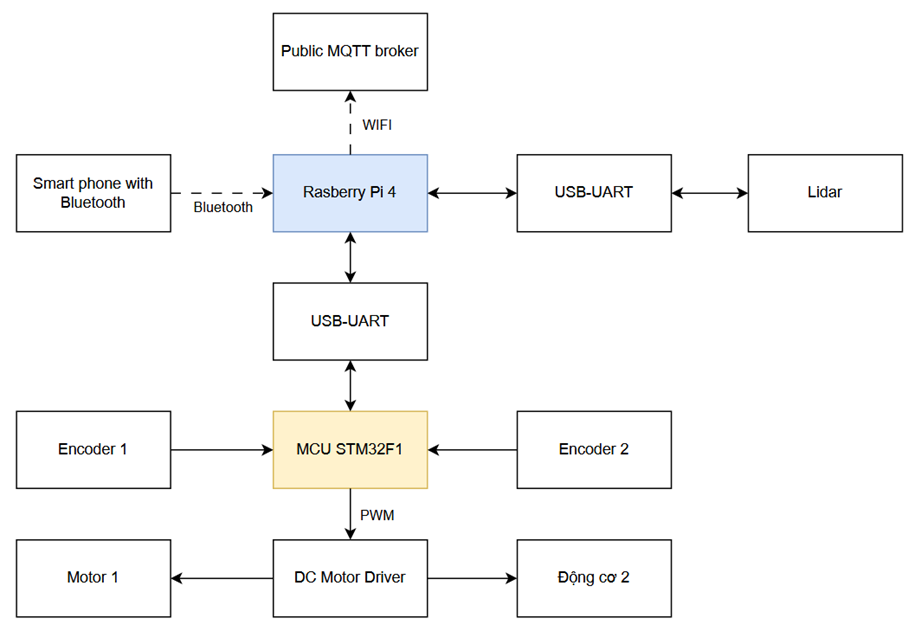
Block Diagram

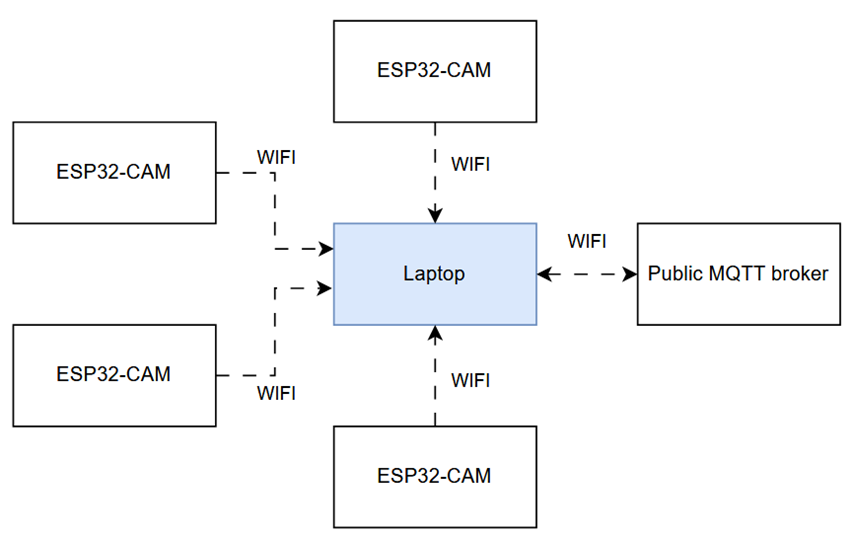
alt text alt text

Components

  • Microcontroller: STM32F103C8T6
  • Motor: JGB37-520 12V 37RPM
  • Power Supply: 3S 45C Lipo-battery
  • Power Regulator: LM2596S
  • Embedded computer: Raspberry Pi 4
  • Observation sensor:RPLidar A1
  • Camera: ESP32 Camera

Hardware Design

https://github.com/Anh-phi-ngu-IT-Dien-tu/DATN_Nhung_Firmware_Raspberrypi/tree/Motor_PCB_Design alt text

Software Design

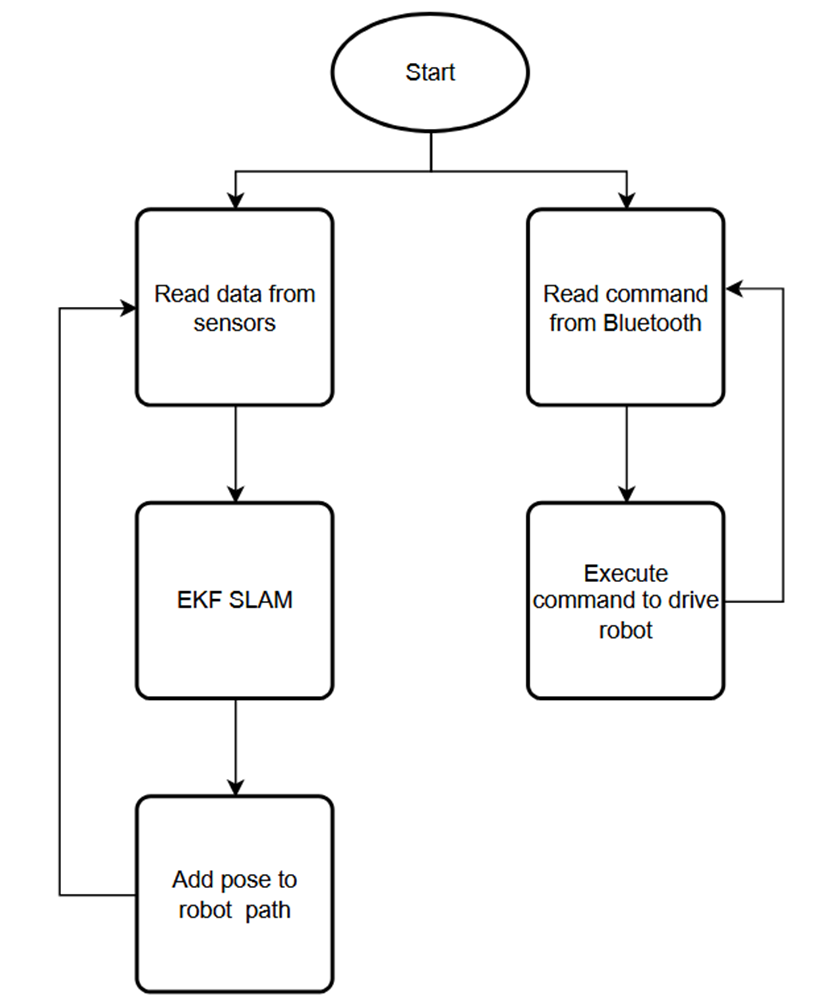
Android app for controlling robot while defining map, robot path

https://github.com/Anh-phi-ngu-IT-Dien-tu/DATN_Nhung_Firmware_Raspberrypi/tree/Android_app

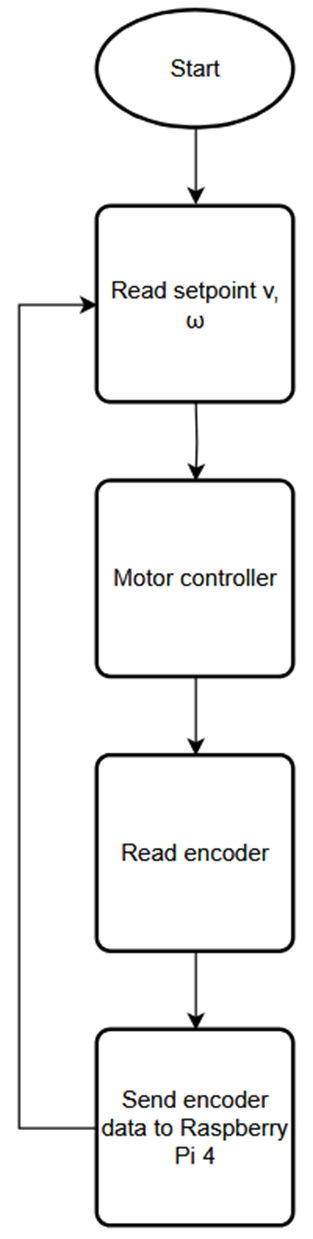
STM32F103C8T6 Firmware

https://github.com/Anh-phi-ngu-IT-Dien-tu/DATN_Nhung_Firmware_Raspberrypi/tree/Motor alt text alt text

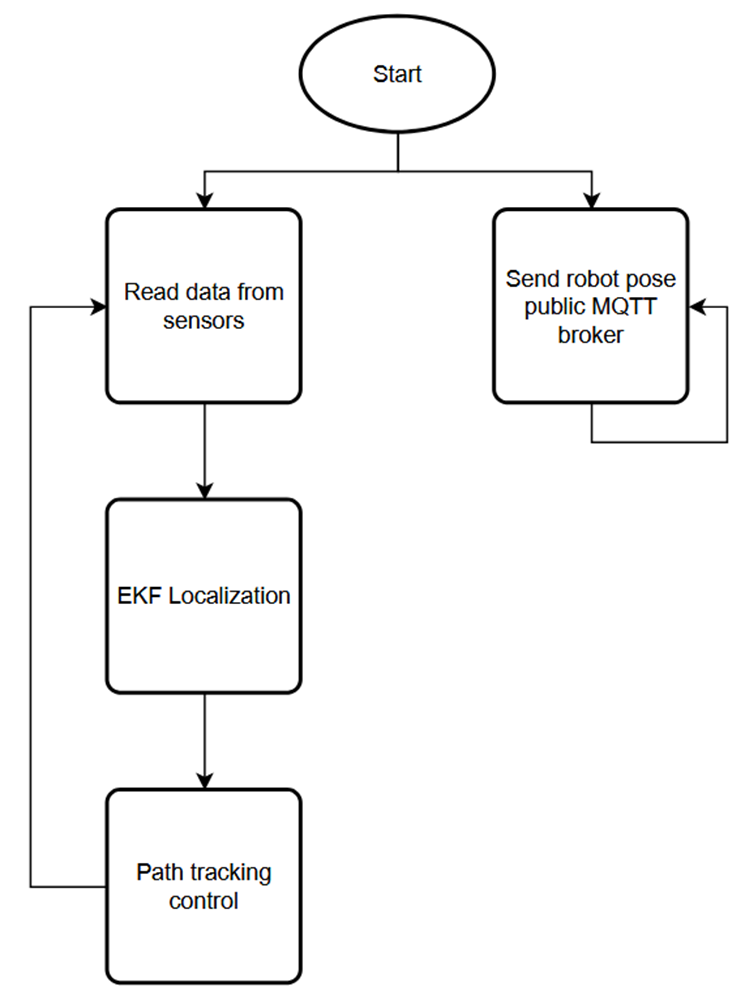
EKF Algorithm (On Raspberry pi 4):

https://github.com/Anh-phi-ngu-IT-Dien-tu/DATN_Nhung_Firmware_Raspberrypi/tree/Raspberrypi alt text

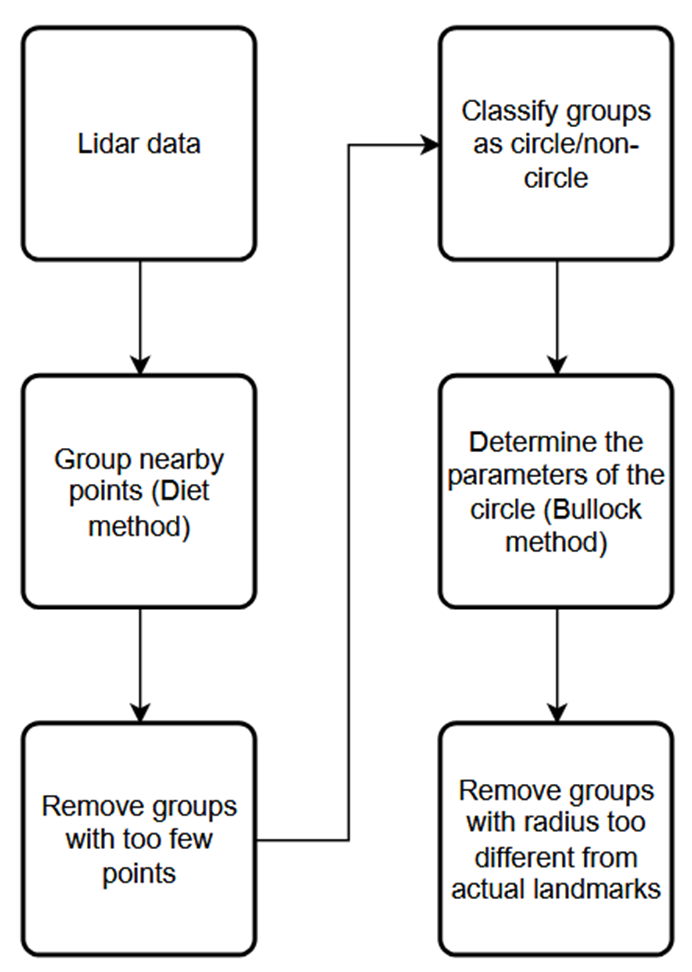
Feature extraction (On Raspberry pi 4):

alt text

EKF SLAM for defining map, robot path

alt text

EKF Localization for tracking robot positiom

alt text

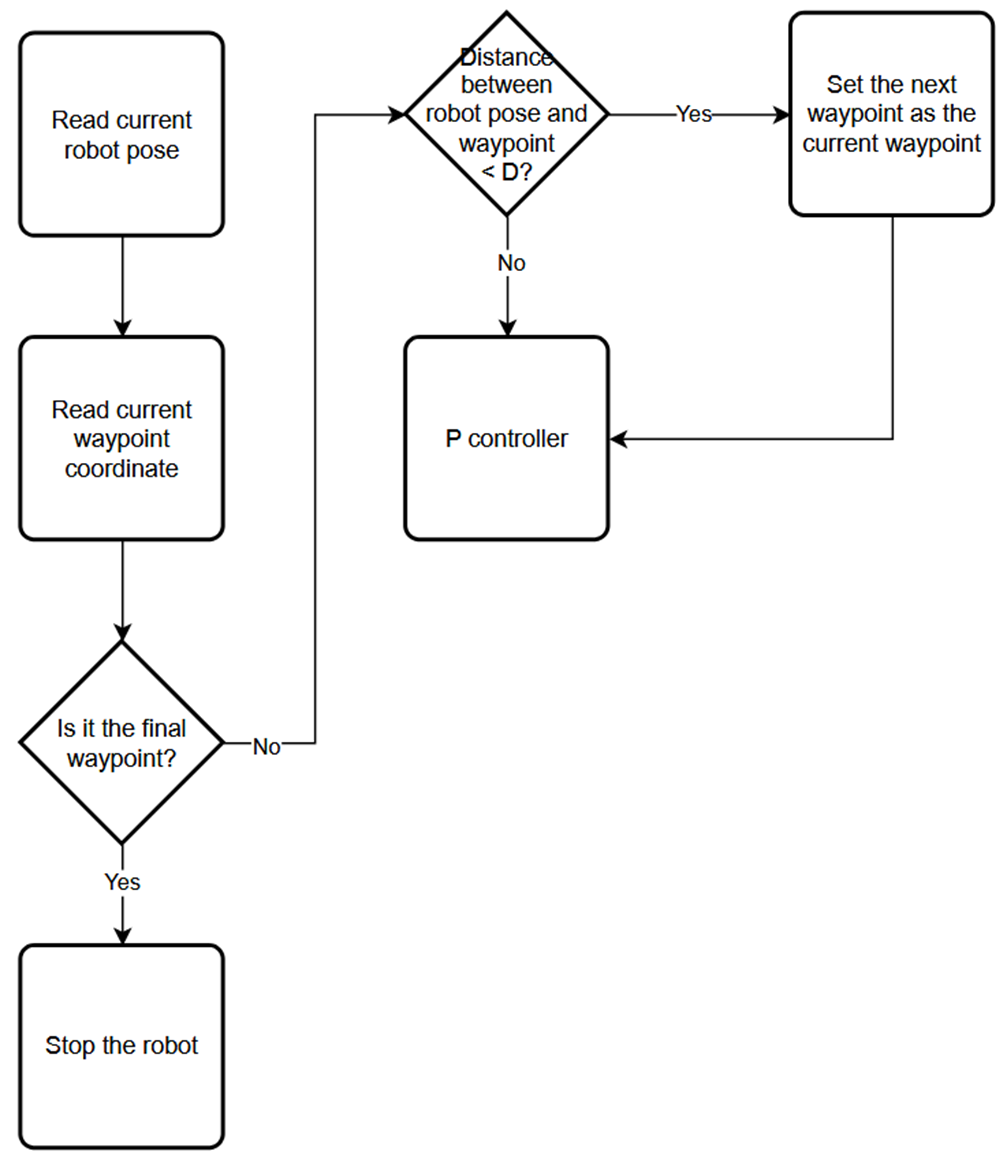
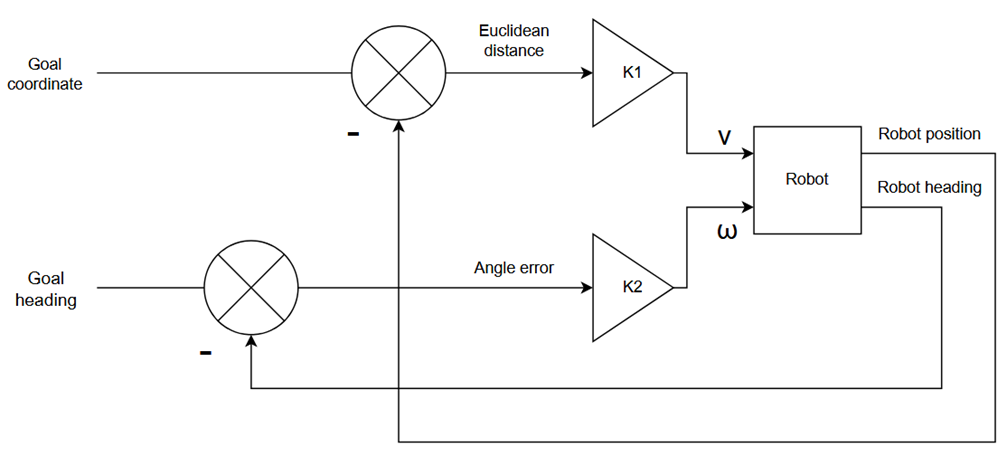
Path-tracking with P controller

alt text alt text

Image processing algorithm

https://github.com/Anh-phi-ngu-IT-Dien-tu/DATN_Nhung_Firmware_Raspberrypi/tree/Vision_Part

Camera handling algorithm

alt text

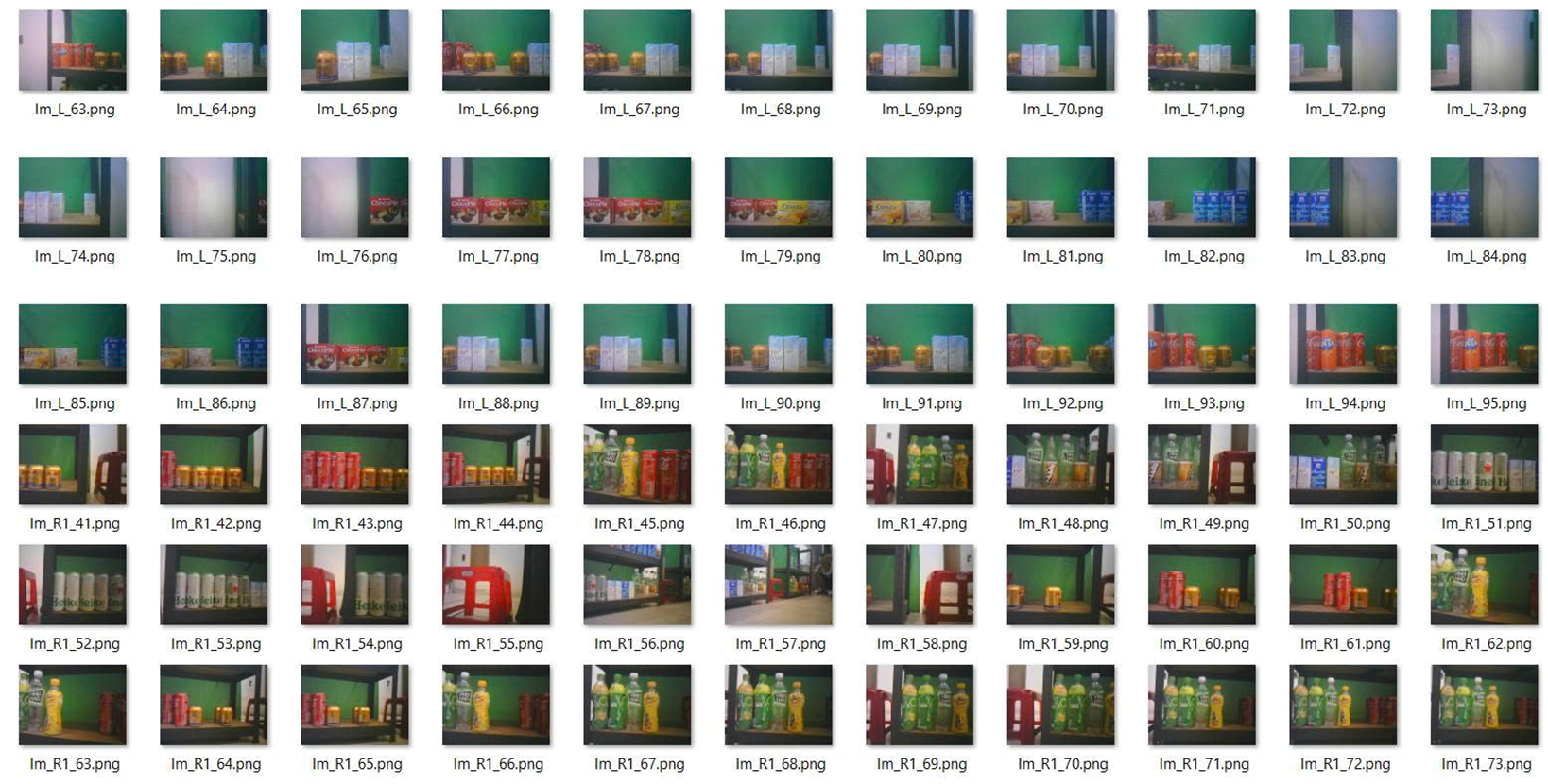
Yolov8 data

alt text

Yolov8 models, classes
  • Object detection model: 21 class: 247, Chinsu, ChocoPie, D.Thanh, Heineken, Oreo, Pepsi-xanh, Redbull, Revive-chanh,Simply, TH true Milk, Tea Plus, Vinamilk, coca, coca-chai, custas, fanta-cam, khongdo, number1, sting, vinhhao
  • Almost out, out detection: 2 class: oos (Out of stock) and semi-oos (Semi out of stock)

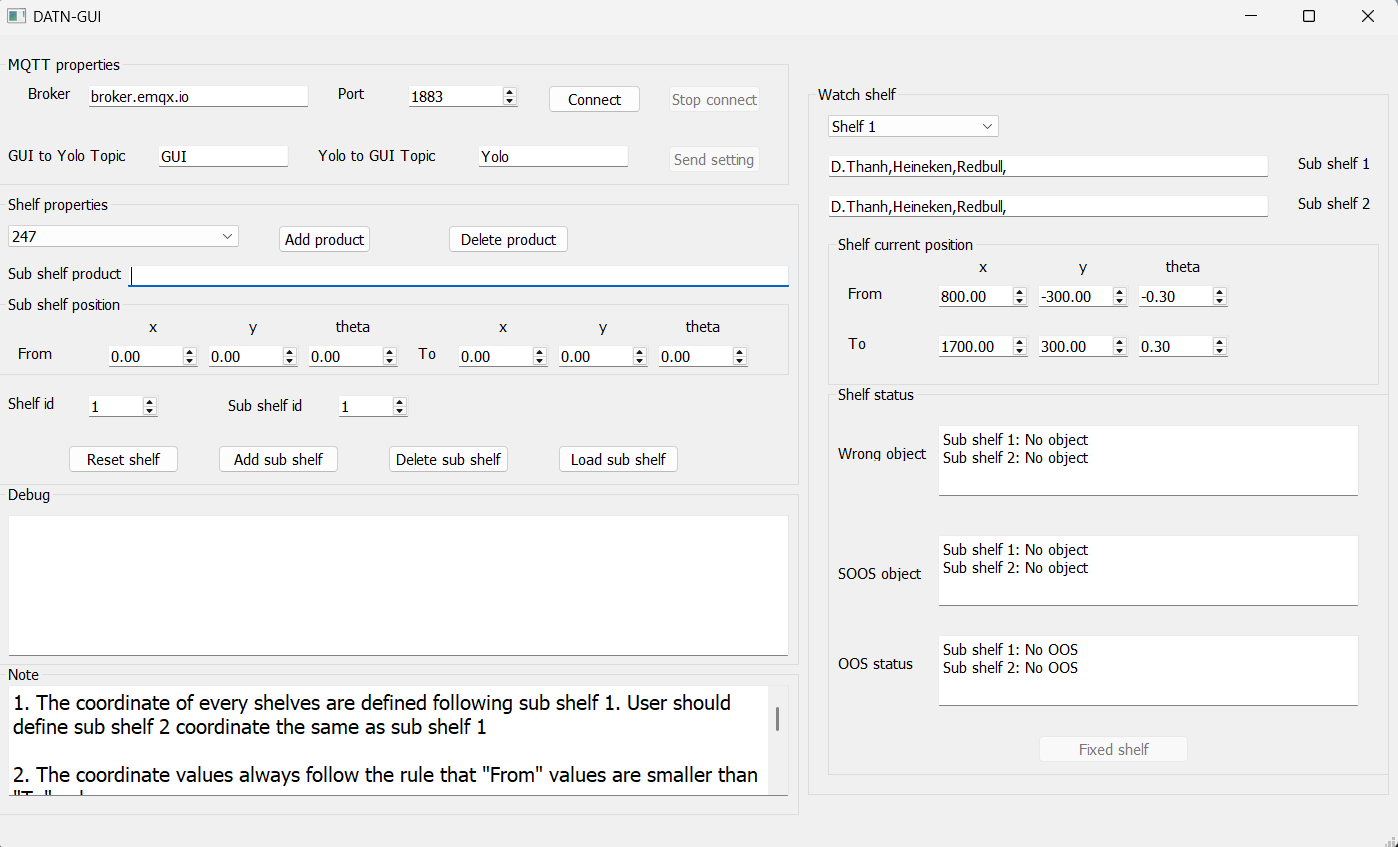
GUI

https://github.com/Anh-phi-ngu-IT-Dien-tu/DATN_Nhung_Firmware_Raspberrypi/tree/Python_GUI alt text

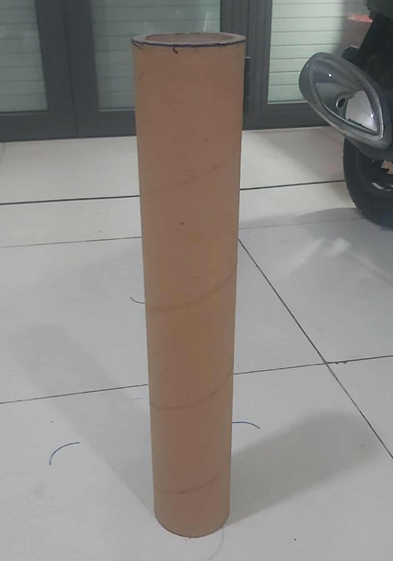
Landmark

alt text

Results and Evaluation

https://youtu.be/jIvI4DPsrL0?si=AIefCEjHjDwL9q_E

Usage

Prepare the power source
  • Plug the LIPO batteries into the existing jack
  • Connect 5V/3A power source(Portable charger)
  • Check the connection between CH340G module to Raspberry pi 4, between RPLIDAR A1 to Raspberry pi 4
Draw map and robot path
  • Download the Android app that in App to smart phone
  • Setup Raspberry pi through headless connection
  • Setup bluetooth connect by following this tutorial : https://youtu.be/sY06F_sPef4?si=ksDs4zLhg-ldZGuX
  • Connect the android app and raspberry pi through bluetooth connection
  • Run Raspberrypi/ekfslam2_main.py, wait for a few second, then control the robot through android app
  • After creating feature-based map (which is saved_landmarks.json file), compare all features exist in map with real landmarks, remove all dupicated, wrong features.
Run localziation and path tracking algorithm
  • (Optional) Modify the waypoints exist in waypoints.json
  • Run localization2_main.py, the robot will follow the waypoint defined in waypoints.json, stop the robot when it meet the last waypoint
Run the vision algorithm
  • (Pass this step if you have already done it)Config the wifi inside Vision\CameraWebServer\CameraWebServer.ino
cpp
// ===========================
// 🔹 Nhập WiFi Credentials
// ===========================
const char *ssid = "LAPTOP-Phi";
const char *password = "Phi18112003Laptop";
  • (Pass this step if you have already done it) Upload the Vision\CameraWebServer\CameraWebServer.ino to esp32 camera
  • Get the IP address of the camera (reset the camera in order to load the ip address)
  • Config the IP address in Vision\main_ver2.py
python
above_cam=Vision_ESP32("http://192.168.137.235/capture","stockv19.pt","oosv12.pt",0.75,0.6,"Shelf1,2_2 detection","Shelf1,2_2 out_of_stock")
below_cam=Vision_ESP32("http://192.168.137.138/capture","stockv19.pt","oosv12.pt",0.75,0.6,"Shelf1,2_1 detection","Shelf1,2_1 out_of_stock")
above_cam2=Vision_ESP32("http://192.168.137.245/capture","stockv19.pt","oosv12.pt",0.75,0.6,"Shelf3,4_2 detection","Shelf3,4_2 out_of_stock")
below_cam2=Vision_ESP32("http://192.168.137.26/capture","stockv19.pt","oosv12.pt",0.75,0.6,"Shelf3,4_1 detection","Shelf3,4_1 out_of_stock")
  • Run Vision\main_ver2.py on a laptop that use the same ip address of ESP32 camera
Setup GUI (proceed this before running localziation and path tracking algorithm and after running Vision\main_ver2.py)
  • Run Python_GUI/datn_gui_handle.py
  • Define shelves object, coordinate so the vision algorithms can determine the shelves states
  • (Optional but not recommended)Config the MQTT topic
  • Press Connect
  • Press setting to send the shelves information and start running Yolov8 models and shelves states determination algorithm
  • Watch the result appears on Watch shelves section
  • (Optional) Press Fixed button if you think that the related shelf in Watch shelves section has been handled

Advantages

  • Reducing observation cost
  • Yolov8 model can work with high confidence
  • Robot can move around the store the way we want

Limitations

  • Time consumption for setup steps
  • There are some small error for feature-based landmark
  • The path-defining algorithm is too dependent to the operation who controlling the robot with bluetooth app
  • The overall image processing algorithm can not determine the complicated situations
  • The GUI still not enough user-friendly

Parts

19
QtyValueFootprintReferences
5Conn_01x02_PinTerminalBlock_MetzConnect:TerminalBlock_MetzConnect_Type073_RT02602HBLU_1x02_P5.08mm_HorizontalJ2, J3, J4, J9, J10
4Conn_01x04_PinConnector_PinHeader_2.54mm:PinHeader_1x04_P2.54mm_VerticalA8, A9, A10, A11
4~Connector_PinHeader_2.54mm:PinHeader_1x04_P2.54mm_VerticalU6, U7, U8, U9
2ZC323000STM32_BLUEPILL_KIT:MODULE_ZC323000U1, U2
1B3F-4055B3F-4055:SW_B3F-4055S1
1BuzzerBuzzer_Beeper:Buzzer_15x7.5RM7.6BZ1
1Conn_01x06_PinConnector_PinHeader_2.54mm:PinHeader_1x06_P2.54mm_VerticalJ1
1SW_DPST_x2Switch_6A:Switch_6A_21x22x15customSW1

Similar boards

  • 4 layers43 × 89 mmReflowControllerV2, the printed circuit board in 3D

    ReflowControllerV2

    walclu/smartReflow

    Repository for STM32WB55 based reflow toaster oven controller.

    99 parts15
  • 2 layers137.2 × 83.8 mmPWA REV2, the printed circuit board in 3D

    PWA REV2

    PubInv/krake

    The Krake™ is a Wi-Fi–enabled server using an MQTT broker, which means it can be controlled remotely by other devices ("clients") via the internet.

    215 parts9AGPL-3.0
  • 2 layers137.2 × 83.8 mmGeneralPurposeAlarmDevicePCB, the printed circuit board in 3D

    GeneralPurposeAlarmDevicePCB

    PubInv/general-purpose-alarm-device

    A general purpose alarm device (with software) as a module for medical devices (and others)

    140 parts7AGPL-3.0
  • 2 layers100.1 × 121.4 mmPanel, the printed circuit board in 3D

    Panel

    da-penguin-guy/Proteus

    The Proteus is a modular collection of PCBs that will be used to develop the Virgil sound Protocol

    137 parts3
  • 2 layers189.2 × 146.7 mmMFD pcb, the printed circuit board in 3D

    MFD pcb

    Apates-MFD/MFD-pcb

    kicad project and components information of pcb

    29 parts2MIT
  • 4 layers90 × 60 mmBench psu, the printed circuit board in 3D

    Bench psu

    PaulBichl/VibePCB-bench-psu

    USB-C PD (20 V) powered bench supply, 2 independent channels, 1.6-16.6 V / 3 A each, constant voltage / constant current, designed with VibePCB.

    206 parts1
  • 2 layers85 × 120 mmHome Assistant Control pad, the printed circuit board in 3D

    Home Assistant Control pad

    Pegoku/Home-Assistant-Control-pad

    This is a programmable Home Assistant Control Pad. It can control 4 Home assistant devices at a time, and has 4 togglable screens/zones (in total 16 devices).

    111 parts1GPL-3.0
  • 2 layers214.5 × 91.5 mmJoystick Controller, the printed circuit board in 3D

    Joystick Controller

    bchiang100/joystick-hid-controller

    ECE 362 Mini Project

    22 parts

Questions

How big is the All in one PCB?

It measures 94 × 94.5 mm and has 2 copper layers, 1.6 mm thick.

What parts does the All in one use?

19 parts, built around the B3F-4055. The full list of its parts is on this page, with links to each part's symbol and footprint where PCBKit's library has them.

Where can I download the All in one KiCad files?

From the anh-phi-dao/DATN_Nhung_Firmware_Raspberrypi repository on GitHub, at the commit this page was made from: the board is Motor_PCB_Design/All_in_one/All_in_one.kicad_pcb and its schematic Motor_PCB_Design/All_in_one/All_in_one.kicad_sch. PCBKit opens the board in the browser, with nothing to install.

Can I use the All in one design in my own project?

Its repository states no licence, so its author keeps all rights: ask anh-phi-dao before reusing the design.