2 layers40 × 20 mm
 akita11/AnythingLLMModule1
現在はLLMサーバーとしてOllamaのみサポートしています。 シリアルで接続する場合はserialにあるスクリプトを動かして待機させてください。 WiFiで接続する場合はOllamaの設定からExpose Ollama to the networkを有効にしてください。
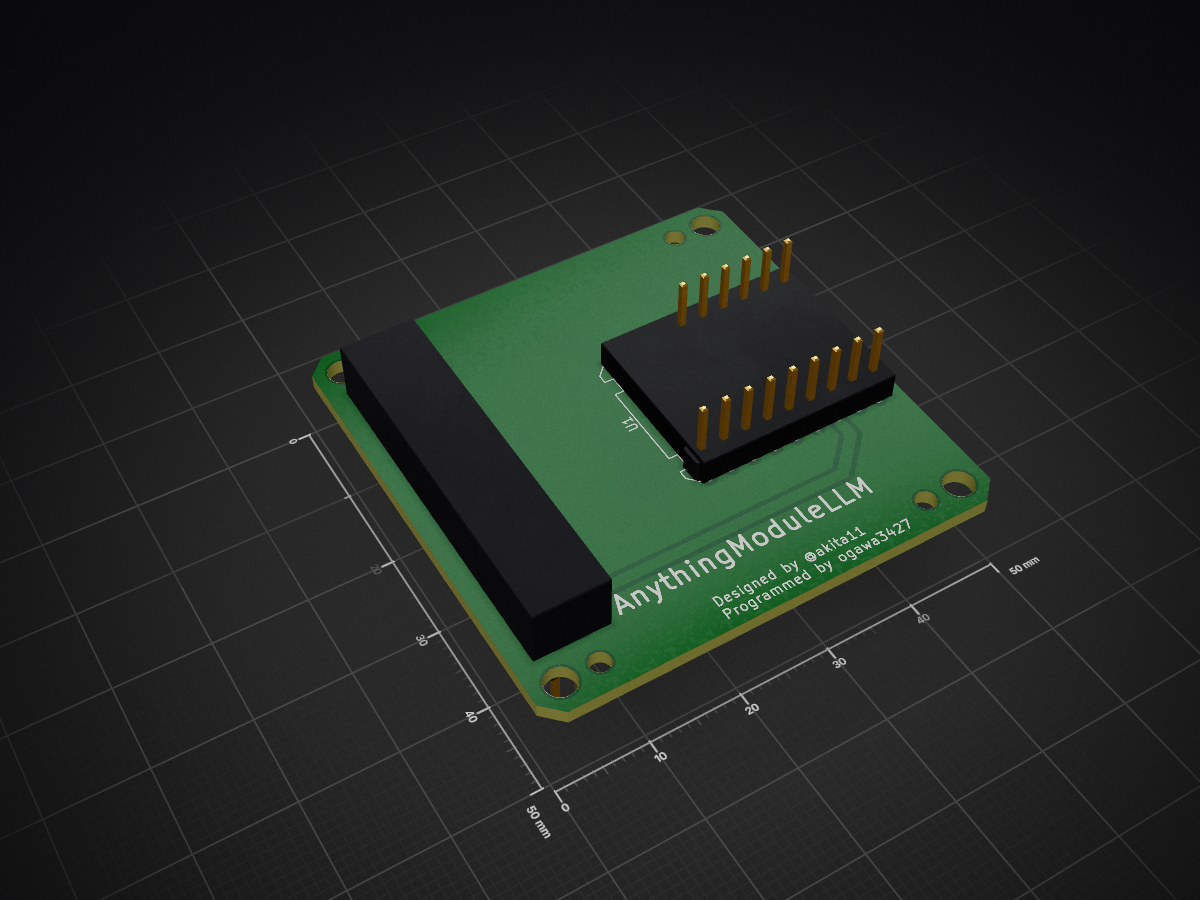
AnythingModuleLLM is an open-source printed circuit board by akita11, from the akita11/AnythingLLMModule repository on GitHub, published under the MIT licence. It is a 2-layer board of 50 × 50 mm with 13 parts on 72 nets, routed with 20 tracks and 0 vias.
Its parts include 4 connectors and 1 IC.


M5Stack Coreシリーズに接続し、他のPC等で動作しているAIモデル(大規模言語モデル(LLM))を、M5Stackから使用できるようにするModuleです。M5Stackとは、M5Stack社のLLM Moduleと同等の接続となるため、ソフトウエア的にはLLM Moduleと同様に扱うことができます。他のPCのLLMへはUSBやWiFiで接続します。M5StampS3Aに必要なソフトウエアを書き込んで使用してください。StampS3Aの取り付け方法が2種類あります。
StampS3Aをリフローはんだ付け等で直接基板に実装します。M5Stack接続用のMbusコネクタもリフローはんだ付け等で基板に実装してください。また必要に応じて、Module Frameをとりつけてください。

2.54mmピンヘッダ実装済みのStampS3Aと、6pと9p(または8p)のピンソケット、およびMbusコネクタまたは2.54mmの2列x15ピンの低プロファイルのピンヘッダを用意します。

まず基板のこちら面に、6pと9p(または8p)のピンソケットをはんだ付けします。(8pソケットを使う場合は、この写真のように1列分を開けた位置にとりつけてください)

Mbusコネクタをはんだ付け、または2.54mmの2列x15ピンの低プロファイルのピンヘッダをこの写真のようにはんだ付けします。M5Stack本体に接続される側(この写真では下側)の端子の先端が、基板面から5.5mmの位置になるようにしてください。
最後に2.54mmピンヘッダ実装済みのStampS3Aを取り付けて完成です。

Moduleに書き込む専用のファームウェアがあります。CoreからはLLM-Moduleのライブラリで通信できるように 「一部」 なっています。PC等との通信はWiFiまたはシリアル通信が選択できます。
※StampS3Aをリフロー実装した場合は、USB-Cケーブル抜き差し時に、StampS3Aを手で押さえて固定することを推奨します。
PlatformIOでstampS3Rをビルドして、基板上のM5StampS3に書き込みます。
このとき、secrets.hでPC等のローカルIPアドレス、WiFiのSSID/パスワードを設定してください。
現在はLLMサーバーとしてOllamaのみサポートしています。
シリアルで接続する場合はserialにあるスクリプトを動かして待機させてください。
WiFiで接続する場合はOllamaの設定からExpose Ollama to the networkを有効にしてください。
サンプルプログラム(coreS3_test)を用意しています。お使いのOllamaからアクセス可能なモデル名に変更してお試しください。画面にreadyと表示されたら、シリアルモニタからテキストを入力してEnterキーを押すと、会話ができます。
Designed by Junichi Akita (@akita11) / akita@ifdl.jp
Programmed by Ogawa3427 / ogawa3427@ifdl.jp
| Qty | Value | Footprint | References |
|---|---|---|---|
| 1 | CON_MBUS_bottom_Core2 | akita:M5STACK_BUS_30P | CN3 |
| 1 | Conn_01x06 | Connector_PinHeader_2.54mm:PinHeader_1x06_P2.54mm_Vertical | J3 |
| 1 | Conn_01x09 | Connector_PinHeader_2.54mm:PinHeader_1x09_P2.54mm_Vertical | J2 |
| 1 | Conn_02x15_Odd_Even | Connector_PinHeader_2.54mm:PinHeader_2x15_P2.54mm_Vertical | J1 |
| 1 | ~ | M5KiCad:STAMP-S3-SMD | U1 |
The 5 most common of 13 parts.


samyk/magspoof
A portable device that can spoof/emulate any magnetic stripe, credit card or hotel card "wirelessly", even on standard magstripe (non-NFC/RFID) readers.

fossasia/pslab-scripts
Pocket Science Lab - Scripts for Sensor Experiments


willem-pennings/balancing-cube
A cube that balances itself in a corner or edge using reaction wheels

VoronDesign/Voron-Hardware
Cool Hardware designed by the Voron Design group

hoglet67/RGBtoHDMI
Bare-metal Raspberry Pi project that provides pixel-perfect sampling of Retro Computer RGB/YUV video and conversion to HDMI
It measures 50 × 50 mm and has 2 copper layers, 1.6 mm thick.
13 parts. The full list of its parts is on this page, with links to each part's symbol and footprint where PCBKit's library has them.
From the akita11/AnythingLLMModule repository on GitHub, at the commit this page was made from: the board is PCB/AnythingModuleLLM.kicad_pcb and its schematic PCB/AnythingModuleLLM.kicad_sch. PCBKit opens the board in the browser, with nothing to install.
Its repository publishes it under the MIT licence: you may reuse it on that licence's terms (keep the author's notice, and for a copyleft licence share your changes alike).