2 layers57 × 75 mm

 agentk/phrettboard1
Basic split wireless ergo keyboard
Right is an open-source printed circuit board by agentk, from the agentk/phrettboard repository on GitHub. It is a 2-layer board of 128 × 91.8 mm with 78 parts on 42 nets, routed with 294 tracks and 0 vias.
Its parts include 19 diodes and 19 switches. It belongs with the keyboards and input boards and the nRF52 and nRF5x boards of this library.
A simple split staggered colluminar layout ergonomic keyboard.
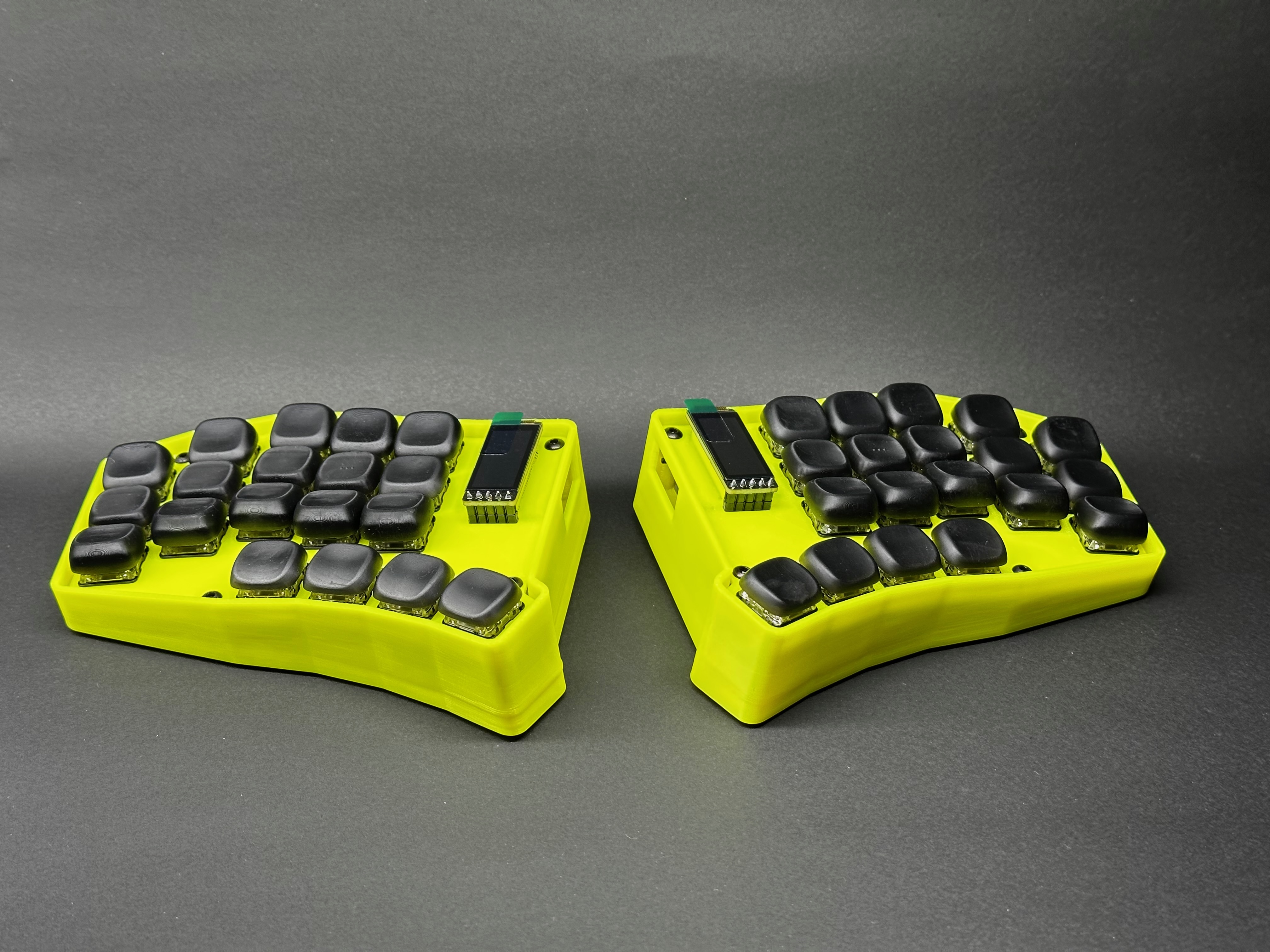
Design priorities:
The repo is essentially ergogen and zmk smashed together with little regard for preserving the GitHub actions support for the ZMK config.
| Item | Quantity |
|---|---|
| M3x10 BHCS | 4 |
| M3x20 BHCS | 4 |
| LiPo Battery 2000mAh 3.7V 113450 | 2 |
| PCB | 1 pair |
| Kailh Choc hotswap sockets | 38 |
| Kailh Choc switches of your choice | 38 |
| Keycaps of your choice to match (1U) | 38 |
| Diodes IN4148 SOD-123 | 38 |
| JST-PH 2P Side entry socket | 2 |
| Silicone dome feet 8.8mm x 2.5mm | 10 |
| NRF82840 or Nice Nano v2 dev board | 2 |
| Pin sockets - machine pin - 12pin | 4 |
| Pin headers - machine pin - 12pin | 4 |
| Nice!view LCD display | 2 |
| Pin sockets - machine pin - 5pin | 2 |
| Pin headers - machine pin - 5pin | 2 |
| EVQPUC02K 4.73.51.65 SMD Reset button | 2 |
| MSS3 SMD Sliding power switch | 2 |
The keyboard layout is built in Ergogen, then routed in Kicad.
To modify the layout:
cd ergogen
make
This will generate files into the ergogen/output/ folder for both outlines and PCBs. It will overwrite any existing routed PCBs and will require you to reroute again.
The 3D printed parts were generated in Fusion 360 based off the PCB step file exported from Kicad. The priority was a form fitting case with some minor tenting which conveniently worked out well to allow space underneath for a large battery alongside the controller. The two inner feet can also be removed to reveal extra heatset inserts that support using M3 screws to increase the hight for extra tenting.
The glamour shots all featue cases FDM printed in ABS and resing printed keycaps. If you decide to print your own keycaps check out KLP Lame for good sculpted keycaps (designed for resin) and Nijuni Keycaps for flatter keycaps (designed for FDM).
If printing the case in ABS I recommend using scaling X & Y by 100.5% to compensate for material shrinkage.
The travel case is designed to be printed in TPU. It prints well in quite flexible TPU and has a lot of give in it. If printing in a different material you will most likely need to scale the model bigger or smaller.
To setup the build environment with Docker installed, run:
cd zmk-config
./zmk.sh build-docker
The typical workflow to modify the keymap is to use the keymap editor, select the Clipboard source with keyboard type of custom, paste in the contents of zmk-config/boards/shields/phrett/phrett.json into the layout field and zmk-config/boards/shields/phrett/phrett.keymap into the keymap field. Modify the keyboard layout as desired, click 'Copy updated keymap' and paste it back into the local keymap.
From there the firmware can be rebuilt using:
cd zmk-config
make
Then connect each keyboard half one at a time, put them into bootloader mode by double tapping reset, then copying to approperate firmware from zmk-config/artifacts/phrett_{left,right}.uf2 to the now mounted controller volume.
Phrettboard v1 by Karl Bowden is licensed under CC BY-SA 4.0


| Qty | Value | Footprint | References |
|---|---|---|---|
| 19 | ComboDiode | D1, D2, D3, D4, D5, D6, D10, D11, D12, D13, D14, D15, D16, D17, D18, D19 +3 | |
| 19 | PG1350 | S1, S2, S3, S4, S5, S6, S10, S11, S12, S13, S14, S15, S16, S17, S18, S19 +3 | |
| 5 | HOLE_M2_TH | , , , , | |
| 1 | E73:SPDT_C128955 | T1 | |
| 1 | JST_PH_S2B-PH-K_02x2.00mm_Angled | JST1 | |
| 1 | Panasonic_EVQPUL_EVQPUC | Panasonic_EVQPUL_EVQPUC | B1 |
| 1 | niceView | lib:niceView_headers | niceView1 |
| 1 | nice_nano | nice_nano | MCU1 |
The 48 most common of 78 parts.
It measures 128 × 91.8 mm and has 2 copper layers, 1.6 mm thick.
78 parts. The full list of its parts is on this page, with links to each part's symbol and footprint where PCBKit's library has them.
From the agentk/phrettboard repository on GitHub, at the commit this page was made from: the board is ergogen/output/pcbs/right.kicad_pcb. PCBKit opens the board in the browser, with nothing to install.
Its repository states no licence, so its author keeps all rights: ask agentk before reusing the design.

OLIMEX/DIY-LAPTOP
Do It Yourself Open Source Hardware and Software Modular Hacker's Friendly Laptop


newdigate/teensy-eurorack
Hardware Design: Eurorack shield for teensy 4.1 with 14 in / 16 out analog channels

CRImier/MyKiCad
My KiCad boards. Can't be bothered uploading individually anymore, so here you go.
