
2 layers40 × 20 mm

A compact 2×3 mechanical macropad built around the Seeed Studio XIAO RP2040 and powered by QMK firmware.
Akash is an open-source printed circuit board by aakashdeeps181, from the aakashdeeps181/jordankeyboard repository on GitHub. It is a 2-layer board of 92 × 43.5 mm with 13 parts on 20 nets, routed with 97 tracks and 0 vias.
Its parts include 6 diodes, 6 switches and 1 IC. It belongs with the keyboards and input boards of this library.
A compact 2×3 mechanical macropad built around the Seeed Studio XIAO RP2040 and powered by QMK firmware.
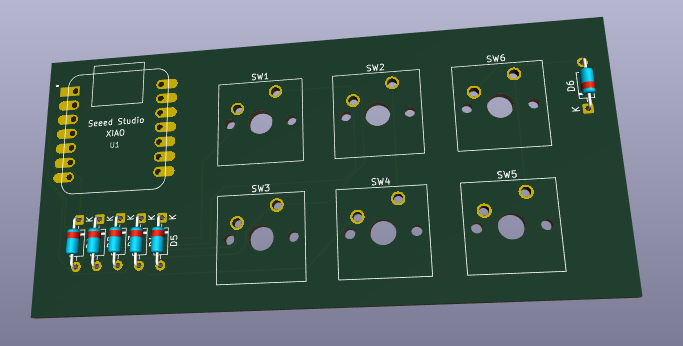
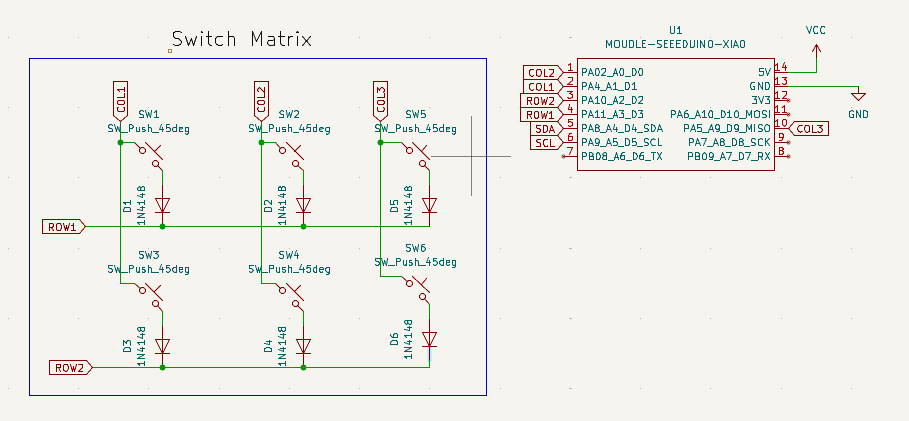
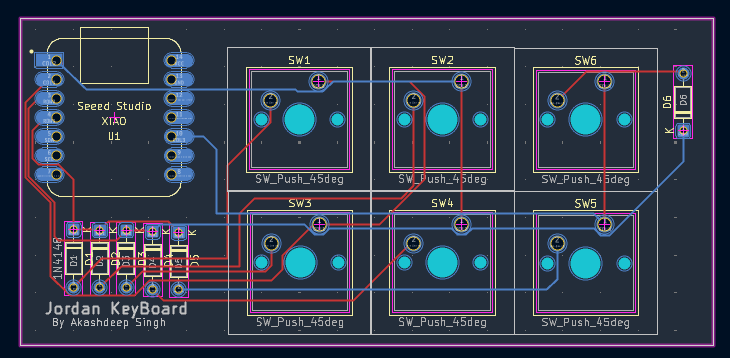
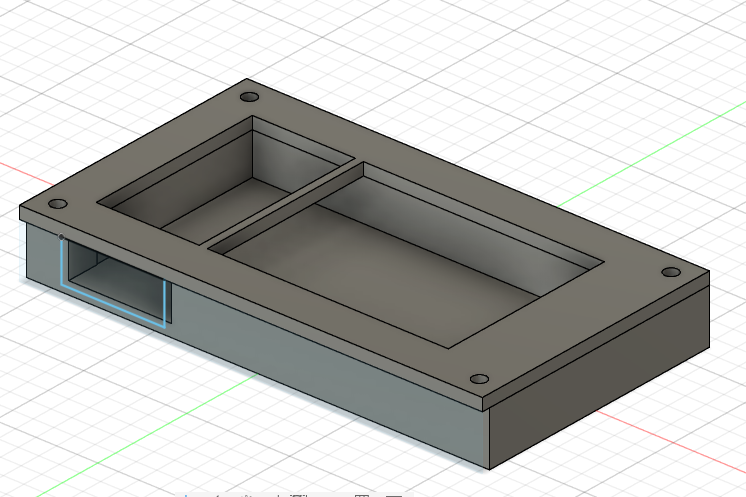
The keyboard uses QMK firmware.
Default keymap:
| Key | Function |
|---|---|
| 1 | + |
| 2 | - |
| 3 | @ |
| 4 | / |
| 5 | * |
| 6 | # |
Firmware source files are located in the Firmware/ directory.
| Qty | Component | Description |
|---|---|---|
| 1 | Seeed Studio XIAO RP2040 | Microcontroller |
| 6 | MX-Compatible Switches | Mechanical keyboard switches |
| 6 | MX Keycaps | Keycaps |
| 6 | 1N4148 Diodes | Matrix diodes |
| 1 | Custom PCB | Designed in KiCad |
| 1 | Top Case | 3D Printed |
| 1 | Bottom Case | 3D Printed |
| 4 | M3 Screws | Assembly hardware |
| 4 | M3 Heat-Set Inserts | Threaded inserts |
jordan-macropad/
├── README.md
├── CAD/
│   └── assembled-model.STEP
├── PCB/
│   ├── jordan-macropad.kicad_pro
│   ├── jordan-macropad.kicad_sch
│   └── jordan-macropad.kicad_pcb
├── Firmware/
│   ├── keyboard.json
│   ├── rules.mk
│   └── keymaps/
│       └── default/
│           └── keymap.c
└── production/
    ├── gerbers.zip
    ├── Top.STEP
    ├── Bottom.STEP
└── firmware.uf2Production files are included in the production/ directory:
gerbers.zip)Top.STEP)Bottom.STEP)firmware.uf2)Akashdeep Singh
| Qty | Value | Footprint | References |
|---|---|---|---|
| 6 | 1N4148 | Diode_THT:D_DO-35_SOD27_P7.62mm_Horizontal | D1, D2, D3, D4, D5, D6 |
| 6 | SW_Push_45deg | Button_Switch_Keyboard:SW_Cherry_MX_1.00u_PCB | SW1, SW2, SW3, SW4, SW5, SW6 |
| 1 | MOUDLE-SEEEDUINO-XIAO | footprints:XIAO-Generic-Hybrid-14P-2.54-21X17.8MM | U1 |


samyk/magspoof
A portable device that can spoof/emulate any magnetic stripe, credit card or hotel card "wirelessly", even on standard magstripe (non-NFC/RFID) readers.

fossasia/pslab-scripts
Pocket Science Lab - Scripts for Sensor Experiments


willem-pennings/balancing-cube
A cube that balances itself in a corner or edge using reaction wheels

VoronDesign/Voron-Hardware
Cool Hardware designed by the Voron Design group

hoglet67/RGBtoHDMI
Bare-metal Raspberry Pi project that provides pixel-perfect sampling of Retro Computer RGB/YUV video and conversion to HDMI
It measures 92 × 43.5 mm and has 2 copper layers, 1.6 mm thick.
13 parts. The full list of its parts is on this page, with links to each part's symbol and footprint where PCBKit's library has them.
From the aakashdeeps181/jordankeyboard repository on GitHub, at the commit this page was made from: the board is PCB/Akash.kicad_pcb and its schematic PCB/Akash.kicad_sch. PCBKit opens the board in the browser, with nothing to install.
Its repository states no licence, so its author keeps all rights: ask aakashdeeps181 before reusing the design.