2 layers40 × 30 mm

 Zeal8bit/Zeal-GBC-Adapter8
Gameboy (Color) Cartridge adapter for Zeal 8-bit Computer!
Gbc cart reader is an open-source printed circuit board by Zeal8bit, from the Zeal8bit/Zeal-GBC-Adapter repository on GitHub, published under the CC0-1.0 licence. It is a 2-layer board of 67.7 × 86.4 mm with 3 parts on 61 nets, routed with 289 tracks and 48 vias.
Its parts include 2 connectors and 1 IC. It belongs with the retro computing and games and interfaces and adapters boards and the FPGA and CPLD boards of this library.
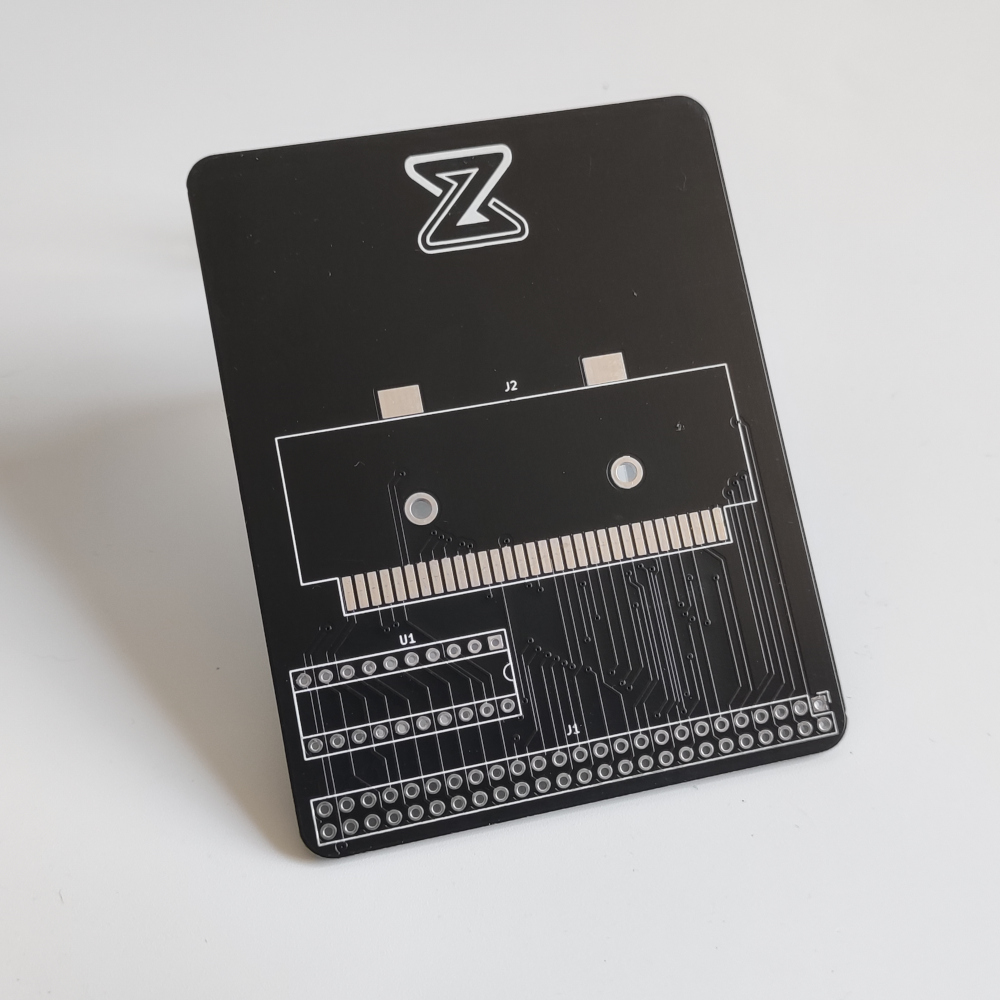
The goal of this project is to create an adapter for connecting any Gameboy or Gameboy Color cartridge to Zeal 8-bit Computer. This will offer the possibility to backup the ROM or RAM (saved data), restore the saved data or even modify the saved data in place.
This repository includes:
DISCLAIMER: To prevent any data loss, NEVER plug or unplug the cartridges from the adapter when it is connected to a computer/board that is powered on! I am not responsible for any potential damage caused to the Gameboy cartridge when using the adapter. Use it at your own risk.
To compile this example you will need:
pip3 install pyserial)kernel_headers directory is required, check this repository.
z88dk v2.2 (or later). Only its assembler, z80asm, is strictly required. The latest version of z80asm must be used as earlier versions don't have support for MACRO.
To install z88dk, please check out their GitHub project.To build the program, define the path to Zeal 8-bit OS, this will let us find the header files used to assemble the example:
export ZOS_PATH=/your/path/to/Zeal8bitOSThen simply use the command:
cd software
make
After compiling, the folder bin/ in software/ should contain the binary dump.bin. This file can be then loaded to Zeal 8-bit OS through UART thanks to the load command.
The binary can also be embedded within the romdisk that will contain both the OS and a read-only file system. For example:
cd $ZOS_PATH
export EXTRA_ROMDISK_FILES="/path/to/this/repo/software/bin/dump.bin"
make
More info about compiling Zeal 8-bit OS here.
The resulting ROM image can then be provided to an emulator or directly flashed to the computer's ROM that will use it.
On the Zeal 8-bit Computer, execute the dump program from the command line:
A:/> ./dump.binThe program should detect the cartridge name, the RAM banks count and their size. The output should look like:
POKEMON BLUE
Cartridge type: 0x3
Cartridge RAM size: 32 KB
Ready to send, start the dump script on the host computer
Close the serial monitor on the host computer! Else, the python script below will not be able to receive characters from the UART.
On the host, execute the python script, you can use -h to have more info about the parameters. For example, to save the file as PKM.sav from UART node /dev/ttyUSB0 with a baudrate of 57600, the following command can be used:
python3 dump.py -o PKM.sav -d /dev/ttyUSB0 -b57600 -vThe output should look like this:
Connecting to /dev/ttyUSB0 with baudrate 57600
Dumping 4 banks of 8192 bytes, 32768 bytes in total...
PKM.sav successfully dumpedUpon execution of the binary on the Zeal 8-bit computer, you may encounter the Get attr error issue. This shows that the serial driver in the Zeal 8-bit OS kernel doesn't support setting attributes (raw) via ioctl. In that case, you should update your installation of the Zeal 8-bit OS to get the latest version of the serial driver.
Distributed under the Creative Commons Zero v1.0 Universal License. See LICENSE file for more information.
You are free to use it for personal and commercial use, the boilerplate present in each file must not be removed.
The zeal8bit.com silkscreen present on the PCB shall be kept.
For any suggestion or request, you can contact me at contact [at] zeal8bit [dot] com or on the Discord server https://discord.gg/UzEjwRvBBb
| Qty | Value | Footprint | References |
|---|---|---|---|
| 1 | GAL16V8 | Package_DIP:DIP-20_W7.62mm_Socket | U1 |
| 1 | GB_Slot | gbc_cart_footprints:GB Slot | J2 |
| 1 | ZealExtConnector | Connector_PinHeader_2.54mm:PinHeader_2x25_P2.54mm_Vertical | J1 |

hzeller/rpi-rgb-led-matrix
Controlling up to three chains of 64x64, 32x32, 16x32 or similar RGB LED displays using Raspberry Pi GPIO


atopile/atopile
Design circuit boards with code! ✨ Get software-like design reuse 🚀, validation, version control and collaboration in hardware; starting with electronics ⚡️


hackclub/sprig
🍃 Learn to code by making games in a JavaScript web-based game editor.
It measures 67.7 × 86.4 mm and has 2 copper layers, 1.6 mm thick.
3 parts. The full list of its parts is on this page, with links to each part's symbol and footprint where PCBKit's library has them.
From the Zeal8bit/Zeal-GBC-Adapter repository on GitHub, at the commit this page was made from: the board is pcb/gbc_cart_reader.kicad_pcb and its schematic pcb/gbc_cart_reader.kicad_sch. PCBKit opens the board in the browser, with nothing to install.
Its repository publishes it under the CC0-1.0 licence: you may reuse it on that licence's terms (keep the author's notice, and for a copyleft licence share your changes alike).