2 layers27.5 × 24.7 mm
TB6612FNG
Will946/Cocktail-Machine
Tell it what's in your liquor cabinet, it asks an AI for a cocktail, then pours it through peristaltic pumps. Judges your ingredient choices silently.
12 parts1MIT
 Will946/Cocktail-Machine1
Tell it what's in your liquor cabinet, it asks an AI for a cocktail, then pours it through peristaltic pumps. Judges your ingredient choices silently.
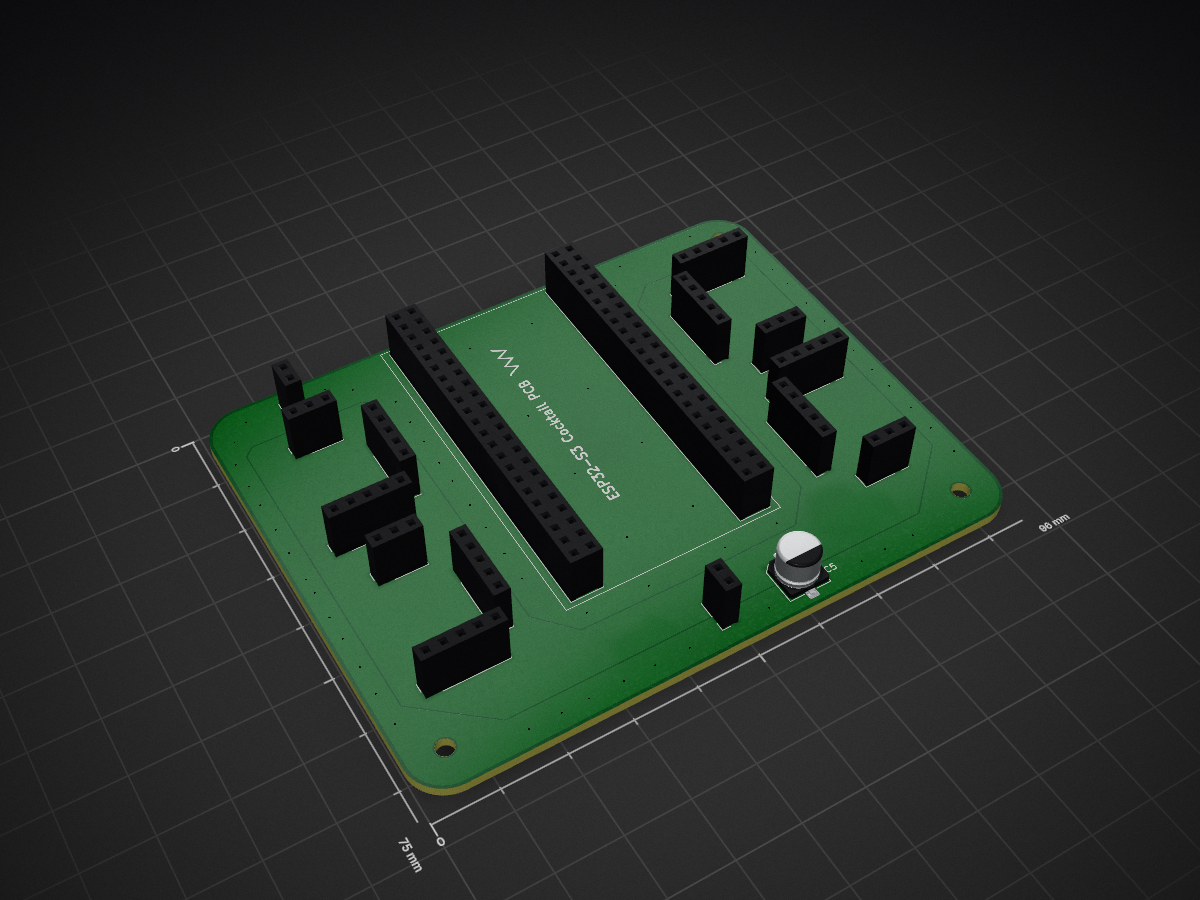
Cocktail PCB is an open-source printed circuit board by Will946, from the Will946/Cocktail-Machine repository on GitHub, published under the MIT licence. It is a 2-layer board of 96 × 75 mm with 21 parts on 58 nets, routed with 78 tracks and 75 vias.
Its parts include 16 connectors and 1 capacitor. It belongs with the ESP32 boards of this library.
An automated cocktail dispenser powered by an ESP32-S3, up to eight peristaltic pumps, and a Groq AI backend. Users connect to the machine via a self-hosted web interface, input available ingredients, and receive AI-generated cocktail suggestions tailored to exactly what they have on hand. Selections are confirmed via onboard buttons and dispensed automatically with real-time LCD feedback and glass-type imagery loaded from SD card.
The system is designed around a modular motor driver architecture — each custom TB6612FNG PCB drives two pumps, and up to four boards can be chained together to support up to eight pumps total. The current firmware configuration drives four pumps across two boards, all connected to a central ESP32-S3 carrier board.
| Section | Description |
|---|---|
| Machine Render | 3D render of the full enclosure |
| PCB Overview | Carrier board and motor driver board renders and schematics |
| Project File Structure | Folder and file layout |
| System Overview | Architecture diagram |
| Features | Full feature list |
| Hardware | Component descriptions |
| Pin Connections | ESP32 GPIO assignments for LCD, motors, and buttons |
| Software Dependencies | Required Arduino libraries |
| Configuration | WiFi, API key, and flow rate calibration |
| SD Card Setup | BMP image requirements and conversion |
| Operation Flow | Step-by-step usage guide |
| Groq API Limits | Free tier request and token budgets |
| BOM | Full bill of materials |

The main carrier board hosts the ESP32-S3 WROOM module in the center, with four TB6612FNG motor driver sub-boards mounted in the corners — one per two pumps. Power input, bulk capacitance, and pin headers for the LCD and buttons are also on this board.
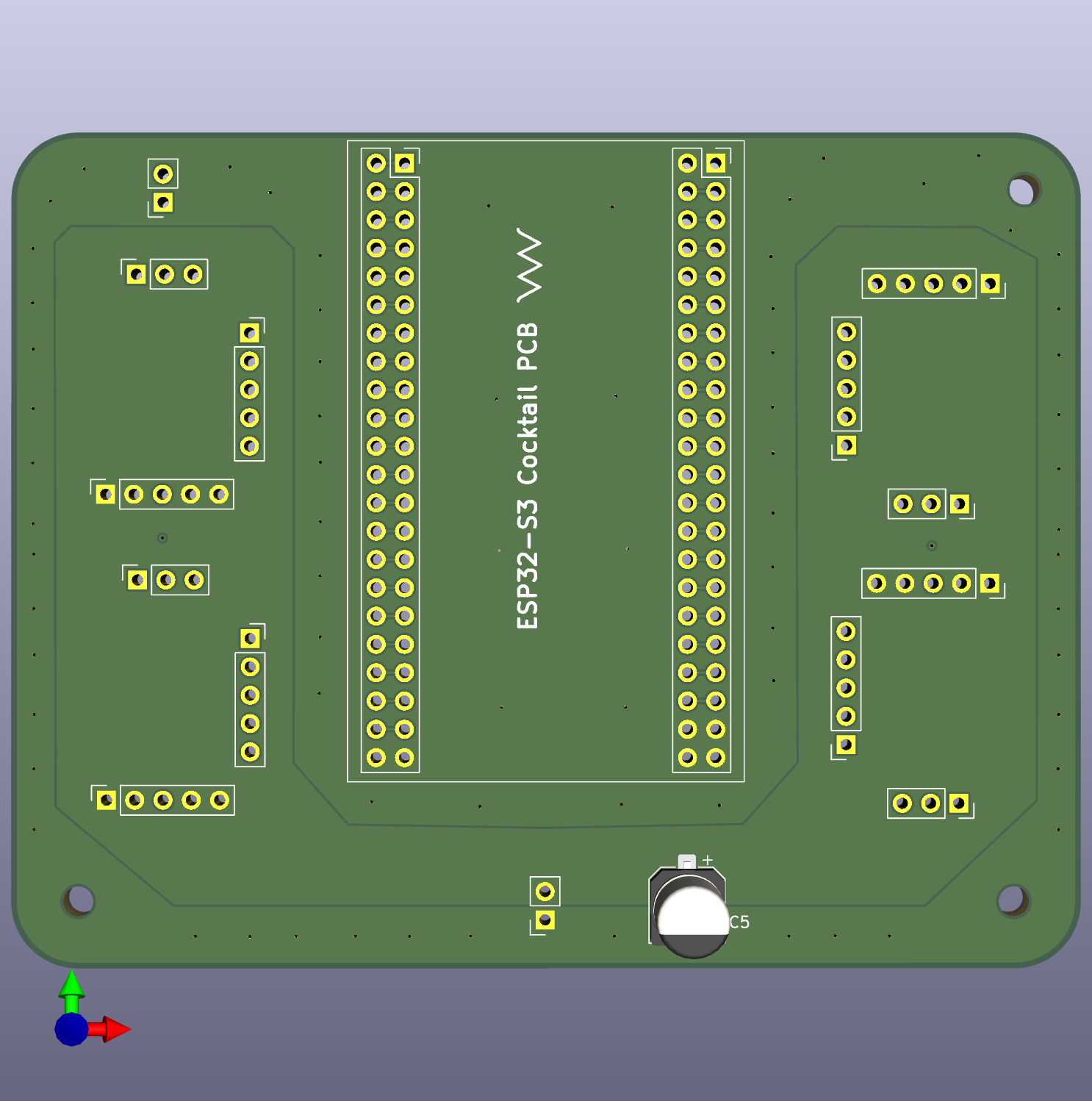
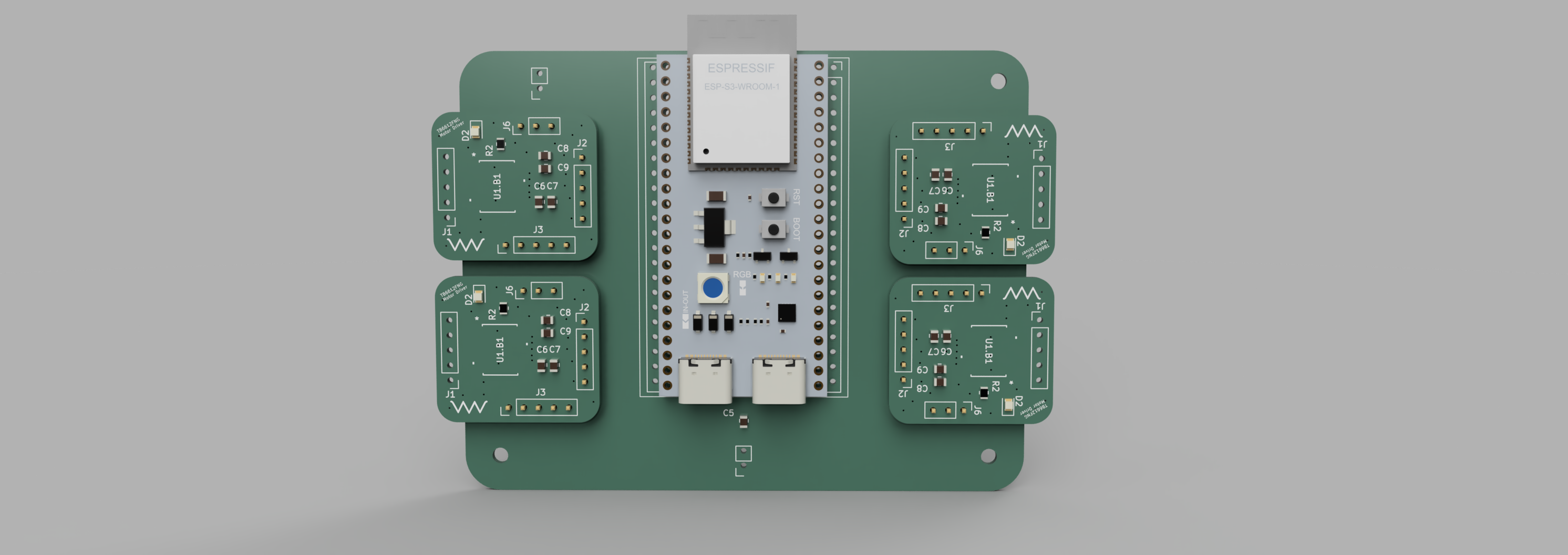
KiCad files: PCB/Cocktail_PCB.kicad_pcb, PCB/Cocktail_PCB.kicad_sch, PCB/Cocktail_PCB.kicad_pro
A compact self-contained dual H-bridge driver board. Each board drives two peristaltic pumps and includes local decoupling capacitors, a power indicator LED, and pin socket connectors for motor outputs, control inputs, and power. Boards are panelized for cost-effective fabrication at JLCPCB.
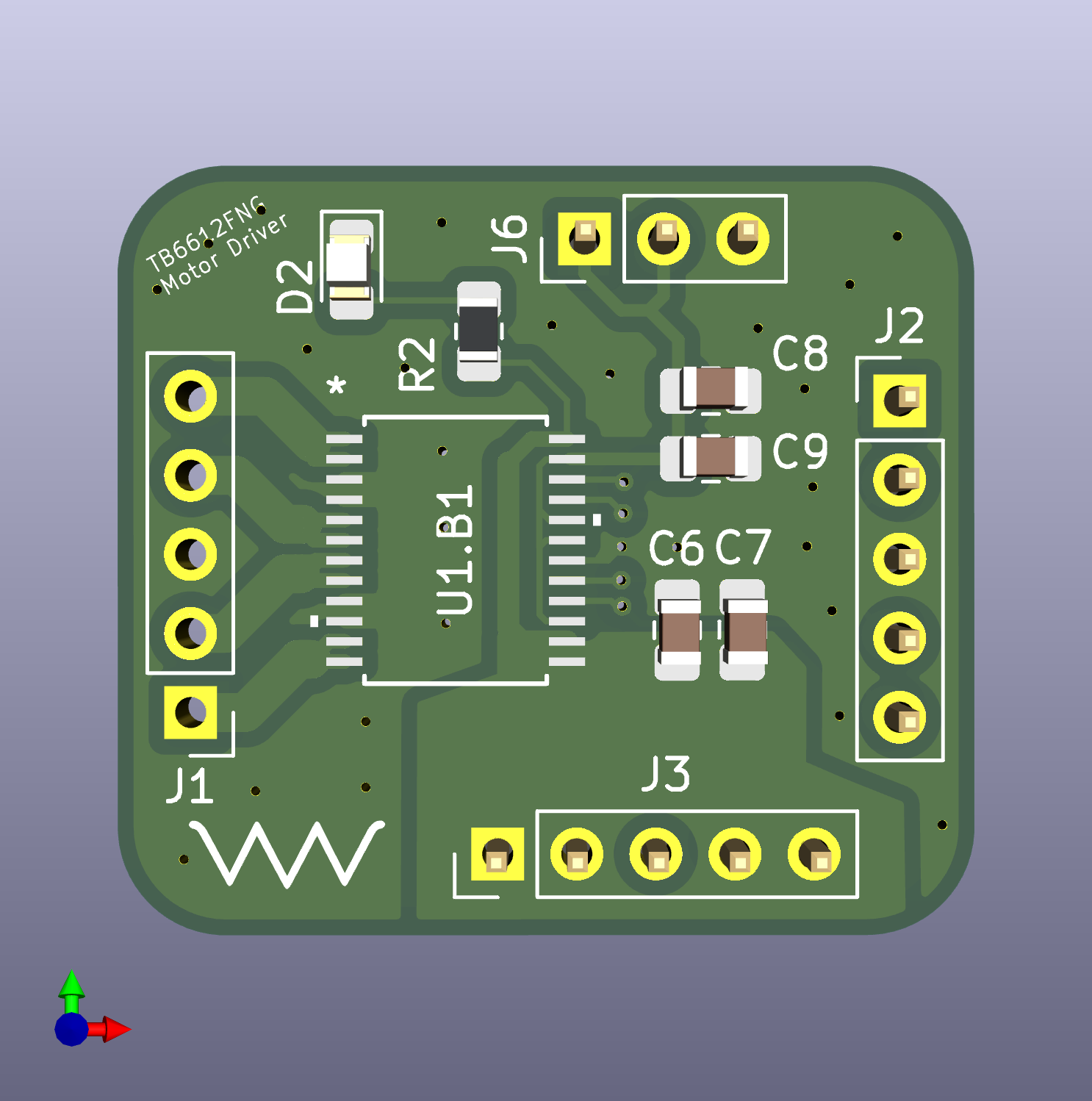
KiCad files: PCB/TB6612FNG.kicad_pcb, PCB/TB6612FNG.kicad_sch, PCB/TB6612FNG.kicad_pro
cocktail_machine/
├── cocktail_machine.ino         # Main Arduino sketch
├── README.md                    # This file
├── BOM.md                       # Bill of materials
│
├── PCB/
│   ├── Cocktail_PCB.kicad_pcb  # Main carrier board PCB layout
│   ├── Cocktail_PCB.kicad_sch  # Main carrier board schematic
│   ├── Cocktail_PCB.kicad_pro  # Main carrier board KiCad project
│   ├── Cocktail_PCB.png        # Main carrier board 3D render
│   ├── PCB.PNG                 # Full system PCB render
│   ├── TB6612FNG.kicad_pcb     # Motor driver sub-board PCB layout
│   ├── TB6612FNG.kicad_sch     # Motor driver sub-board schematic
│   ├── TB6612FNG.kicad_pro     # Motor driver KiCad project
│   ├── TB6612FNG.png           # Motor driver board 3D render
│   └── TB6612FNG_Sch.png       # Motor driver schematic screenshot
│
├── 3DModel/
│   └── machinerender.PNG       # Full machine enclosure render
│
└── sd_card/
    ├── start.bmp
    ├── highball.bmp
├── martini.bmpUser's Phone/Laptop Browser
↕ HTTP (AsyncWebServer on ESP32)
ESP32-S3 (WiFi access point + web server)
↕ HTTPS (Groq Cloud API)
Groq LLM (llama-3.3-70b-versatile)
↕ parsed JSON recipe data
Motor Driver Boards (TB6612FNG ×2, expandable to ×4)
↕ H-bridge direction control
Peristaltic Pumps ×4 (expandable to ×8)
↕
Drink in glassPCB/TB6612FNG_Sch.png for full schematic.| LCD Pin | ESP32 GPIO |
|---|---|
| VCC | 3.3V |
| GND | GND |
| CS | GPIO41 |
| RESET | GPIO40 |
| DC | GPIO39 |
| SDI (MOSI) | GPIO37 |
| SCK | GPIO36 |
| LED | 3.3V |
| SDO (MISO) | GPIO35 |
| SD_CS | GPIO15 |
| Signal | ESP32 GPIO | Notes |
|---|---|---|
| AIN1 | GPIO4 | Pump A direction |
| AIN2 | GPIO5 | Pump A direction |
| BIN1 | GPIO6 | Pump B direction |
| BIN2 | GPIO7 | Pump B direction |
| VCC | 3.3V | Logic supply |
| VM | 12V | Motor supply |
| GND | GND | Common ground |
| Signal | ESP32 GPIO | Notes |
|---|---|---|
| AIN1 | GPIO1 | Pump C direction |
| AIN2 | GPIO2 | Pump C direction |
| BIN1 | GPIO47 | Pump D direction |
| BIN2 | GPIO48 | Pump D direction |
| VCC | 3.3V | Logic supply |
| VM | 12V | Motor supply |
| GND | GND | Common ground |
| Button | GPIO | Function |
|---|---|---|
| BTN1 | GPIO8 | Cancel selection / hold 3s to abort dispensing |
| BTN2 | GPIO3 | Resume dispensing after pause |
| BTN3 | GPIO18 | Pause active dispensing |
Add Motor Driver Boards 3 and 4, wiring their IN pins to available GPIOs. Update pumpOn() and pumpOff() in cocktail_machine.ino to add cases 4–7.
| Library | Source |
|---|---|
| Adafruit GFX Library | Arduino Library Manager |
| Adafruit ILI9341 | Arduino Library Manager |
| Adafruit ImageReader Library | Arduino Library Manager |
| SdFat — Adafruit Fork | Arduino Library Manager |
| ArduinoJson (by Benoit Blanchon) | Arduino Library Manager |
| AsyncTCP | GitHub: me-no-dev/AsyncTCP (install as ZIP) |
| ESPAsyncWebServer | GitHub: me-no-dev/ESPAsyncWebServer (install as ZIP) |
Note: If both the standalone SdFat and SdFat-Adafruit-Fork libraries are installed, delete the standalone one. The Adafruit ImageReader requires the Adafruit fork specifically.
At the top of cocktail_machine.ino, set your credentials:
const char* ssid       = "YOUR_WIFI_NAME";
const char* password   = "YOUR_WIFI_PASSWORD";
const char* groqApiKey = "YOUR_GROQ_API_KEY";
Get a free Groq API key at console.groq.com
#define ML_PER_SECOND 1.31To calibrate: order a cocktail with a known total volume, measure the actual output, then:
new ML_PER_SECOND = current × (actual_ml / expected_ml)Example: expected 200ml, got 175ml → 1.31 × (175 / 200) = 1.146
Run several trials and average for best accuracy.
Format as FAT32 (Mac: Disk Utility → MS-DOS FAT). Place in the root directory:
| Filename | Used for |
|---|---|
start.bmp | Boot screen, idle state, waiting for selection |
highball.bmp | Highball / Collins glass cocktails |
martini.bmp | Martini / Coupe glass cocktails |
rocks.bmp | Rocks glass cocktails |
champagne.bmp | Champagne flute cocktails |
mulemug.bmp | Moscow Mule mug cocktails |
start.bmp loads with "Press Button To Start"Press Custom Pour on the website to skip AI and manually specify ml per pump. Useful for calibration, testing, or simple single-ingredient pours.
Model: llama-3.3-70b-versatile
| Limit | Value |
|---|---|
| Requests per minute | 30 |
| Requests per day | 1,000 |
| Tokens per minute | 12,000 |
| Tokens per day | 100,000 |
At ~3,800 tokens per request (prompt + 15 cocktail recipes), approximately 26 suggestion requests per day = 390 individual cocktail suggestions. Adding a credit card to Groq (free, no minimum spend) unlocks ~10× higher limits.
| Qty | Value | Footprint | References |
|---|---|---|---|
| 8 | Conn_01x05_Socket | Connector_PinSocket_2.54mm:PinSocket_1x05_P2.54mm_Vertical | J7, J8, J9, J12, J13, J14, J15, J16 |
| 4 | Conn_01x03_Socket | Connector_PinSocket_2.54mm:PinSocket_1x03_P2.54mm_Vertical | J1, J2, J3, J4 |
| 3 | MountingHole | MountingHole:MountingHole_2.7mm_M2.5 | H1, H2, H4 |
| 2 | Conn_01x02_Pin | Connector_PinSocket_2.54mm:PinSocket_1x02_P2.54mm_Vertical | J5, J6 |
| 2 | Conn_02x22_Odd_Even | Connector_PinSocket_2.54mm:PinSocket_2x22_P2.54mm_Vertical | J10, J11 |
| 1 | 100uF | Capacitor_SMD:CP_Elec_6.3x5.9 | C5 |
| 1 | LOGO | LOGO | G*** |
Will946/Cocktail-Machine
Tell it what's in your liquor cabinet, it asks an AI for a cocktail, then pours it through peristaltic pumps. Judges your ingredient choices silently.

gusmanb/logicanalyzer
24 channel, 100Msps logic analyzer hardware and software

mntmn/amiga2000-gfxcard
MNT VA2000, an Open Source Amiga 2/3/4000 Graphics Card (Zorro II/III), written in Verilog


hackclub/OnBoard
💡 Join 1,000 teenagers and make your first PCB with a $100 grant!

drandyhaas/KiCadRoutingTools
A set of Python/Rust tools to aid routing in KiCad

Arrow-air/project-quiver
Project Quiver documentation, designs, and project artifacts.


It measures 96 × 75 mm and has 2 copper layers, 1.6 mm thick.
21 parts. The full list of its parts is on this page, with links to each part's symbol and footprint where PCBKit's library has them.
From the Will946/Cocktail-Machine repository on GitHub, at the commit this page was made from: the board is PCB/Cocktail_PCB.kicad_pcb and its schematic PCB/Cocktail_PCB.kicad_sch. PCBKit opens the board in the browser, with nothing to install.
Its repository publishes it under the MIT licence: you may reuse it on that licence's terms (keep the author's notice, and for a copyleft licence share your changes alike).