
2 layers40 × 20 mm

 ThePangel/Mixuino2
An Arduino Mixer for windows built with Python
MixuinoPCB is an open-source printed circuit board by ThePangel, from the ThePangel/Mixuino repository on GitHub, published under the GPL-3.0 licence. It is a 2-layer board of 83.8 × 81.3 mm with 13 parts on 42 nets, routed with 59 tracks and 0 vias.
It belongs with the audio and music boards and the AVR (ATmega, ATtiny) boards of this library.




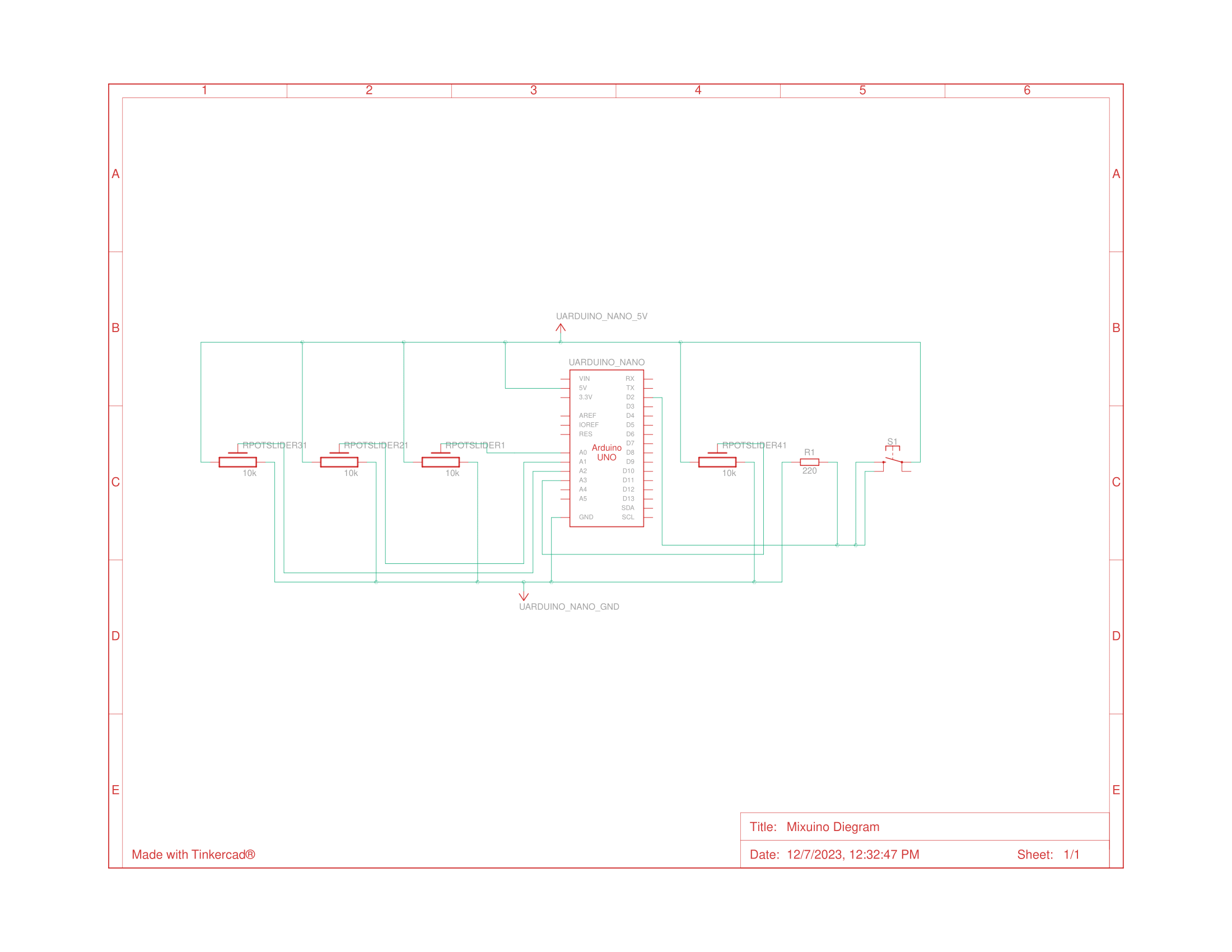
Mixuino is a windows audio mixer build with on a Arduino nano and controlled by a python program. It uses 4 slide potentiometers feeding analog input into an Arduino nano that sends the values through serial to a python scripts that handles volume management in the windows machine. You can also add an optional push button to mute/un-mute the speakers.
I also have made a PCB for ease of instalation + a 3D printable enclosure for the latter so you can build your own Mixer.
This is my first Arduino projects and first "big" program so please bear with me :)



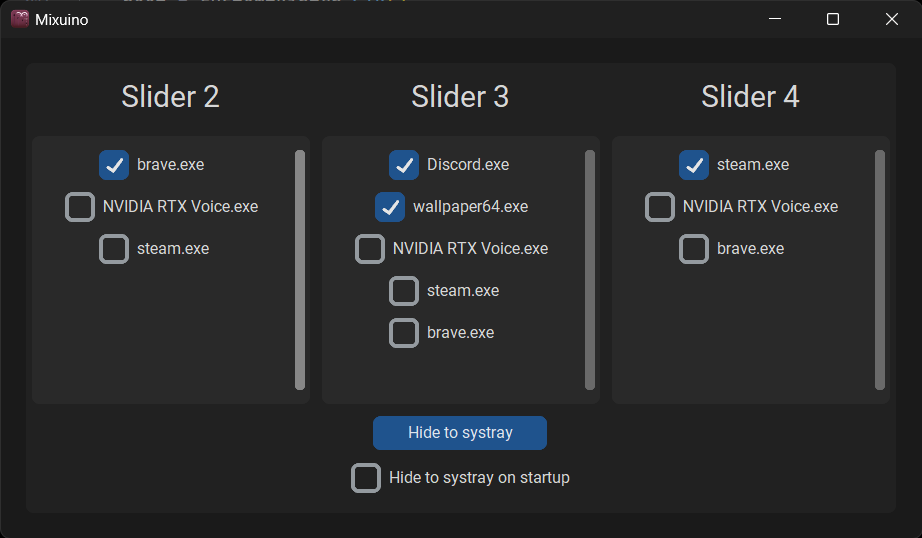
Each checkbox corresponds to a running process and/or a process stored in the config file, ones stored (therefore selected) are checked, moving that slider will change the volume of selected processes (1st slider is for master volume)
Hide to systray hides the window, the window can be revealed again from the systray icon option Show
There is also a checkbox than when checked changes the hideDefault value if you want the window to be hidden at startup
The options available refreshes and changes (if new programs are opened or others closed) when the mouse hovers any of the scrollable frames
To close the application you can just close this window or close it with the Exit option in the systray icon
To run the program you require processes.yaml file with the structure :
hideDefault: false
slider1: []
slider2: []
slider3: []
The values are the processes each slide changes and can be changed manually or through the UI
comtypes==1.2.0 # To communicate with the ports

Pillow==10.1.0 # For opening the image for the systray icon

pycaw==20230407 # For audio handling

pyserial==3.5 # To read the serial data sent from the arduino

pystray==0.19.5 # To create and manage the systray icon

PyYAML==6.0.1 # To edit the Yaml config file

customtkinter==5.2.1 # To build the UIpip install comtypes
pip install Pillow
pip install pycaw
pip install pyserial
pip install pystray
pip install PyYAML
pip install customtkinter
Feel free to contact me @ThePangel_ on Twitter/X or DM me on discord @thepangel
| Qty | Value | Footprint | References |
|---|---|---|---|
| 4 | ~ | Library:Slide Potentiometer - B103 | U1, U2, U3, U4 |
| 3 | LOGO | LOGO | , G***, G*** |
| 1 | Arduino_Nano_v3.x | Module:Arduino_Nano | A1 |
| 1 | LOGO | Library:LOGO | REF |
The 9 most common of 13 parts.


samyk/magspoof
A portable device that can spoof/emulate any magnetic stripe, credit card or hotel card "wirelessly", even on standard magstripe (non-NFC/RFID) readers.

fossasia/pslab-scripts
Pocket Science Lab - Scripts for Sensor Experiments


willem-pennings/balancing-cube
A cube that balances itself in a corner or edge using reaction wheels

VoronDesign/Voron-Hardware
Cool Hardware designed by the Voron Design group

hoglet67/RGBtoHDMI
Bare-metal Raspberry Pi project that provides pixel-perfect sampling of Retro Computer RGB/YUV video and conversion to HDMI
It measures 83.8 × 81.3 mm and has 2 copper layers, 1.6 mm thick.
13 parts. The full list of its parts is on this page, with links to each part's symbol and footprint where PCBKit's library has them.
From the ThePangel/Mixuino repository on GitHub, at the commit this page was made from: the board is PCB/MixuinoPCB-backups/MixuinoPCB.kicad_pcb and its schematic PCB/MixuinoPCB-backups/MixuinoPCB.kicad_sch. PCBKit opens the board in the browser, with nothing to install.
Its repository publishes it under the GPL-3.0 licence: you may reuse it on that licence's terms (keep the author's notice, and for a copyleft licence share your changes alike).