2 layers37 × 19 mm
Passive rpi hub75-adapter
hzeller/rpi-rgb-led-matrix
Controlling up to three chains of 64x64, 32x32, 16x32 or similar RGB LED displays using Raspberry Pi GPIO
2 parts4.4kGPL-2.0

 ScottGibb/Home-Power-Monitor-Hardware
The hardware schematics for the Home Power Monitor Application
Lcd control unit is an open-source printed circuit board by ScottGibb, from the ScottGibb/Home-Power-Monitor-Hardware repository on GitHub. It is a 2-layer board with 2 parts on 16 nets.
It belongs with the lEDs and displays boards of this library.


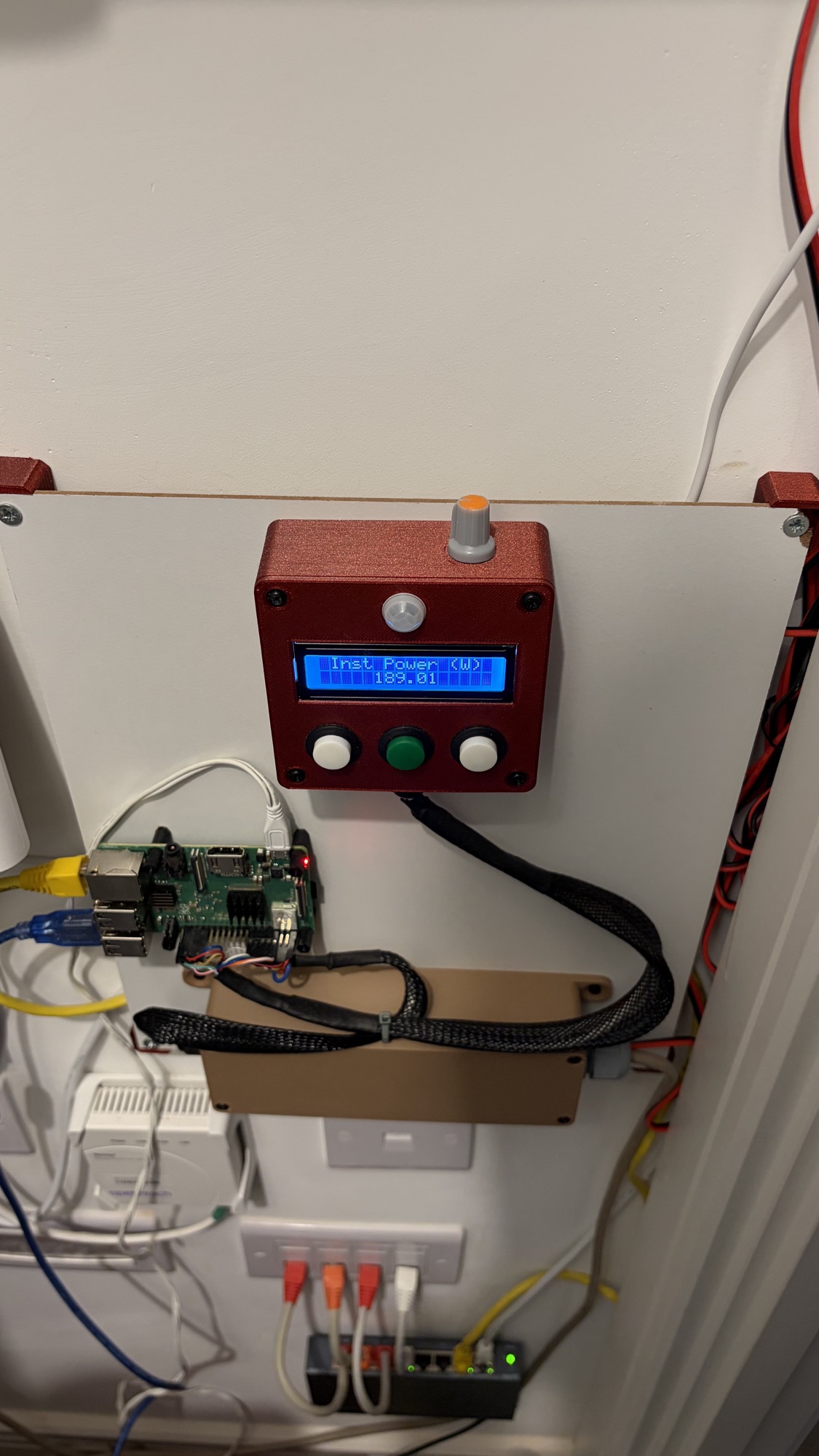
This repository contains the KiCad hardware designs for the Home Power Monitor project. It currently consists of two hardware components:
For more details on the prototype build, see the prototyping notes.
The lcd_control_unit project is the control board for the display section of the power monitor. The schematic is built around a WC1602A 16x2 character LCD and is designed as a board for the display assembly. The unit contains the screen along with four button inputs, one of which is connected to a PIR sensor, specifically the AM312 Mini PIR Sensor.
The power_monitor_protection project is the interface and protection board. It includes isolation circuitry for both serial communication and power.
The ./libraries/ directory contains the external footprints and symbols used by the project.
Open either KiCad project directly in KiCad:
./lcd_control_unit/lcd_control_unit.kicad_pro./power_monitor_protection/power_monitor_protection.kicad_proThe custom library content used by the protection board is stored in ./libraries/.
The wiring documentation contains WireViz sources for LCD, front-panel and protection-board connections. Connector mapping follows the saved KiCad schematics, host configuration, build photos and confirmed termination types. See its unresolved details before constructing a harness.
The locked Nix flake provides WireViz, Graphviz and DejaVu fonts on macOS and Linux (Apple Silicon/ARM64 and x86-64):
nix develop
wireviz --version
dot -V
For a one-off render, use nix run . -- <WireViz arguments>. Open VS Code from
inside nix develop so the recommended WireViz Preview extension inherits the
tools; press F8 to preview a harness and save YAML to refresh it.
GitHub Actions are configured to help keep the hardware projects consistent:
wiring-v<version> tag; its exact tagged sources,
README, HTML/PNG/SVG diagrams and TSV BOMs are attached as wiring.zip.Due to funding, PCB layouts were never produced for these schematics. This was largely because the boards themselves were too simple to justify manufacturing, so veroboard was used instead. 3D-printed cases and a mounting panel were produced, however, and can be found on Printables and Thingiverse.
| Model | Printables | Thingiverse |
|---|---|---|
| LCD Control Unit | Printables | Thingiverse |
| Power Monitor Isolator Box | Printables | Thingiverse |
| Home Power Monitor Mounting Panel | Printables | Thingiverse |
| Qty | Value | Footprint | References |
|---|---|---|---|
| 1 | 2N2222 | Package_TO_SOT_THT:TO-92 | Q1 |
| 1 | WC1602A | Display:WC1602A | DS1 |
hzeller/rpi-rgb-led-matrix
Controlling up to three chains of 64x64, 32x32, 16x32 or similar RGB LED displays using Raspberry Pi GPIO


adamws/kicad-kbplacer
KiCad plugin for automatic keyboard's key placement and routing

Luos-io/luos_engine
Open-source and real-time orchestrator for cyber-physical-systems, to easily design, test and deploy embedded applications and digital twins.

NVNTLabs/switch2-SDEX2M2
Micro SD Express to M.2 NVME Adapter for Nintendo Switch 2

BlueSCSI/BlueSCSI-v2
BlueSCSI v2/Ultra - an open source, open hardware, SCSI emulator using the Pi Pico PR2040 and Pico 2 RP2350

ohmtech-rdi/eurorack-blocks
Software to Hardware Prototyping for Eurorack using C++, Max/Gen~ or Faust

2 parts. The full list of its parts is on this page, with links to each part's symbol and footprint where PCBKit's library has them.
From the ScottGibb/Home-Power-Monitor-Hardware repository on GitHub, at the commit this page was made from: the board is lcd_control_unit/lcd_control_unit.kicad_pcb and its schematic lcd_control_unit/lcd_control_unit.kicad_sch. PCBKit opens the board in the browser, with nothing to install.
Its repository states no licence, so its author keeps all rights: ask ScottGibb before reusing the design.