2 layers62.5 × 39.8 mm
Sed1200emu
RetroLoom/sed1200emu
A Raspberry Pi Pico display replacement for the Roland MT-32, with a modern TFT/OLED, MIDI VU meters, and MIDI buffer-overflow protection.
15 parts4GPL-3.0

 RetroLoom/sed1200emu4
A Raspberry Pi Pico display replacement for the Roland MT-32, with a modern TFT/OLED, MIDI VU meters, and MIDI buffer-overflow protection.
ST7789 Shim is an open-source printed circuit board by RetroLoom, from the RetroLoom/sed1200emu repository on GitHub, published under the GPL-3.0 licence. It is a 2-layer board of 90 × 25 mm with 16 parts on 8 nets, routed with 14 tracks and 0 vias.
It belongs with the lEDs and displays and audio and music boards and the RP2040 boards of this library.
This project replaces the hard-to-obtain Epson SED1200-based LCD module found in the Roland MT-32 (and similar gear) with a modern Raspberry Pi Pico driving a color TFT or grayscale OLED panel. It captures the MT-32's native SED1200 display bus, mirrors the text onto the new panel, and adds a layer of modern features on top: real-time MIDI VU meters, color themes, screensavers/burn-in protection, and a browser-based monitor and control panel.
The project began as a drop-in replacement for the SED1200 using an ATMEGA8 and a standard HD44780 LCD. The original project page can be found at http://sensi.org/~tnt23/sed1200emu/index.html. All attempts to reach the original designer have failed — please reach out if you have any information. This Pico-based revision supersedes the ATMEGA8 design and is where active development now happens.
⚠️ This project is still in active testing. It works and is in use, but it has not been validated across every MT-32 revision, display, or MIDI host. Installation involves opening your synth and soldering to its main board. Use it at your own risk — there is no warranty. See Disclaimer & Warranty before you build or install.
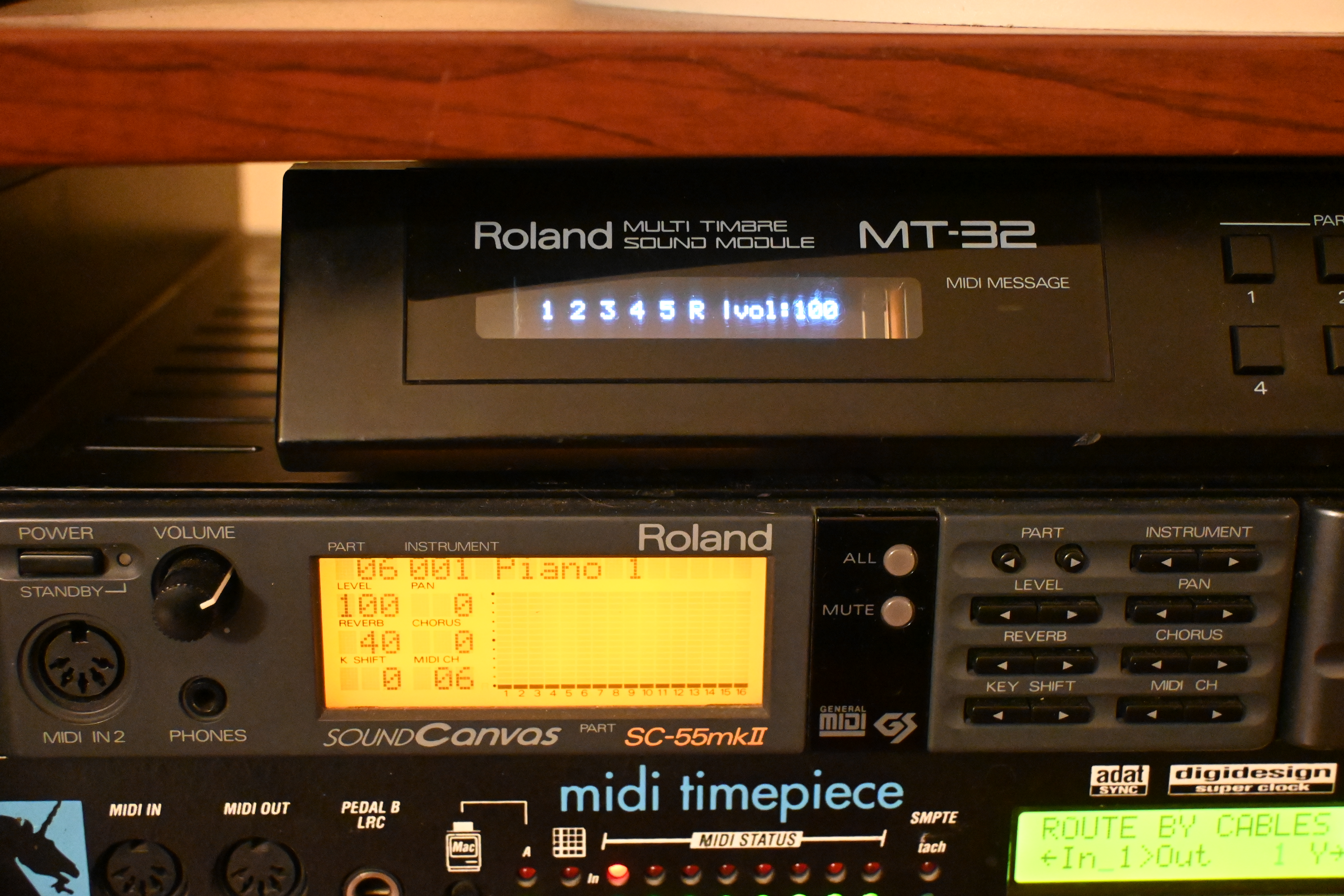
The emulator running in a Roland MT-32, showing live per-channel activity and master volume.
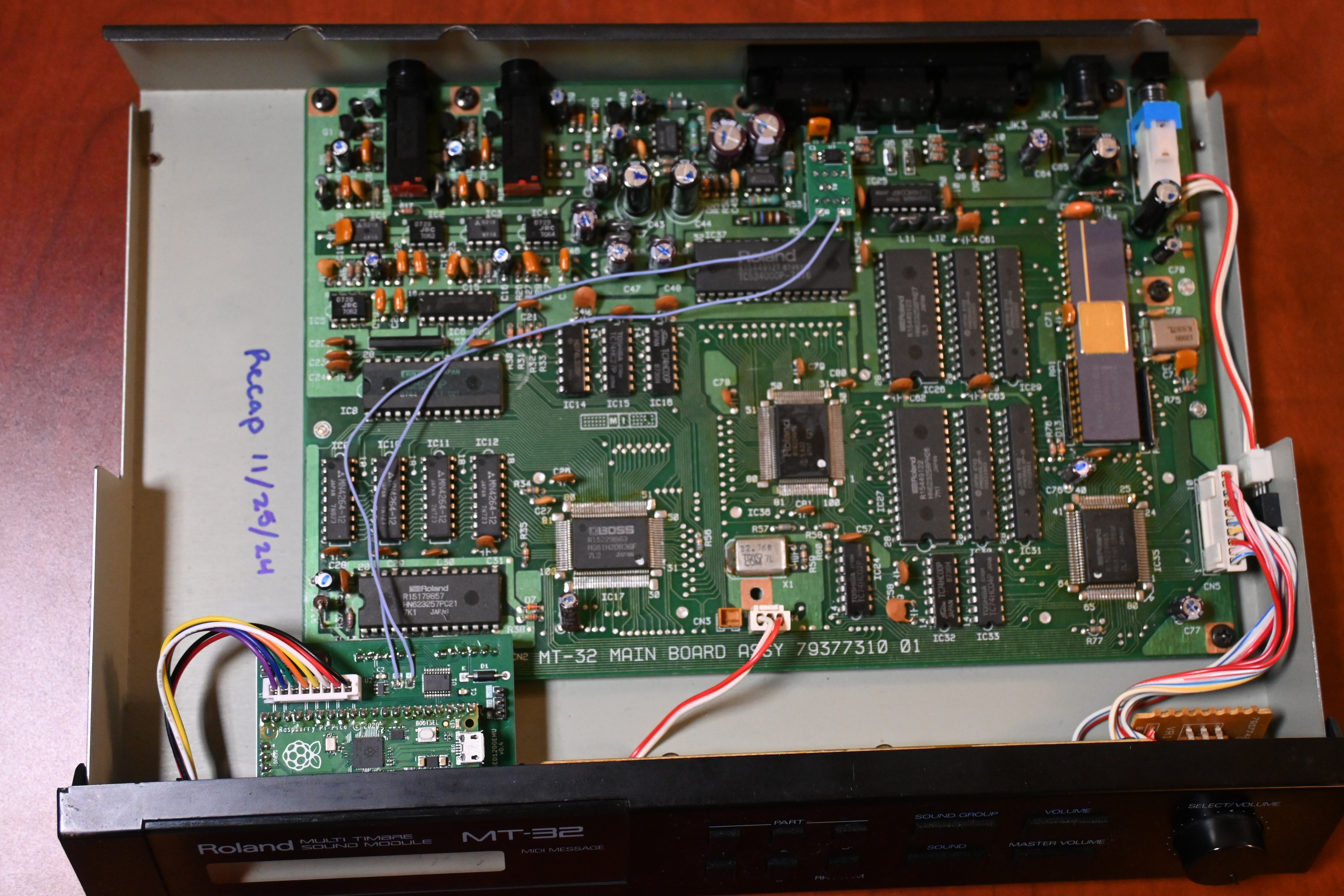
Raspberry Pi Pico installed inside the MT-32, tapping the display bus and MIDI lines.
MT32_Monitor.html) — a browser UI using the Web MIDI API to mirror the display, watch the MIDI buffer, and adjust device settings live.The core is a Raspberry Pi Pico. This repository also includes KiCad designs for the supporting hardware modules:
Note: The MT-32 bezel blocks the lower portion of the display, so content is positioned in the upper area. A shim adapter determines the physical display position; see the module folders for the current designs.
The Pico and its shim board mount inside the MT-32, replacing the original SED1200 LCD. It taps the MT-32's internal display bus to read the text the synth wants to show, and sits inline on the MIDI input path so it can buffer and forward MIDI to the MT-32 CPU.

The Raspberry Pi Pico on its carrier board, wired into the MT-32 main board.
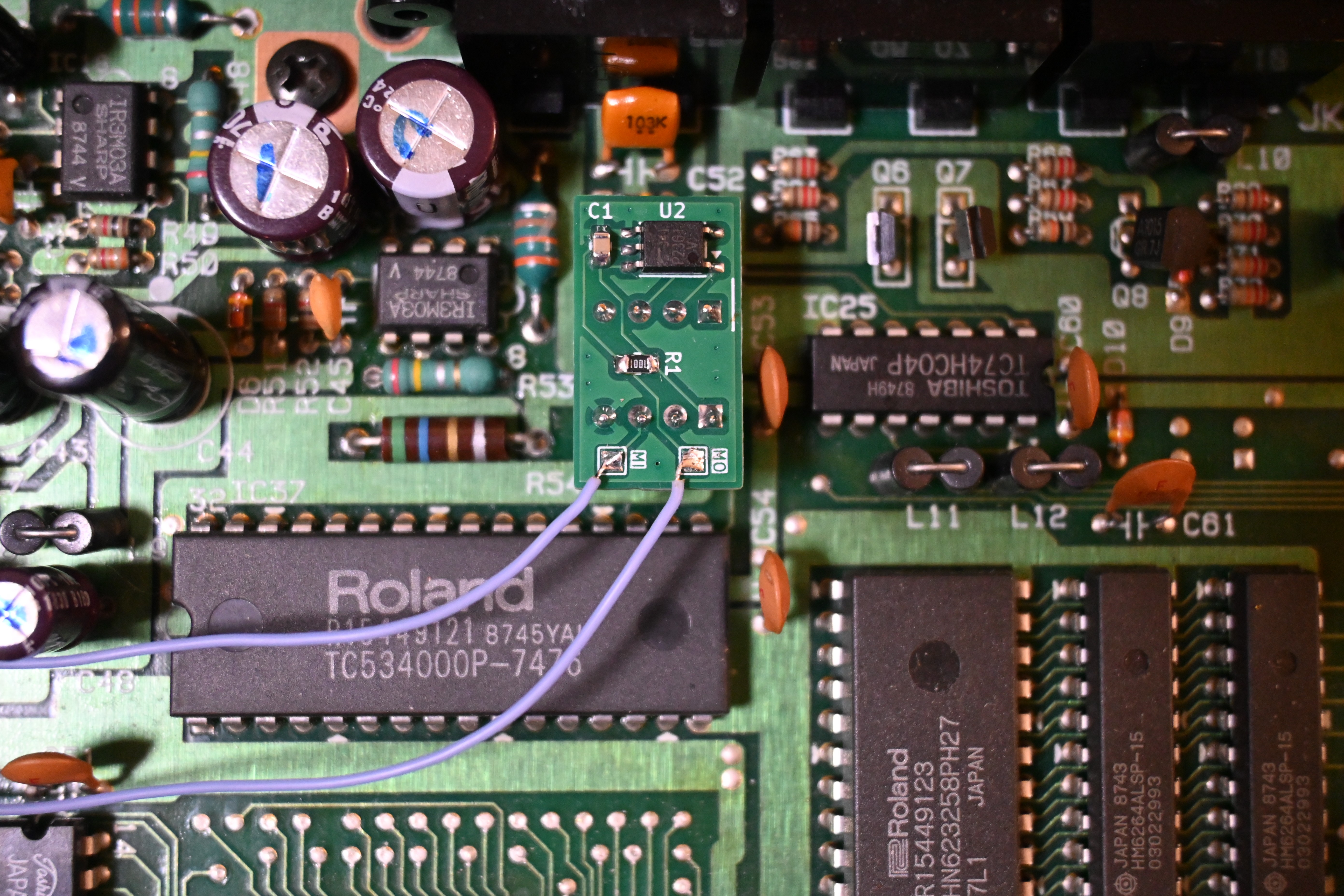
Opto-isolated MIDI tap soldered to the MT-32's CPU, feeding the forwarder's MIDI-in (MI) and MIDI-out (MO) lines.
One of the biggest benefits of this mod is what it does for MIDI reliability. The Pico doesn't just listen to the display — it sits inline between the MIDI source and the MT-32's CPU, forwarding every message. This solves a well-known MT-32 weakness: SysEx-heavy software can overrun the synth's small input buffer, causing dropped bytes, checksum errors, and missing or incorrect instruments.
The forwarder runs on the Pico's second core, isolating MIDI timing from display rendering. Incoming MIDI is received via DMA and sorted into three priority queues:
Additional reliability features:
mt32.delay), letting MIDI pass through transparently at wire speed.The firmware is built with the Raspberry Pi Pico SDK and CMake. The source lives in src/pico/.
arm-none-eabi-gcc)Open src/pico/display.h and set the display type:
// SELECT YOUR DISPLAY HERE:
#define DISPLAY_TYPE DISPLAY_TYPE_ST7789 // or DISPLAY_TYPE_SH1122Point CMake at your SDK (use an absolute path) and build:
cd src/pico
cmake -B build -DPICO_SDK_PATH=/path/to/pico-sdk
cmake --build build
The resulting firmware image is build/sed1200_display.uf2.
Hold the BOOTSEL button while plugging the Pico into USB so it mounts as a mass-storage device, then copy sed1200_display.uf2 onto it. The Pico reboots and runs the firmware automatically.
Settings are stored persistently in the Pico's flash and can be changed at runtime — no reflashing required.
Open MT32_Monitor.html in a browser that supports the Web MIDI API (e.g. Chrome/Edge). It connects to the device over MIDI and lets you:
The device exposes a MIDI back-channel via the MT-32's MIDI THRU, allowing the browser to read device state and push changes.
The same configuration parameters are available over USB serial and over MIDI SysEx (MT-32-compatible message format), including theme, SED text position/scale, display offset and brightness, VU meter layout and labels, channel indicators, screen-protection timeouts, screensaver style and text, and SysEx pacing. Settings can be saved, loaded, or reset to defaults.
The firmware uses USB for stdio output. Connect a serial terminal to view debug and status messages.
Reference material lives in documents/, including the MT-32 Implementation Guide (patch/timbre system and SysEx details), the Roland MT-32 owner's manual and service notes, the SED1200 and display datasheets, and the MT-32 sound list.
Before the Pico-based redesign, this project used an ATMEGA8 to drive a standard HD44780 character LCD as a direct SED1200 replacement. That version is preserved in the project's git history.
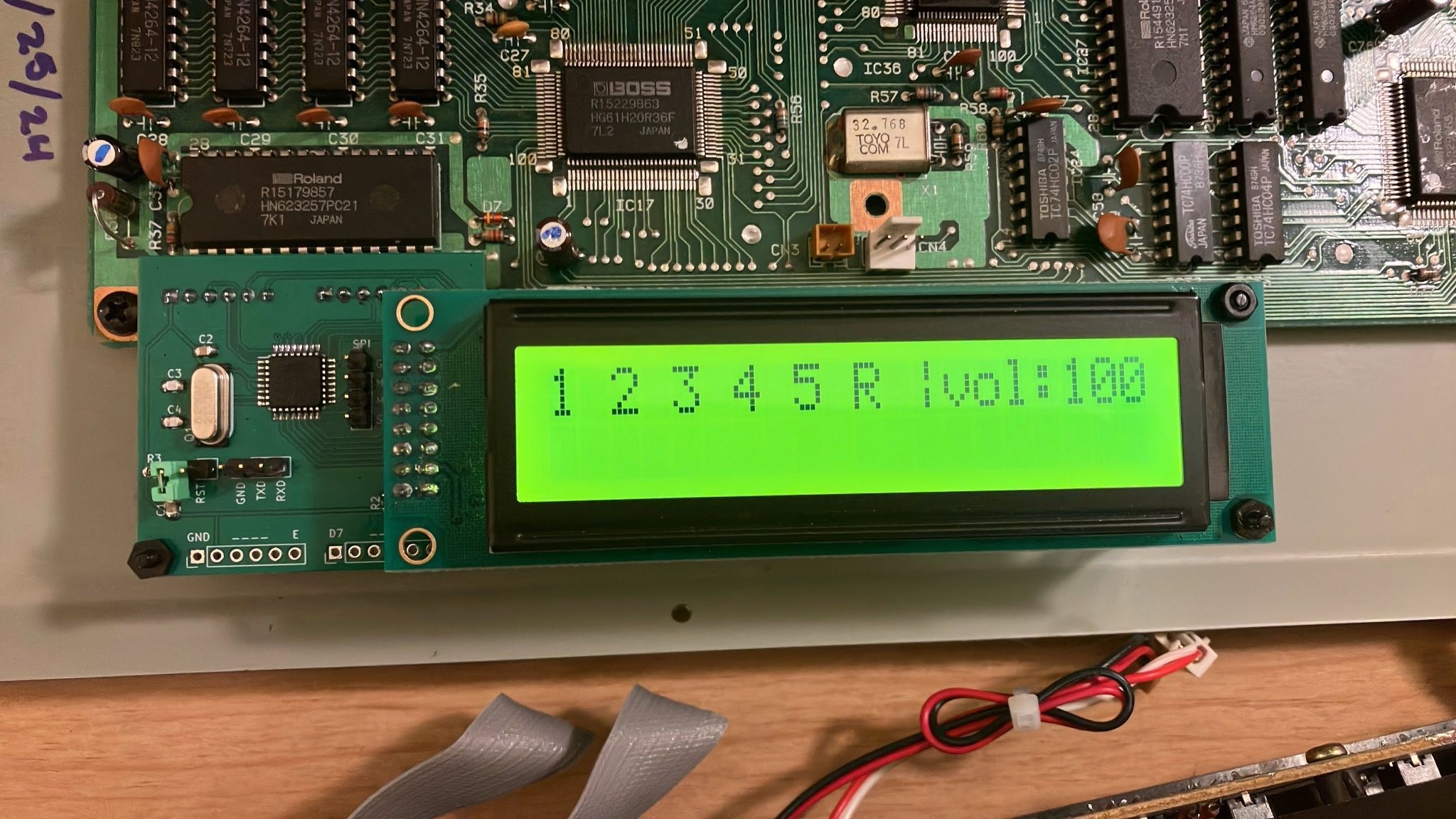
The original ATMEGA8 + HD44780 build.
This project is provided "as is," without warranty of any kind. It is an enthusiast hardware/firmware modification that is still in its testing phases — actively developed and in use, but not exhaustively validated across all MT-32 hardware revisions, displays, MIDI sources, or operating conditions. Bugs, regressions, and breaking changes should be expected between revisions.
Please understand and accept the following before building or installing:
To the fullest extent permitted by law, the authors and contributors accept no liability for any damage, loss, or injury arising from the use of this project. The full legal terms are in the GPL v3 (software) and CERN OHL-S (hardware) licenses below — note especially their "no warranty" and "disclaimer of liability" sections.
If you find a problem or have improvements, contributions and bug reports are very welcome.
This project is derived from the original release by Tim Tashpulatov, which was released without license or warranty. The updated revisions of this project (2024 onward) include a GPL v3 license, found in the LICENSE file.
Source code and software license — GPL v3
Hardware design license — CERN OHL-S
| Qty | Value | Footprint | References |
|---|---|---|---|
| 1 | BL | TestPoint:TestPoint_Pad_D2.0mm | TP8 |
| 1 | BL | TestPoint:TestPoint_Pad_1.5x1.5mm | TP16 |
| 1 | CS | TestPoint:TestPoint_Pad_1.5x1.5mm | TP15 |
| 1 | CS | TestPoint:TestPoint_Pad_D2.0mm | TP7 |
| 1 | DC | TestPoint:TestPoint_Pad_D2.0mm | TP6 |
| 1 | DC | TestPoint:TestPoint_Pad_1.5x1.5mm | TP14 |
| 1 | GND | TestPoint:TestPoint_Pad_D2.0mm | TP1 |
| 1 | GND | TestPoint:TestPoint_Pad_1.5x1.5mm | TP9 |
| 1 | RST | TestPoint:TestPoint_Pad_1.5x1.5mm | TP13 |
| 1 | RST | TestPoint:TestPoint_Pad_D2.0mm | TP5 |
| 1 | SCL | TestPoint:TestPoint_Pad_D2.0mm | TP3 |
| 1 | SCL | TestPoint:TestPoint_Pad_1.5x1.5mm | TP11 |
| 1 | SDA | TestPoint:TestPoint_Pad_D2.0mm | TP4 |
| 1 | SDA | TestPoint:TestPoint_Pad_1.5x1.5mm | TP12 |
| 1 | VDD | TestPoint:TestPoint_Pad_1.5x1.5mm | TP10 |
| 1 | VDD | TestPoint:TestPoint_Pad_D2.0mm | TP2 |
RetroLoom/sed1200emu
A Raspberry Pi Pico display replacement for the Roland MT-32, with a modern TFT/OLED, MIDI VU meters, and MIDI buffer-overflow protection.

RetroLoom/sed1200emu
A Raspberry Pi Pico display replacement for the Roland MT-32, with a modern TFT/OLED, MIDI VU meters, and MIDI buffer-overflow protection.

google/mozc-devices
Circuit diagrams and firmware source code for Gboard DIY keyboards

conorpp/u2f-zero
U2F USB token optimized for physical security, affordability, and style

rusefi/rusefi
rusefi - GPL internal combustion engine control unit

VoronDesign/Voron-Hardware
Cool Hardware designed by the Voron Design group

hoglet67/RGBtoHDMI
Bare-metal Raspberry Pi project that provides pixel-perfect sampling of Retro Computer RGB/YUV video and conversion to HDMI

hackclub/OnBoard
💡 Join 1,000 teenagers and make your first PCB with a $100 grant!


It measures 90 × 25 mm and has 2 copper layers, 0.8 mm thick.
16 parts. The full list of its parts is on this page, with links to each part's symbol and footprint where PCBKit's library has them.
From the RetroLoom/sed1200emu repository on GitHub, at the commit this page was made from: the board is ST7789/ST7789 Shim.kicad_pcb and its schematic PC910 Module/PC910 Module.kicad_sch. PCBKit opens the board in the browser, with nothing to install.
Its repository publishes it under the GPL-3.0 licence: you may reuse it on that licence's terms (keep the author's notice, and for a copyleft licence share your changes alike).