2 layers57 × 55.2 mm
LogicAnalyzer
gusmanb/logicanalyzer
24 channel, 100Msps logic analyzer hardware and software
10 parts5.1kGPL-3.0

 PreetinderSinghBadesha/bubble-bot
A friendly desktop companion robot. Bubble-Bot chats with you through a phone app powered by Google Gemini, replies in a short conversational style, and tags every reply with an emotion ([HAPPY], [SAD], [THINKING], ...)…
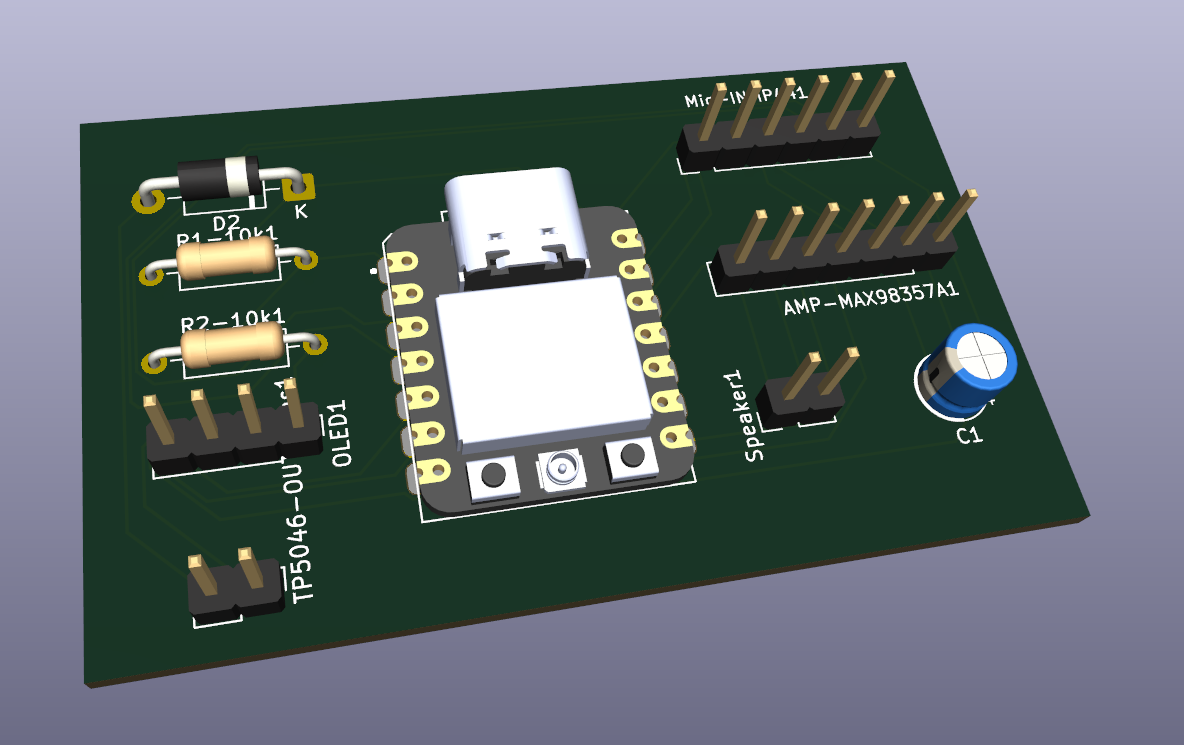
Bubble bot pcb is an open-source printed circuit board by PreetinderSinghBadesha, from the PreetinderSinghBadesha/bubble-bot repository on GitHub. It is a 2-layer board of 64 × 39 mm with 10 parts on 19 nets, routed with 114 tracks and 0 vias.
Its parts include 2 resistors, 1 capacitor, 1 IC and 1 diode.
A friendly desktop companion robot. Bubble-Bot chats with you through a phone app powered by Google Gemini, replies in a short conversational style, and tags every reply with an emotion ([HAPPY], [SAD], [THINKING], ...) that the robot shows as a face on its OLED display.
The project covers the whole stack: 3D-printed enclosure, custom PCB, ESP32 firmware, and a Flutter controller app.
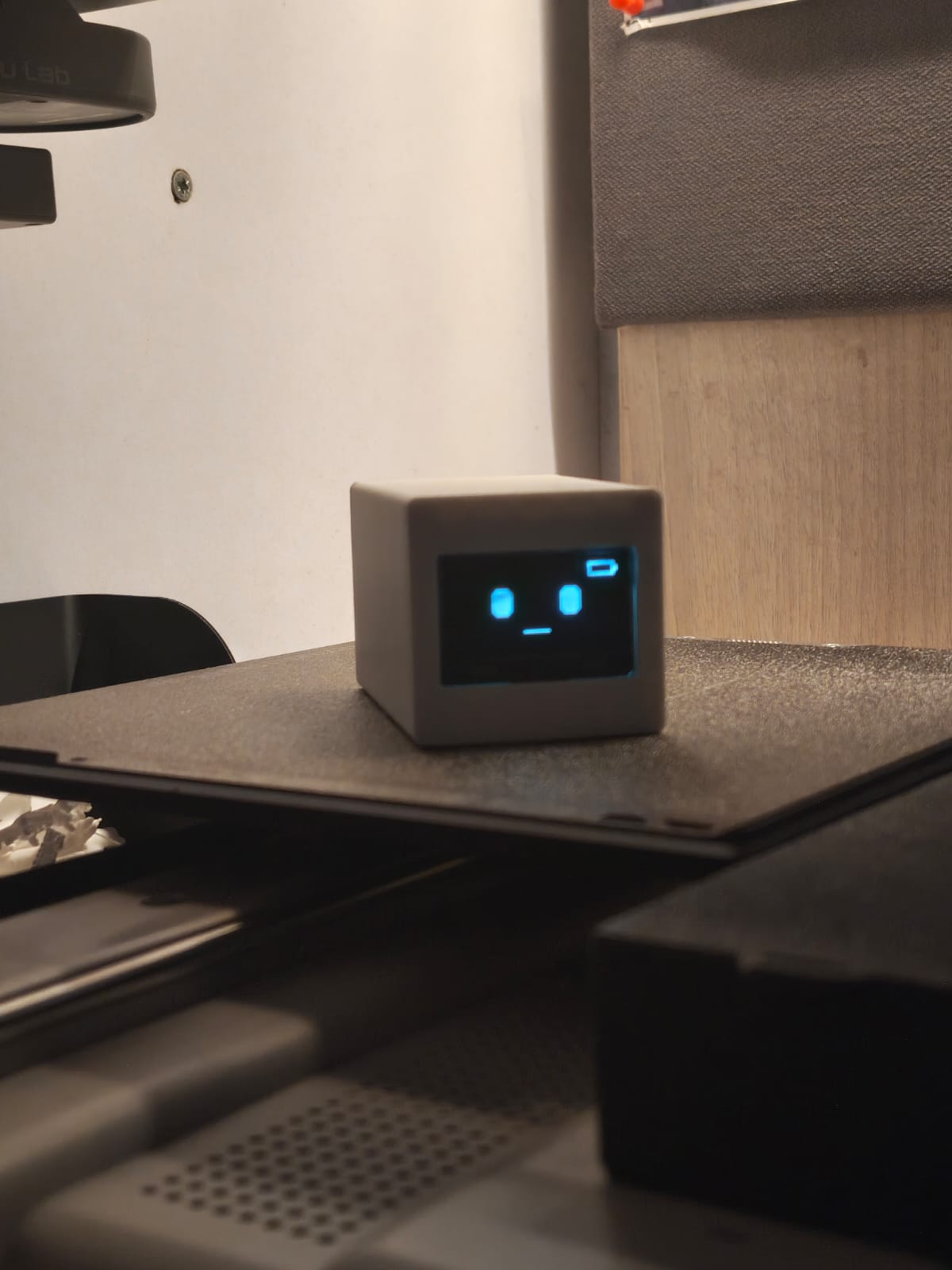
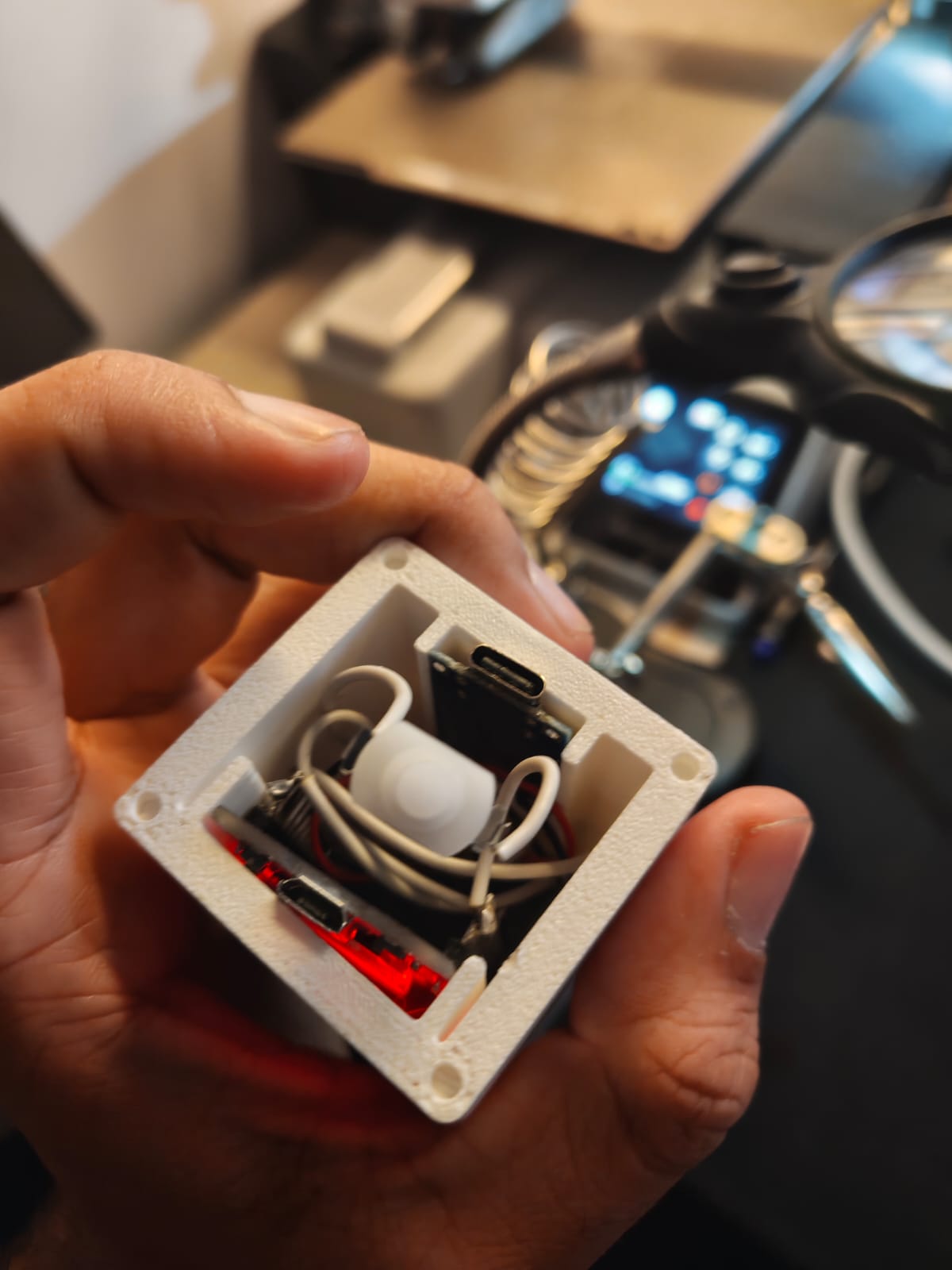
Left: Bubble-Bot showing a neutral face with a battery indicator. Right: the electronics inside the printed body.
| Folder | Contents |
|---|---|
bubble-bot-code/bubble-bot-code | ESP32 firmware (PlatformIO, Arduino framework) |
bubble-bot-code/bubble_app | Flutter controller app (BLE + Gemini chat) |
bubble-bot-model | 3D-printable enclosure: front cover, back cover, main body (STL / 3MF) |
bubble-bot-pcb | KiCad 9 project: schematic, PCB layout, STEP model |
pcb v1 | Earlier PCB revision |
Bubble-Bot Embedded Systems.pdf / .pptx | Project presentation |
 Phone (Flutter app)                         Bubble-Bot (ESP32)
┌────────────────────────┐   BLE write     ┌──────────────────────────┐
│ Chat UI                │  "HAPPY" etc.   │ XIAO ESP32               │
│ Gemini 2.5 Flash       │ ───────────────►│  └─ I2C ─► OLED face     │
│ Parses [EMOTION] tag   │                 │  I2S ─► mic / speaker    │
└────────────────────────┘ └──────────────────────────┘gemini-2.5-flash) with a system prompt that makes it answer briefly and end with an emotion tag.Supported emotions: NEUTRAL, HAPPY, SAD, SURPRISED, THINKING, ANGRY, EXCITED, SLEEPY, CONFUSED, LOVE, WINK.
BLE details used by the app:
Bubble-Bot4fafc201-1fb5-459e-8fcc-c5c9c331914bbeb5483e-36e1-4688-b7f5-ea07361b26a8 (UTF-8 emotion string)The custom PCB carries:
bubble-bot-model)The firmware in bubble-bot-code/bubble-bot-code is a separate PCA9685 + 6-servo bring-up test for an earlier servo-driven prototype (ESP32 DevKit V1, I2C 0x40, SDA = GPIO21, SCL = GPIO22, servos on channels 0-5).
| Schematic | Layout | 3D view |
|---|---|---|
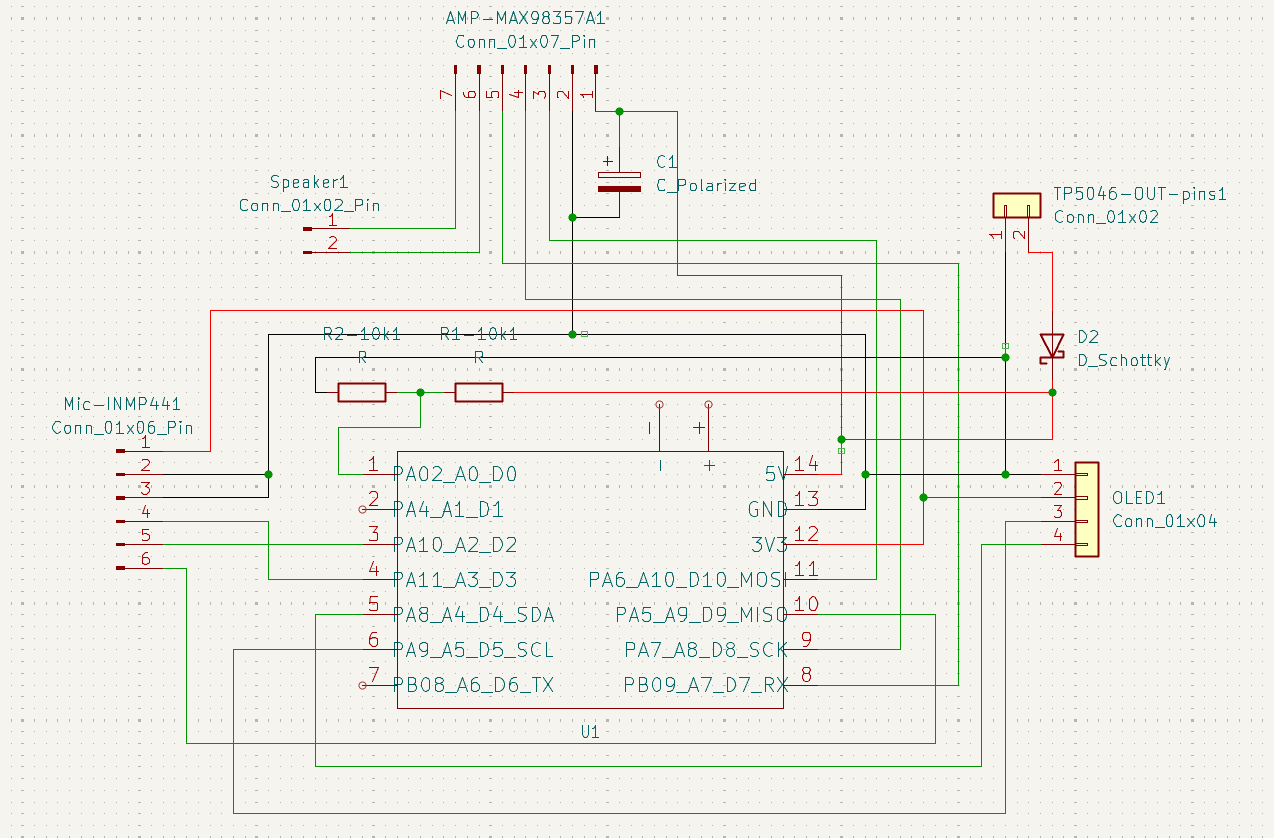 | 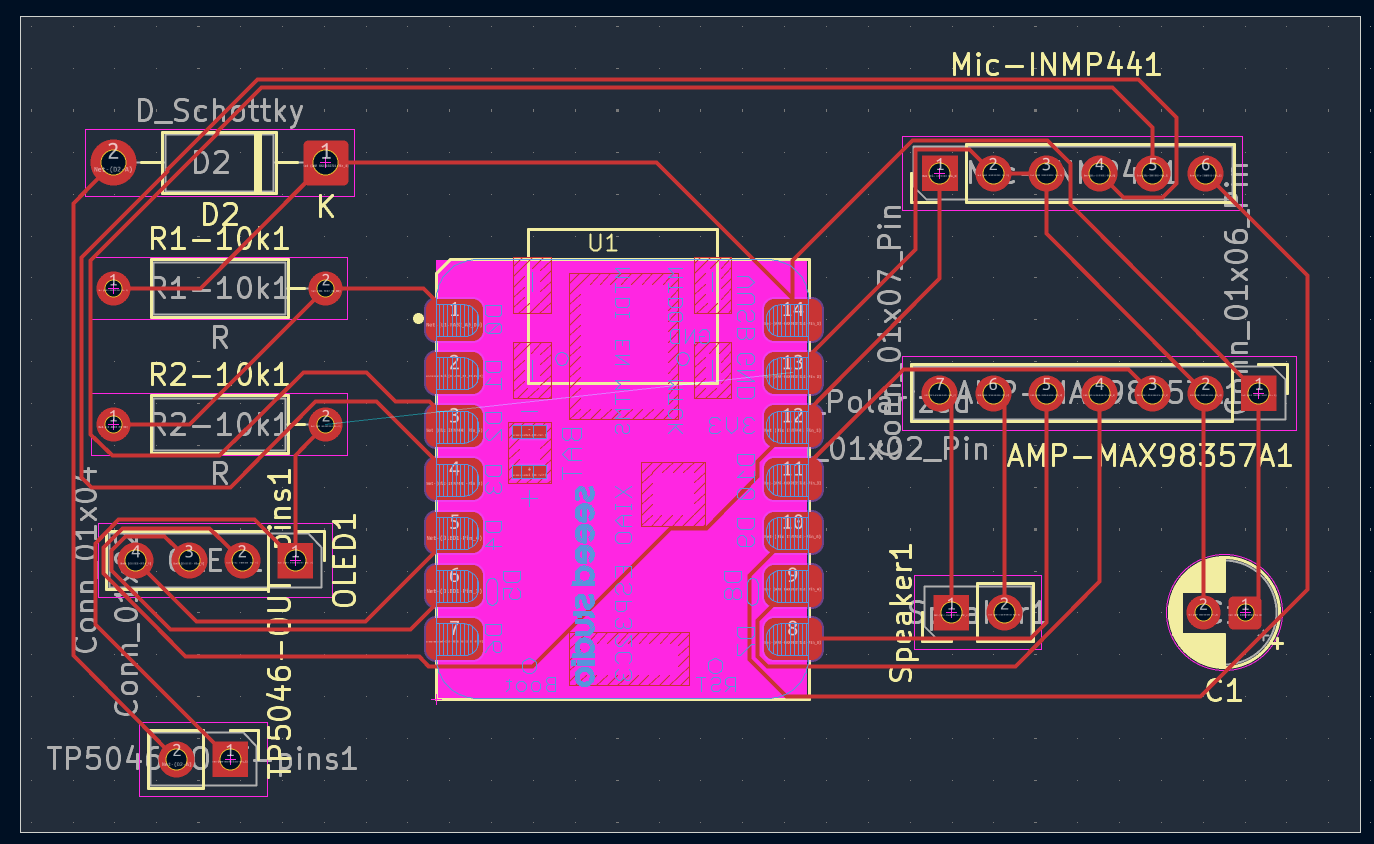 |  |
Requires PlatformIO.
cd bubble-bot-code/bubble-bot-code
pio run -t upload
pio device monitor      # 115200 baud
Status: the current firmware is a servo bring-up test. It sweeps each of the six servos 0° → 180° → 0° in turn. The BLE server and emotion-to-movement mapping that the app talks to are not implemented in this firmware yet.
Servo pulse limits are set by SERVOMIN / SERVOMAX in src/main.cpp; tune them if your servos jitter or overshoot.
Requires the Flutter SDK (Dart ^3.8.1) and a Gemini API key. The key is supplied at build time and is never stored in the repo:
cd bubble-bot-code/bubble_app
flutter pub get
flutter run --dart-define=GEMINI_API_KEY=your_key_here
The app needs Bluetooth and location permissions on Android in order to scan for the robot.
Open bubble-bot-pcb/bubble-bot-pcb.kicad_pro in KiCad 9. A STEP model of the board is included for enclosure fitting.
Print main body.stl, front-cover.stl and back cover.stl from bubble-bot-model/.
No license has been chosen yet. Until one is added, all rights are reserved by the author.
| Qty | Value | Footprint | References |
|---|---|---|---|
| 2 | R | Resistor_THT:R_Axial_DIN0207_L6.3mm_D2.5mm_P10.16mm_Horizontal | R1-10k1, R2-10k1 |
| 1 | C_Polarized | Capacitor_THT:CP_Radial_D5.0mm_P2.00mm | C1 |
| 1 | Conn_01x02 | Connector_PinHeader_2.54mm:PinHeader_1x02_P2.54mm_Vertical | TP5046-OUT-pins1 |
| 1 | Conn_01x02_Pin | Connector_PinHeader_2.54mm:PinHeader_1x02_P2.54mm_Vertical | Speaker1 |
| 1 | Conn_01x04 | Connector_PinHeader_2.54mm:PinHeader_1x04_P2.54mm_Vertical | OLED1 |
| 1 | Conn_01x06_Pin | Connector_PinHeader_2.54mm:PinHeader_1x06_P2.54mm_Vertical | Mic-INMP441 |
| 1 | Conn_01x07_Pin | Connector_PinHeader_2.54mm:PinHeader_1x07_P2.54mm_Vertical | AMP-MAX98357A1 |
| 1 | D_Schottky | Diode_THT:D_DO-41_SOD81_P10.16mm_Horizontal | D2 |
| 1 | ~ | ESP32C3-footprint-eagle_single_device_kicad:MOUDLE14P-SMD-2.54-21X17.8MM | U1 |
gusmanb/logicanalyzer
24 channel, 100Msps logic analyzer hardware and software

byrantech/laptop
anyon_e, a highly integrated, high end, open source laptop. Attempt the impossible.

joeycastillo/Sensor-Watch
A board replacement for the classic Casio F-91W wristwatch


OLIMEX/OLINUXINO
OLINUXINO is Open Source / Open Hardware, low cost from EUR 24 Linux Industrial grade Single Board Computer capable to operate -25+85C

rusefi/rusefi
rusefi - GPL internal combustion engine control unit

VoronDesign/Voron-Hardware
Cool Hardware designed by the Voron Design group

hoglet67/RGBtoHDMI
Bare-metal Raspberry Pi project that provides pixel-perfect sampling of Retro Computer RGB/YUV video and conversion to HDMI
It measures 64 × 39 mm and has 2 copper layers, 1.6 mm thick.
10 parts. The full list of its parts is on this page, with links to each part's symbol and footprint where PCBKit's library has them.
From the PreetinderSinghBadesha/bubble-bot repository on GitHub, at the commit this page was made from: the board is bubble-bot-pcb/bubble-bot-pcb.kicad_pcb and its schematic bubble-bot-pcb/bubble-bot-pcb.kicad_sch. PCBKit opens the board in the browser, with nothing to install.
Its repository states no licence, so its author keeps all rights: ask PreetinderSinghBadesha before reusing the design.