Skip to the content
2 layersRotaryEncoderAttiny85, the printed circuit board in 3D

RotaryEncoderAttiny85

MatthewAHarvey/SmartEncoder1

Arduino friendly, serially addressable, ATTINY85 based rotary encoders. Reduce the pin count from 3 * n where n is the number of encoders (pins A, B and button C) to 2 total. Serial in, Serial out. Use Hardware Serial, AltSoftSerial or Software Serial

Copper layers
2
Thickness
1.6 mm
Parts
9
Nets
8
Pads
27
Tracks, vias
38, 0
Pours
2
Routed
Yes
KiCad
KiCad 4
Created
23 Apr 2018
Updated
15 Oct 2019

Overview

RotaryEncoderAttiny85 is an open-source printed circuit board by MatthewAHarvey, from the MatthewAHarvey/SmartEncoder repository on GitHub, published under the GPL-3.0 licence. It is a 2-layer board with 9 parts on 8 nets, routed with 38 tracks and 0 vias.

Its parts include 2 connectors, 1 capacitor, 1 IC and 1 switch. It belongs with the interfaces and adapters boards and the AVR (ATmega, ATtiny) boards of this library.

README

README.md

SmartEncoder

Arduino friendly, serially addressable, ATTINY85 based rotary encoders. Reduce the pin count from 3 * n where n is the number of encoders (pins A, B and button C) to 2 total. Serial in, Serial out. Use Hardware Serial, AltSoftSerial or Software Serial

Handling lots of encoders at the same time can be a challenge. For example, in our use case, we had 15 encoders attached to one Arduino Mega. After all the connections to other peripherals, we ran out of pins. The encoders had to be polled since there are not enough interrupts. Our solution is to offload the handling of the encoders to dedicated ATTINY85 chips. These then talk asynchronous serial at 125000 baud in a ring with the master arduino. The arduino now only needs 2 pins: 1 serial tx and 1 serial rx. At the moment this is limited to one of the hardware serial ports but tests show it's possible with software serial implementations.

In order for this to work, the ATTINY85s' clock frequencies must be set more accurately than straight from the factory.

Installation instructions:

  1. First, the ATTINYs must be frequency calibrated. We do this by burning the arduino bootloader on to an ATTINY and uploading the FreqCal sketch. We use the ATTINYCore which must be installed in the Arduino IDE. We output a square wave from pin 6 and observe it using an oscilloscope. An attached rotary encoder is then used to adjust this signal until it is as close to 1 MHz as possible. Pressing the encoder button saves the current OSCCAL register value to the EEPROM.

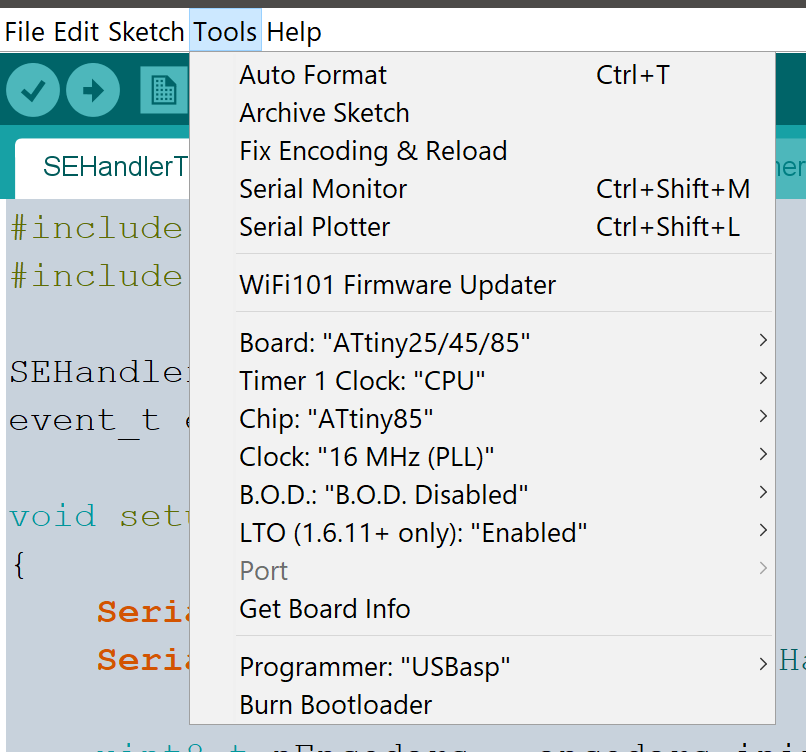
Arduino IDE settings for ATTINY85: ATTINY85 Settings
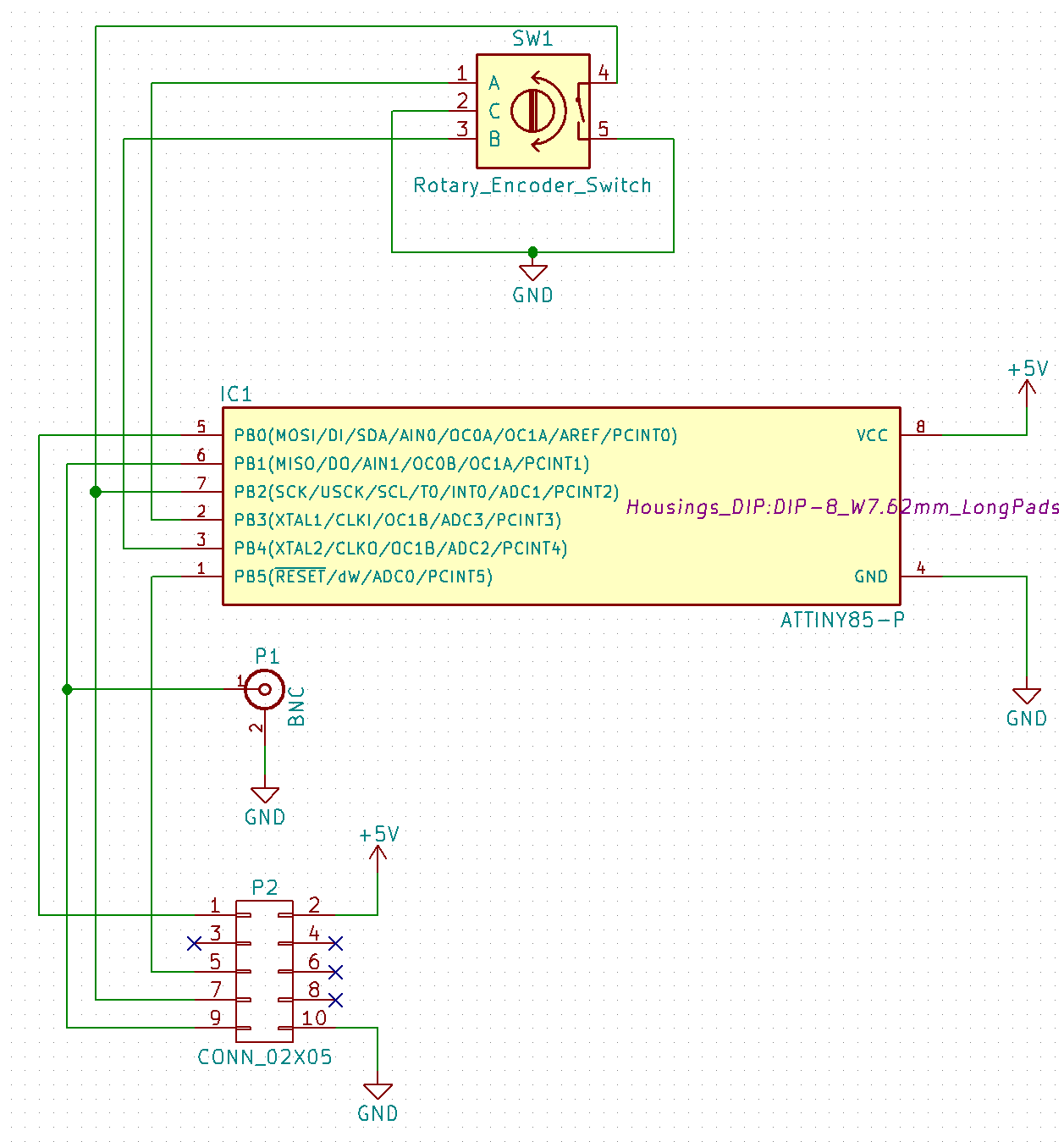
Schematic for the FreqCal rotary encoder programme: Schematic
  1. Now upload the ATTINY85RotEncCode sketch to each of the ATTINYs.

  2. The example SEHandlerTest programme can be uploaded to the master arduino mega.

To Do:

  1. Add individual encoder direction swap command that can be called any time after init().
  2. Add global encoder direction swap at creation time that tells all the individual encoders to swap direction at init time.
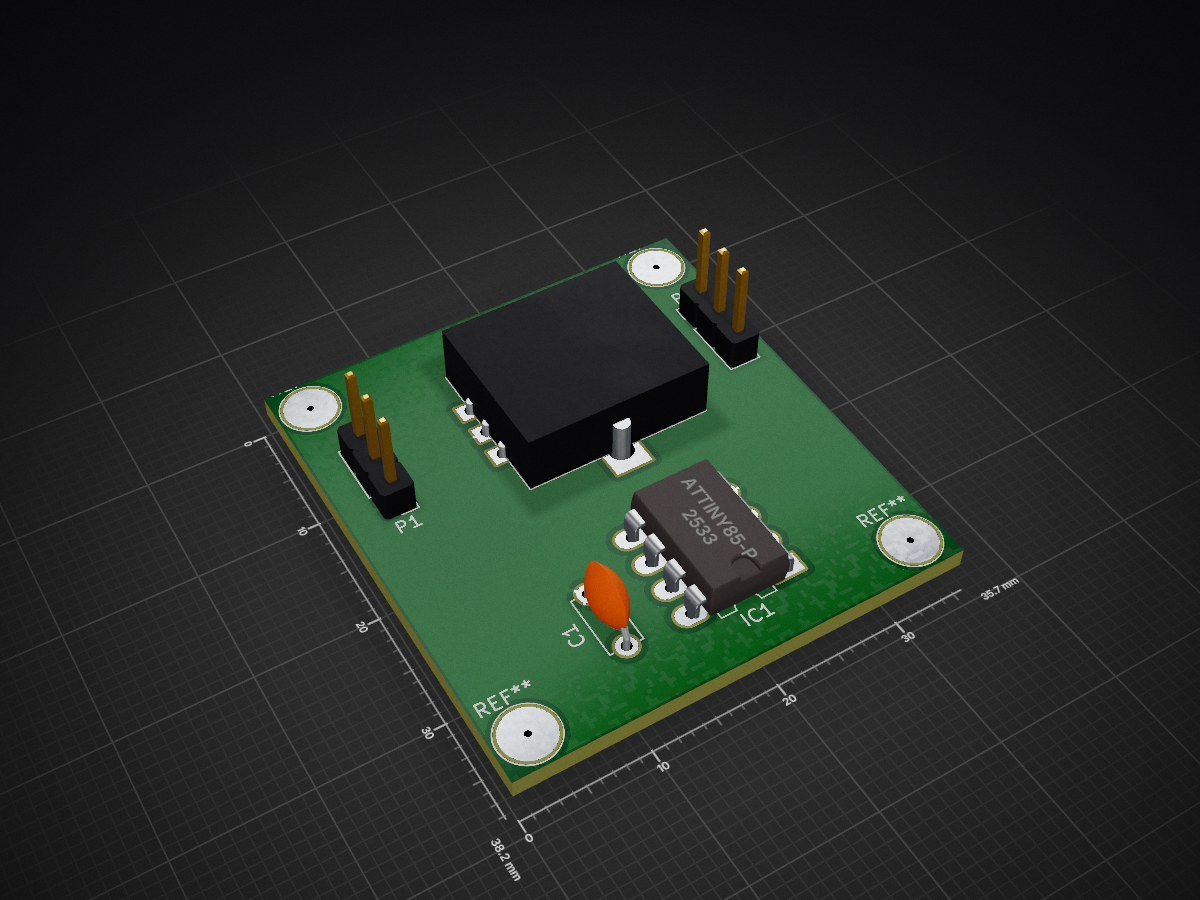
Parts

9
QtyValueFootprintReferences
2CONN_01X03Pin_Headers:Pin_Header_Straight_1x03_Pitch2.54mmP1, P2
1ATTINY85-PHousings_DIP:DIP-8_W7.62mm_LongPadsIC1
1CCapacitors_THT:C_Disc_D5.0mm_W2.5mm_P5.00mmC1
1Rotary_Encoder_SwitchMatthewLib:RotEncSW1

The 5 most common of 9 parts.

More from MatthewAHarvey/SmartEncoder

3
  • 2 layersATTINY841Version, the printed circuit board in 3D

    ATTINY841Version

    MatthewAHarvey/SmartEncoder

    Arduino friendly, serially addressable, ATTINY85 based rotary encoders. Reduce the pin count from 3 * n where n is the number of encoders (pins A, B and button C) to 2 total. Serial in, Serial out.

    6 parts1GPL-3.0
  • 2 layersRotaryEncoderAttiny85, the printed circuit board in 3D

    RotaryEncoderAttiny85

    MatthewAHarvey/SmartEncoder

    Arduino friendly, serially addressable, ATTINY85 based rotary encoders. Reduce the pin count from 3 * n where n is the number of encoders (pins A, B and button C) to 2 total. Serial in, Serial out.

    5 parts1GPL-3.0
  • 2 layersATTINYFreqSet, the printed circuit board in 3D

    ATTINYFreqSet

    MatthewAHarvey/SmartEncoder

    Arduino friendly, serially addressable, ATTINY85 based rotary encoders. Reduce the pin count from 3 * n where n is the number of encoders (pins A, B and button C) to 2 total. Serial in, Serial out.

    4 parts1GPL-3.0

Similar boards

  • 2 layers103 × 30.5 mmTS Back Endcap, the printed circuit board in 3D

    TS Back Endcap

    EEVengers/ThunderScope

    ThunderScope GitHub Repo

    9 parts1.3kMIT
  • 2 layers31.8 × 47.6 mmNGC 38 connector, the printed circuit board in 3D

    NGC 38 connector

    rusefi/rusefi

    rusefi - GPL internal combustion engine control unit

    9 parts1.2k
  • 2 layers24 × 27.3 mmExpansion Card Retrofit, the printed circuit board in 3D

    Expansion Card Retrofit

    FrameworkComputer/ExpansionCards

    Reference designs and documentation to create Expansion Cards for the Framework Laptop

    9 parts1.1kCC-BY-4.0
  • 2 layers15.6 × 17.3 mmSKR Mini TFT Thermistor Board, the printed circuit board in 3D

    SKR Mini TFT Thermistor Board

    VoronDesign/Voron-Hardware

    Cool Hardware designed by the Voron Design group

    9 parts1.1kGPL-3.0
  • 2 layers39.1 × 49.5 mmLearnoliver, the printed circuit board in 3D

    Learnoliver

    hackclub/OnBoard

    💡 Join 1,000 teenagers and make your first PCB with a $100 grant!

    9 parts915
  • 2 layers17.4 × 16.9 mmToolhead, the printed circuit board in 3D

    Toolhead

    tanaes/whopping_Voron_mods

    9 parts787GPL-3.0
  • 2 layers9.8 × 108 mmExpander, the printed circuit board in 3D

    Expander

    wntrblm/Castor_and_Pollux

    A Juno-inspired dual oscillator

    9 parts587
  • 2 layersKeyboard after, the printed circuit board in 3D

    Keyboard after

    adamws/kicad-kbplacer

    KiCad plugin for automatic keyboard's key placement and routing

    9 parts547GPL-3.0

Questions

What parts does the RotaryEncoderAttiny85 use?

9 parts. The full list of its parts is on this page, with links to each part's symbol and footprint where PCBKit's library has them.

Where can I download the RotaryEncoderAttiny85 KiCad files?

From the MatthewAHarvey/SmartEncoder repository on GitHub, at the commit this page was made from: the board is PCBs/RotaryEncoderAttiny85_TEST_PCB/RotaryEncoderAttiny85.kicad_pcb. PCBKit opens the board in the browser, with nothing to install.

Can I use the RotaryEncoderAttiny85 design in my own project?

Its repository publishes it under the GPL-3.0 licence: you may reuse it on that licence's terms (keep the author's notice, and for a copyleft licence share your changes alike).