2 layers97 × 58 mm

 Manish4268/OctoBoard
OutDoor Data
Chuck v1 is an open-source printed circuit board by Manish4268, from the Manish4268/OctoBoard repository on GitHub. It is a 4-layer board of 450 × 45 mm with 150 parts on 131 nets, routed with 3,666 tracks and 414 vias.


This repository documents the design, implementation, and operation of a massively parallel, low-cost Maximum Power Point Tracker (MPPT) for aging and degradation studies of perovskite solar cells. The system integrates custom-designed PCBs and software for efficient tracking and data logging.
NEW: v2.0 System - Production-ready system supporting 3 Raspberry Pis with up to 288 channels (72 samples). Features include configurable IV sweep intervals (1-1000 minutes), automated file transfer, persistent state management, optimized web dashboard, and automatic hardware detection for scalable deployment!
Octoboards (Custom-designed PCBs) - Source Measure Unit (SMU) functions
Measurement Chuck
Dual-System Architecture:
RPi System (rpi_system/)
Main PC System (main_pc_system/)
Key Capabilities:
SampleID/pixel/IV_timestamp.csv├── docs/ # Documentation and images
├── hardware/ # PCB designs and CAD files
│ ├── Measurement Chuck Housing CAD Design/
│ ├── Measurement Chuck PCB Design/
│ └── Octoboard PCB Design/
│ │ └── gerber.zip
│ ├── Octoboard PCB Design/
│ │ ├── DAC.kicad_sch
│ │ ├── octoboard.kicad_pcb
│ │ ├── octoboard.kicad_prl
│ │ ├── octoboard.kicad_pro
│ │ └── octoboard.kicad_sch
├── software/
│ ├── hardware/
│ │ ├── __init__.py
│ │ ├── channel.py
│ │ ├── constants.py
│ │ ├── i2c.py
│ │ ├── manager.py
│ │ ├── oboard.py
│ │ └── sdac.py
│ ├── tests/
│ │ ├── test_hardware.py
│ │ ├── test_logger.pyThe Octoboard is a custom-designed PCB that forms the core of the MPPT system, providing capabilities for maximum power point tracking in solar cell testing and evaluation.
Key Components:
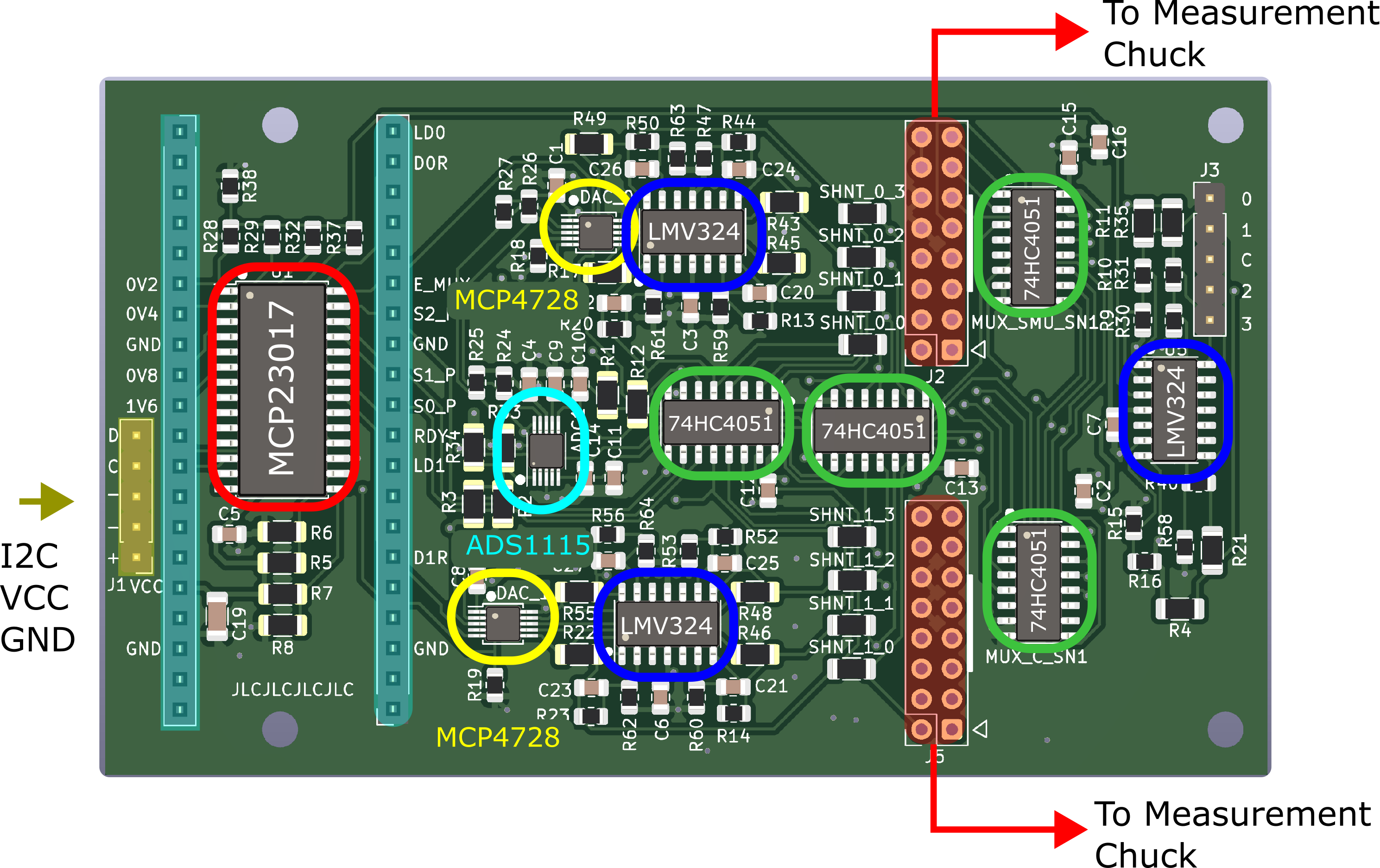
| Component | Type | Key Specifications | Datasheet |
|---|---|---|---|
| MCP4728 | DAC | 12-bit, 4-channel, I2C | Datasheet |
| ADS1115 | ADC | 16-bit, 4-channel, I2C | Datasheet |
| LMV324 | Op-Amp | Rail-to-rail, low power | Datasheet |
| 74HC4051 | Multiplexer | 8-channel analog | Datasheet |
| MCP23017 | I/O Expander | 16-bit, I2C | Datasheet |
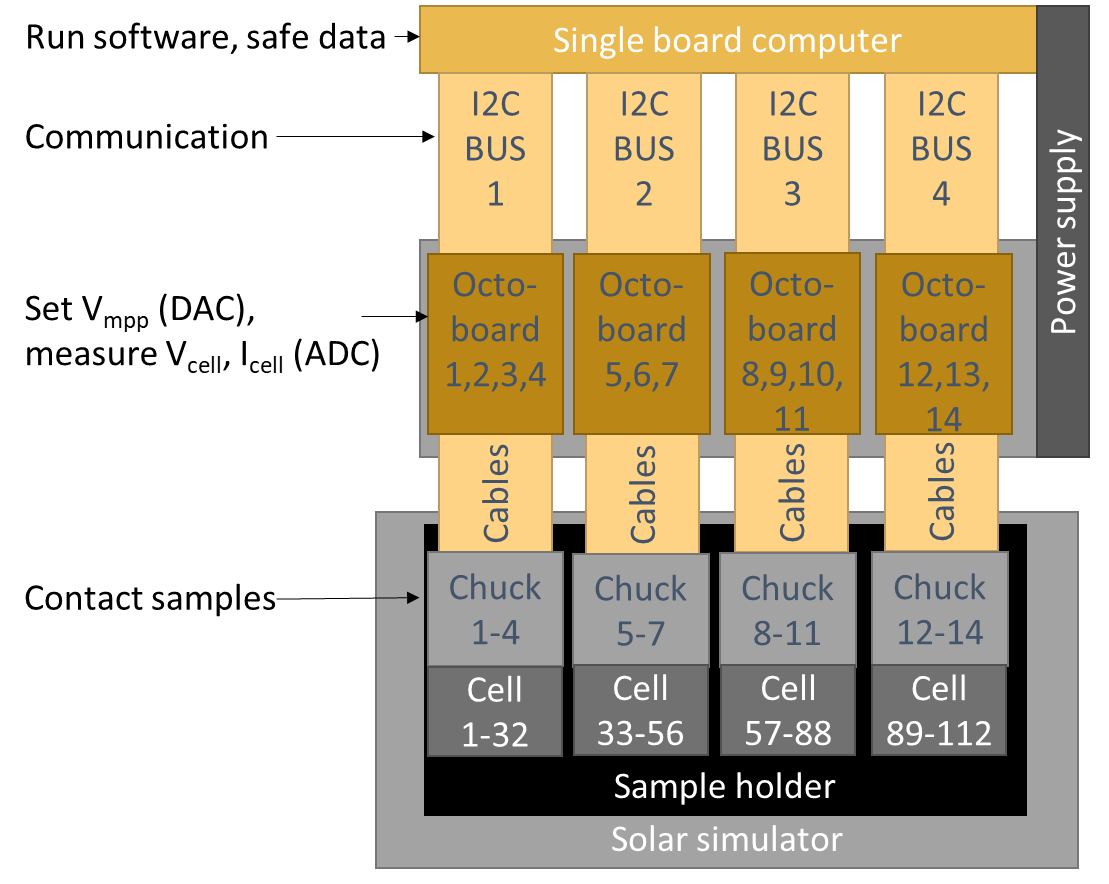
The MPPT system is designed with a hierarchical structure:
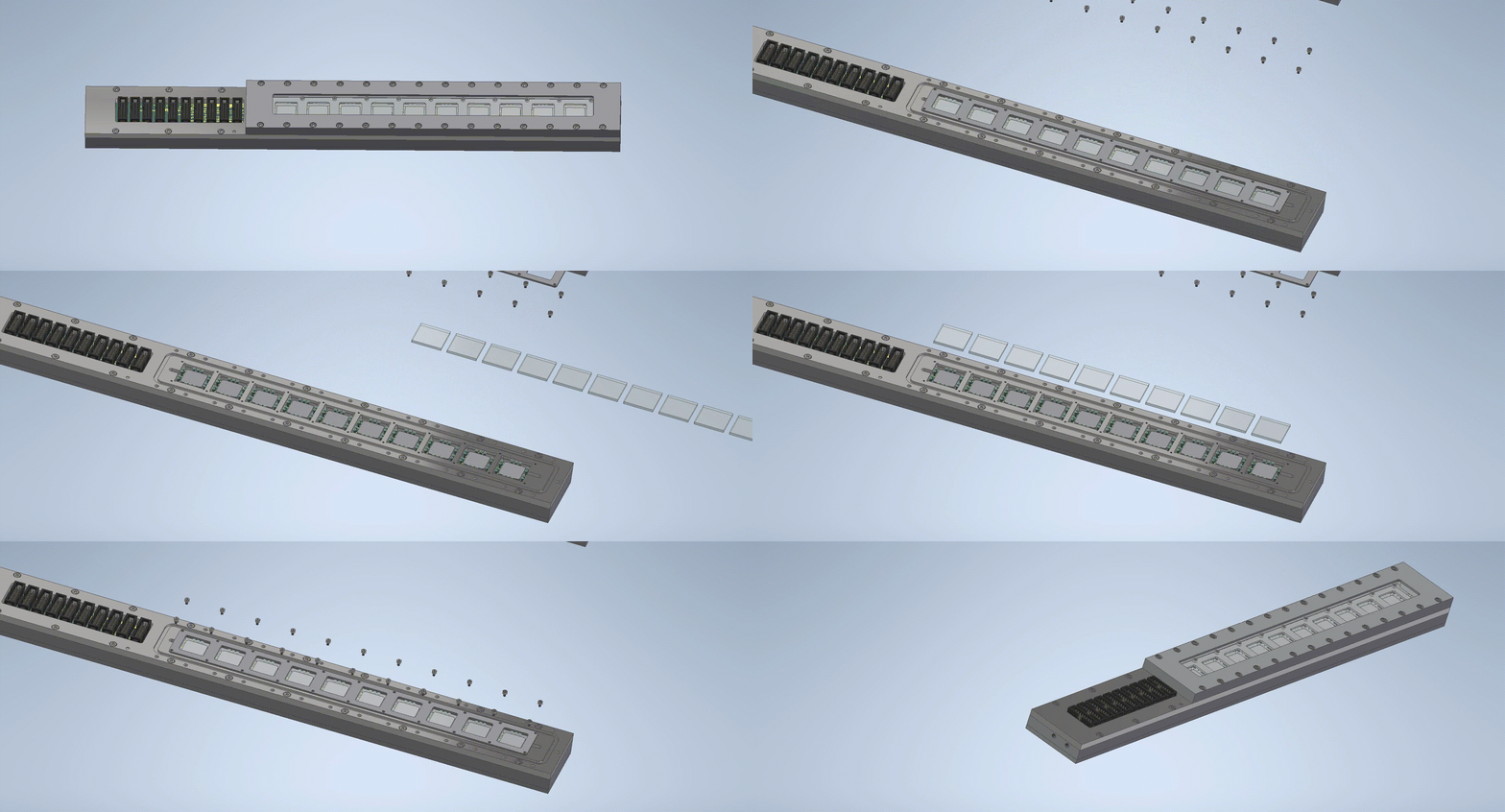
The Measurement Chuck allows up to 10 substrates (40 solar cells on a "University of Marburg" cell layout) to be aged under a nitrogen atmosphere. Due to its compact design, up to eight measurement chucks can be fit in a Solaronix SOLIXON A-45 solar simulator.
Operation & Handling To replace the substrates inside a chuck:
1. Raspberry Pi System (rpi_system/)
2. Main PC System (main_pc_system/)
cd main_pc_system
.\start.bat  # Automatic setup and launch
Opens:
http://192.168.1.100:8000http://localhost:8501cd rpi_system
# For actual hardware
python api_server.py
# For simulation/testing (Windows)
$env:OCTOBOARD_SIMULATION="True"
python api_server.py| Metric | Value |
|---|---|
| Raspberry Pis | 3 |
| Octoboards per RPi | 12 |
| Channels per RPi | 96 |
| Total Channels | 288 |
| Samples per RPi | 24 (4 pixels each) |
| Total Sample Capacity | 72 |
| IV Sweep Frequency | Every 1 hour |
| Files Generated | 96 per hour per RPi |
| Device | IP Address | Port | Role |
|---|---|---|---|
| Main PC | 192.168.1.100 | 8000 (Receiver) | Control center |
| Main PC | 192.168.1.100 | 8501 (Dashboard) | Web interface |
| RPi 1 | 192.168.1.101 | 8001 | Channels 0-95 |
| RPi 2 | 192.168.1.102 | 8001 | Channels 0-95 |
| RPi 3 | 192.168.1.103 | 8001 | Channels 0-95 |
┌─────────────┐
│   RPi 1-3   │ ──► Hourly IV Sweeps (96 channels each)
│ (Octoboards)│       │
└─────────────┘       │
                      ▼
              ┌──────────────┐
              │  Generate    │ ──► 4 CSV files per sample
              │  IV Files    │       (pixels a, b, c, d)
              └──────────────┘
                      │
                      ▼
              ┌──────────────┐
              │  HTTP POST   │ ──► Transfer over LAN
              │  to Main PC  │
              └──────────────┘
                      │
                      ▼
         ┌────────────────────────┐
         │  Main PC File Receiver │
         │  Organizes & Stores    │
         └────────────────────────┘
                      │
                      ▼
C:/OctoBoard_Data/git clone https://github.com/H2020DiamondEU/octoboard.git
cd octoboardpip install -r software/requirements.txtpip install -e .from software import OBoardManager
# Initialize manager with I2C bus number
manager = OBoardManager(i2c_num=1)
# Start MPP tracking on all channels
manager.cycle_all_channels(iterations_per_channel=10)python -m software.cli 1 # Start tracking on I2C bus 1Data is stored in CSV format with the following structure:
data/[board_id]_channel_[n]_data.csvCommon issues and solutions:
I2C Communication Errors
Measurement Instability
This project is licensed under the MIT License. See LICENSE for details.
For further information on integrating this measurement system into your PV lab, please contact:

This design was developed at the University of Marburg and Fraunhofer ISE. The project is funded by the European Union in the Horizon 2.5. Climate, Energy and Mobility programme under Grant Agreement No. 101084124. Views and opinions expressed are however those of the author(s) only and do not necessarily reflect those of the European Union. Neither the European Union nor the granting authority can be held responsible for them.

| Qty | Value | Footprint | References |
|---|---|---|---|
| 140 | Conn_01x01_Pin | TestPoint:TestPoint_Pogo_D2.0mm | J10, J11, J12, J13, J14, J15, J16, J153, J154, J155, J156, J157, J158, J159, J160, J161 +124 |
| 10 | Conn_02x08_Odd_Even | Connector_IDC:IDC-Header_2x08_P2.54mm_Vertical | J1, J2, J61, J62, J151, J152, J181, J182, J271, J272 |


r-map/rmap
rete monitoraggio ambientale partecipativo documentation at https://doc.rmap.cc

atopile/swoop
With swoop, you can fly remote controlled aircraft with the motion of your hand. It's especially fun when flying FPV because the motion of your remote precisely maps to the aircraft.


Ozonised/FeroFlyF405
FeroFlyF405 an open source STM32F405 based flight controller running INAV

Floyd-Fish/Noise-Amplifier
An ultra-low noise amplifier to measure low-noise LDO/OPA's wide band output noise, and many other interesting measurements. Referred to AN-159.

It measures 450 × 45 mm and has 4 copper layers, 1.6 mm thick.
150 parts. The full list of its parts is on this page, with links to each part's symbol and footprint where PCBKit's library has them.
From the Manish4268/OctoBoard repository on GitHub, at the commit this page was made from: the board is hardware/Measurement Chuck PCB Design/chuck_v1.kicad_pcb and its schematic hardware/Measurement Chuck PCB Design/SubSheet.kicad_sch. PCBKit opens the board in the browser, with nothing to install.
Its repository states no licence, so its author keeps all rights: ask Manish4268 before reusing the design.