
2 layers65 × 30 mm
Rgb to hdmi
hoglet67/RGBtoHDMI
Bare-metal Raspberry Pi project that provides pixel-perfect sampling of Retro Computer RGB/YUV video and conversion to HDMI
33 parts1kGPL-3.0
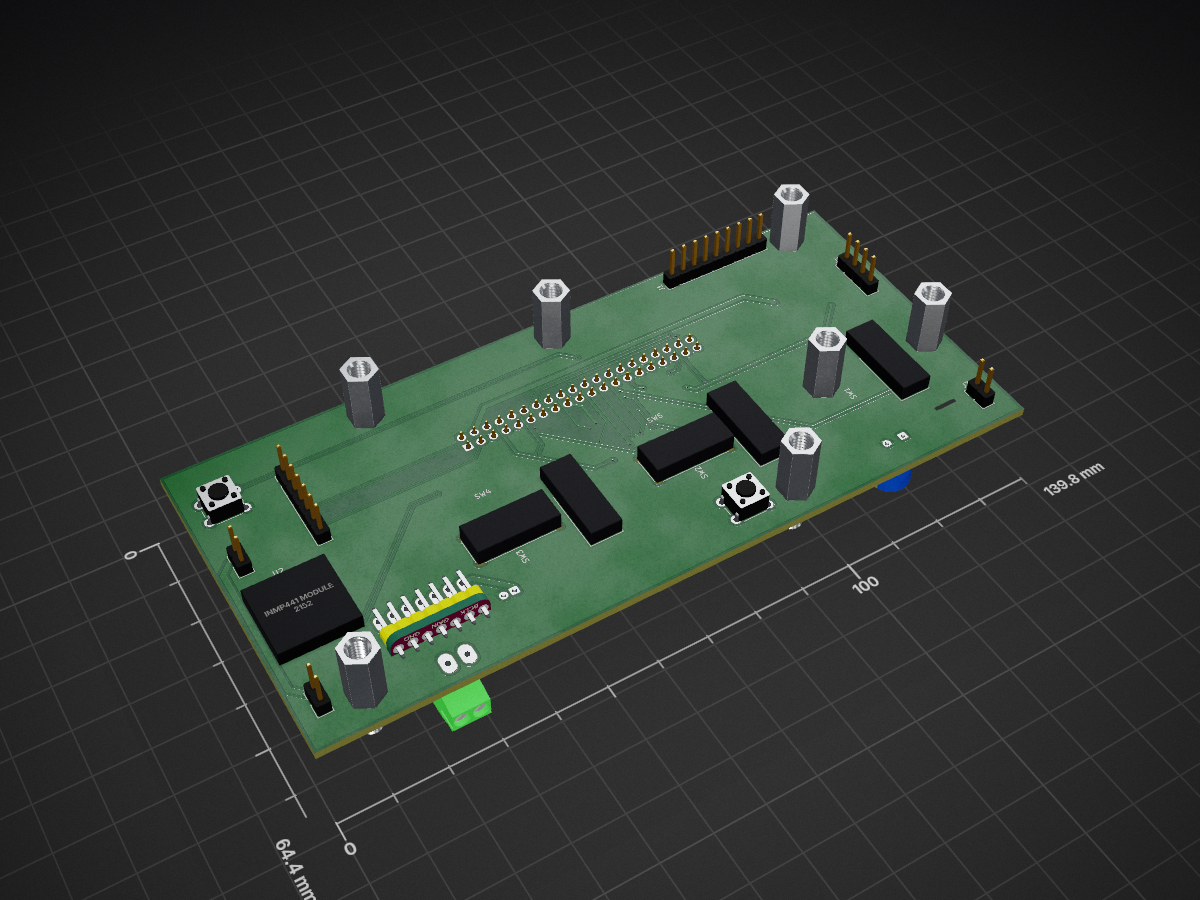
Raspberry Pi Powered Fisher Price Mix & Learn DJ Table
DJTable is an open-source printed circuit board by LifeOnAFarm, from the LifeOnAFarm/RaveRepeatDJTable repository on GitHub, published under the MIT licence. It is a 2-layer board of 139.8 × 64.4 mm with 33 parts on 53 nets, routed with 239 tracks and 26 vias.
Its parts include 7 switches, 6 connectors, 5 capacitors, 4 resistors and 3 ICs.
A Raspberry Pi rebuild of a Fisher-Price kids' DJ table toy: an eight-key musical play table running on a Raspberry Pi Zero 2 W, written in Python 3.11+.
Full run down of the hardware setup can be found here. The PCB files, parts list and wiring notes are in hardware/.
The table has three keyboard modes, chosen on its web page or by holding the mode button for 5 seconds.
Learning. The keys say their colour and shape in English (Level 1) or Irish (Level 2), or play notes (Level 3). The NumPad (the single button made to look like a number pad) plays a random song. Record asks for a message, records 3 seconds of your voice and plays it back as a pitched-up remix over a beat. There are four music themes, each with its own instruments, songs and beats: Teenage Disco, House, Punk and Baby Raver. A tap on the mode button changes theme.
Music Maker. Build a loop in three layers: melody (Level 1), drums (Level 2) and your own voice as an instrument (Level 3).
Bluetooth. Phone music plays through the table and the keys play along.
| Control | Learning | Music Maker | Bluetooth |
|---|---|---|---|
| Keys | Colour/shape words or notes | Notes, drums or your voice | Notes over the music |
| Level | 1 English, 2 Irish, 3 notes | 1 melody, 2 drums, 3 voice | 1 Punk, 2 Teenage Disco, 3 House sounds |
| Tone | Three sounds per theme | Three instruments, kits or voice characters | Three instruments |
| Volume | Low / medium / high | Low / medium / high | Low / medium / high |
| Record | Voice remix | Hold: record a layer after the count-in. Tap at Level 3: sample a sound to play on the keys | Off |
| NumPad | Random song, or stop | Tap: play/pause. Hold 2 s: clear this layer. Hold 5 s: clear all | Tap: play/pause. Hold: next track |
| Platter | Bends notes and song speed; spun on its own, plays a scratch | Bends notes and loop speed |
Spoken announcements say when the theme, mode or Level changes.
Turning it off: hold the mode button, then Record as well, and keep both held for 10 seconds. The table says it's shutting down and powers off safely. Wait for the Pi's light to stop flashing before you switch off the power.
In Bluetooth mode the table is visible as DJTable for two minutes. Pair with no PIN. If no phone connects in time, it goes back to Learning.
Open http://<your-table>:8080 from a phone or computer on the same network.
Every sound the table needs is in sounds/, except the random songs, which you upload
yourself. There are no commercial songs, licensed samples or personal recordings.
The Music Maker drum kits are built by the app itself when it starts.
Make the table your own with Replacing sounds.
djtable/        the app: audio engine, buttons, platter, web pages
deploy/         install scripts, services, sound overlay
tools/          song volume matcher
sounds/         all of the table's sounds
docs/           install and sound guides
hardware/       PCB Gerbers, schematic, KiCad project, parts list and 3D prints
config.example.json   the table's settings (copied to config.json on install)
On the Pi, config.json, assets/ (sounds) and data/ (songs, recordings, loops) are
created by the installer and are never part of the repository.
Unofficial hobby project. Not affiliated with, endorsed by or sponsored by Fisher-Price or Mattel. Fisher-Price is a trademark of its owner, used here only to describe the toy this project rebuilds.
MIT source; see LICENSE. Your own songs and sounds keep their own licences.
| Qty | Value | Footprint | References |
|---|---|---|---|
| 2 | 100nF | DJTable:C_1206_3216Metric_Pad1.33x1.80mm_HandSolder | C3, C4 |
| 2 | 33 ohm | DJTable:R_1206_3216Metric_Pad1.30x1.75mm_HandSolder | R6, R7 |
| 1 | 100nF / 16V | DJTable:C_1206_3216Metric_Pad1.33x1.80mm_HandSolder | C2 |
| 1 | 1k - DNP / optional | DJTable:R_1206_3216Metric_Pad1.30x1.75mm_HandSolder | R2 |
| 1 | 220uF / 10V | DJTable:CP_Radial_D8.0mm_P3.50mm | C1 |
| 1 | 330 ohm | DJTable:R_1206_3216Metric_Pad1.30x1.75mm_HandSolder | R1 |
| 1 | 47uF / 10V | DJTable:CP_Radial_D5.0mm_P2.00mm | C5 |
| 1 | 5V INPUT | DJTable:PinHeader_1x02_P2.54mm_Vertical | J3 |
| 1 | AS5600 MODULE | DJTable:PinHeader_1x07_P2.54mm_Vertical | J6 |
| 1 | AUX AUDIO POWER | DJTable:PinHeader_1x02_P2.54mm_Vertical | J4 |
| 1 | AUX LED POWER | DJTable:PinHeader_1x02_P2.54mm_Vertical | J5 |
| 1 | INMP441 MODULE | DJTable:INMP441_Round_Module_2x3_P2.54_Row7.62 | U2 |
| 1 | KEYBOARD 2.54mm | DJTable:PinHeader_1x09_P2.54mm_Vertical | J1 |
| 1 | MAX98357A MODULE | DJTable:MAX98357_Adafruit_Module | U3 |
| 1 | MODE / SHUTDOWN | DJTable:SW_PUSH_6mm | SW7 |
| 1 | PS-12F03-G4 HIGH / MEOW | DJTable:PS12F03_Momentary_3Pin_P3.2 | SW2 |
| 1 | PS-12F03-G4 PIANO | DJTable:PS12F03_Momentary_3Pin_P3.2 | SW1 |
| 1 | PS-12F03-G4 SYNTH | DJTable:PS12F03_Momentary_3Pin_P3.2 | SW3 |
| 1 | PTC 2A hold / >=6V | DJTable:Fuse_1812_4532Metric | F1 |
| 1 | RANDOM + LED | DJTable:PinHeader_1x04_P2.54mm_Vertical | J2 |
| 1 | RECORD | DJTable:SW_PUSH_6mm | SW6 |
| 1 | Raspberry Pi Zero 2 W | DJTable:Raspberry_Pi_Zero_Socketed_THT_FaceDown_MountingHoles | U1 |
| 1 | SS-23D03-G4 LEVEL | DJTable:SS23D03_G4_2P3T_P2_P4 | SW4 |
| 1 | SS-23D03-G4 VOLUME | DJTable:SS23D03_G4_2P3T_P2_P4 | SW5 |
The 26 most common of 33 parts.
hoglet67/RGBtoHDMI
Bare-metal Raspberry Pi project that provides pixel-perfect sampling of Retro Computer RGB/YUV video and conversion to HDMI

mntmn/amiga2000-gfxcard
MNT VA2000, an Open Source Amiga 2/3/4000 Graphics Card (Zorro II/III), written in Verilog

hackclub/OnBoard
💡 Join 1,000 teenagers and make your first PCB with a $100 grant!

Arrow-air/project-quiver
Project Quiver documentation, designs, and project artifacts.

ozel/DIY_particle_detector
A mobile low-cost spectrometer for measuring radioactivity and the energy of ionising radiation like alpha particles and electrons

BlueAndi/Pixelix
Full RGB LED matrix, based on an ESP32 and WS2812B LEDs or emulated LEDs on TFT.

jrsteensen/OpenHornet
OpenHornet 1:1 F/A-18C Simulator Repository

It measures 139.8 × 64.4 mm and has 2 copper layers, 1.6 mm thick.
33 parts. The full list of its parts is on this page, with links to each part's symbol and footprint where PCBKit's library has them.
From the LifeOnAFarm/RaveRepeatDJTable repository on GitHub, at the commit this page was made from: the board is hardware/kicad/DJTable.kicad_pcb and its schematic hardware/kicad/Audio_Sensor.kicad_sch. PCBKit opens the board in the browser, with nothing to install.
Its repository publishes it under the MIT licence: you may reuse it on that licence's terms (keep the author's notice, and for a copyleft licence share your changes alike).