2 layers47.6 × 27.3 mm

 Jagrit0711/zuuppad3
Zuup is a cicropad is a 9 key macropad built around the Arduino Pro Micro.
Keyboard is an open-source printed circuit board by Jagrit0711, from the Jagrit0711/zuuppad repository on GitHub. It is a 2-layer board of 70.9 × 81.9 mm with 27 parts on 23 nets, routed with 97 tracks and 4 vias.
Its parts include 10 switches, 9 diodes, 1 IC and 1 connector. It belongs with the keyboards and input boards and the RP2040 boards of this library.
Zuup is a cicropad is a 9 key macropad built around the Arduino Pro Micro.
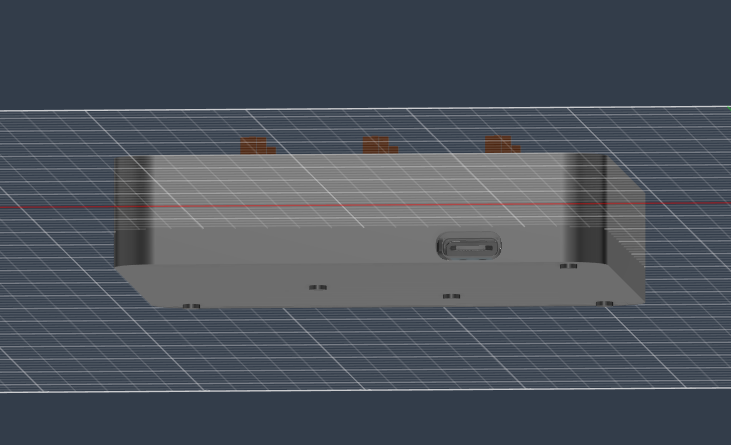
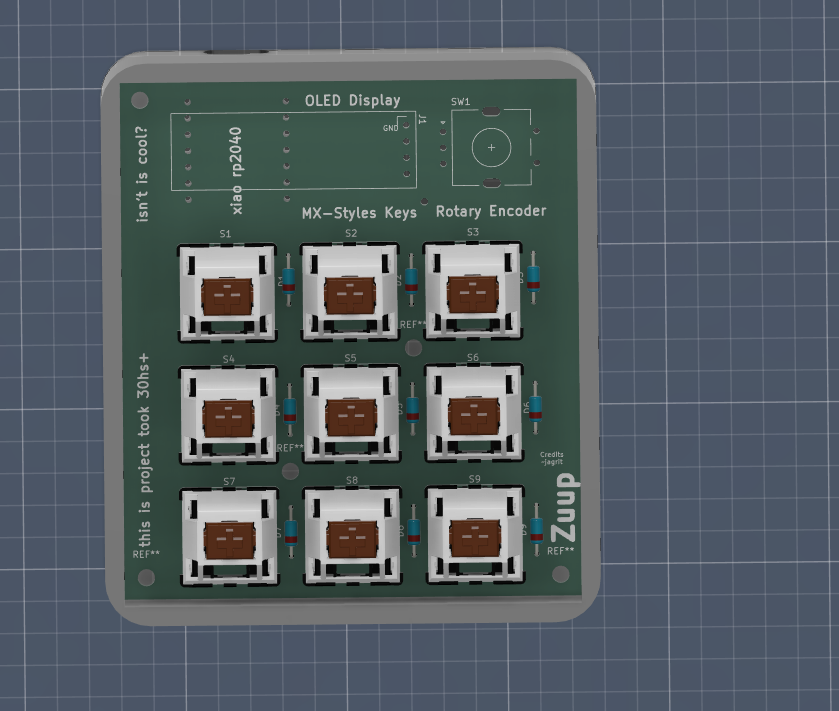
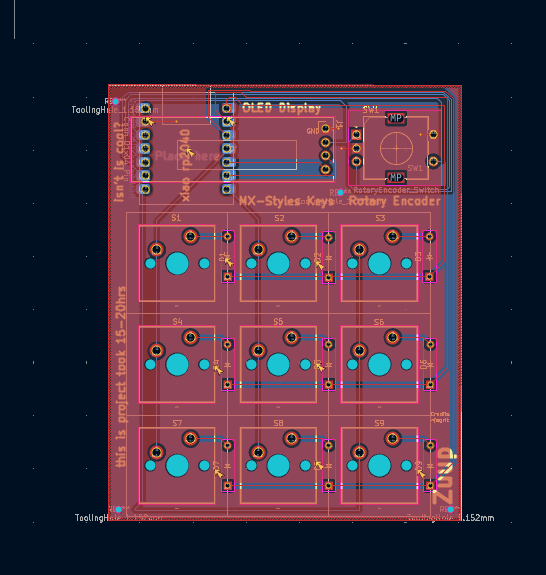
in my case the switches and controller are fully visible because it looks cool like tht lol
for usb c there with a pill shaped cutout. i didn't made top panel i have made the bezzle and i am going to manually cut and place a acrylic sheet so that internal components are always visible hence i didn't made a top panel and my pcb is elevated so it doesnt require a plate
i made it on KiCad 10. i used 9 MX_PCB_1.00u switch footprints in a clean 3x3 grid. Diodes are DO-35 1N4148, one per key i also aded random usless cool stuff on the pcb too
Uses circuitpython firmware.
9 keys act as fully remappable macros
i made a micropad yay!
| Qty | Value | Footprint | References |
|---|---|---|---|
| 9 | ~ | ScottoKeebs_Components:Diode_DO-35 | D1, D2, D3, D4, D5, D6, D7, D8, D9 |
| 9 | ~ | ScottoKeebs_MX:MX_PCB_1.00u | S1, S2, S3, S4, S5, S6, S7, S8, S9 |
| 1 | Conn_01x04_Pin | Display:ER_OLEDM0.91_1x-I2C | J1 |
| 1 | MCU_Seeed_XIAO_RP2040 | ScottoKeebs_MCU:Seeed_XIAO_RP2040 | U1 |
| 1 | RotaryEncoder_Switch | Rotary_Encoder:RotaryEncoder_Alps_EC11E-Switch_Vertical_H20mm | SW1 |
The 21 most common of 27 parts.

hackclub/OnBoard
💡 Join 1,000 teenagers and make your first PCB with a $100 grant!


CRImier/MyKiCad
My KiCad boards. Can't be bothered uploading individually anymore, so here you go.

pjgpetecodes/pico-streamdeck
This project is an OBS Controller using a Raspberry Pi Pico and CircuitPython.

freeDSP/freeDSP-aurora
freeDSP ADAU1452 with 8 analog input, 8 analog outputs, S/P-DIF I/O, ADAT I/O, USB Audio Class2, WiFi, Bluetooth

ugcs/ddc
Drone Show Software is software designed for drone shows, allowing flight path planning as well as control of dozens of drones simultaneously in a synchronized manner.
It measures 70.9 × 81.9 mm and has 2 copper layers, 1.6 mm thick.
27 parts. The full list of its parts is on this page, with links to each part's symbol and footprint where PCBKit's library has them.
From the Jagrit0711/zuuppad repository on GitHub, at the commit this page was made from: the board is pcb/keyboard.kicad_pcb and its schematic pcb/keyboard.kicad_sch. PCBKit opens the board in the browser, with nothing to install.
Its repository states no licence, so its author keeps all rights: ask Jagrit0711 before reusing the design.