2 layers50 × 23.2 mm
Analog
hoglet67/RGBtoHDMI
Bare-metal Raspberry Pi project that provides pixel-perfect sampling of Retro Computer RGB/YUV video and conversion to HDMI
32 parts1kGPL-3.0

 GadgetReboot/Button_Joystick_Breakout1
Thumb joystick and tactile buttons arranged in a D-pad for prototyping
Button Joystick Breakout is an open-source printed circuit board by GadgetReboot, from the GadgetReboot/Button_Joystick_Breakout repository on GitHub. It is a 2-layer board of 99.6 × 62 mm with 32 parts on 30 nets, routed with 258 tracks and 59 vias.
Its parts include 12 resistors, 12 switches, 6 connectors and 2 ICs. It belongs with the keyboards and input and interfaces and adapters boards of this library.
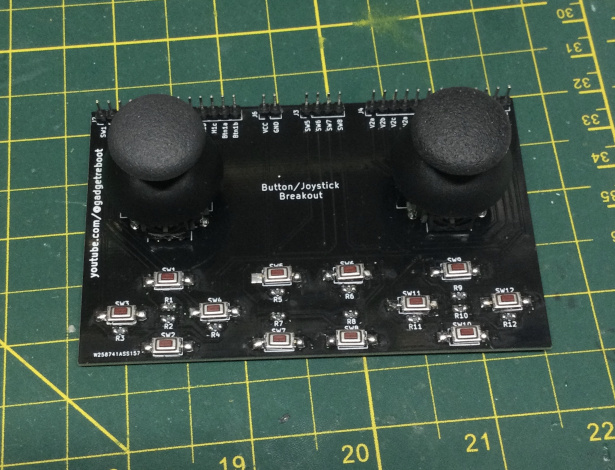
Thumb joystick and tactile buttons arranged in a D-pad for prototyping
| Qty | Value | Footprint | References |
|---|---|---|---|
| 12 | 100K | Resistor_SMD:R_0805_2012Metric_Pad1.20x1.40mm_HandSolder | R1, R2, R3, R4, R5, R6, R7, R8, R9, R10, R11, R12 |
| 12 | SW_Push | _Footprints:SW_SPST_60x35 | SW1, SW2, SW3, SW4, SW5, SW6, SW7, SW8, SW9, SW10, SW11, SW12 |
| 3 | Conn_01x04 | Connector_PinHeader_2.54mm:PinHeader_1x04_P2.54mm_Vertical | J2, J3, J5 |
| 2 | Analog Joystick | _Footprints:XDCR_COM-09032 | U1, U2 |
| 2 | Conn_01x08 | Connector_PinHeader_2.54mm:PinHeader_1x08_P2.54mm_Vertical | J1, J4 |
| 1 | Conn_01x02 | Connector_PinHeader_2.54mm:PinHeader_1x02_P2.54mm_Vertical | J6 |
hoglet67/RGBtoHDMI
Bare-metal Raspberry Pi project that provides pixel-perfect sampling of Retro Computer RGB/YUV video and conversion to HDMI

hackclub/OnBoard
💡 Join 1,000 teenagers and make your first PCB with a $100 grant!


octosavvi/ESPKey
Wiegand data logger, replay device and micro door-controller

zmaker/arduino_cookbook
gli sketch del nuovo progetto Arduino Cookbook e dei video di YouTube

murexrobotics/electrical
Highly integrated electronics design and printed circuit boards (PCBs) for the MATE ROV Competition. Attempt the impossible.

swharden/AVR-projects
A collection of standalone AVR projects written in C

hardenedlinux/cheap-pcb
Cheap PCB: Better understanding the current status of hardware supply chain
It measures 99.6 × 62 mm and has 2 copper layers, 1.6 mm thick.
32 parts. The full list of its parts is on this page, with links to each part's symbol and footprint where PCBKit's library has them.
From the GadgetReboot/Button_Joystick_Breakout repository on GitHub, at the commit this page was made from: the board is KiCad/Button_Joystick_Breakout.kicad_pcb and its schematic KiCad/Button_Joystick_Breakout.kicad_sch. PCBKit opens the board in the browser, with nothing to install.
Its repository states no licence, so its author keeps all rights: ask GadgetReboot before reusing the design.