2 layers152.4 × 56.4 mm
 GT-IEEE-Robotics/20183
2018 Southeastcon Code
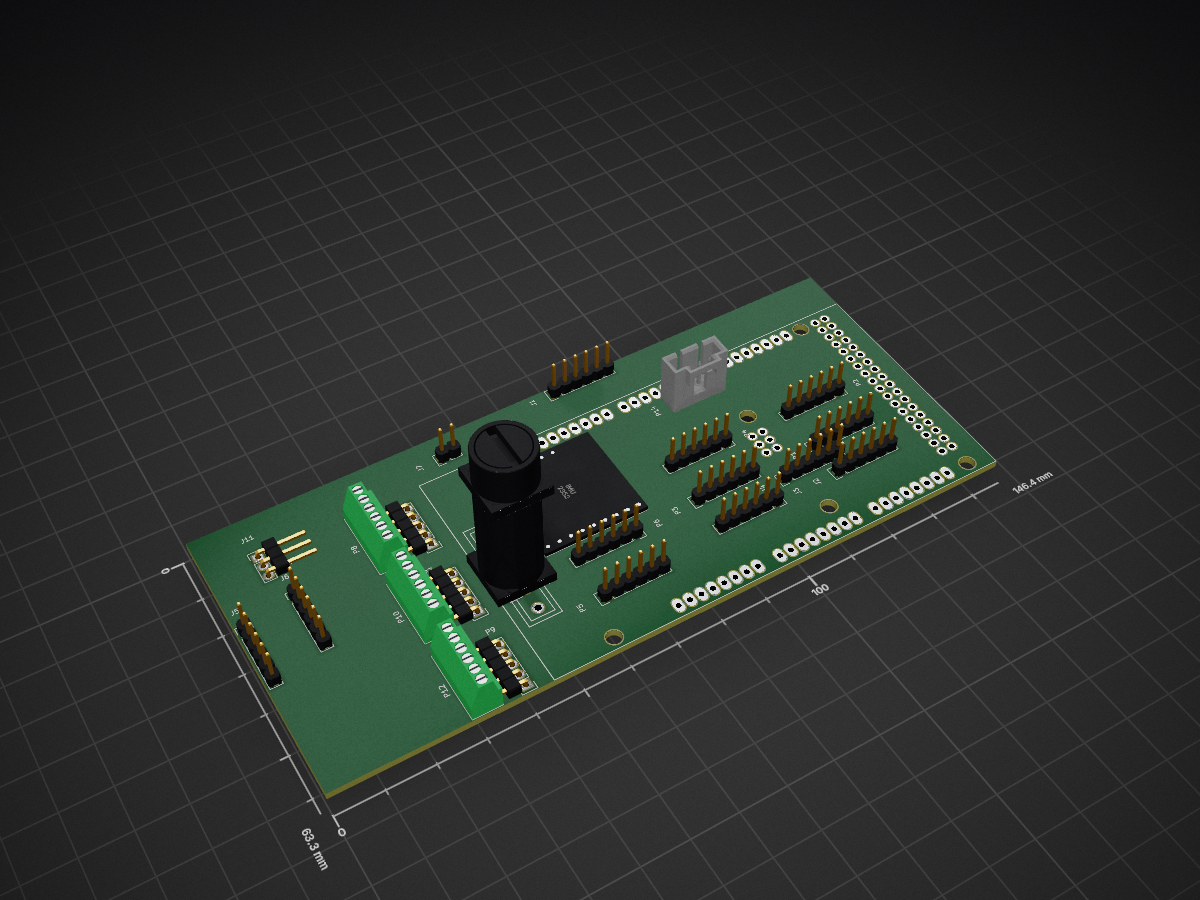
MotorCape is an open-source printed circuit board by GT-IEEE-Robotics, from the GT-IEEE-Robotics/2018 repository on GitHub. It is a 2-layer board with 25 parts on 59 nets.
Its parts include 22 connectors, 1 IC and 1 fuse.
Library of schematic components and footprints of common Arduino boards for KiCAD.
Currently included are:
Shield means the Arduino is designed to plug in from beneath your PCB; socket means it is designed to plug in from above.
To add this library to your KiCad Project, do the following steps:
All are welcome. Please file an "Issue" in the Bug Tracker.
This library is licensed under the GNU LGPL v2.1, which can be found in file LICENSE.txt.
| Qty | Value | Footprint | References |
|---|---|---|---|
| 1 | Arduino_Due_Shield-NEW | MotorCapeComponents:Arduino_Due_Shield | ARD1 |
| 1 | CONN_01X04 | Pin_Headers:Pin_Header_Straight_1x04 | P14 |
| 1 | Controller 1_1 | Pin_Headers:Pin_Header_Straight_1x05 | P7 |
| 1 | Controller 1_2 | Terminal_Blocks:TerminalBlock_Pheonix_MPT-2.54mm_6pol | P8 |
| 1 | Controller 2_1 | Pin_Headers:Pin_Header_Straight_1x05 | P9 |
| 1 | Controller 2_2 | Terminal_Blocks:TerminalBlock_Pheonix_MPT-2.54mm_6pol | P10 |
| 1 | Controller 3_1 | Pin_Headers:Pin_Header_Straight_1x05 | P11 |
| 1 | Controller 3_2 | Terminal_Blocks:TerminalBlock_Pheonix_MPT-2.54mm_6pol | P12 |
| 1 | Fuse | Fuse_Holders_and_Fuses:Fuseholder5x20_horiz_open_inline_Type-I | F1 |
| 1 | IMU | MotorCapeComponents:IMU | U1 |
| 1 | Shifter_Back_HI | Pin_Headers:Pin_Header_Straight_1x06 | P3 |
| 1 | Shifter_Back_LO | Pin_Headers:Pin_Header_Straight_1x06 | P4 |
| 1 | Shifter_Front_HI | Pin_Headers:Pin_Header_Straight_1x06 | P1 |
| 1 | Shifter_Front_LO | Pin_Headers:Pin_Header_Straight_1x06 | P2 |
| 1 | Shifter_Misc_HI | Pin_Headers:Pin_Header_Straight_1x06 | P5 |
| 1 | Shifter_Misc_LO | Pin_Headers:Pin_Header_Straight_1x06 | P6 |
| 1 | back_left motor | Pin_Headers:Pin_Header_Straight_1x06 | J3 |
| 1 | back_right motor | Pin_Headers:Pin_Header_Straight_1x06 | J1 |
| 1 | battery stuff | Pin_Headers:Pin_Header_Straight_1x02 | P13 |
| 1 | draw_bridge motor | Pin_Headers:Pin_Header_Straight_1x06 | J5 |
| 1 | flag_wheel motor | Pin_Headers:Pin_Header_Straight_1x06 | J6 |
| 1 | flag_wheel servo | Pin_Headers:Pin_Header_Straight_1x03 | J11 |
| 1 | front_left motor | Pin_Headers:Pin_Header_Straight_1x06 | J4 |
| 1 | front_right motor | Pin_Headers:Pin_Header_Straight_1x06 | J2 |
| 1 | i2c bus connector | Pin_Headers:Pin_Header_Straight_1x02 | J7 |

google/mozc-devices
Circuit diagrams and firmware source code for Gboard DIY keyboards

davidphilipbarr/Sweep
Sweep - a small promicro based keyboard inspired by the Ferris.


hackclub/OnBoard
💡 Join 1,000 teenagers and make your first PCB with a $100 grant!

xyphro/UsbGpib
Versatile, cheap and portable USB to GPIB converter (USBTMC class based)


jes/scamp-cpu
A homebrew 16-bit CPU with a homebrew Unix-like-ish operating system.

25 parts. The full list of its parts is on this page, with links to each part's symbol and footprint where PCBKit's library has them.
From the GT-IEEE-Robotics/2018 repository on GitHub, at the commit this page was made from: the board is Electrical/Motor Cape/MotorCape.kicad_pcb. PCBKit opens the board in the browser, with nothing to install.
Its repository states no licence, so its author keeps all rights: ask GT-IEEE-Robotics before reusing the design.
