2 layers39 × 32 mm
 CosmiQuantum/MEMS_docs2
Datasheets and READMEs for the MEMS system in LOUD
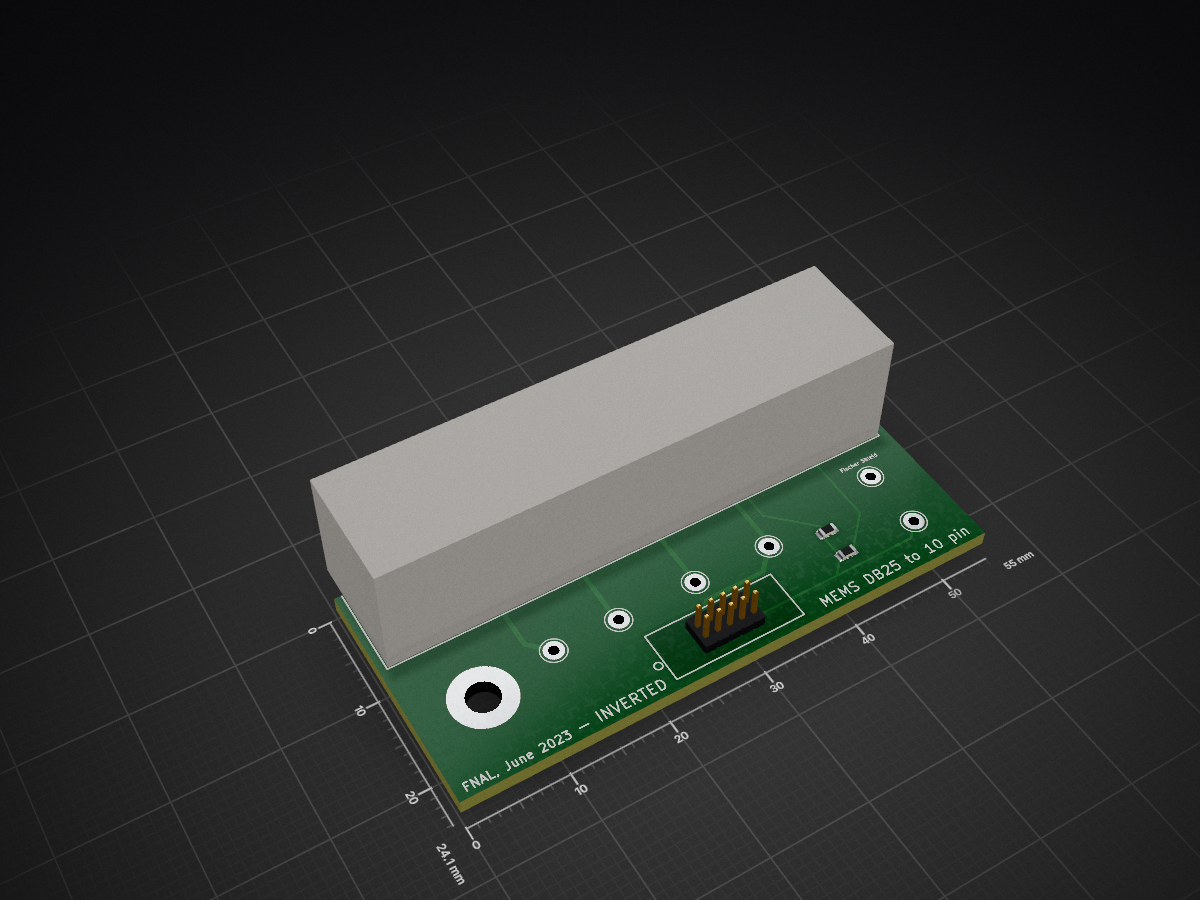
MEMS DB25-to-10pin is an open-source printed circuit board by CosmiQuantum, from the CosmiQuantum/MEMS_docs repository on GitHub. It is a 2-layer board of 55 × 24.1 mm with 15 parts on 11 nets, routed with 64 tracks and 0 vias.
Its parts include 8 connectors and 6 resistors.
Hello and welcome to MEMS in LOUD. This repository is intended to serve as a central (and sharable) location with instructions and datasheets for the MEMS system. Control code for the system is stored in the MEMS_Ctrl repo. It is kept separate so that users of the system do not need to download this entire handbook to run things.
This documentation is broken into four categories:
LOUD_Electrical contains information about the DC cable chain.LOUD_Optical contains information about the laser routing and control.LOUD_Hardware contains information about the design and assembly of the MEMS and qubit housingsMEMS_Mirrors contains mirror datasheets as well as instructions for running the MEMS Windows software (which serves as an alternative to the usb/serial control software linked above).The MEMS laser system can be used to sweep a laser beam across the surface of a given quantum device. In LOUD, the system is currently hooked up to a 6-qubit silicon transmon chip from Robert Mcdermott's group at the University of Wisconsin. A block diagram of the system is shown here:
Image credit: Kelly Stifter
MEMS google drive: https://drive.google.com/drive/folders/1IxKxNAd-OEq4rYUD9z-39MRGrSPkV5Ok?usp=drive_link
MEMS QSC confluence: https://confluence.qscience.org/display/1HTCSA/MEMS+System
Running slide decks:
Please reach out if you have questions or comments. Even if I'm not around, I'm more than happy to help clarify or troubleshoot. My contact info is listed here:
| Name | Phone? | |
|---|---|---|
| Hannah Magoon | hwmagoon@stanford.edu | 508-665-8282 |
I don't want to volunteer the contact info of others, but if you are reading this and have a baseline understanding of the system, please add your name to the table & edit this documentation as you see fit.
MEMS at FNAL photo album:
MEMS on the NEXUS confluence:
Running Slide Decks
| Qty | Value | Footprint | References |
|---|---|---|---|
| 6 | R | digikey_resistor_RMCF0603ZT0R00:digikey_resistor_RMCF0603ZT0R00 | R1, R2, R3, R4, R5, R6 |
| 1 | 3220-10-0100-00 | digikey_10pin_1175-1627-ND:digikey_10pin_1175-1627-ND | J6 |
| 1 | DB25_Female_MountingHoles | digikey_DSub_NOR1137-ND:digikey_DSub_NOR1137-ND | J1 |
| 1 | Fischer Shield | Connector_Pin:Pin_D1.0mm_L10.0mm | J8 |
| 1 | GND | Connector_Pin:Pin_D1.0mm_L10.0mm | J7 |
| 1 | MountingHole | MountingHole:MountingHole_3.2mm_M3_Pad | H1 |
| 1 | X+ | Connector_Pin:Pin_D1.0mm_L10.0mm | J2 |
| 1 | X- | Connector_Pin:Pin_D1.0mm_L10.0mm | J3 |
| 1 | Y+ | Connector_Pin:Pin_D1.0mm_L10.0mm | J5 |
| 1 | Y- | Connector_Pin:Pin_D1.0mm_L10.0mm | J4 |

google/mozc-devices
Circuit diagrams and firmware source code for Gboard DIY keyboards

hoglet67/RGBtoHDMI
Bare-metal Raspberry Pi project that provides pixel-perfect sampling of Retro Computer RGB/YUV video and conversion to HDMI

mntmn/amiga2000-gfxcard
MNT VA2000, an Open Source Amiga 2/3/4000 Graphics Card (Zorro II/III), written in Verilog

hackclub/OnBoard
💡 Join 1,000 teenagers and make your first PCB with a $100 grant!

kenp-io/not-for-airpods-repairs
The content of this repository is licensed under the WTFPL License. Please have a close look at the terms before using this material.

Luos-io/luos_engine
Open-source and real-time orchestrator for cyber-physical-systems, to easily design, test and deploy embedded applications and digital twins.

Chrismettal/EleLab_v2
Cheap DIY lab system for hobbyists and the tinkering folk

It measures 55 × 24.1 mm and has 2 copper layers, 1.6 mm thick.
15 parts. The full list of its parts is on this page, with links to each part's symbol and footprint where PCBKit's library has them.
From the CosmiQuantum/MEMS_docs repository on GitHub, at the commit this page was made from: the board is LOUD_electrical/MEMS KiCad/MEMS-DB25-to-10pin reversed polarity/MEMS-DB25-to-10pin.kicad_pcb. PCBKit opens the board in the browser, with nothing to install.
Its repository states no licence, so its author keeps all rights: ask CosmiQuantum before reusing the design.