2 layers
Encoder
byrantech/laptop
anyon_e, a highly integrated, high end, open source laptop. Attempt the impossible.
7 parts4.3kMIT

 CheimaAmmar/remotesign-lab
RemoteSignLab is an academic prototype for secure remote electronic signatures combining a hardware authentication terminal, a FastAPI backend, PKCS#11-based key protection, PAdES PDF signatures, RFC 3161 timestamps…
Remotesign lab is an open-source printed circuit board by CheimaAmmar, from the CheimaAmmar/remotesign-lab repository on GitHub. It is a 2-layer board of 58.5 × 63.5 mm with 7 parts on 17 nets, routed with 74 tracks and 0 vias.
Its parts include 3 capacitors, 2 ICs and 1 connector.
RemoteSignLab is an academic prototype for secure remote electronic signatures combining a hardware authentication terminal, a FastAPI backend, PKCS#11-based key protection, PAdES PDF signatures, RFC 3161 timestamps, and tamper-evident security auditing.
The system uses an ESP32-C3 terminal with RFID and fingerprint authentication to authorize signing requests, while the RSA signing key remains protected on the server side through SoftHSM2 and PKCS#11.
The project also includes a custom PCB designed with KiCad and manufactured locally using an Emblaser 2 laser-assisted resist process followed by chemical etching.
flowchart TD
    User[USER Web Interface] -->|HTTPS| API[FastAPI Backend]
    Admin[ADMIN Web Interface] -->|HTTPS| API

    Device[ESP32-C3 Terminal<br/>RFID + Fingerprint + OLED]
        -->|HTTPS + HMAC-SHA256| API

    API --> DB[(PostgreSQL)]
    API --> HSM[SoftHSM2 / PKCS#11]
    API --> TSA[RFC 3161 TSA]

    HSM --> PDF[PAdES Signed PDF]
    TSA --> PDF
    API --> PDF
The FastAPI backend coordinates authentication, authorization, user consent, document management, signature requests, signing and verification.
PostgreSQL stores application and workflow data, including users, devices, documents, authentication sessions, nonces, signature requests, signature metadata and security audit events.
The ESP32-C3 terminal performs the local authentication steps and authenticates sensitive requests to the backend using HMAC-SHA256.
The private RSA signing key is never stored on the ESP32-C3. It remains protected behind the PKCS#11 interface provided by SoftHSM2.
pyHanko generates and validates the PAdES signatures. For PAdES-B-T, an RFC 3161 TSA provides the signature timestamp.
No credential, device secret, HSM PIN or private key is stored in this README or intentionally committed to the repository.
RemoteSignLab includes a dedicated authentication terminal based on the DFRobot Beetle ESP32-C3.
| Component | Purpose |
|---|---|
| DFRobot Beetle ESP32-C3 | Main embedded controller |
| MFRC522 | RFID authentication |
| DY50 | Fingerprint authentication |
| SSD1306 0.96" OLED | Local status and workflow display |
| Custom PCB | Electrical integration of the terminal |
The terminal performs the local authentication operations required before the backend can authorize a remote electronic signature.
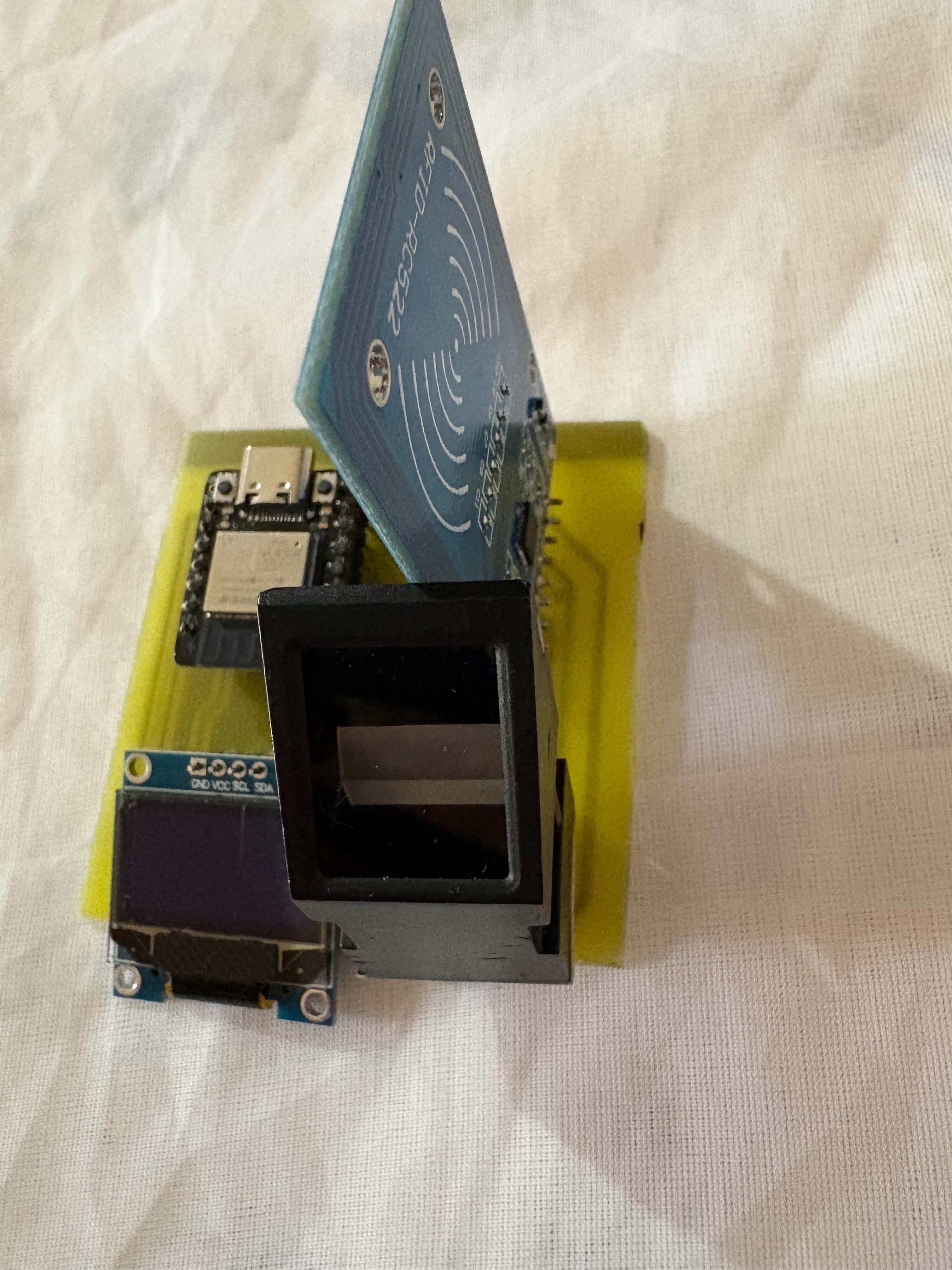
The prototype combines the ESP32-C3, RFID reader, fingerprint sensor and OLED display on a custom PCB.
The PCB was designed with KiCad.
Editable design files are available in:
The schematic integrates:
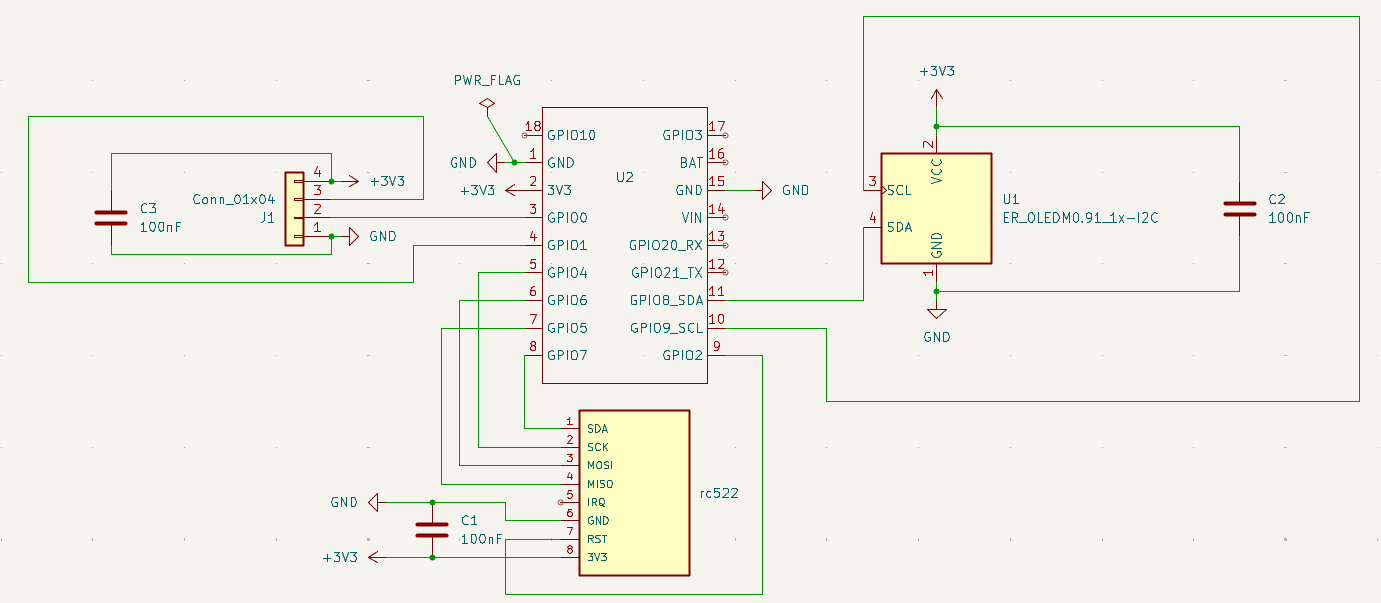
The complete exported schematic is also available as PDF:
The PCB routing was designed specifically for local prototype fabrication.
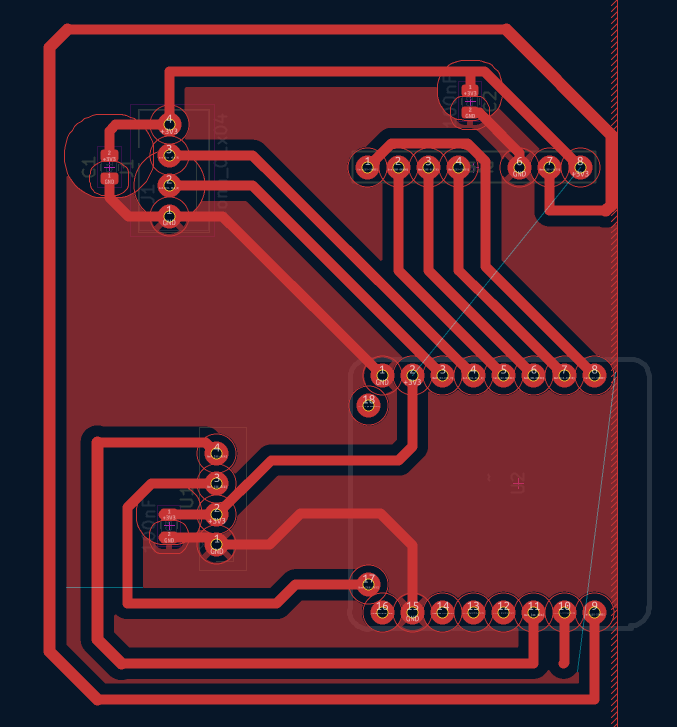
The editable KiCad PCB file is available here:
The PCB was fabricated locally rather than ordered from an industrial PCB manufacturer.
The manufacturing process combines:
The copper layout is inverted before laser engraving because the black coating acts as a temporary chemical-etching resist.
The Emblaser 2 removes the coating only from the areas where copper must later be removed by the etchant.
The fabrication pattern is available here:
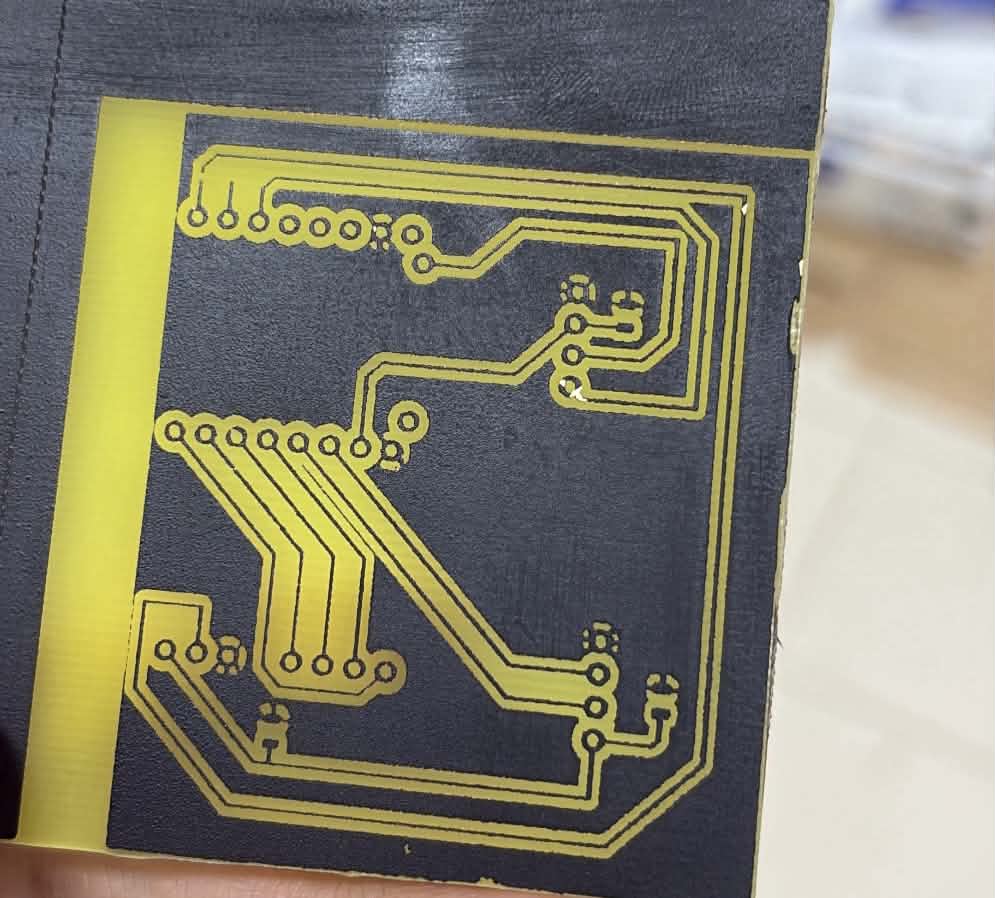
At this stage, the laser has selectively removed the black resist coating.
The exposed copper areas will be removed during chemical etching.
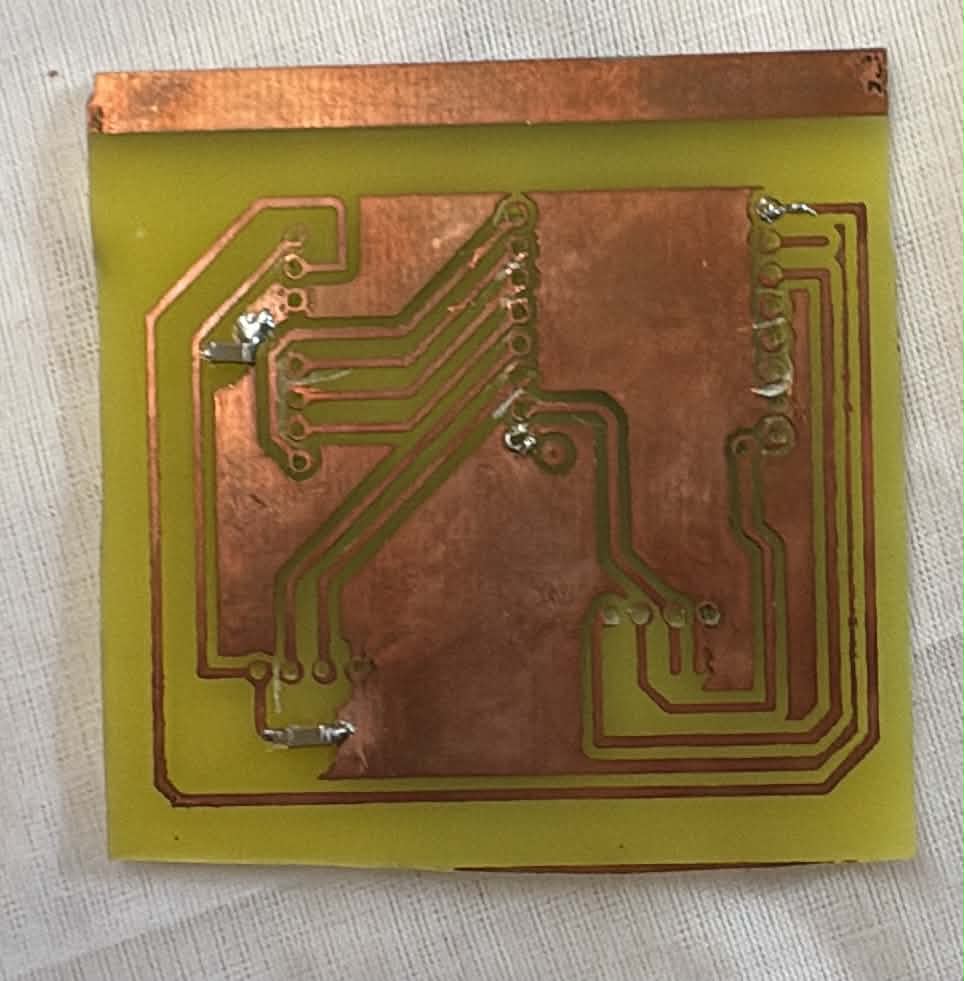
After chemical etching, the unwanted copper has been removed.
The remaining copper protected by the resist forms the conductive PCB tracks.
The board can then be cleaned, drilled, assembled and electrically tested.
hardware/
├── kicad/
│   ├── remotesign_lab.kicad_sch
│   └── remotesign_lab.kicad_pcb
│
└── fabrication/
    ├── schematic.pdf
    └── copper-layout-inverted.pdf
Hardware images are stored under:
docs/images/
├── prototype/
│   └── prototype-complete.jpg
│
└── pcb/
    ├── schematic.png
    ├── pcb-routing.png
    ├── pcb-after-laser.jpg
└── pcb-after-etching.jpg| Path | Purpose |
|---|---|
app/ | FastAPI backend, APIs, Web interfaces, security modules and services |
alembic/ | PostgreSQL database migrations |
firmware/remotesign_lab/ | ESP32-C3 firmware and safe configuration templates |
hardware/kicad/ | Editable KiCad schematic and PCB layout |
hardware/fabrication/ | PCB fabrication exports and laser patterns |
docs/images/ | Hardware prototype and PCB images |
docs/ | PAdES, TSA, certificate and audit documentation |
scripts/ | Development utilities, certificate tools and development TSA |
tests/ | Automated test suite |
softhsm/ | Safe SoftHSM configuration; runtime tokens are excluded |
Pinned Python dependencies are listed in:
python3 -m venv .venv
source .venv/bin/activate
pip install -r requirements.txtCreate a local configuration file:
cp .env.example .envReplace all placeholders in .env with appropriate local values.
The .env file must never be committed.
Apply the database migrations:
alembic upgrade headThe current audit-hardening migration is:
a84f2c1d9e70Start the FastAPI backend over HTTPS:
uvicorn app.main:app \
  --host 0.0.0.0 \
  --port 8443 \
  --ssl-keyfile certs/server.key \
  --ssl-certfile certs/server.crt
TLS private keys are local files and must remain outside version control.
For local PAdES-B-T development:
python -m scripts.dev_tsa_server \
  --config scripts/dev-tsa-openssl.cnf \
  --bind 127.0.0.1 \
  --port 8090
The development TSA and its certificates are intended only for testing and demonstration.
They are not a production PKI.
Firmware credentials and the local HTTPS trust anchor are intentionally excluded from Git.
Create them from the safe templates:
cp firmware/remotesign_lab/secrets.example.h \
   firmware/remotesign_lab/secrets.h

cp firmware/remotesign_lab/trust_anchor.example.h \
   firmware/remotesign_lab/trust_anchor.h
Local Wi-Fi credentials and the device authentication secret must only be stored in:
firmware/remotesign_lab/secrets.hThe local CA certificate used to validate the HTTPS server belongs in:
firmware/remotesign_lab/trust_anchor.hBoth files are excluded from version control.
TLS certificate validation remains enabled through:
secureClient.setCACert(SERVER_CA_CERT);The firmware must not use:
setInsecure();RemoteSignLab applies security controls at the device, communication, backend, signing and auditing layers.
Sensitive ESP32-C3 requests are protected using:
The hardware terminal combines:
Both checks are required before the remote signing workflow can proceed.
The private RSA signing key:
Communication between the ESP32-C3 and FastAPI backend uses HTTPS with server certificate validation.
No insecure TLS fallback is used.
Device requests include:
Used nonces are persisted to prevent replay across application restarts.
RemoteSignLab supports two PAdES profiles.
Provides the cryptographic PDF signature and signer certificate information.
Extends the signature with an RFC 3161 timestamp token.
Future visible PDF signatures include:
ELECTRONICALLY SIGNED
RemoteSignLab

Signer
Certificate
Profile
Date
Signature ID
Existing signed PDFs are never modified.
Security-sensitive operations are recorded in a structured audit trail.
The audit system includes:
New audit events contain:
previous_hash
event_hash
The hash chain provides evidence of database-event modification.
Audit writes are serialized through a PostgreSQL transaction-level advisory lock to prevent concurrent events from referencing the same previous hash.
Historical events created before hash chaining remain unsealed and are not artificially modified.
The integrity checker recalculates the chain in read-only mode.
The audit hash chain provides tamper evidence, not absolute immutability against an administrator with unrestricted database access.
The following data must never be committed:
.envDEVICE_SECRETsecrets.htrust_anchor.hOnly safe templates are included in the repository.
python -m compileall app scriptspytestCurrent validated baseline:
143 tests passingpip checkpip-audit -r requirements.txtbandit -r app scripts -x testsgit diff --checkCurrent validated baseline:
| Check | Result |
|---|---|
| Automated tests | 143 passed |
pip check | No broken requirements |
pip-audit | No known vulnerabilities |
| Bandit High | 0 |
| Bandit Medium | 0 |
| Bandit Low | 2 |
| Git whitespace check | Passed |
The two remaining Low-severity Bandit findings are associated with the local development TSA invoking OpenSSL through Python subprocess without shell execution.
The repository includes the following stable development tags:
pades-bt-stableaudit-hardening-stableRemoteSignLab demonstrates a complete academic remote-signature workflow covering:
RemoteSignLab is an academic and demonstration prototype.
Its development certificates, development TSA, SoftHSM2 configuration, locally manufactured PCB and trust model must not be considered equivalent to:
A production deployment would require additional controls such as secure hardware key storage, hardened provisioning, production PKI, device lifecycle management, operational monitoring, high-availability infrastructure and the appropriate regulatory and certification framework.
| Qty | Value | Footprint | References |
|---|---|---|---|
| 3 | 100nF | Capacitor_SMD:C_0805_2012Metric | C1, C2, C3 |
| 1 | Conn_01x04 | Connector:FanPinHeader_1x04_P2.54mm_Vertical | J1 |
| 1 | ER_OLEDM0.91_1x-I2C | Display:ER_OLEDM0.91_1x-I2C | U1 |
| 1 | ~ | stage_hsm_footprints:BEETLE_ESP32_C3_DFR0868 | U2 |
| 1 | ~ | RFID-RC522:RFID-RC522 | rc522 |
byrantech/laptop
anyon_e, a highly integrated, high end, open source laptop. Attempt the impossible.


AxxAxx/AxxSolder
STM32 Based soldering station for JBC cartridges, 9-24 VDC and USB-PD power


jamro/tiny-engineer
A small desktop robot that brings an AI coding assistant to life, physically acting out when it reads files, thinks, writes code, and finishes work.

hoglet67/RGBtoHDMI
Bare-metal Raspberry Pi project that provides pixel-perfect sampling of Retro Computer RGB/YUV video and conversion to HDMI

It measures 58.5 × 63.5 mm and has 2 copper layers, 1.6 mm thick.
7 parts. The full list of its parts is on this page, with links to each part's symbol and footprint where PCBKit's library has them.
From the CheimaAmmar/remotesign-lab repository on GitHub, at the commit this page was made from: the board is hardware/kicad/remotesign_lab.kicad_pcb and its schematic hardware/kicad/remotesign_lab.kicad_sch. PCBKit opens the board in the browser, with nothing to install.
Its repository states no licence, so its author keeps all rights: ask CheimaAmmar before reusing the design.