2 layers159.5 × 30 mm
Type f
google/mozc-devices
Circuit diagrams and firmware source code for Gboard DIY keyboards
25 parts3kApache-2.0

 BokkaaTokka/macropad
My own macropad for Fusion 360 and first hackclub project.
Electronics design is an open-source printed circuit board by BokkaaTokka, from the BokkaaTokka/macropad repository on GitHub. It is a 2-layer board of 70 × 96 mm with 25 parts on 23 nets, routed with 123 tracks and 0 vias.
Its parts include 10 switches, 9 diodes and 2 ICs. It belongs with the keyboards and input boards of this library.
This is my own macropad called CadPad.
CadPad is designed to provide shortcuts in CAD, but also works for other things by mapping it to anything you want. It is also my very first PCB design.
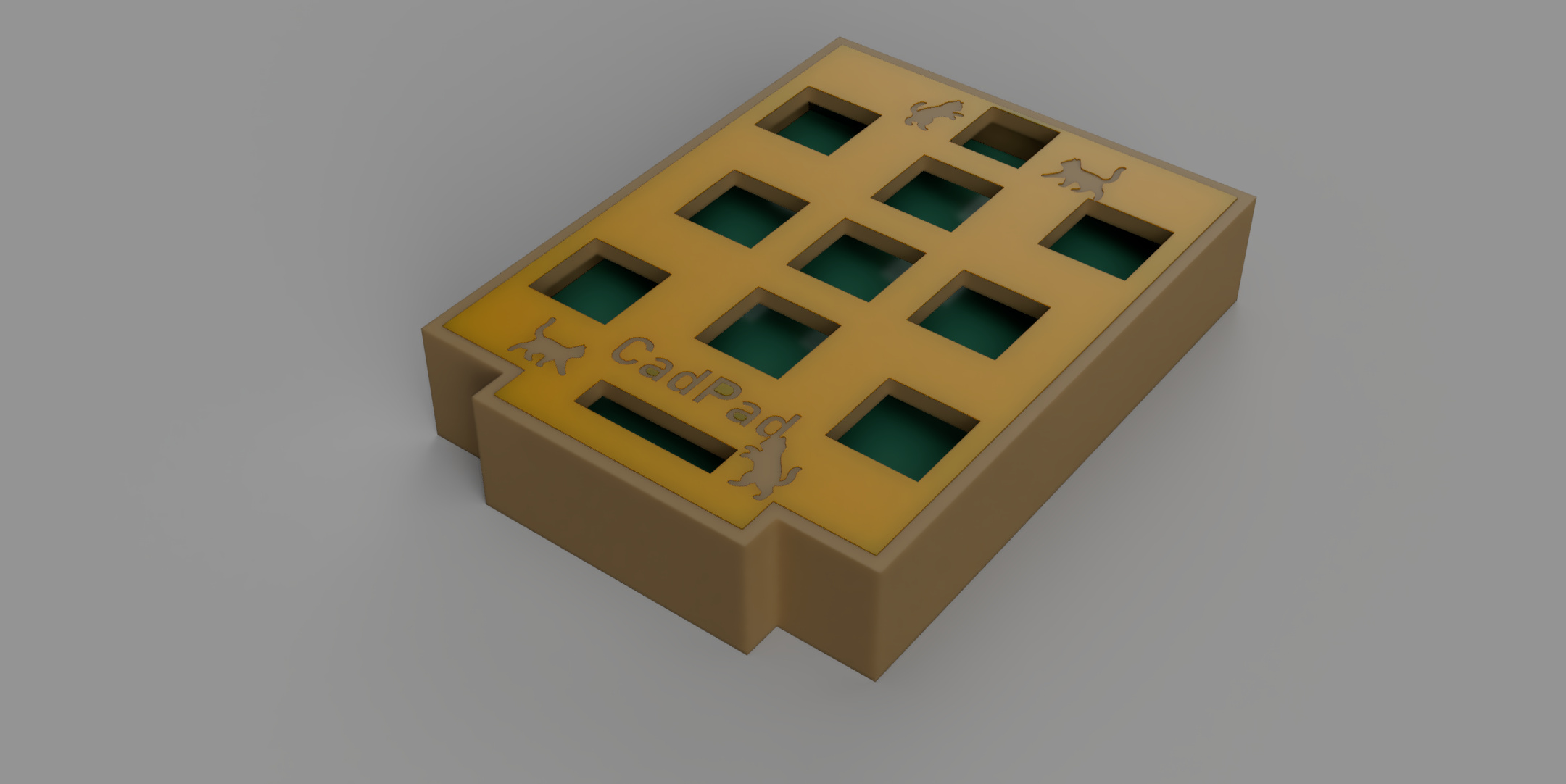
I had a really fun time making the PCB, it was my first time, but thanks to the good introduction an the intuitive software, it turned out pretty well.(I think, we'll see when I get the real ones.) I'm also completely new to QMK-firmware and compiling. I have done a lot of programming before, mainly with micropython/circuitpython/python, but this was something new. I can't tell how happy I was when the console filled up with [OK].
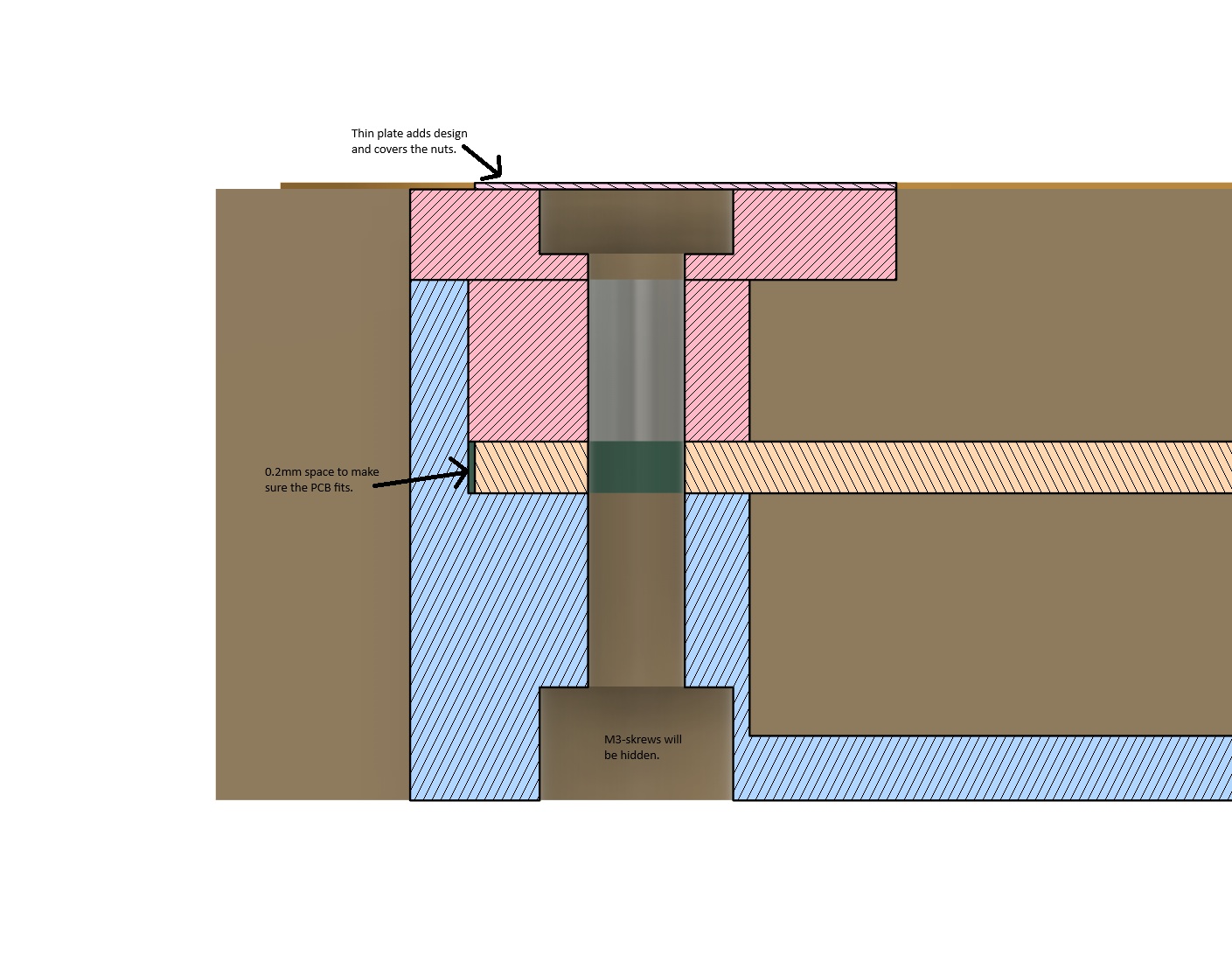 I wanted to try a kind of mounting that I have never used before. The nut and end of the screw will be covered by a thin plate that also adds some design to the project. This will require me to cut the screws in exact lenghths. The section analysis is slightly outdated, I have for example added some space between the top and base, the vertical ble/pink line.
| Unit | Amount |
|---|---|
| Cherry MX Switch | 9x |
| XIAO rp2040 | 1x |
| Blank DSA Keycap | 9x |
| M3x16 Bolt | 4x |
| M3 Nut | 4x |
| 1N4148 DO-35 Diodes | 9x |
| EC11 Rotary Encoder | 1x |
| 2.54mm straight pin header | 18x |
I'm done with designing PCB, case and firmware. The current version has two layers, for CAD and normal use, this will be modified later.
Below is a screenshot of the current PCB routing, I had tho change the placing of the diodes, as the may be in the way of the buttons.

I will definitly change the firmware a bit once I have tested the functionality, add an animation to the OLED and update the keymap. But it will get a lot easier once I have the physical product to test on.
| Qty | Value | Footprint | References |
|---|---|---|---|
| 9 | 1N4148 | Diode_THT:D_DO-35_SOD27_P7.62mm_Horizontal | D1, D2, D3, D4, D5, D6, D7, D8, D9 |
| 9 | SW_Push | footprints:SW_Cherry_MX_1.00u_PCB_centered | SW1, SW2, SW3, SW4, SW5, SW6, SW7, SW8, SW9 |
| 1 | ER_OLEDM0.91_1x-I2C | Connector_PinSocket_2.54mm:PinSocket_1x04_P2.54mm_Vertical | U2 |
| 1 | MOUDLE-SEEEDUINO-XIAO | footprints:XIAO-Generic-Hybrid-14P-2.54-21X17.8MM | U1 |
| 1 | RotaryEncoder_Switch | Rotary_Encoder:RotaryEncoder_Alps_EC11E-Switch_Vertical_H20mm | SW10 |
The 21 most common of 25 parts.
google/mozc-devices
Circuit diagrams and firmware source code for Gboard DIY keyboards

davidphilipbarr/Sweep
Sweep - a small promicro based keyboard inspired by the Ferris.


hackclub/OnBoard
💡 Join 1,000 teenagers and make your first PCB with a $100 grant!

xyphro/UsbGpib
Versatile, cheap and portable USB to GPIB converter (USBTMC class based)


jes/scamp-cpu
A homebrew 16-bit CPU with a homebrew Unix-like-ish operating system.

It measures 70 × 96 mm and has 2 copper layers, 1.6 mm thick.
25 parts. The full list of its parts is on this page, with links to each part's symbol and footprint where PCBKit's library has them.
From the BokkaaTokka/macropad repository on GitHub, at the commit this page was made from: the board is electronics design/electronics design.kicad_pcb and its schematic electronics design/electronics design.kicad_sch. PCBKit opens the board in the browser, with nothing to install.
Its repository states no licence, so its author keeps all rights: ask BokkaaTokka before reusing the design.