

2 layers70 × 65 mm

 AlexJMcIntyre/HexyHexyMic5
If you're here, there's a good chance you've picked up one of my HexyHexyMic Hexpansions. I hope I got the chance to say hello! If not, you can find me on Mastodon: @GlitchEngine@mastodon.social.
HexyMicSMD is an open-source printed circuit board by AlexJMcIntyre, from the AlexJMcIntyre/HexyHexyMic repository on GitHub. It is a 2-layer board of 33.7 × 36.6 mm with 11 parts on 14 nets, routed with 87 tracks and 11 vias.
It is built around the AT24C256N and SPH0645LM4H-B. Its parts include 3 resistors, 1 IC, 1 diode and 1 connector.
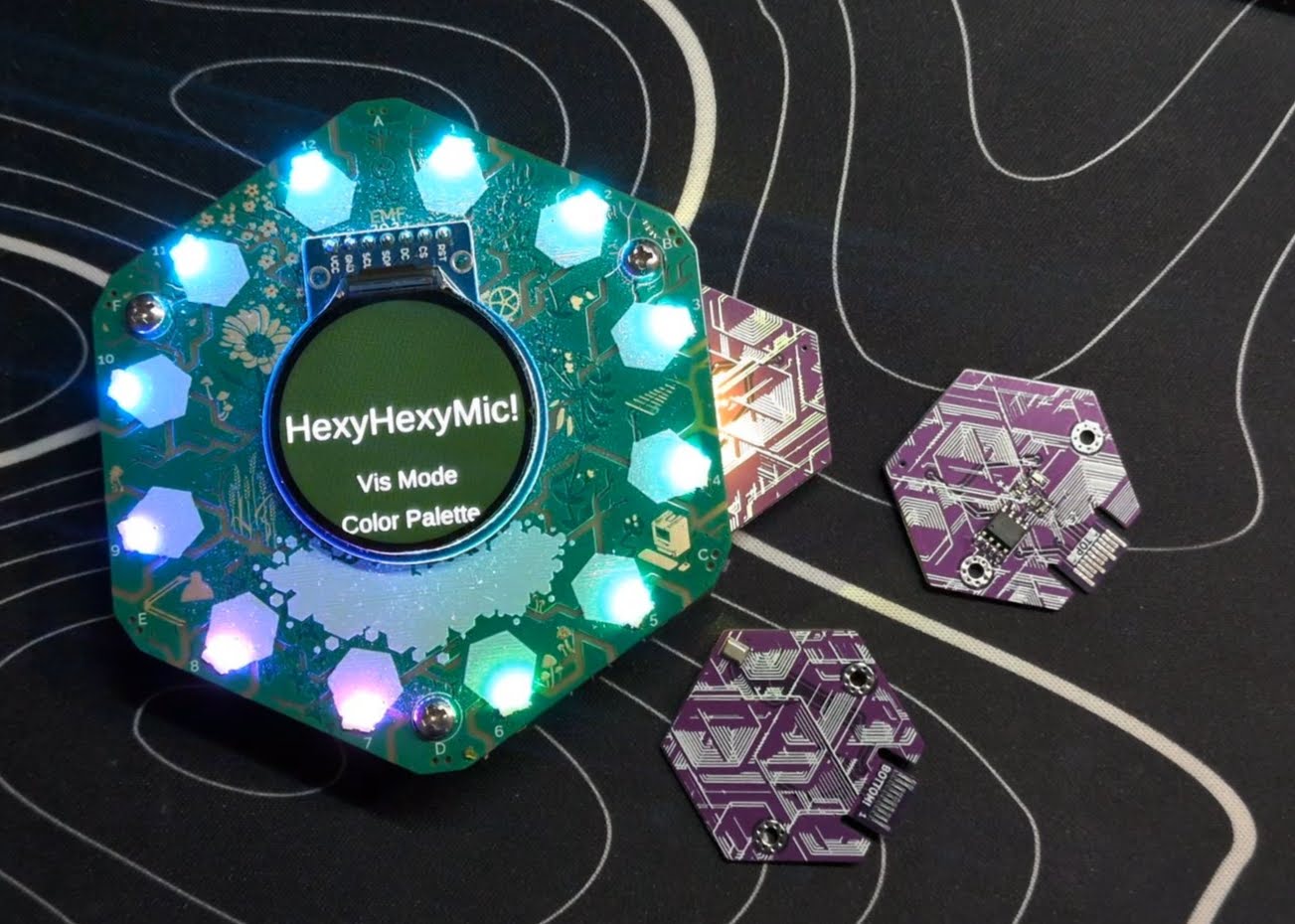
Because EMF needed more flashy lights!
If you're here, there's a good chance you've picked up one of my HexyHexyMic Hexpansions. I hope I got the chance to say hello! If not, you can find me on Mastodon: @GlitchEngine@mastodon.social.
HexyHexyMic adds a digital microphone to the Tildagon badge, along with a collection of audio-reactive visualisations for the badge LEDs.
This was my first attempt at building a Tildagon Hexpansion, and also my first serious dive into audio signal processing.
The entire application is written in MicroPython and is baked into the EEPROM on the Hexpansion.
Post EMF 2026 edit
I sold or traded most of my HexyHexyMics in the field, but I've got enough parts in stock to make a handful more. Check out my Ko-fi shop where I'm selling them at £6 each to cover parts and postage.
https://ko-fi.com/AlexJMcIntyre
The app lives on the Hexpansion itself, so there are no downloads or internet connection required.
Simply plug the Hexpansion into your badge and it should launch automatically. If the badge is powered on with the Hexpansion already connected, it should load immediately during startup. Post EMF 2026 Edit- Powering up the Spaceagon with a HexyMic plugged in absolutely doesn't work. Unplug your HexyMic before powering up, otherwise the LEDs with glitch.
To exit the app gracefully, press the F button (top left).
Removing the Hexpansion should also exit automatically. If your LEDs don't return afterwards, try toggling them back on from the badge menu or simply reboop the badge.
Uses the Root Mean Square of the incoming audio as a measure of volume.
The louder the sound, the more LEDs illuminate.
Counts how often the audio waveform crosses zero to estimate its average pitch.
It's a very lightweight algorithm that gives surprisingly fun results despite being only a rough approximation.
Performs a tiny Fast Fourier Transform to estimate the energy in twelve frequency bands.
This isn't intended to be an accurate spectrum analyser, but it's fast enough to run smoothly on the badge and gives a satisfying visual representation of the music.
Attempts to detect the beat of whatever it's listening to and synchronise a rotating comet of light with the rhythm.
It's definitely more artistic than scientific, but I think it looks rather nice.
When enabled, the app attempts to detect musical beats from the incoming audio. Whenever it thinks it has found one, the LEDs briefly desaturate to create a bright flash effect.
Beat detection is intentionally simple, so don't expect perfect DJ-grade synchronisation. It works best with music that has a clear, steady rhythm.
The visualisers automatically adapt to the ambient sound level.
This means they work just as well in a quiet workshop as they do in a noisy concert.
If you make an unusually loud noise (for example by tapping the microphone), the display may become less sensitive for a few seconds while it recalibrates itself.
Tested with Tildagon firmware 1.10.
The source is included in this repository, but unlike a normal Python application it isn't installed directly onto the badge.
The app is flashed onto the Hexpansion's EEPROM, allowing it to run automatically whenever the Hexpansion is plugged into a Tildagon.
To build or modify the app you'll currently need:
I've included the batch files I use to build and flash the EEPROM image as a starting point. They're fairly simple, but you'll need to adjust the paths for your own setup.
If you improve the code or add new visualisation modes, I'd love to hear about it!
Firmware and documentation are licensed under the MIT Licence. Hardware design files are licensed under CERN-OHL-P v2. Tildagon is a project by the EMF Camp team. This project is an independent community accessory and is not affiliated with or endorsed by EMF Camp.
| Qty | Value | Footprint | References |
|---|---|---|---|
| 2 | LOGO | LOGO | G***, G*** |
| 2 | MountingHole_Pad | MountingHole:MountingHole_2.2mm_M2_Pad_Via | H1, H2 |
| 2 | R4k7 | Resistor_SMD:R_0603_1608Metric | R2, R3 |
| 1 | AT24C256 | Package_SO:SOIC-8_3.9x4.9mm_P1.27mm | U1 |
| 1 | Hexpansion-Connector | tildagon:hexpansion-edge-connector | J1 |
| 1 | LED | LED_SMD:LED_0603_1608Metric | D1 |
| 1 | R470 | Resistor_SMD:R_0603_1608Metric | R1 |
| 1 | SPH0645LM4H | Sensor_Audio:Knowles_SPH0645LM4H-6_3.5x2.65mm | MK1 |


nicki419/Open-3-Step
(WIP) Open-Source Circuit and code for custom built 120/240V 3-step (or n-step) light bulb dimmer working by turning off/on the light switch quickly to switch between brightness levels.


Viva-la-Insomnia/OSHW-Smartwatch
Contribute by contacting us / sending in a pull request. Welcome additions: integration of https://github.com/NordicSemiconductor/ble-sdk-efm32/, USB code.
It measures 33.7 × 36.6 mm and has 2 copper layers, 1 mm thick.
11 parts, built around the AT24C256N and SPH0645LM4H-B. The full list of its parts is on this page, with links to each part's symbol and footprint where PCBKit's library has them.
From the AlexJMcIntyre/HexyHexyMic repository on GitHub, at the commit this page was made from: the board is hardware/HexyMicSMD.kicad_pcb and its schematic hardware/HexyMicSMD.kicad_sch. PCBKit opens the board in the browser, with nothing to install.
Its repository states no licence, so its author keeps all rights: ask AlexJMcIntyre before reusing the design.