

2 layers56 × 37 mm
Libb
3351666087/solar-vest
Self-powered solar-harvesting wearable ECG vest: PCBs, 3D-printed enclosures, vest patterns, simulation and an interactive 3D explorer
26 parts

Self-powered solar-harvesting wearable ECG vest: PCBs, 3D-printed enclosures, vest patterns, simulation and an interactive 3D explorer
Pmbh is an open-source printed circuit board by 3351666087, from the 3351666087/solar-vest repository on GitHub. It is a 2-layer board of 86 × 60 mm with 100 parts on 47 nets, routed with 789 tracks and 57 vias.
It is built around the INA226AIDGSR, CN3791 and ME6211C33M5G-N, with the AO3400A, AO3401A and BZT52C10 among its other parts. Its parts include 21 capacitors, 20 resistors, 8 ICs, 8 connectors and 6 diodes. It belongs with the power boards of this library.


A self-powered, solar-harvesting wearable for ECG research
一件为心电研究而做的太阳能自供电可穿戴背心




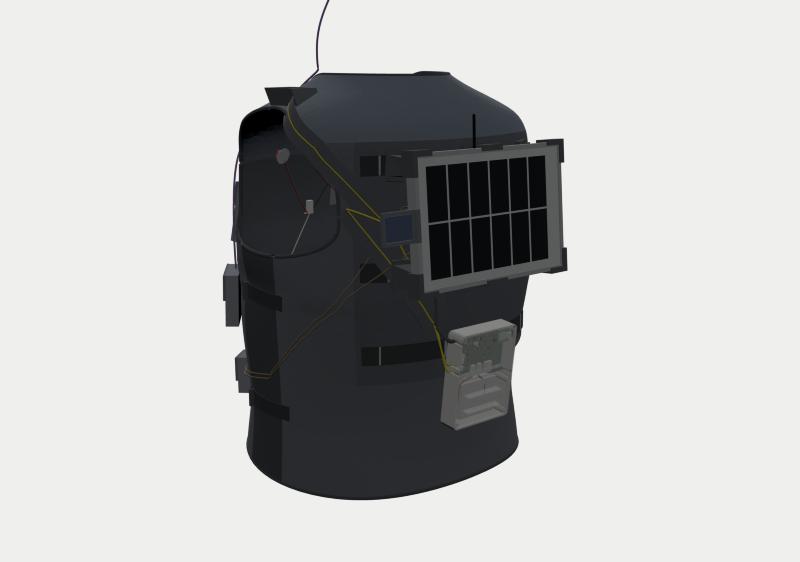
Solar Vest is a research platform that answers one question:
Can a body-worn 6 V / 6 W solar panel keep a Bluetooth ECG acquisition unit running, and does solar powering change the ECG signal compared with an identical battery-powered control recorded on the same subject at the same time?
A rigid 6 V / 6 W panel rides on the back of a vest. It charges a 1S Li-ion cell through PMB-H, an MPPT charger and power-monitor board of our own design. The battery feeds BITalino B (the device under test) through LIB, an ideal-diode hold-up board with supercapacitors. BITalino C records ECG from mirror-symmetric electrodes on its own battery as the control, and BITalino A (HeartBIT) adds ear-lobe PPG. Six INA226 monitors log every energy path, and a XIAO nRF52840 streams the telemetry over BLE to a gateway and on to a remote web console.
The energy budget (see docs/architecture-v3.md) says continuous acquisition is only fully self-powered on good days; on a typical day the panel extends runtime by about 76 %, and duty-cycled measurement reaches energy balance.
flowchart LR
    PV["6 V / 6 W solar panel"] --> PMB
    REF["REF1 / REF2 reference cells"] --> PMB

    subgraph PMB["PMB-H (back pod)"]
        direction TB
        CHG["CN3791 MPPT charger<br/>night back-feed cut-off"]
        INA["6 x INA226<br/>PV hi/lo, BAT, LOAD, REF1, REF2"]
        MCU["XIAO nRF52840 Sense<br/>firmware v2"]
        INA -- "I2C" --> MCU
    end

    CHG <--> BAT["1S Li-ion 2500 mAh"]
    PMB -- "VLOAD (LOAD_EN)" --> LIB["LIB (chest pod)<br/>LM66100 ideal diode<br/>+ 2 x 10 F supercaps"]
    LIB --> B["BITalino B<br/>Core BLE, ECG (DUT)"]
    C["BITalino C<br/>Board Kit BLE, ECG<br/>own battery (control)"]
    A["BITalino A<br/>HeartBIT, ear-lobe PPG"]

    MCU -- "BLE telemetry / commands" --> GW["Gateway<br/>Mac (bleak) | ESP32 (MicroPython) | browser relay"]
    GW -- "HTTPS /api/ingest" --> SRV["Console server<br/>console.example.org"]
    SRV --> UI["Web console"]
    B -. "BLE ECG" .-> PHONE["Phone / Mac recording"]
    C -. "BLE ECG" .-> PHONE
A -. "Classic BT PPG" .-> PHONE| Part | What it is | Where |
|---|---|---|
| PMB-H (back pod) | CN3791 MPPT charger (set point 5.93 V), night back-feed cut-off, 6 × INA226 (panel high / indoor range, battery, load, two reference cells), NTC, XIAO nRF52840 Sense logger | hardware/pcb/pmbh/ |
| LIB (chest pod) | Hold-up board: feeds BITalino Core B through an LM66100 ideal diode; 2 × 10 F supercaps take over if the supply drops | hardware/pcb/libb/ |
| Fabrication outputs | KiCad 10 projects (generated from SKiDL), schematics PDF, Gerbers, JLCPCB BOM + CPL (*_v3.xlsx are the ordered files), 3D models, final placement images, rotation audit | hardware/pcb/ |
| Enclosures | 18 printable parts (STEP / STL / 3MF): back pod, chest pod, C case, ear clip, six panel shoes (18–52 mm air gap), REF holders, bench stand, webbing hook | hardware/enclosures/ (read README_print-list.txt) |
| Vest patterns | Shell, lining and accessory patterns: DXF, 1:1 plotter PDF, A4 tiles, body-fitted placement data | hardware/vest/ |
| Wiring | 20-wire harness specified pin-to-pin with routed lengths: table (md / csv), system diagram (svg), interactive guide | hardware/wiring/ |
| BITalino A / B / C | A: HeartBIT (Core BT) + ear-lobe PPG · B: Core BLE, solar-powered DUT · C: Board Kit BLE on its own battery (control) | docs/bom-and-system-overview.md |
| Component | What it is | Where |
|---|---|---|
| Firmware | Arduino sketch for the XIAO nRF52840: INA226 sampling, MPPT / charge / load control, safety lockouts, BLE GATT telemetry and commands, settings persisted in flash | firmware/solarvest_pmb/ |
| Bring-up sketch | Serial-console bench test for PMB-H (toggle every control pin, read every INA226) | firmware/pmbh_bringup/, tools/serial_bridge.py |
| Console server | Python 3.12, standard library only; SQLite storage, session login, device-token ingest, command queue; single-file HTML console with Web Bluetooth relay | software/server/ |
| Mac gateway | Python + bleak; BLE central → HTTPS, offline buffer, runs unattended under caffeinate | software/gateway-mac/ |
| ESP32 gateway | MicroPython 1.28 port of the same gateway (uses aioble) | software/gateway-esp32/ |
| Protocol | Interface spec (GATT layout, HTTP API, console UI) and shared decode test vectors | software/SPEC.md, software/protocol/vectors.json |
| CAD / EDA generators | build123d enclosures, SKiDL / pcbnew board scripts, JLCPCB rotation check, vest patterns, harness, fit checks, ngspice testbenches | tools/cad/ |
.
├── docs/          Architecture v3 (+ v1/v2 history), v3.1 change list, build & assembly guide,
│                  BOM cross-reference, retrospective, tailoring survey, renders
├── hardware/      PCB projects and fab files, printable enclosures, vest patterns, wiring
├── firmware/      XIAO nRF52840 firmware, bench bring-up sketch, packing check
├── software/      Console server, Mac and ESP32 gateways, protocol spec and test vectors
├── simulation/    ngspice report and figures (MPPT stability, night back-feed, hold-up)
├── explorer/      Interactive 3D explorer (open index.html, works offline)
├── viewer/        Earlier glTF viewer of the full assembly (incl. a body-fitted variant)
├── modeling/      Component models: BITalino Core, panel, supercap, HeartBIT kit, viewer
├── body/          Body reconstruction used to fit the vest (owner's data, published with consent)
├── research/      Toolchain survey and the parametric samples that validated it
├── tools/         CAD/EDA/simulation generators, explorer source, serial bridge
├── pdf/           Pipeline that typesets the architecture documents to PDF (fonts not included)
└── THIRD_PARTY_NOTICES.md
Start with docs/build-and-assembly-guide.md.
Open explorer/index.html in Chrome, Edge or Safari (works offline). Press P for the guided tour, X for X-ray and E to explode. The wiring guide is hardware/wiring/wiring-guide.html.
Core Seeeduino:nrf52 1.1.13 (Adafruit Bluefruit based). No external libraries are needed.
arduino-cli config add board_manager.additional_urls \
  https://files.seeedstudio.com/arduino/package_seeeduino_boards_index.json
arduino-cli core update-index
arduino-cli core install Seeeduino:nrf52@1.1.13

FQBN=Seeeduino:nrf52:xiaonRF52840Sense
arduino-cli compile --fqbn $FQBN firmware/solarvest_pmb
arduino-cli upload  --fqbn $FQBN -p /dev/cu.usbmodem101 firmware/solarvest_pmb

python3 firmware/pack_check.py          # firmware packing vs protocol vectors
For a first power-up use firmware/pmbh_bringup instead (serial 115200; h prints help).
cd software/server
python3 test_server.py                  # end-to-end HTTP tests (stdlib unittest)
node test_decoder.mjs                   # console JS decoder vs vectors.json
python3 ../gateway-esp32/test_host.py   # ESP32 gateway logic on CPython

SV_CONSOLE_PASSWORD=change-me SV_DEVICE_TOKEN=dev-token SV_SESSION_SECRET=$(openssl rand -hex 32) \
SV_DB=./solarvest.db SV_COOKIE_SECURE=0 PORT=8790 python3 server.py
# then open http://localhost:8790software/deploy.sh copies the server to a Docker host that already runs a Caddy edge container, builds the image and adds a site block. Everything is set through environment variables; the values below are placeholders.
# ~/.config/solarvest/server.env holds SV_CONSOLE_PASSWORD, SV_DEVICE_TOKEN, SV_SESSION_SECRET
SV_SSH_HOST=your-server SV_DOMAIN=console.example.org \
SV_DOCKER_NETWORK=web SV_EDGE_CONTAINER=caddy ./software/deploy.shMac (unattended, sleep prevented):
mkdir -p ~/.config/solarvest
printf 'SV_URL=https://console.example.org\nSV_DEVICE_TOKEN=...\n' > ~/.config/solarvest/gateway.env
./software/gateway-mac/run.sh            # creates .venv, installs bleak, runs gateway.py
python3 software/gateway-mac/gateway.py --selftest   # decoder check, exit 0/1
python3 software/gateway-mac/gateway.py --dry-run    # replay vectors without Bluetooth
Browser relay: log in to the console in Chrome / Edge on Android or a Mac and use the panel Use this device as the gateway (Web Bluetooth; the screen must stay on; not available in Safari / iOS).
ESP32: software/gateway-esp32/push.sh [port] uploads aioble, main.py and a config.json built from ~/.config/solarvest/gateway.env and ~/.config/solarvest/wifi.json.
Everything is generated by code; there is no GUI CAD.
| What | How |
|---|---|
| Explorer | cd tools/cad/SolarVest_Explorer_src && npm install && npm run build (three 0.160, three-mesh-bvh 0.8, esbuild) |
| Enclosures | Python 3.12 + build123d trimesh manifold3d scipy shapely: tools/cad/enclosures.py (the panel shoes also need the body model, which is not included) |
| Fit check | python tools/cad/check_fit.py <parts dir> <data dir>: interference and free travel of every board and battery |
| PCBs | KiCad 10 + SKiDL: tools/cad/pmbh.py, libb.py, then place_*.py, fab.py (Gerbers, BOM, CPL), jlc_rotcheck.py (pad-matched placement rotations) |
| Simulation | ngspice through KiCad's bundled libngspice: tools/cad/simulation/ |
Some scripts expect tool locations from the original workstation (KiCad app path, scratch directories); adapt them as needed.
Bench bring-up done (2026-10-28):
Next:
[!WARNING] BITalino is a research device, not a medical device.
Details: docs/bom-and-system-overview.md.
modeling/.aioble (MIT, © 2021 Jim Mussared), vendored in software/gateway-esp32/lib/aioble/.Personal identifiers (names, institution, e-mail addresses, local paths, third-party contacts) have been removed; the supervisor is referred to by role only. The body data in body/ and viewer/*_PRIVATE*.glb belongs to the project owner and is published with their consent.
No license has been chosen yet, so all rights are reserved by the author. Third-party parts keep their own licenses (see the notices).
Solar Vest 是一个研究平台,要回答的问题只有一个:
一块穿在身上的 6 V / 6 W 太阳能板,能不能让蓝牙心电采集单元持续工作?和同一个人、同一时间、用电池供电的同款对照组相比,太阳能供电会不会影响心电信号?
背心后背装一块 6 V / 6 W 硬质太阳能板,经自研的 MPPT 充电与功率监测板 PMB-H 给单节锂电充电。电池通过 LIB(理想二极管 + 超级电容的掉电保持板)给 BITalino B(被测设备)供电;BITalino C 用自己的电池、在镜像对称的电极位置同步采集心电作为对照;BITalino A(HeartBIT)另外采集耳垂 PPG。6 路 INA226 记录每一条能量路径,XIAO nRF52840 把遥测数据经 BLE 发给网关,再上传到远程网页控制台。
按能量预算(见 docs/architecture-v3.md):连续采集只有在好天气下才能完全自供电;典型日子里太阳能能把续航延长约 76%,改为间歇测量则可以做到能量收支平衡。
flowchart LR
    PV["6 V / 6 W 太阳能板"] --> PMB
    REF["REF1 / REF2 参考电池片"] --> PMB

    subgraph PMB["PMB-H(背部仓)"]
        direction TB
        CHG["CN3791 MPPT 充电<br/>夜间防倒灌"]
        INA["6 × INA226<br/>PV 高/低量程、BAT、LOAD、REF1、REF2"]
        MCU["XIAO nRF52840 Sense<br/>固件 v2"]
        INA -- "I2C" --> MCU
    end

    CHG <--> BAT["单节锂电 2500 mAh"]
    PMB -- "VLOAD(LOAD_EN)" --> LIB["LIB(胸前仓)<br/>LM66100 理想二极管<br/>+ 2 × 10 F 超级电容"]
    LIB --> B["BITalino B<br/>Core BLE,心电(被测)"]
    C["BITalino C<br/>Board Kit BLE,心电<br/>自带电池(对照)"]
    A["BITalino A<br/>HeartBIT,耳垂 PPG"]

    MCU -- "BLE 遥测 / 指令" --> GW["网关<br/>Mac(bleak)| ESP32(MicroPython)| 浏览器中继"]
    GW -- "HTTPS /api/ingest" --> SRV["控制台服务器<br/>console.example.org"]
    SRV --> UI["网页控制台"]
    B -. "BLE 心电" .-> PHONE["手机 / Mac 记录"]
    C -. "BLE 心电" .-> PHONE
A -. "经典蓝牙 PPG" .-> PHONE| 部分 | 说明 | 位置 |
|---|---|---|
| PMB-H(背部仓) | CN3791 MPPT 充电(设定点 5.93 V)、夜间防倒灌、6 × INA226(太阳能板高量程/室内量程、电池、负载、两块参考电池片)、NTC、XIAO nRF52840 Sense 记录仪 | hardware/pcb/pmbh/ |
| LIB(胸前仓) | 掉电保持板:经 LM66100 理想二极管给 BITalino Core B 供电,供电跌落时由 2 × 10 F 超级电容接管 | hardware/pcb/libb/ |
| 生产文件 | KiCad 10 工程(由 SKiDL 生成)、原理图 PDF、Gerber、嘉立创 BOM + 坐标文件(*_v3.xlsx 为实际下单版本)、3D 模型、最终贴片图、旋转角核对 | hardware/pcb/ |
| 外壳 | 18 个打印件(STEP / STL / 3MF):背部仓、胸前仓、C 外壳、耳夹、6 个太阳能板支脚(留 18–52 mm 空气层)、参考电池片支架、桌面支架、织带挂钩 | hardware/enclosures/(先看 README_print-list.txt) |
| 背心版型 | 面料、里料、配件版型:DXF、1:1 绘图仪 PDF、A4 拼贴、贴合身体的布局数据 | hardware/vest/ |
| 接线 | 20 根线的线束,逐针定义并给出走线长度:接线表(md / csv)、系统接线图(svg)、交互式指南 | hardware/wiring/ |
| BITalino A / B / C | A:HeartBIT(Core BT)+ 耳垂 PPG · B:Core BLE,太阳能供电的被测设备 · C:Board Kit BLE,自带电池(对照) | docs/bom-and-system-overview.md |
| 组件 | 说明 | 位置 |
|---|---|---|
| 固件 | XIAO nRF52840 的 Arduino 程序:INA226 采样、MPPT / 充电 / 负载控制、安全锁定、BLE GATT 遥测与指令、设置存入 flash | firmware/solarvest_pmb/ |
| 点亮测试程序 | PMB-H 桌面测试,走串口:逐个切换控制引脚、读取每颗 INA226 | firmware/pmbh_bringup/、tools/serial_bridge.py |
| 控制台服务器 | Python 3.12,只用标准库;SQLite 存储、登录会话、设备令牌上传、指令队列;单文件 HTML 控制台,自带 Web Bluetooth 中继 | software/server/ |
| Mac 网关 | Python + bleak;BLE 主机 → HTTPS,离线缓存,用 caffeinate 防休眠、无人值守运行 | software/gateway-mac/ |
| ESP32 网关 | 同一网关的 MicroPython 1.28 移植版(基于 aioble) | software/gateway-esp32/ |
| 协议 | 接口规范(GATT 布局、HTTP API、控制台界面)和共用的解码测试向量 | software/SPEC.md、software/protocol/vectors.json |
| CAD / EDA 生成脚本 | build123d 外壳、SKiDL / pcbnew 电路板脚本、嘉立创旋转角核对、背心版型、线束、装配干涉检查、ngspice 仿真 | tools/cad/ |
.
├── docs/          架构文档 v3(及 v1/v2 历史版本)、v3.1 变更清单、制造与装配指南、
│                  物料对照、项目回顾、裁缝调研、效果图
├── hardware/      PCB 工程与生产文件、可打印外壳、背心版型、接线
├── firmware/      XIAO nRF52840 固件、桌面点亮程序、打包校验
├── software/      控制台服务器、Mac 与 ESP32 网关、协议规范与测试向量
├── simulation/    ngspice 仿真报告与图(MPPT 稳定性、夜间倒灌、掉电保持)
├── explorer/      交互式 3D 浏览器(打开 index.html,可离线使用)
├── viewer/        早期的整机 glTF 查看器(含贴合人体的版本)
├── modeling/      元件建模:BITalino Core、太阳能板、超级电容、HeartBIT 套件、查看器
├── body/          用于背心贴合的人体还原(项目负责人本人数据,经本人同意公开)
├── research/      工具链调研及验证用的参数化样例
├── tools/         CAD/EDA/仿真生成脚本、3D 浏览器源码、串口桥
├── pdf/           把架构文档排版成 PDF 的流程(不含字体)
└── THIRD_PARTY_NOTICES.md
建议从 docs/build-and-assembly-guide.md 开始看。
用 Chrome、Edge 或 Safari 打开 explorer/index.html(可离线)。按 P 进入导览,X 透视,E 爆炸视图。接线指南见 hardware/wiring/wiring-guide.html。
内核 Seeeduino:nrf52 1.1.13(基于 Adafruit Bluefruit),不需要额外的库。
arduino-cli config add board_manager.additional_urls \
  https://files.seeedstudio.com/arduino/package_seeeduino_boards_index.json
arduino-cli core update-index
arduino-cli core install Seeeduino:nrf52@1.1.13

FQBN=Seeeduino:nrf52:xiaonRF52840Sense
arduino-cli compile --fqbn $FQBN firmware/solarvest_pmb
arduino-cli upload  --fqbn $FQBN -p /dev/cu.usbmodem101 firmware/solarvest_pmb

python3 firmware/pack_check.py          # 校验固件打包与协议测试向量一致
第一次上电请改用 firmware/pmbh_bringup(串口 115200,输入 h 查看帮助)。
cd software/server
python3 test_server.py                  # 端到端 HTTP 测试(标准库 unittest)
node test_decoder.mjs                   # 控制台 JS 解码器对照 vectors.json
python3 ../gateway-esp32/test_host.py   # 在 CPython 上测试 ESP32 网关逻辑

SV_CONSOLE_PASSWORD=change-me SV_DEVICE_TOKEN=dev-token SV_SESSION_SECRET=$(openssl rand -hex 32) \
SV_DB=./solarvest.db SV_COOKIE_SECURE=0 PORT=8790 python3 server.py
# 然后打开 http://localhost:8790software/deploy.sh 把服务器拷到一台已经运行 Caddy 入口容器的 Docker 主机上,构建镜像并追加站点配置。所有设置都通过环境变量传入,下面的值都是占位符。
# ~/.config/solarvest/server.env 中写 SV_CONSOLE_PASSWORD、SV_DEVICE_TOKEN、SV_SESSION_SECRET
SV_SSH_HOST=your-server SV_DOMAIN=console.example.org \
SV_DOCKER_NETWORK=web SV_EDGE_CONTAINER=caddy ./software/deploy.shMac(无人值守,防休眠):
mkdir -p ~/.config/solarvest
printf 'SV_URL=https://console.example.org\nSV_DEVICE_TOKEN=...\n' > ~/.config/solarvest/gateway.env
./software/gateway-mac/run.sh            # 自动建 .venv、装 bleak、运行 gateway.py
python3 software/gateway-mac/gateway.py --selftest   # 解码器自检,返回 0/1
python3 software/gateway-mac/gateway.py --dry-run # 不用蓝牙,回放测试向量浏览器中继:在安卓或 Mac 上用 Chrome / Edge 登录控制台,使用面板 Use this device as the gateway(基于 Web Bluetooth;屏幕需保持常亮;Safari / iOS 不支持)。
ESP32:software/gateway-esp32/push.sh [串口] 会上传 aioble、main.py,以及由 ~/.config/solarvest/gateway.env 和 ~/.config/solarvest/wifi.json 生成的 config.json。
所有内容都由代码生成,不用图形界面 CAD。
| 内容 | 方法 |
|---|---|
| 3D 浏览器 | cd tools/cad/SolarVest_Explorer_src && npm install && npm run build(three 0.160、three-mesh-bvh 0.8、esbuild) |
| 外壳 | Python 3.12 + build123d trimesh manifold3d scipy shapely:tools/cad/enclosures.py(太阳能板支脚还需要人体模型,仓库中未包含) |
| 干涉检查 | python tools/cad/check_fit.py <零件目录> <数据目录>:检查每块板和电池的干涉与活动余量 |
| PCB | KiCad 10 + SKiDL:tools/cad/pmbh.py、libb.py,然后 place_*.py、fab.py(Gerber、BOM、坐标)、jlc_rotcheck.py(按焊盘匹配的贴片旋转角) |
| 仿真 | 通过 KiCad 自带的 libngspice 调用 ngspice:tools/cad/simulation/ |
部分脚本写死了原工作站上的工具路径(KiCad 安装路径、临时目录),使用时请按需修改。
桌面联调已完成(2026-10-28):
下一步:
[!WARNING] BITalino 是科研设备,不是医疗器械。
详见 docs/bom-and-system-overview.md。
modeling/。aioble(MIT,© 2021 Jim Mussared),随附于 software/gateway-esp32/lib/aioble/。已去除个人身份信息(姓名、学校、邮箱、本地路径、第三方联系方式),导师只以身份称呼。body/ 和 viewer/*_PRIVATE*.glb 中的身体数据属于项目负责人本人,经本人同意公开。
目前尚未选择开源许可,因此作者保留所有权利。第三方内容仍遵循各自的许可(见第三方声明)。
| Qty | Value | Footprint | References |
|---|---|---|---|
| 10 | 100n | Capacitor_SMD:C_0603_1608Metric | C4, C5, C8, C9, C20, C30, C40, C50, C60, C70 |
| 10 | NetTie | NetTie:NetTie-2_SMD_Pad0.5mm | NT1, NT2, NT3, NT4, NT5, NT6, NT7, NT8, NT9, NT10 |
| 8 | 100k | Resistor_SMD:R_0603_1608Metric | R2, R3, R7, R9, R10, R12, R14, R20 |
| 8 | TP | TestPoint:TestPoint_Pad_D1.5mm | TP1, TP2, TP3, TP4, TP5, TP6, TP7, TP8 |
| 6 | INA226AIDGSR | Package_SO:MSOP-10_3x3mm_P0.5mm | U2, U3, U4, U5, U6, U7 |
| 5 | AO3400A | Package_TO_SOT_SMD:SOT-23 | Q2, Q3, Q4, Q6, Q8 |
| 4 | 1u 50V | Capacitor_SMD:C_0603_1608Metric | C3, C10, C12, C13 |
| 4 | 22u 25V | Capacitor_SMD:C_0805_2012Metric | C1, C2, C7, C11 |
| 4 | M2 | MountingHole:MountingHole_2.2mm_M2 | H1, H2, H3, H4 |
| 4 | PH2.0 2P | Connector_JST:JST_PH_S2B-PH-SM4-TB_1x02-1MP_P2.00mm_Horizontal | J2, J3, J7, J8 |
| 3 | AO3401A | Package_TO_SOT_SMD:SOT-23 | M1, Q1, Q5 |
| 2 | 0.05 1W 1% | Resistor_SMD:R_1206_3216Metric | RS1A, RS2 |
| 2 | 0.1 1W 1% | Resistor_SMD:R_1206_3216Metric | R8, RS3 |
| 2 | 0.47 1% | Resistor_SMD:R_1206_3216Metric | RS4, RS5 |
| 2 | 10k | Resistor_SMD:R_0603_1608Metric | R11, R13 |
| 2 | 4.7k | Resistor_SMD:R_0603_1608Metric | R17, R18 |
| 2 | BZT52C10 | Diode_SMD:D_SOD-123 | D1, D3 |
| 2 | PM254-1-07-Z-8.5 | Connector_PinSocket_2.54mm:PinSocket_1x07_P2.54mm_Vertical | J4, J5 |
| 1 | 0.22 1W 1% | Resistor_SMD:R_1206_3216Metric | RS1B |
| 1 | 1.5A 16V | Fuse:Fuse_1812_4532Metric | F1 |
| 1 | 100u 35V | Capacitor_SMD:CP_Elec_6.3x7.7 | C15 |
| 1 | 10u 10V | Capacitor_SMD:C_0603_1608Metric | C14 |
| 1 | 120 | Resistor_SMD:R_0603_1608Metric | R4 |
| 1 | 1M | Resistor_SMD:R_0603_1608Metric | R19 |
| 1 | 1k | Resistor_SMD:R_0603_1608Metric | R15 |
| 1 | 200k | Resistor_SMD:R_0603_1608Metric | R5 |
| 1 | 220n | Capacitor_SMD:C_0603_1608Metric | C6 |
| 1 | 22k | Resistor_SMD:R_0603_1608Metric | R1 |
| 1 | 22uH 1.8A | Inductor_SMD:L_Sunlord_SWPA6045S | L1 |
| 1 | 51k | Resistor_SMD:R_0603_1608Metric | R6 |
| 1 | B5819W | Diode_SMD:D_SOD-123 | D4 |
| 1 | CN3791 | Package_SO:SSOP-10_3.9x4.9mm_P1.00mm | U1 |
| 1 | KF350-3.5-2P | TerminalBlock_Phoenix:TerminalBlock_Phoenix_PT-1,5-2-3.5-H_1x02_P3.50mm_Horizontal | J1 |
| 1 | ME6211C33M5G-N | Package_TO_SOT_SMD:SOT-23-5 | U8 |
| 1 | PH2.0 5P | Connector_JST:JST_PH_S5B-PH-SM4-TB_1x05-1MP_P2.00mm_Horizontal | J6 |
| 1 | SMAJ10A | Diode_SMD:D_SMA | D2 |
| 1 | SMF5.0A | Diode_SMD:D_SOD-123F | D6 |
| 1 | SS34 | Diode_SMD:D_SMA | D5 |
3351666087/solar-vest
Self-powered solar-harvesting wearable ECG vest: PCBs, 3D-printed enclosures, vest patterns, simulation and an interactive 3D explorer

HeyPCB/whisker
Drop-in controller for Petoi's Nybble robot cat running the stock OpenCat firmware: ATmega328P, PCA9685, MPU-6050, USB-C, 3 A buck, protected battery input. 4-layer KiCad 10 board plus printed cradle.

Satya777777/ESP32-Industrial-IO-Controller
4-layer ESP32-based industrial I/O controller designed in KiCad with 0–10 V, 4–20 mA, RS485, USB-C and relay interfaces.

misko/prompt2device
The separate vNext PCB skill and orchestrator package is available alongside the reference workflow below; existing projects keep their accepted toolchain until an explicit migration.


Eniemooo/Sensor-HAT
Open-hardware indoor air sensor (CO2, VOC/NOx, T/RH, light, sound): HAT for Raspberry Pi or standalone with Seeed XIAO + ESPHome. KiCad 10.


MaverickUK/HDDSynth
Recreate the sound of mechanical spinning HDDs on retro PCs that use a solid state drive

It measures 86 × 60 mm and has 2 copper layers, 1.6 mm thick.
100 parts, built around the INA226AIDGSR, CN3791, ME6211C33M5G-N and AO3400A. The full list of its parts is on this page, with links to each part's symbol and footprint where PCBKit's library has them.
From the 3351666087/solar-vest repository on GitHub, at the commit this page was made from: the board is hardware/pcb/pmbh/pmbh.kicad_pcb and its schematic hardware/pcb/libb/libb.kicad_sch. PCBKit opens the board in the browser, with nothing to install.
Its repository states no licence, so its author keeps all rights: ask 3351666087 before reusing the design.